
Allow to configure a product in 1 click

Project description

Product Profile





This module provides easier products configuration (in one click). It allows to configure a product template with only one field.
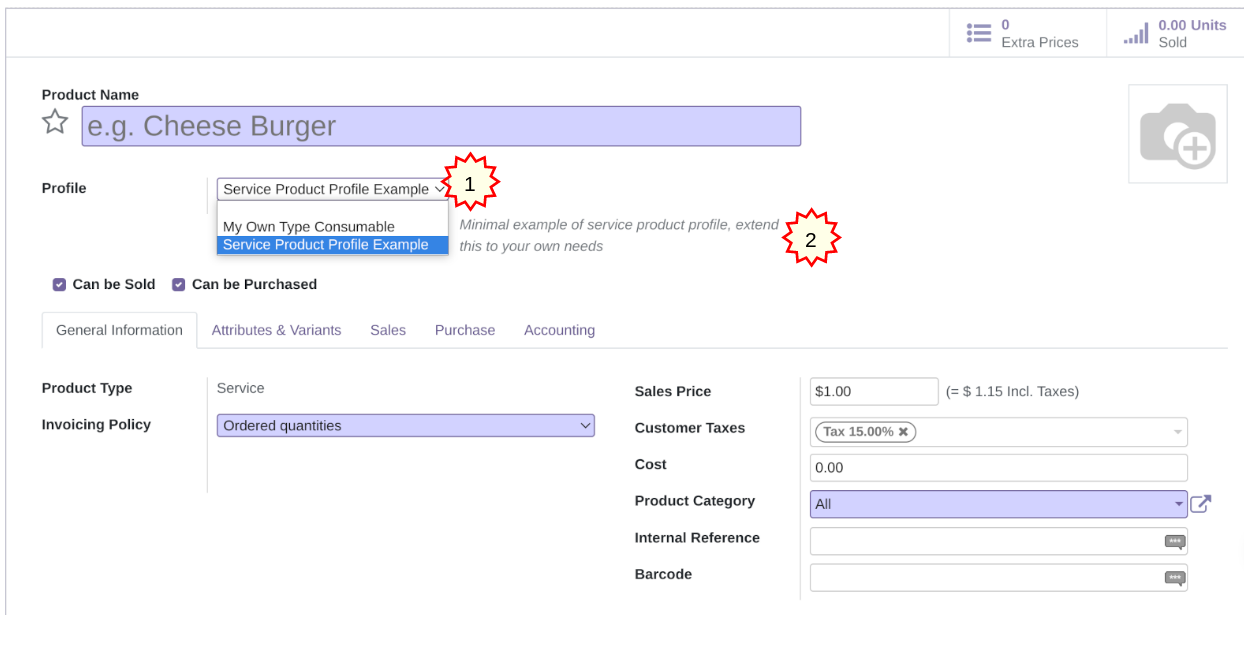
Main use case: a lot of modules are installed (mrp, purchase, sale, pos) and products configuration becomes harder for end users: too many fields to take care of.
You are concerned that at any time a product might be not configured correctly: this module is your friend.
Thanks to this module, a lot of complexity becomes hidden (default behavior) to the end user and usability is optimal.
It eases as well the data migration by only specifying the profile field instead of all fields which depend on it.
Note: This module is meant to be used by skilled people in database fields creation within the ERP framework.
Additional feature: a default value can be attached to a profile (see § Configuration, part 3)
Table of contents
Configuration
Create your own profile here: Sales > Configuration > Product > Product Profiles
Extend “product.profile” model to add fields from product.template, either in normal mode or default mode (see note section below). These fields should be identical to their original fields (especially “required” field attribute).
class ProductProfile(models.Model):
  """ Require dependency on sale, purchase and point_of_sale modules
  """

  _inherit = "product.profile"

  def _get_types(self):
      return [("product", "Stockable Product"),
              ("consu", 'Consumable'),
              ("service", "Service")]

  sale_ok = fields.Boolean(
      string="Can be Sold",
      help="Specify if the product can be selected in a sales order line.")
  purchase_ok = fields.Boolean(
      string="Can be Purchased")
  available_in_pos = fields.Boolean()
Insert data (xml or csv) and define values for each field defined above for each configuration scenario
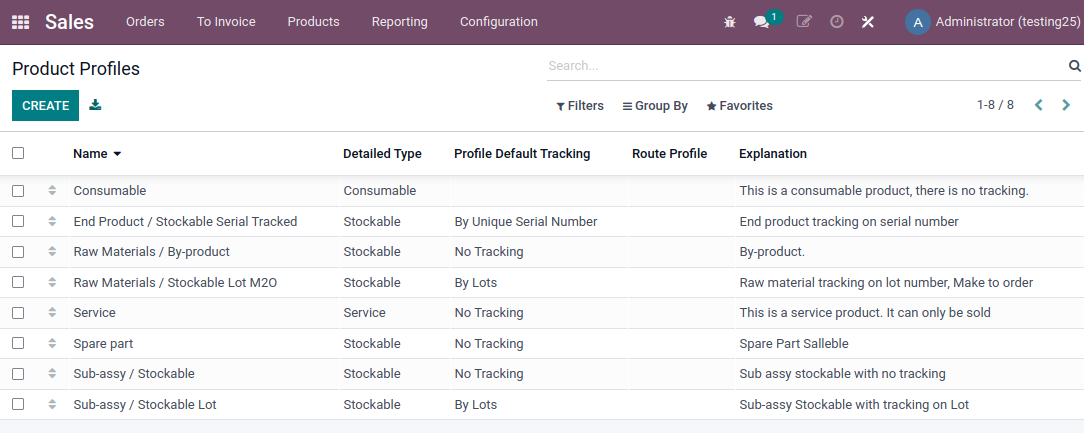
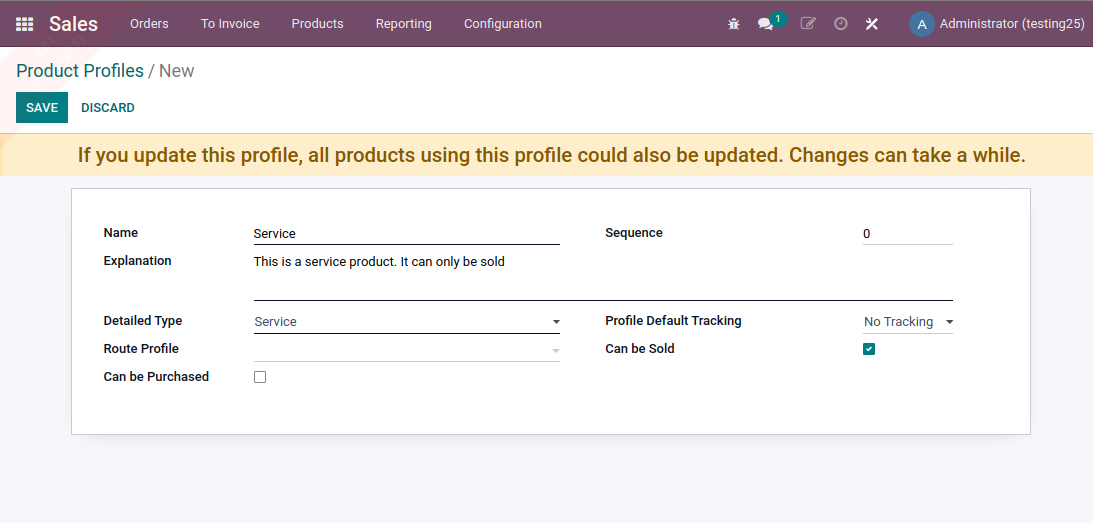
Note : You might want to declare profile fields as defaults. To do this, just prefix the field with “profile_default”.
class ProductProfile(models.Model):
  profile_default_categ_id = fields.Many2one(
      "product.category",
      string="Default category",
    )
  profile_default_tag_ids = fields.Many2many(
      comodel_name="product.template.tag",
      string="Tags",
    )
Default fields only influence the records the first time they are set. - if the profile is modified, changes are not propagated to all the records that have this profile - if the record previously had another profile, changing profile will not influence default values
Usage
Assign a value to the profile field in the product template form. Then, all fields which depend on this profile will be set to the right value at once.
If you deselect the profile value, all these fields keep the same value and you can change them manually (back to standard behavior).
Profiles are also defined as search filter and group.
Known issues / Roadmap
Streamlined behaviour of default/nondefault fields in every situation
More robust/less error-prone functionality for required fields or fields implicated in workflows
More flexible/configurable behaviour for profile fields (instead of only default/nondefault fields)
Bug Tracker
Bugs are tracked on GitHub Issues. In case of trouble, please check there if your issue has already been reported. If you spotted it first, help us to smash it by providing a detailed and welcomed feedback.
Do not contact contributors directly about support or help with technical issues.
Credits
Contributors
David BEAL <david.beal@akretion.com>
Sébastien BEAU <sebastien.beau@akretion.com>
Abdessamad HILALI
Kevin Khao <kevinkhao@gmail.com>
Stefan Rijnhart <stefan.rijnhart@opener.amsterdam>
Maintainers
This module is maintained by the OCA.

OCA, or the Odoo Community Association, is a nonprofit organization whose mission is to support the collaborative development of Odoo features and promote its widespread use.
Current maintainers:


This module is part of the OCA/product-attribute project on GitHub.
You are welcome to contribute. To learn how please visit https://odoo-community.org/page/Contribute.
Release history Release notifications | RSS feed


Download files
Download the file for your platform. If you're not sure which to choose, learn more about installing packages.
Source Distributions
Built Distribution
Filter files by name, interpreter, ABI, and platform.
If you're not sure about the file name format, learn more about wheel file names.
Copy a direct link to the current filters
File details
Details for the file odoo_addon_product_profile-18.0.1.0.0.2-py3-none-any.whl.
File metadata
- Download URL: odoo_addon_product_profile-18.0.1.0.0.2-py3-none-any.whl
- Upload date:
- Size: 294.3 kB
- Tags: Python 3
- Uploaded using Trusted Publishing? No
- Uploaded via: twine/6.2.0 CPython/3.12.3
File hashes
| Algorithm | Hash digest | |
|---|---|---|
| SHA256 |
00454e9ffc03ce0328200196059e302767ab7405db03bee3edfe5e2184c0e326
|
|
| MD5 |
d3649c14a8ec4999fc1046e4a00d490f
|
|
| BLAKE2b-256 |
841dd321ad0e06c597b100474b07077b496b1d3597c87d78eae298e918620581
|






