

Sale layout category hide detail





This module allows you to check/uncheck the new ‘Show details’ and ‘Show subtotal’ flags in Sale order section lines and Customer invoice section lines if you want to show or hide their lines or their subtotals in the PDF report and in the website. You can also show or hide the section subtotal and line amount by checking or unchecking the new ‘Show section subtotal’ and ‘Show line amount’ flags.
Table of contents
Usage
The flags on the right hand side of the sale order line allow you to show or hide details, subtotal, line amount and section subtotal.
These are the possible combinations:
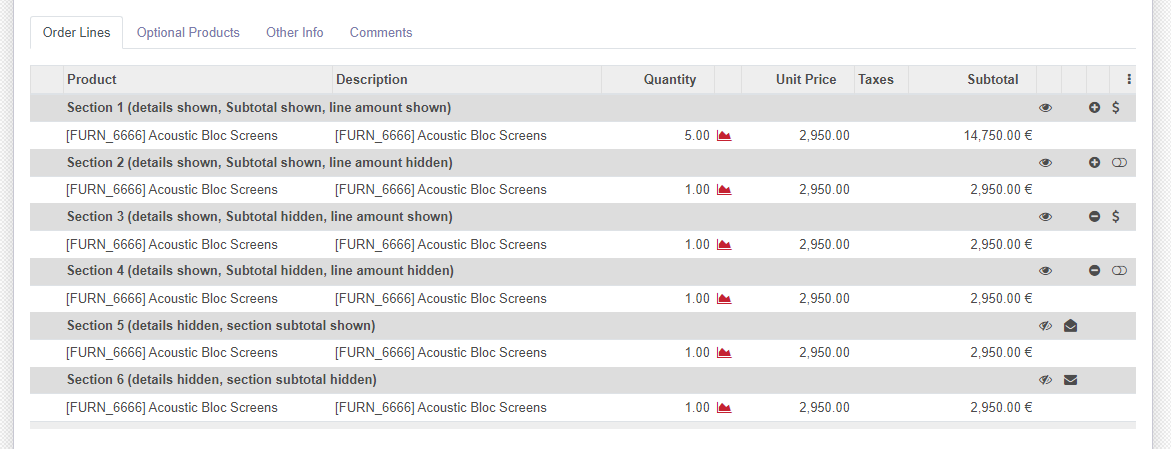
And these are the results in report:
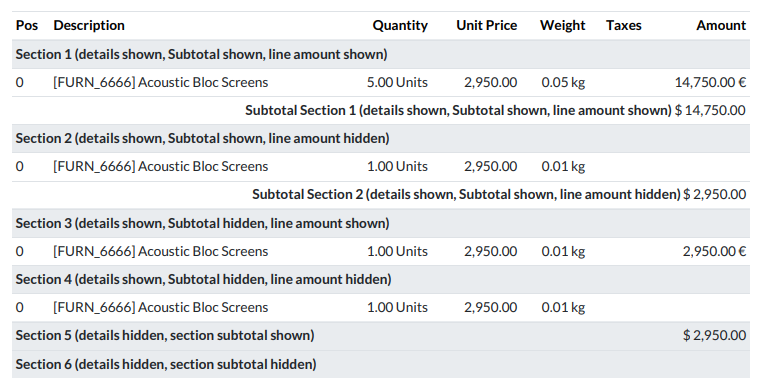
The behavior described before is the same for Quotations and Invoices.
Known issues / Roadmap
The boolean_fa_icon widget has not been extracted to a module into OCA/web because until now this widget has not been needed for anything else, but it’s good that in the future that would be done.
Bug Tracker
Bugs are tracked on GitHub Issues. In case of trouble, please check there if your issue has already been reported. If you spotted it first, help us to smash it by providing a detailed and welcomed feedback.
Do not contact contributors directly about support or help with technical issues.
Credits
Contributors
-
Ernesto Tejeda
Pedro M. Baeza
Víctor Martínez
Yadier Quesada
Denis Roussel <denis.roussel@acsone.eu>
Jeroen Evens <jeroen.evens@dynapps.be>
Tris Doan <tridm@trobz.com>
Maintainers
This module is maintained by the OCA.

OCA, or the Odoo Community Association, is a nonprofit organization whose mission is to support the collaborative development of Odoo features and promote its widespread use.
This module is part of the OCA/sale-reporting project on GitHub.
You are welcome to contribute. To learn how please visit https://odoo-community.org/page/Contribute.
1 maintainer

Release files for odoo-addon-sale-layout-category-hide-detail 18.0.1.0.0.4
For a detailed explanation of source distributions (sdists) and built distributions (wheels), please see the package formats documentation.
Built distribution (wheel)
| File | Interpreter | ABI | Platform | Reset |
|---|---|---|---|---|
| odoo_addon_sale_layout_category_hide_detail-18.0.1.0.0.4-py3-none-any.whl | Python 3 | none | any | Details |
Release files / odoo_addon_sale_layout_category_hide_detail-18.0.1.0.0.4-py3-none-any.whl
| Download URL | odoo_addon_sale_layout_category_hide_detail-18.0.1.0.0.4-py3-none-any.whl |
|---|---|
| Size | 160.1 kB |
| Tags | Python 3 |
|
SHA-256 checksum How to use checksums |
71fccf896e5ddc2c2db08c799066f1a801c129fa75033f3c5c43035d3914b5be
|
|
BLAKE2b-256 checksum How to use checksums |
b3727105ea050debc199da35fc2b5f41c59218990585497e547692aecfe3f278
|
| Upload date | |
|
Uploaded using Trusted Publishing? What is trusted publishing? |
No |
| Uploaded via |
twine/6.2.0 CPython/3.12.3
|














