
Sale Order Product Picker

Project description





This module adds a simply way for salesmen to create/update/delete lines of a sale order.
Table of contents
Configuration
The default behavior is get last sales and last price from partner_id field, but partner_delivery_address can be used by following these steps:
Create user default value with field use_delivery_address of sale.order model with true value.
Another option is extend view to show use_delivery_address field and allow that user select this option in each sale order.
The default behavior is to display 40 records, but it can be configured by following these steps:
Activate developer mode.
Go to Settings > Technical > Parameters > System Parameters.
Locate the setting with key sale_order_product_picker.product_picker_limit or create a new one if not exists.
Set desired number of records
The default behavior is to display qty_available, but it can be configured by following these steps:
Activate developer mode.
Go to Settings > Technical > Parameters > System Parameters.
Locate the setting with key sale_order_product_picker.product_available_field or create a new one if not exists.
Set desired availability field (virtual_available, free_qty)
When available field is virtual_available the default behavior is take into account moves to commitment date or today at exactly time, but it can be configured by following these steps:
Activate developer mode.
Go to Settings > Technical > Parameters > System Parameters.
Locate the setting with key sale_order_product_picker.product_virtual_available_time or create a new one if not exists.
Set desired time to be used in available quantities compute (Example: 23:59)
ATTENTION: product_virtual_available_time is a technical parameter and the value must be set in server timezone
Installation of this module sets sale_planner_calendar.action_open_sale_order system parameter as sale_order_product_picker.action_open_picker_views to show new picker view from sale calendar planner.
When the +1 button is used, the changes are added to a processing queue. By default, this queue is processed after one second, but this can be changed by using the system parameter sale_order_product_picker.delay and setting the number of seconds to wait before writing the lines.
Usage
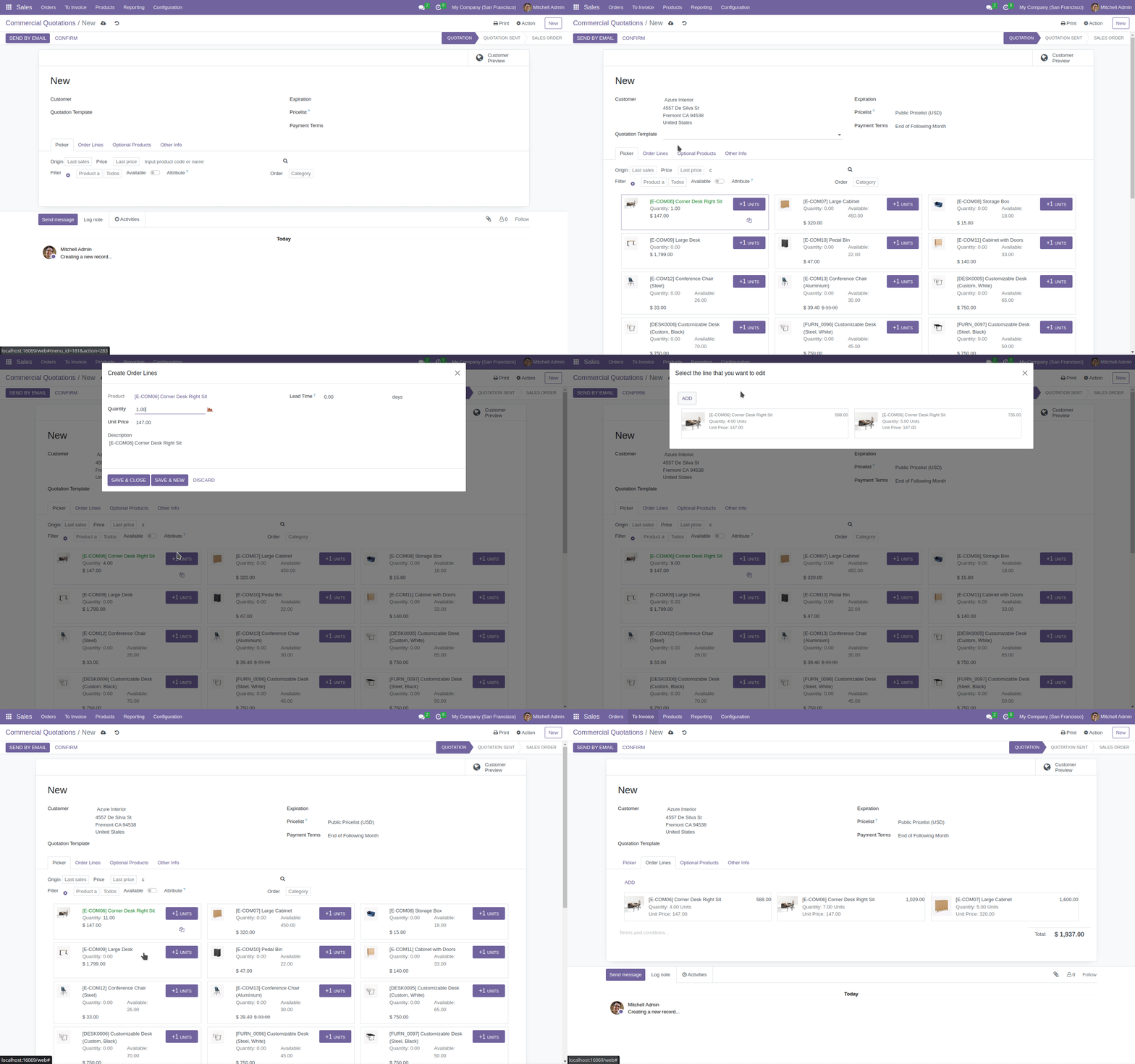
Go to Sales > Orders > Salesman Quotations
Create or edit an order.
On page Picker you can search for products.
- You can:
Add a line by clicking on +1 button.
Add/edit/delete a line by clicking the kanban card.
Show image on fullscreen by clicking it.
On next gif you can see the options mentioned:
Bug Tracker
Bugs are tracked on GitHub Issues. In case of trouble, please check there if your issue has already been reported. If you spotted it first, help us to smash it by providing a detailed and welcomed feedback.
Do not contact contributors directly about support or help with technical issues.
Credits
Contributors
-
Sergio Teruel
Carlos Dauden
Carlos Roca
Maintainers
This module is maintained by the OCA.

OCA, or the Odoo Community Association, is a nonprofit organization whose mission is to support the collaborative development of Odoo features and promote its widespread use.
This module is part of the OCA/sale-workflow project on GitHub.
You are welcome to contribute. To learn how please visit https://odoo-community.org/page/Contribute.
Release history Release notifications | RSS feed


Download files
Download the file for your platform. If you're not sure which to choose, learn more about installing packages.
Source Distributions
Built Distribution
Filter files by name, interpreter, ABI, and platform.
If you're not sure about the file name format, learn more about wheel file names.
Copy a direct link to the current filters
File details
Details for the file odoo_addon_sale_order_product_picker-16.0.1.2.0.1-py3-none-any.whl.
File metadata
- Download URL: odoo_addon_sale_order_product_picker-16.0.1.2.0.1-py3-none-any.whl
- Upload date:
- Size: 2.2 MB
- Tags: Python 3
- Uploaded using Trusted Publishing? No
- Uploaded via: twine/5.1.1 CPython/3.12.3
File hashes
| Algorithm | Hash digest | |
|---|---|---|
| SHA256 |
e70958bfcd852d5037b49926612a85c87f0dd67205fb743c3159e1d8b60ef418
|
|
| MD5 |
87fc2edebee8f40f2f90bec7e2471877
|
|
| BLAKE2b-256 |
9af7acec1a14c7464defeda415f8ab094a77705a48915e4849132f5351d314ce
|






