

Sale Order Type





This module adds a typology for the sales orders. In each different type, you can define, invoicing and refunding journal, a warehouse, a stock route, a sequence, the shipping policy, the invoicing policy, a payment term, a pricelist and an incoterm.
You can see sale types as lines of business.
You are able to select a sales order type by partner so that when you add a partner to a sales order it will get the related info to it.
Additionally, it adds a warning message to notify users when there is a mismatch between the partner’s default pricelist and the effective pricelist set by the sales order type. This ensures clarity when creating sales orders, as the effective pricelist (determined by the sales order type) will take precedence over the partner’s default pricelist. The warning is only visible for companies without a parent and when there is a mismatch between the two pricelists.
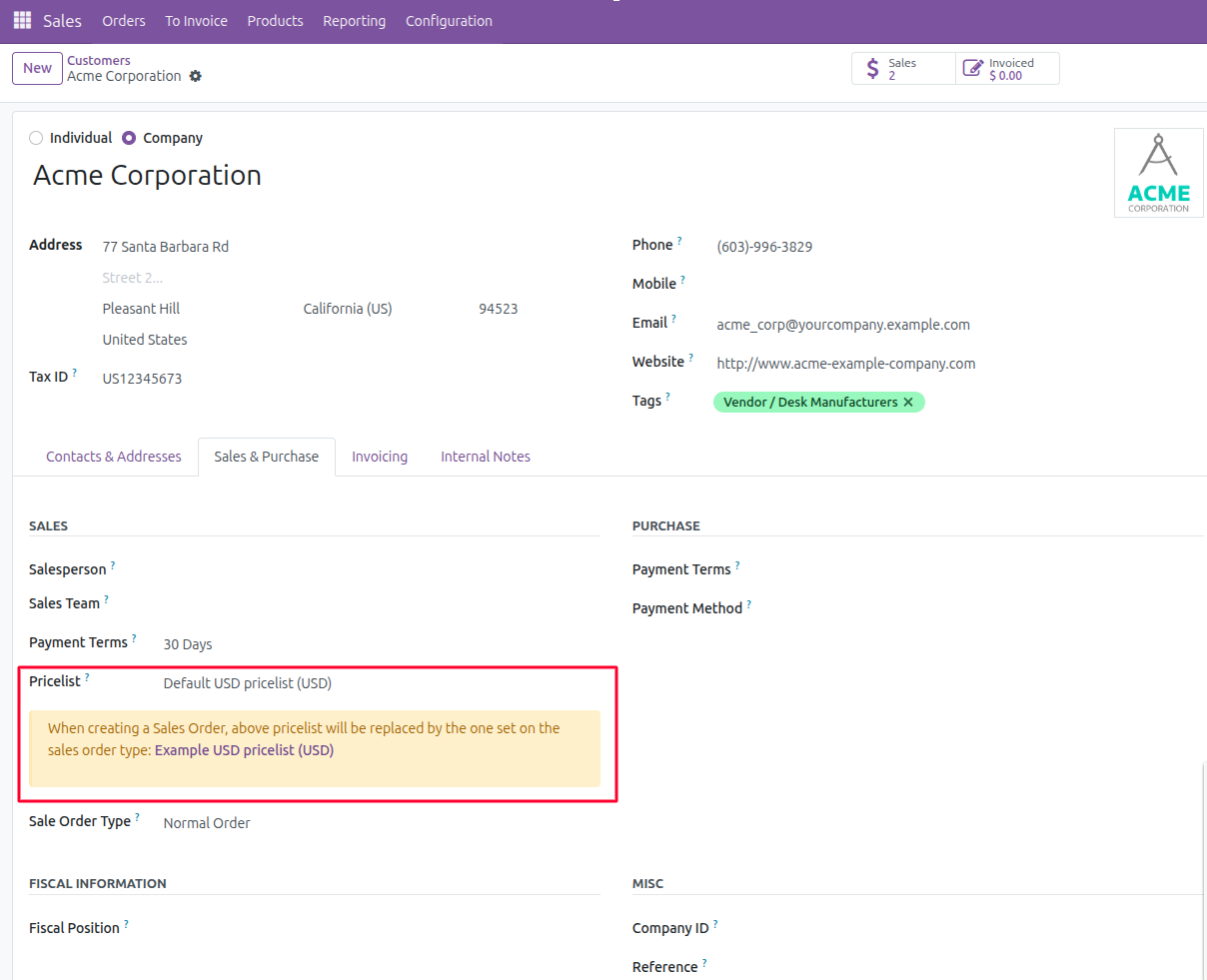
Table of contents
Configuration
To configure Sale Order Types you need to:
Go to Sales > Configuration > Sales Orders Types
Create a new sale order type with all the settings you want
Usage
Go to Sales > Sales Orders and create a new sale order. Select the new type you have created before and all settings will be propagated.
You can also define a type for a particular partner if you go to Sales & Purchases and set a sale order type.
Bug Tracker
Bugs are tracked on GitHub Issues. In case of trouble, please check there if your issue has already been reported. If you spotted it first, help us to smash it by providing a detailed and welcomed feedback.
Do not contact contributors directly about support or help with technical issues.
Credits
Contributors
-
Carlos Sánchez Cifuentes <csanchez@grupovermon.com>
-
Oihane Crucelaegui <oihanecrucelaegi@avanzosc.es>
Ana Juaristi <anajuaristi@avanzosc.es>
Daniel Campos <danielcampos@avanzosc.es>
Ainara Galdona <ainaragaldona@avanzosc.es>
-
Lorenzo Battistini <lorenzo.battistini@agilebg.com>
-
Samuel Lefever <sam@niboo.be>
Pierre Faniel <pierre@niboo.be>
-
Pedro M. Baeza
David Vidal
Carlos Dauden
Sergio Teruel
-
Angel Moya Pardo <angel.moya@pesol.es>
Antonio J Rubio Lorente <antonio.rubio@pesol.es>
Rattapong Chokmasermkul <rattapongc@ecosoft.co.th>
-
Iván Todorovich <ivan.todorovich@druidoo.io>
-
Giovanni Serra <giovanni@gslab.it>
Tharathip Chaweewongphan <tharathipc@ecosoft.co.th>
Isaac Gallart <igallart@puntsistemes.es>
Denis Rousse <denis.roussel@acsone.eu>
Do not contact contributors directly about support or help with technical issues.
Maintainers
This module is maintained by the OCA.

OCA, or the Odoo Community Association, is a nonprofit organization whose mission is to support the collaborative development of Odoo features and promote its widespread use.
This module is part of the OCA/sale-workflow project on GitHub.
You are welcome to contribute. To learn how please visit https://odoo-community.org/page/Contribute.
1 maintainer

Release files for odoo-addon-sale-order-type 18.0.1.4.0
For a detailed explanation of source distributions (sdists) and built distributions (wheels), please see the package formats documentation.
Built distribution (wheel)
| File | Interpreter | ABI | Platform | Reset |
|---|---|---|---|---|
| odoo_addon_sale_order_type-18.0.1.4.0-py3-none-any.whl | Python 3 | none | any | Details |
Release files / odoo_addon_sale_order_type-18.0.1.4.0-py3-none-any.whl
| Download URL | odoo_addon_sale_order_type-18.0.1.4.0-py3-none-any.whl |
|---|---|
| Size | 295.1 kB |
| Tags | Python 3 |
|
SHA-256 checksum How to use checksums |
08d617d740da9a4e9cf71e19ea6a29e9efa0581a7a8b17ed54132b5a4b9d0974
|
|
BLAKE2b-256 checksum How to use checksums |
e93c1e42b4d2fd7dbe7d9d9509ffa103729ccc00e477bdf6e9b3ed287065f400
|
| Upload date | |
|
Uploaded using Trusted Publishing? What is trusted publishing? |
No |
| Uploaded via |
twine/6.2.0 CPython/3.12.3
|














