

Server Actions - Navigate





This module provides a generic tool to have the possibility to see a list of records associated to a given selection of records. This is basically the UI version of recordset.mapped('field1.field2').
For example, if you use the sale module, you can configure an action to see all the products that have been sold for a given selection of sale orders.
Table of contents
Configuration
Go to ‘Setting / Technical / Actions / Server Actions’
Create a new item
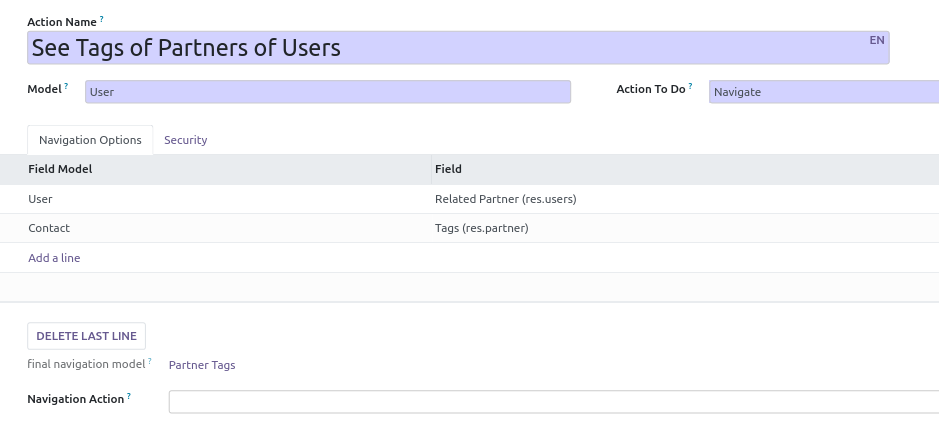
Set a name that will be used for the Contextual Action
Choose a model
Select ‘Navigate’ option in the field ‘Action To Do’
Then, select a field of this model. It can be a one2many, many2many, many2one field.
You can then optionally select another fields (#2) that belong to the previous selected field (#1) relation model
Once done, click on the ‘Create Contextual Action’ to generate a new ‘More options’ button.
Extra options
You can define groups whose members will have access to that option.
You can select an action that will be used to display the target field list.
Usage
Go to a tree view, for a model for which you have defined a navigation action.
click on ‘Action’ Button
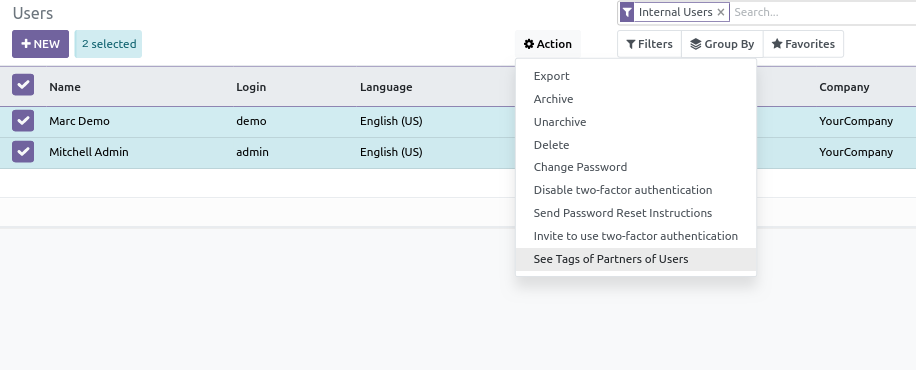
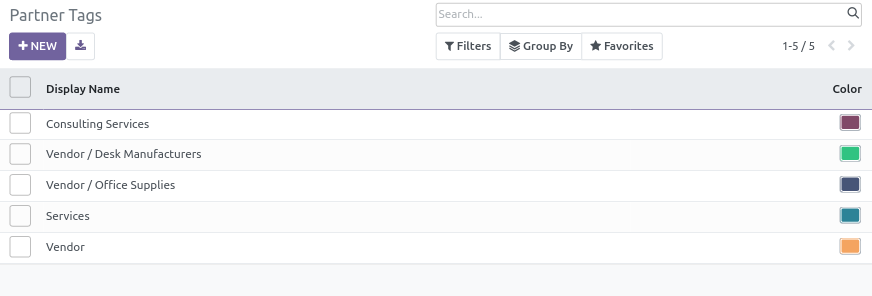
then click on the name of the configured Action and see the results
Bug Tracker
Bugs are tracked on GitHub Issues. In case of trouble, please check there if your issue has already been reported. If you spotted it first, help us to smash it by providing a detailed and welcomed feedback.
Do not contact contributors directly about support or help with technical issues.
Credits
Contributors
Sylvain LE GAL (https://www.twitter.com/legalsylvain)
Ashish Hirpara (https://ashish-hirpara.com)
-
Bhavesh Heliconia
Maintainers
This module is maintained by the OCA.

OCA, or the Odoo Community Association, is a nonprofit organization whose mission is to support the collaborative development of Odoo features and promote its widespread use.
Current maintainers:


This module is part of the OCA/server-backend project on GitHub.
You are welcome to contribute. To learn how please visit https://odoo-community.org/page/Contribute.
1 maintainer

Release files for odoo-addon-server-action-navigate 19.0.1.0.0.2
For a detailed explanation of source distributions (sdists) and built distributions (wheels), please see the package formats documentation.
Built distribution (wheel)
| File | Interpreter | ABI | Platform | Reset |
|---|---|---|---|---|
| odoo_addon_server_action_navigate-19.0.1.0.0.2-py3-none-any.whl | Python 3 | none | any | Details |














