

Social Media Advertising LinkedIn





This module plugs LinkedIn Ads into Social Media Advertising. Its lists hang from a LinkedIn menu of their own, under Advertising and under Configuration > Stages, so they never show the records of another social media.
Main features:
Campaign group and campaign management synchronized with LinkedIn Ads: create them in LinkedIn from Odoo (in draft state) or import the existing ones, and link posts to campaigns as sponsored creatives.
The LinkedIn statuses of campaigns, campaign groups and ads (Draft, Active, Paused, Archived…) are declared as stages of Social Media Advertising, so the badges and the status bars show the real LinkedIn vocabulary.
Table of contents
Configuration
The LinkedIn application.
The campaign features (Create in LinkedIn and Fetch campaigns) require an advertising account in the LinkedIn Campaign Manager and the following products, which the Social Media Linkedin module does not request on its own. Ask for them on the Products tab of your LinkedIn Developer App, following the configuration steps of that module:
Advertising API
The access levels of those products are described in the LinkedIn Marketing API documentation.
The member who authorizes the account must also have a role on that advertising account (ACCOUNT_BILLING_ADMIN, ACCOUNT_MANAGER, CAMPAIGN_MANAGER, CREATIVE_MANAGER or VIEWER, the last one read only), as listed in the account users documentation. LinkedIn only answers the advertising accounts of the authorized member, so without a role the import finds nothing.
That requirement is unrelated to the formats LinkedIn accepts as an ad: a post with several images cannot be sponsored with any product nor with any advertising account, because LinkedIn does not turn a multi-image post into an ad. See the ROADMAP section about it.
Test and production advertising accounts.
The Environment of an advertising account is the test flag LinkedIn answers for it: it is read on every Fetch advertising accounts and never chosen in Odoo, so an advertising account is shown as Test for as long as LinkedIn reports it that way.
The role requirement above is what makes the list of advertising accounts return anything: LinkedIn only answers the advertising accounts the authorized member holds a role on.
Usage
Choose the LinkedIn advertising account.
Go to Social Media > Configuration > Accounts, open the LinkedIn account and its Advertising tab, then click Fetch advertising accounts.
Besides the generic columns, the list shows LinkedIn Status and LinkedIn Serving Status, with LinkedIn Type and LinkedIn Owner available from the optional-columns toggle:
LinkedIn Status: DRAFT, ACTIVE, CANCELED, PENDING_DELETION or REMOVED.
LinkedIn Serving Status: RUNNABLE when the advertising account is eligible for serving, otherwise the reasons why it is not, such as BILLING_HOLD, ACCOUNT_TOTAL_BUDGET_HOLD, ACCOUNT_END_DATE_HOLD, RESTRICTED_HOLD, INTERNAL_HOLD or STOPPED. This is the column to look at when nothing is being served.
LinkedIn Type: BUSINESS or ENTERPRISE.
LinkedIn Owner: the organization or person the advertising account advertises on behalf of, which tells apart two advertising accounts sharing a name.
Open an advertising account and press Open advertising account to reach it in the LinkedIn Campaign Manager. The address is also available in this list as the optional Web URL column.
Fetch campaigns, and Create in LinkedIn on a campaign or a campaign group that is not on LinkedIn yet, work against the advertising account marked In Use.
What already exists on LinkedIn keeps the advertising account it was created in or imported from, whichever one is in use later: updating, archiving or checking a campaign or a campaign group, and deleting an ad, address the advertising account stored on the record.
A new campaign whose group already exists on LinkedIn is created in the advertising account of that group, and the sponsored creative of a post is created in the advertising account of its campaign.
A record that exists on LinkedIn but lost its advertising account, because that advertising account is no longer returned by LinkedIn, is never sent to the one in use instead. Updating, archiving or checking such a campaign or campaign group, creating a campaign in such a group and deleting such an ad are refused with The advertising account of … is no longer available on LinkedIn. A post sponsored with such a campaign is published anyway: its creative cannot be created, and the failure is reported on the chatter of the post.
Create a campaign in LinkedIn.
To link a post to a campaign, the campaign must already exist in LinkedIn: only the campaigns already synchronized with LinkedIn are offered on the post, and publishing one never creates the campaign it points at.
Go to Social Media > Advertising > LinkedIn > Campaigns and open the campaign
Fill in the campaign group, the account, the Unit cost and the Daily budget. Before calling LinkedIn, Odoo checks everything at once and shows the errors together: the unit cost, the daily budget of the campaign and the total budget of its group have to be greater than zero, and the group, the social account, the currency, the objective (required with the Single video format) and the political advertising declaration have to be set.
A LinkedIn campaign can only point to one LinkedIn account: on LinkedIn a campaign belongs to a single advertising account. Adding a second one is refused when saving with A LinkedIn campaign can only have one LinkedIn account.
Choose the LinkedIn Ad Format: Standard update for posts with text or images, Single video for posts with a video. LinkedIn fixes the format when the campaign is created and only accepts posts of that format afterwards, so a post with a video needs its own video campaign. The check works both ways: a Single video campaign only accepts posts carrying a video, and a post without one linked to it is refused before publishing with The campaign … only accepts posts containing a video. The fields of a campaign are the ones of the campaigns documentation.
The Social campaign field of the post only offers the campaigns matching what the post carries, so the format cannot be got wrong from the form: a post with a video is offered the Single video campaigns, and a post without one the Standard update campaigns. Campaigns imported without a format count as Standard update, like everywhere else in the module, and campaigns not created on LinkedIn yet are left out whatever the format.
Attaching or removing the video of a post changes which campaigns it accepts. A campaign already chosen that no longer matches is cleared right there, so the mismatch is not discovered when the post is published.
The LinkedIn Objective is required by LinkedIn for the video format. Four of the seven objectives LinkedIn defines are offered here: brand awareness, video views, website visits and engagement. A campaign imported from LinkedIn keeps its real objective, and the ones that are not offered here are simply not shown in the field. The ROADMAP says why the other three are left out.
The campaign is always created as Sponsored Updates, with off-site delivery disabled and without targeting criteria: the audience is defined in the LinkedIn Campaign Manager, and LinkedIn does not let a campaign be activated without one.
No bidding strategy is chosen from Odoo either, so the Unit cost only applies when the campaign uses manual bidding, target cost or cost cap in the Campaign Manager; with automatic bidding LinkedIn ignores it. Both are described in the campaigns documentation.
A post with more than one image is published as a multi-image post, and LinkedIn does not sponsor that format: “API partners can only create non-sponsored multiImage posts”. Linking such a post to a campaign is refused before publishing, so the post is not left online without its ad, and the post form warns about it as soon as the campaign is selected. Publish the post with a single image if it has to be sponsored.
https://learn.microsoft.com/en-us/linkedin/marketing/community-management/shares/multiimage-post-api
The LinkedIn Political Intent is the declaration LinkedIn requires to create any campaign since the EU political advertising regulation. It defaults to Not political advertising, which states that none of your ads qualify as political advertising under the law of the targeted countries, including EU law for ads targeted to the EU. Change it to Political advertising when they do.
Click on the Create in LinkedIn button
The campaign group and the campaign are created in LinkedIn in DRAFT status, so no budget is spent until you activate them from the LinkedIn Campaign Manager.
If the campaign cannot be created, the error is shown in a notification and logged in the chatter instead of being raised: the campaign group is already created on LinkedIn, which does not allow deleting it, so its reference is kept to avoid importing it later as a duplicate. Fix the reported problem and press Create in LinkedIn again; the existing group is reused, and the campaign is created in its advertising account.
A campaign group can also be created on LinkedIn on its own: open the group and click its Create in LinkedIn button (it requires a positive total budget and a currency). If you forget to do it, the group is created automatically when the first campaign of the group is published. The button only works once: if the group already has a LinkedIn reference, the action is refused with The campaign group already exists on LinkedIn. Use Update in LinkedIn to push later changes.
A group has no LinkedIn account of its own: to create, update or archive it on LinkedIn, Odoo takes the LinkedIn account from the campaigns of the group, and it never guesses. If the group has no campaign with an account and the database holds several LinkedIn accounts, or if its campaigns point to different accounts, the operation is refused; set the account on one of its campaigns first. A new group is created in the advertising account in use of that LinkedIn account, and a group already on LinkedIn is updated and archived in the advertising account stored on it.
The language and the country of the campaign (its locale) are taken from the form of the user who presses Create in LinkedIn: their language and the country of their company or contact. When the user has no country, US is sent. Check the user form before creating campaigns, because LinkedIn fixes that value when the campaign is created.
The LinkedIn stages are installed as data of the module and listed in Configuration > Stages > LinkedIn. If they are deleted or their code is modified, creating or archiving a campaign or a group fails with The LinkedIn stage with code … for Campaign is missing. Upgrading the module Social Media Advertising LinkedIn recreates a stage that was deleted, but not one whose code was modified: the stages are declared noupdate, so the module data never overwrites them. Put the code back by hand, or delete the record and upgrade the module.
When a post linked to a campaign is published, it is attached to the campaign as a sponsored creative. If the post is published but the creative cannot be linked, the post is kept and the error is logged in the chatter.
The creative is created with an active intended status, unlike the campaign and the campaign group, which are created in draft. It therefore starts being served as soon as the campaign is activated in the Campaign Manager, with no further step in Odoo.
A post with more than one image cannot be sponsored: LinkedIn publishes it as a multi-image post and does not accept that format as an ad, so linking it to a campaign is refused before publishing. The post form warns about it as soon as the campaign is selected, without waiting for the Post button.
Fetch campaigns from LinkedIn.
Go to Social Media > Configuration > Accounts, open the LinkedIn account and its Advertising tab
Click on the Fetch campaigns button
The campaign groups, campaigns and their sponsored creatives are imported from LinkedIn Ads. Every creative is matched with the publication it promotes by its remote reference.
A publication brought from the wall with Update has no post in Odoo, so its campaign is resolved from the creative and written to its Social Campaign field, which the publication form shows and the search view offers as a filter and a group-by. Publications published from Odoo keep the campaign of their post and are never overwritten by the import.
The Posts API does not return the campaign of a post, so only this import can resolve it. The order does not matter, but the publications have to be already in Odoo: if they are brought after importing the campaigns, press Fetch campaigns again.
Campaign groups created on LinkedIn often carry no total budget, which is optional there, as described in the campaign groups documentation. Those groups set no limit in Odoo either: the rule keeping the daily budgets of the campaigns within the total budget of their group only applies when the group has one, and it is never checked on the values brought by the import. The rule is enforced from both sides: raising the daily budget of a campaign, moving it to another group, and lowering the total budget of a group are all refused when the sum goes over it.
The LinkedIn Ad Format field only covers Standard update and Single video. A campaign created on LinkedIn with any other format (carousel, spotlight, text ad…) is imported into Odoo as Standard update, because that format does not exist in the field. Do not link publications to those campaigns: LinkedIn refuses the creative.
The cost reported by the statistics of the ads is returned by LinkedIn in US dollars (costInUsd), even when the advertising account works in another currency: LinkedIn applies its own conversion, so it does not match the billing in the currency of the account exactly.
The real LinkedIn status of each campaign and campaign group (Draft, Active, Paused, Archived…) is stored in its Stage, shown as a status bar on the form and refreshed on every import. Campaigns flagged as test campaigns on LinkedIn are marked as well.
Campaigns and campaign groups deleted on LinkedIn (Pending deletion, Removed) are hidden in the LinkedIn Campaign Manager, but the API keeps returning them because of their performance data. They are therefore kept in Odoo as history, and a note is logged in their chatter when the deletion is detected. Keep in mind that deleting a campaign group on LinkedIn also deletes all its campaigns and ads.
Delete an ad in LinkedIn.
The Delete ad button of an ad deletes it on LinkedIn. It needs the rw_ads scope, and the member who authorized the account has to hold an administrative role on the advertising account: a VIEWER cannot delete anything even with the scope granted.
The ad is deleted in the advertising account stored on it, not in the one in use. An ad whose advertising account is no longer returned by LinkedIn cannot be deleted from Odoo.
LinkedIn only deletes a sponsored creative outright when it is still a draft, when its campaign is, or when it is a video that failed to process. Odoo tries that outright deletion only when the ad or its campaign is in Draft, and when LinkedIn accepts it the ad disappears from LinkedIn and its record is deleted in Odoo too, statistics included. A video that failed to process is not recognised here, so it goes through the deletion request like any other ad and its record is kept.
Any other ad is not deleted on the spot: LinkedIn only takes the request and processes it afterwards. The creative is read back right away, so the status shown in Odoo is the one LinkedIn reports and not the one that was asked for, and the notification says which of the two happened.
An ad with no statistics is dropped by LinkedIn as soon as the deletion is requested. Its record is then archived with the Removed status instead of waiting for the next Sync ads, and it stays as history like every ad that stops being answered.
A creative already deleted keeps being returned by the API as Removed while it has performance data, exactly like the campaigns.
The button is not offered on an ad whose status is Archived, Canceled, Pending deletion or Removed: LinkedIn accepts no change on those and answers Cannot update a canceled creative. Those ads stay in Odoo as history.
The form of an ad carries an Open ad button, which opens the creative in the LinkedIn Campaign Manager in a new tab.
Update a campaign in LinkedIn.
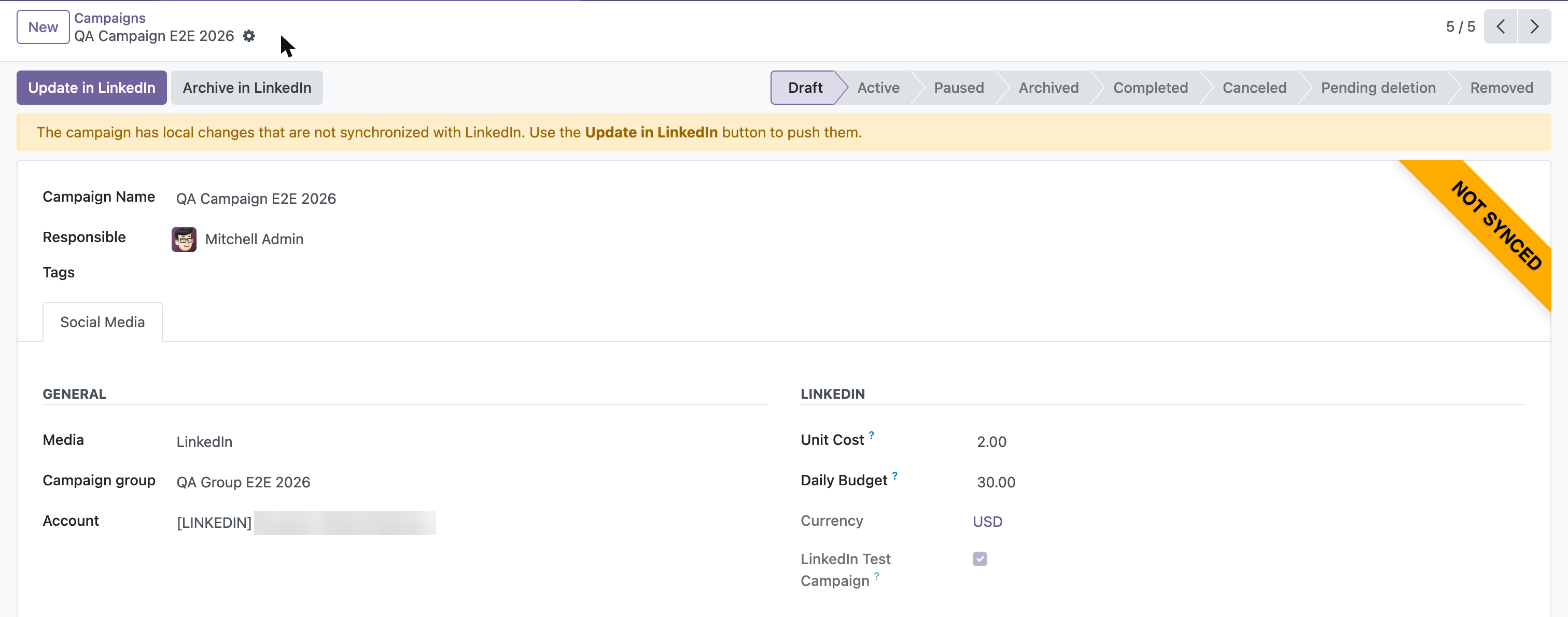
When you modify in Odoo the editable fields of a campaign (name, unit cost, daily budget, campaign group, political declaration) or of a campaign group (name, total budget, currency) that already exists on LinkedIn, the record shows a Pending changes ribbon, a warning banner explaining that the local changes have not been pushed yet, and an Update in LinkedIn button. A record that does not exist on LinkedIn yet carries no ribbon at all: the Create in LinkedIn button already says it. The tracked fields also log their changes in the chatter. The Media of a campaign is guarded the same way, so an archived campaign cannot be unlocked by taking it out of LinkedIn.
Click Update in LinkedIn to push the local values to LinkedIn. To move the campaign to another campaign group, the target group must already exist on LinkedIn. The political advertising declaration is pushed the same way, since LinkedIn allows updating it when the targeting changes.
Synchronization priority is hybrid: the LinkedIn-only fields (stage, test flag) are always refreshed by Fetch campaigns; for the editable fields, your local pending changes are preserved by the import — the LinkedIn values are logged in the chatter so you can decide whether to keep your changes (push them with Update in LinkedIn) or re-type the LinkedIn ones.
The form of a campaign and of a campaign group that already exists on LinkedIn also carries an Open campaign / Open campaign group button, which opens it in the LinkedIn Campaign Manager in a new tab. It is not drawn while the record has no LinkedIn reference.
When the LinkedIn stage is Archived, Canceled, Pending deletion or Removed, the campaign or campaign group cannot be modified in Odoo (LinkedIn does not allow editing them either): the editable fields become read-only, the Update in LinkedIn button is hidden and a red banner explains the situation. The Media of a campaign that exists on LinkedIn is read-only as well, so the lock cannot be escaped by taking the campaign out of LinkedIn. The import keeps refreshing their stage, so an archived record becomes editable again once it is unarchived on LinkedIn.
Archive a campaign or a campaign group in LinkedIn.
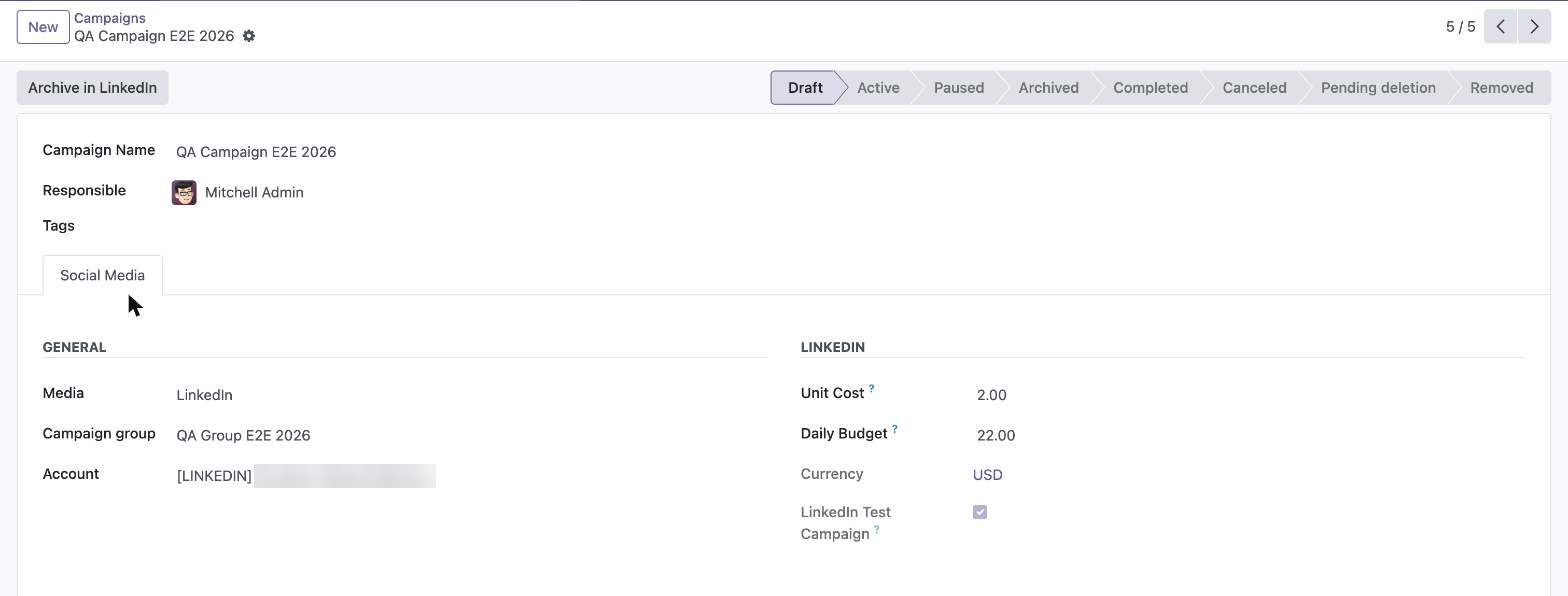
LinkedIn does not allow deleting a campaign or a campaign group through its API, whose statuses are the ones of the campaigns documentation. Archiving is the only way to end them, and it is what the Archive in LinkedIn button does.
Go to Social Media > Advertising > LinkedIn, open the campaign or the campaign group and click Archive in LinkedIn. The button is only shown when the record already exists on LinkedIn and is not already archived, canceled or deleted.
LinkedIn refuses to archive a campaign while its campaign group is still in Draft: activate the group in the Campaign Manager first, or archive the group instead, which archives its campaigns. Odoo checks it before calling LinkedIn and explains it.
A campaign or a campaign group still in Draft keeps the start date given when it was created, and LinkedIn rejects any later change because that date already belongs to the past. Odoo therefore sends a new run schedule when it updates or archives a record in Draft, which moves its start date to the moment of the change.
The campaign stops running on LinkedIn and disappears from the Campaign Manager active lists, but it is kept in Odoo with its performance data. Its stage becomes Archived, which makes the record read-only in Odoo, because LinkedIn no longer accepts changes on it.
It cannot be reactivated from Odoo. To unarchive it, use the LinkedIn Campaign Manager and then run Fetch campaigns to refresh the stage.
Archiving a campaign group on LinkedIn also changes the status of its campaigns there. Odoo does not know about any of it until you run Fetch campaigns, so run it afterwards to see the stage each campaign was left in, and archive from Odoo the ones LinkedIn did not archive.
Deleting the campaign in Odoo does not do anything on LinkedIn: the campaign keeps running there and the next Fetch campaigns brings it back. Use Archive in LinkedIn to actually end it.
Known issues / Roadmap
Campaign objectives that are not offered
LinkedIn defines seven campaign objectives: brand awareness, video views, website visits, engagement, lead generation, website conversions and job applicants, as listed in the campaigns documentation.
The last three are not offered. They need a configuration that lives on LinkedIn and that the module does not create nor check: lead generation needs a lead gen form, website conversions need conversion tracking, and job applicants needs LinkedIn Talent Solutions and is not compatible with the video format. Selecting them without that configuration is refused by LinkedIn when the campaign is created.
Targeting and bidding cannot be set from Odoo
The audience and the bidding strategy of a campaign are defined in the LinkedIn Campaign Manager, never from Odoo. Offering them means mapping the targeting criteria of LinkedIn and validating the combinations it accepts, which is a feature of its own.
Carousel ads
The format LinkedIn offers for several sponsored images is Carousel ads (content.carousel with an adContext, on a campaign whose format is set to carousel when it is created, see the creatives documentation). This module does not implement it, so a post with several images cannot be sponsored even though the platform allows that format.
The refusal of a multi-image post is a restriction of the content format, not of the access level of the application nor of the advertising account: no LinkedIn plan sponsors a multi-image post.
Two references for the same creative
social.post.account.creative_urn and social.advertising.ad.remote_ref both hold the URN of a creative. The first one is written when a sponsored post is published, before any import, so it is kept as it is. Merging them is left for a later version.
Bug Tracker
Bugs are tracked on GitHub Issues. In case of trouble, please check there if your issue has already been reported. If you spotted it first, help us to smash it by providing a detailed and welcomed feedback.
Do not contact contributors directly about support or help with technical issues.
Credits
Contributors
-
Edilio Escalona Almira e.escalona@binhex.cloud
Jorge Elena Poblet j.elena@binhex.cloud
Other credits
This work has been funded by AEOdoo (Asociación Española de Odoo - https://www.aeodoo.org)
Maintainers
This module is maintained by the OCA.

OCA, or the Odoo Community Association, is a nonprofit organization whose mission is to support the collaborative development of Odoo features and promote its widespread use.
Current maintainer:

This module is part of the OCA/social project on GitHub.
You are welcome to contribute. To learn how please visit https://odoo-community.org/page/Contribute.
Metadata
Release files for odoo-addon-social-media-advertising-linkedin 17.0.1.0.0.2
For a detailed explanation of source distributions (sdists) and built distributions (wheels), please see the package formats documentation.
Built distribution (wheel)
| File | Interpreter | ABI | Platform | Reset |
|---|---|---|---|---|
| odoo_addon_social_media_advertising_linkedin-17.0.1.0.0.2-py3-none-any.whl | Python 3 | none | any | Details |














