

Move Stock Location





This module allows to move entire location of products from one place to another and move only selected quantities.
Table of contents
Usage
A new menu item Operations > Move from location… opens a wizard where 2 locations can be specified.
Select origin and destination locations and press “IMMEDIATE TRANSFER” or “PLANNED TRANSFER”
Press ADD ALL button to add all products available
Those lines can be edited. Move quantity can’t be more than a max available quantity
Move doesn’t care about the reservations and will move stuff anyway
If during your operation with the wizard the real quantity will change it will move only the available quantity at the button press
Products will be moved and a form view of picking that did that will show up
If “PLANNED TRANSFER” is used - the picking won’t be validated automatically
If you want to transfer a full quant:
Go to Inventory > Products > Products and click “On hand” smart button or Inventory > Reporting > Inventory, the quants view will be opened.
Select the quantities which you want move to another location
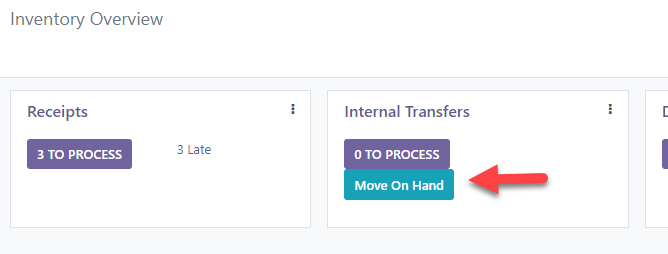
If you go to the Inventory Dashboard you can see the button “Move from location” in each of the picking types (only applicable to internal and outgoing transfers). Press it and you will be directed to the wizard.
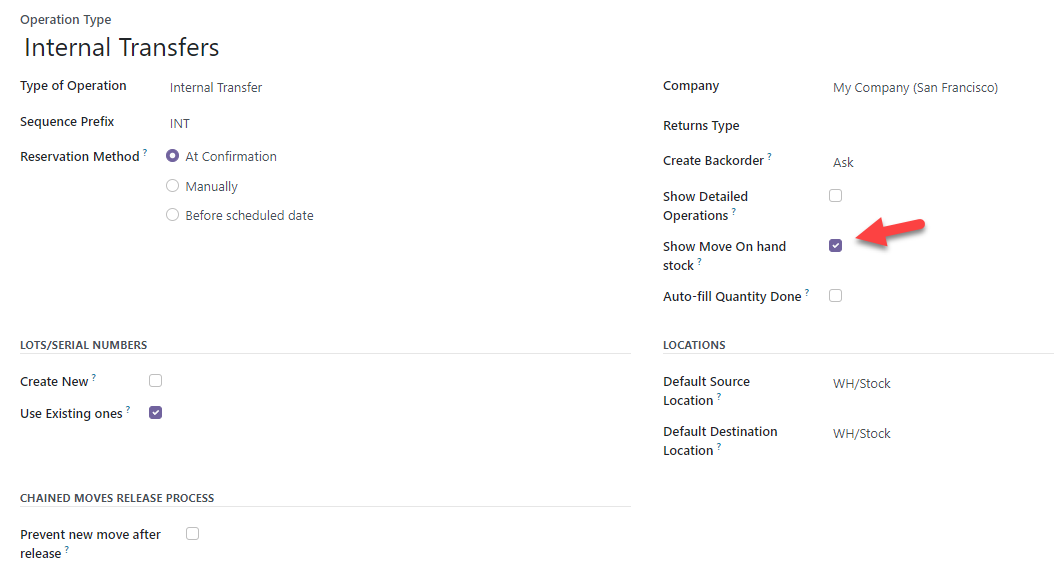
To enable this option, check “Show Move On Hand Stock” in the Picking Type configuration.
If you want transfer everything from stock.location
On a draft picking, add a button to fill with moves lines for all products in the source destination. This allows to create a picking to move all the content of a location. The Origin Location must have stock. The Destination Location has to be a final location. If some quants are not available (i.e. reserved) the picking will be in partially available state and reserved moves won’t be listed in the operations. Use barcode interface to scan a location and create an empty picking. Then use the fill with stock button.
Known issues / Roadmap
Change the current implementation (suggested by Denis Roussel from ACSONE):
A new parameter on stock picking types : ‘Product Change Location’ (with a little help).
With this, go to the dashboard, create a picking with that type.
Add a button on the picking form which is visible with that type that fill in the picking as now
Nice to have: add a magic button on locations that with context creates a new picking of that type with the origin location already filled in.
Bug Tracker
Bugs are tracked on GitHub Issues. In case of trouble, please check there if your issue has already been reported. If you spotted it first, help us to smash it by providing a detailed and welcomed feedback.
Do not contact contributors directly about support or help with technical issues.
Credits
Contributors
Mathieu Vatel <mathieu@julius.fr>
Mykhailo Panarin <m.panarin@mobilunity.com>
Joan Sisquella <joan.sisquella@forgeflow.com>
Jordi Ballester Alomar <jordi.ballester@forgeflow.com>
Lois Rilo <lois.rilo@forgeflow.com>
Héctor Villarreal <hector.villarreal@forgeflow.com>
Tecnativa <tecnativa.com>
Sergio Teruel
João Marques
Jacques-Etienne Baudoux <je@bcim.be>
Iryna Vyshnevska <i.vyshnevska@mobilunity.com>
Alexei Rivera <arivera@archeti.com>
Abraham Anes <abraham@studio73.es>
Quartile <https://www.quartile.co>
Aung Ko Ko Lin
Laurent Mignon <laurent.mignon@acsone.eu>
Maintainers
This module is maintained by the OCA.

OCA, or the Odoo Community Association, is a nonprofit organization whose mission is to support the collaborative development of Odoo features and promote its widespread use.
This module is part of the OCA/stock-logistics-warehouse project on GitHub.
You are welcome to contribute. To learn how please visit https://odoo-community.org/page/Contribute.
1 maintainer

Release files for odoo-addon-stock-move-location 16.0.1.4.3.4
For a detailed explanation of source distributions (sdists) and built distributions (wheels), please see the package formats documentation.
Built distribution (wheel)
| File | Interpreter | ABI | Platform | Reset |
|---|---|---|---|---|
| odoo_addon_stock_move_location-16.0.1.4.3.4-py3-none-any.whl | Python 3 | none | any | Details |
Release files / odoo_addon_stock_move_location-16.0.1.4.3.4-py3-none-any.whl
| Download URL | odoo_addon_stock_move_location-16.0.1.4.3.4-py3-none-any.whl |
|---|---|
| Size | 67.4 kB |
| Tags | Python 3 |
|
SHA-256 checksum How to use checksums |
ccdbdb7908a1f54f3b5b9611aa37d0768ab6d02edba27d0d0f087e076151dcc3
|
|
BLAKE2b-256 checksum How to use checksums |
a2ef3206cb941ecd73debb8d34aa5a5554fefbe86b9047d59878576311f46653
|
| Upload date | |
|
Uploaded using Trusted Publishing? What is trusted publishing? |
No |
| Uploaded via |
twine/7.0.0 CPython/3.14.4
|














