

Web Form Banner





The module adds configurable banners for backend form views. Define rules per model (and optionally per view) to show context-aware alerts with a chosen severity (info/warning/danger).
Messages can be plain text with ${placeholders} or fully custom HTML; visibility, severity, and values are computed server-side via a safe Python expression.
Banners are injected just before or after a target node (default: //sheet) and refresh on form load/save/reload.
Table of contents
Usage
Go to Settings > Technical > User Interface > Form Banner Rules and create a rule.
Choose Model, select Trigger Fields (optional), set Default Severity, select Views (optional), update Target XPath (insertion point) and Position, and configure the message.
Save. Open any matching form record—the banner will appear and auto-refresh after load/save/reload.
Usage of message fields:
Message (message): Text shown in the banner. Supports ${placeholders} filled from values returned by message_value_code. Ignored if message_value_code returns an html value.
HTML (message_is_html): If enabled, the message string is rendered as HTML; otherwise it’s treated as plain text.
Message Value Code (message_value_code): Safe Python expression evaluated per record. Return a dict such as {“visible”: True, “severity”: “warning”, “values”: {“name”: record.name}}. Use either message or html (from this code), not both. Several evaluation context variables are available.
Evaluation context variables available in Message Value Code:
`env`: Odoo environment for ORM access.
`user`: Current user (env.user).
`ctx`: Copy of the current context (dict(env.context)).
`record`: Current record (the form’s record).
`draft`: The persisted field values of the ORM record (before applying the current form’s unsaved changes) + the current unsaved changes on trigger fields. Should be used instead of record when your rule is triggered dynamically by an update to a trigger field. It doesn’t include any values from complex fields (one2many/reference, etc).
`record_id`: Integer id of the record being edited, or False if the form is creating a new record.
`model`: Shortcut to the current model (env[record._name]).
`url_for(obj): Helper that returns a backend form URL for `obj.
`context_today(ts=None)`: User-timezone “today” (date) for reliable date comparisons.
time, `datetime`: Standard Python time/datetime modules.
`dateutil`: { “parser”: dateutil.parser, “relativedelta”: dateutil.relativedelta }
`timezone`: pytz.timezone for TZ handling.
float_compare, float_is_zero, `float_round`: Odoo float utils for precision-safe comparisons/rounding.
All of the above are injected by the module to the safe_eval locals.
Trigger Fields
Trigger Fields is an optional list of model fields that, when changed in the open form, cause the banner to recompute live. If left empty, the banner does not auto-refresh as the user edits the form.
When a trigger fires, the module sends the current draft values to the server, sanitizes them, builds an evaluation record, and re-runs your message_value_code.
You should use draft instead of record to access the current form values if your rule is triggered based on an update to a trigger field.
Message setting examples:
A) Missing email on contact (warning)
Model: res.partner
Message: This contact has no email.
Message Value Code:
{"visible": not bool(record.email)}B) Show partner comment if available
Model: purchase.order
Message: Vendor Comments: ${comment}
Message Value Code (single expression):
{
  "visible": bool(record.partner_id.comment),
  "values": {"comment": record.partner_id.comment},
}
It is also possible to use “convenience placeholders” without an explicit values key:
{
  "visible": bool(record.partner_id.comment),
  "comment": record.partner_id.comment,
}
C) High-value sale order (dynamic severity)
Model: sale.order
Message: High-value order: ${amount_total}
Message Value Code:
{
  "visible": record.amount_total >= 30000,
  "severity": "danger" if record.amount_total >= 100000 else "warning",
  "values": {"amount_total": record.amount_total},
}
D) Quotation past validity date
Model: sale.order
Message: This quotation is past its validity date (${validity_date}).
Message Value Code:
{
  "visible": bool(record.validity_date and context_today() > record.validity_date and record.state in ["draft", "sent"]),
  "values": {"validity_date": record.validity_date},
}
E) Pending activities on a task (uses `env`)
Model: project.task
Message: There are ${cnt} pending activities.
Message Value Code (multi-line with result):
cnt = env["mail.activity"].search_count([("res_model","=",record._name),("res_id","=",record.id)])
result = {"visible": cnt > 0, "values": {"cnt": cnt}}
F) Product is missing internal reference (uses trigger fields)
Model: product.template
Trigger Fields: default_code
Message: Make sure to set an internal reference!
Message Value Code:
{"visible": not bool(draft.default_code)}G) HTML banner linking to the customer’s last sales order (uses trigger fields)
Model: sale.order
Trigger Fields: partner_id
Message: (leave blank; html provided by Message Value Code)
Message Value Code (multi-line with result):
domain = [("partner_id", "=", draft.partner_id.id)]
if record_id:
  domain += [("id", "<", record_id)]
last = model.search(domain, order="date_order desc, id desc", limit=1)
if last:
  html = "<strong>Previous order:</strong> <a href='%s'>%s</a>" % (url_for(last), last.name)
  result = {"visible": True, "html": html}
else:
  result = {"visible": False}
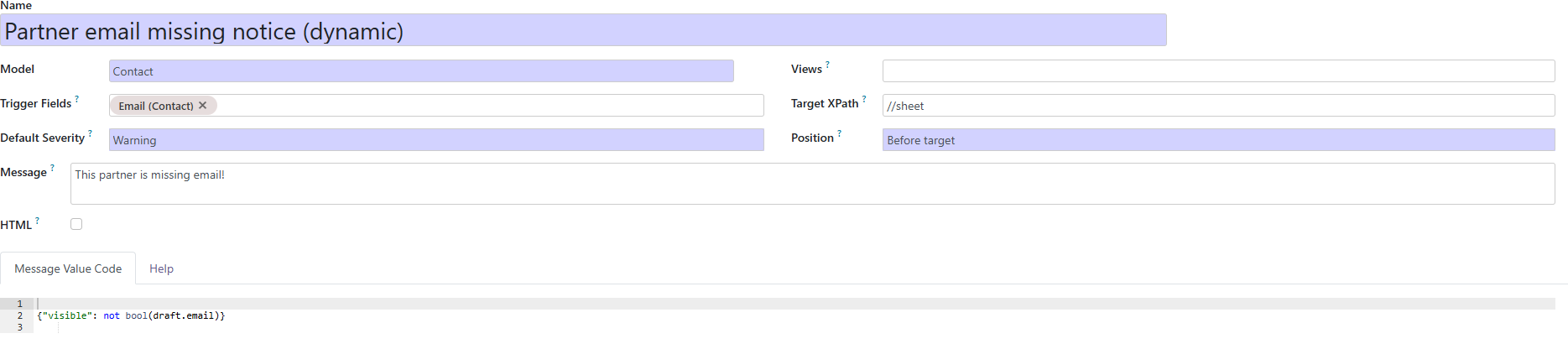
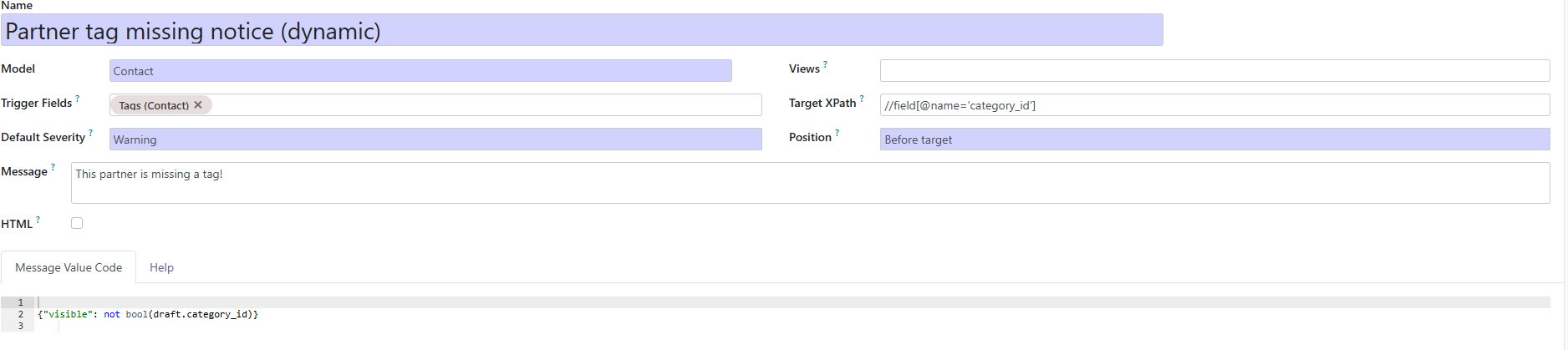
If we set up the rules for a partner record as shown below:
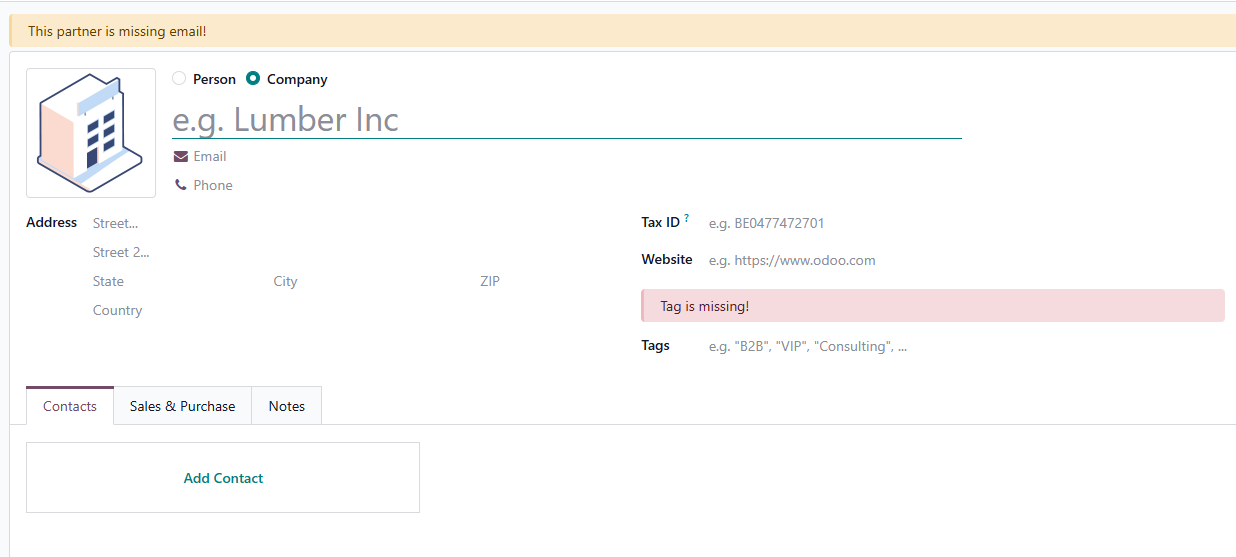
The banners will be displayed in the partner form view:
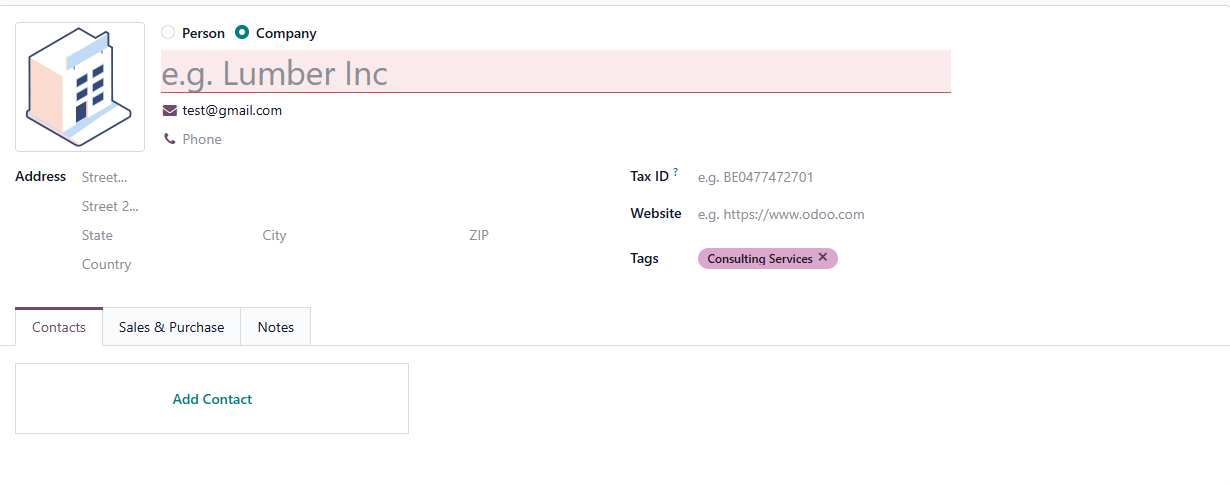
Once the values are filled in, the banners will disappear:
Known issues / Roadmap
Limitations of draft eval context variable
draft is always available in the eval context, but for new records (record_id = False) it only contains the trigger fields from the banner rules.
For existing records, draft overlays the trigger field values on top of the persisted record; all other fields come from Model.new defaults rather than the database.
Only simple field types are included: char, text, html, selection, boolean, integer, float, monetary, date, datetime, many2one, and many2many. one2many/reference/other types are omitted.
Bug Tracker
Bugs are tracked on GitHub Issues. In case of trouble, please check there if your issue has already been reported. If you spotted it first, help us to smash it by providing a detailed and welcomed feedback.
Do not contact contributors directly about support or help with technical issues.
Credits
Contributors
-
Yoshi Tashiro
Aung Ko Ko Lin
Maintainers
This module is maintained by the OCA.

OCA, or the Odoo Community Association, is a nonprofit organization whose mission is to support the collaborative development of Odoo features and promote its widespread use.
Current maintainers:


This module is part of the OCA/web project on GitHub.
You are welcome to contribute. To learn how please visit https://odoo-community.org/page/Contribute.
1 maintainer

Metadata
1 maintainer
Release files for odoo-addon-web-form-banner 19.0.1.0.1.1
For a detailed explanation of source distributions (sdists) and built distributions (wheels), please see the package formats documentation.
Built distribution (wheel)
| File | Interpreter | ABI | Platform | Actions Reset |
|---|---|---|---|---|
| odoo_addon_web_form_banner-19.0.1.0.1.1-py3-none-any.whl | Python 3 | none | any | Details for odoo_addon_web_form_banner-19.0.1.0.1.1-py3-none-any.whl |
Security for odoo-addon-web-form-banner 19.0.1.0.1.1
Provenance
Provenance describes where a file came from. On PyPI, provenance is shared via attestations, which provide a verifiable record of the build or publishing details. View details, limitations and caveats.
No provenance found
None of the files in this release were uploaded with provenance metadata.
A note on package security
PyPI is a repository for distributing packages, not a service for auditing them. While third-party security researchers and our staff do their best to detect and remove malicious packages, PyPI cannot guarantee the quality, security or suitability of any given package.
To learn more about protecting yourself from malicious actors, visit our package security documentation.














