
Show list fields as a matrix

Project description

2D matrix for x2many fields





This module allows to show an x2many field with 3-tuples ($x_value, $y_value, $value) in a table
$x_value1 |
$x_value2 |
|
|---|---|---|
$y_value1 |
$value(1/1) |
$value(2/1) |
$y_value2 |
$value(1/2) |
$value(2/2) |
where value(n/n) is editable.
An example use case would be: Select some projects and some employees so that a manager can easily fill in the planned_hours for one task per employee. The result could look like this:
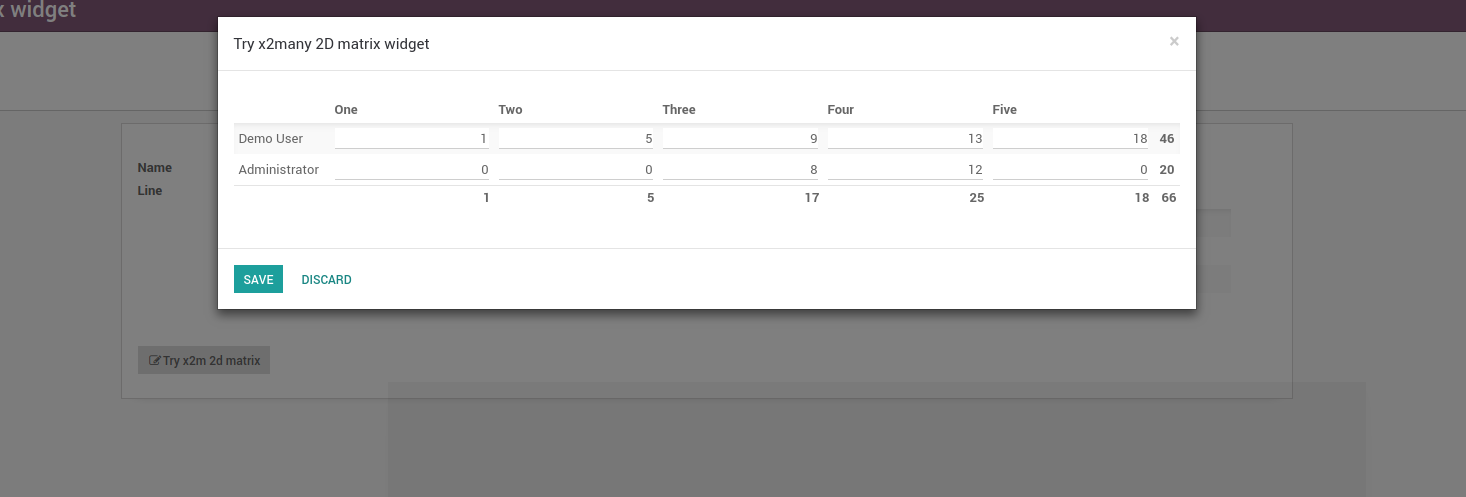
The beauty of this is that you have an arbitrary amount of columns with this widget, trying to get this in standard x2many lists involves some quite ugly hacks.
Table of contents
Usage
Use this widget by saying:
<field name="my_field" widget="x2many_2d_matrix" />
This assumes that my_field refers to a model with the fields x, y and value. If your fields are named differently, pass the correct names as attributes:
<field name="my_field" widget="x2many_2d_matrix" field_x_axis="my_field1" field_y_axis="my_field2" field_value="my_field3">
    <list>
        <field name="my_field"/>
        <field name="my_field1"/>
        <field name="my_field2"/>
        <field name="my_field3"/>
    </list>
</field>
You can pass the following parameters:
field_x_axis The field that indicates the x value of a point
field_y_axis The field that indicates the y value of a point
field_value Show this field as value
show_row_totals If field_value is a numeric field, it indicates if you want to calculate row totals. True by default
show_column_totals If field_value is a numeric field, it indicates if you want to calculate column totals. True by default
x_axis_clickable If the x axis field is a many2one field, render the values as links to the record in question
y_axis_clickable If the y axis field is a many2one field, render the values as links to the record in question
For the value field, you can set any attributes you’d set in a normal list view, ie if your value field is a many2one field and you want to disable creating records via this field, you’d write
<field name="my_field3" options="{'no_create': true}"/>or if you want to have a custom domain or context
<field name="my_field3" domain="[('some_field', '=', my_field1)]" context="{'default_some_field': my_field1}" />Note that to be able to refer to other fields than the ones used as coordinates or value, you have to add them inside the list node.
Example
You need a data structure already filled with values. Let’s assume we want to use this widget in a wizard that lets the user fill in planned hours for one task per project per user. In this case, we can use project.task as our data model and point to it from our wizard. The crucial part is that we fill the field in the default function:
from odoo import fields, models

class MyWizard(models.TransientModel):
    _name = 'my.wizard'

    def _default_task_ids(self):
        # your list of project should come from the context, some selection
        # in a previous wizard or wherever else
        projects = self.env['project.project'].browse([1, 2, 3])
        # same with users
        users = self.env['res.users'].browse([1, 2, 3])
        return [
            (0, 0, {
                'name': 'Sample task name',
                'project_id': p.id,
                'user_id': u.id,
                'planned_hours': 0,
                'message_needaction': False,
                'date_deadline': fields.Date.today(),
            })
            # if the project doesn't have a task for the user,
            # create a new one
            if not p.task_ids.filtered(lambda x: x.user_id == u) else
            # otherwise, return the task
            (4, p.task_ids.filtered(lambda x: x.user_id == u)[0].id)
            for p in projects
            for u in users
        ]

    task_ids = fields.Many2many('project.task', default=_default_task_ids)
Now in our wizard, we can use:
<field name="task_ids" widget="x2many_2d_matrix" field_x_axis="project_id" field_y_axis="user_id" field_value="planned_hours">
    <list>
        <field name="task_ids"/>
        <field name="project_id"/>
        <field name="user_id"/>
        <field name="planned_hours"/>
    </list>
</field>
Known issues / Roadmap
Support limit total records in the matrix. Ref: https://github.com/OCA/web/issues/901
Support cell traversal through keyboard arrows.
Entering the widget from behind by pressing Shift+TAB in your keyboard will enter into the 1st cell until https://github.com/odoo/odoo/pull/26490 is merged.
Support kanban mode. Current behaviour forces list mode.
Changelog
12.0.1.0.1 (2018-12-07)
[FIX] Cells are unable to render property. (#1126)
12.0.1.0.0 (2018-11-20)
[12.0][MIG] web_widget_x2many_2d_matrix (#1101)
Bug Tracker
Bugs are tracked on GitHub Issues. In case of trouble, please check there if your issue has already been reported. If you spotted it first, help us to smash it by providing a detailed and welcomed feedback.
Do not contact contributors directly about support or help with technical issues.
Credits
Contributors
Holger Brunn <mail@hunki-enterprises.com>
Pedro M. Baeza <pedro.baeza@tecnativa.com>
Artem Kostyuk <a.kostyuk@mobilunity.com>
Simone Orsi <simone.orsi@camptocamp.com>
Timon Tschanz <timon.tschanz@camptocamp.com>
Jairo Llopis <jairo.llopis@tecnativa.com>
Dennis Sluijk <d.sluijk@onestein.nl>
-
Alexey Pelykh <alexey.pelykh@corphub.eu>
Adrià Gil Sorribes <adria.gil@forgeflow.com>
Christopher Ormaza <chris.ormaza@forgeflow.com>
SodexisTeam <dev@sodexis.com>
Jasmin Solanki jasmin.solanki@forgeflow.com
David Jiménez david.jimenez@forgeflow.com
Maintainers
This module is maintained by the OCA.

OCA, or the Odoo Community Association, is a nonprofit organization whose mission is to support the collaborative development of Odoo features and promote its widespread use.
Current maintainers:



This module is part of the OCA/web project on GitHub.
You are welcome to contribute. To learn how please visit https://odoo-community.org/page/Contribute.
Release history Release notifications | RSS feed


Download files
Download the file for your platform. If you're not sure which to choose, learn more about installing packages.
Source Distributions
Built Distribution
Filter files by name, interpreter, ABI, and platform.
If you're not sure about the file name format, learn more about wheel file names.
Copy a direct link to the current filters
File details
Details for the file odoo_addon_web_widget_x2many_2d_matrix-18.0.2.1.0.2-py3-none-any.whl.
File metadata
- Download URL: odoo_addon_web_widget_x2many_2d_matrix-18.0.2.1.0.2-py3-none-any.whl
- Upload date:
- Size: 68.8 kB
- Tags: Python 3
- Uploaded using Trusted Publishing? No
- Uploaded via: twine/6.2.0 CPython/3.12.3
File hashes
| Algorithm | Hash digest | |
|---|---|---|
| SHA256 |
2520410853e61bcf9ed0470a15c64625281a73f2615965556f14fb3e4d3c4495
|
|
| MD5 |
b88bf072b650c23d0014f8388440d26b
|
|
| BLAKE2b-256 |
ef97242343ef53c492bfbad0832dfcf6b424ea3284f7842a3abda6ba69f46f54
|






