





This module integrates Odoo website with Cookiebot, to ask for consent before installing cookies on users’ browsers.
Table of contents
Configuration
To configure this module, you need to:
Go to Website > Configuration > Settings
Under Select the Website to Configure, choose a website.
In the privacy section enable Cookiebot option.
Click on `How to configure Cookiebot <https://cookiebot.com/goto/help>`__.
Follow the instructions, except step 3 (do not insert the <script> tags, the module will do it for you).
Fill in your Domain Group ID (e.g. 00000000-0000-0000-0000-000000000000)
Click on the Save button.
⚠️ This module will do nothing unless configured and linked with Cookiebot.
Usage
To use this module, once configured for your website, you just need to browse that website. You will see the Cookiebot consent banner, and a Cookies Policy link in the footer.
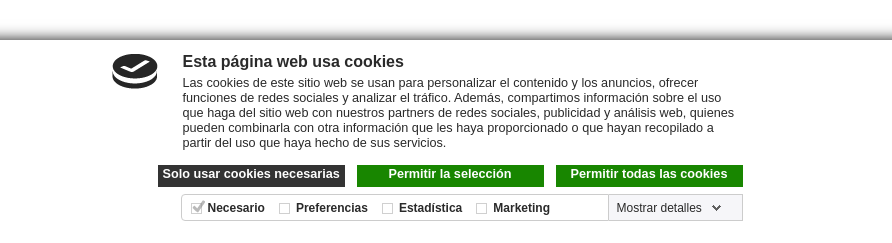
Remember that, if your browser is configured to block 3rd party cookies, trackers or consent banners, you won’t notice the change. Disable any of those protections to experiment the benefits.
Bug Tracker
Bugs are tracked on GitHub Issues. In case of trouble, please check there if your issue has already been reported. If you spotted it first, help us to smash it by providing a detailed and welcomed feedback.
Do not contact contributors directly about support or help with technical issues.
Credits
Contributors
- Trey:
Jorge Camacho <jorge@trey.es>
Antonio González <antonio@trey.es>
- Tecnativa:
Jairo Llopis
Stefan Ungureanu
Pilar Vargas
Maintainers
This module is maintained by the OCA.

OCA, or the Odoo Community Association, is a nonprofit organization whose mission is to support the collaborative development of Odoo features and promote its widespread use.
This module is part of the OCA/website project on GitHub.
You are welcome to contribute. To learn how please visit https://odoo-community.org/page/Contribute.
1 maintainer

Release files for odoo-addon-website-cookiebot 16.0.2.0.0.13
For a detailed explanation of source distributions (sdists) and built distributions (wheels), please see the package formats documentation.
Built distribution (wheel)
| File | Interpreter | ABI | Platform | Reset |
|---|---|---|---|---|
| odoo_addon_website_cookiebot-16.0.2.0.0.13-py3-none-any.whl | Python 3 | none | any | Details |














