

Website Exclude Sitemap





This module lets website administrators exclude public website URLs from /sitemap.xml.
The module only affects sitemap generation. It does not unpublish pages, change access rights, or block direct access to the excluded URLs.
It also clears the cached sitemap when website pages are created, deleted, or their URL changes, so sitemap URLs are refreshed in the next sitemap generation.
Table of contents
Use Cases / Context
Odoo includes public website URLs in the generated sitemap.
Some public URLs can be useful for direct navigation but add little or no SEO value when exposed in /sitemap.xml.
This module was created to keep the sitemap focused on strategic public pages while leaving normal website access untouched.
Configuration
Configure sitemap exclusions:
Go to Website > Configuration > Settings.
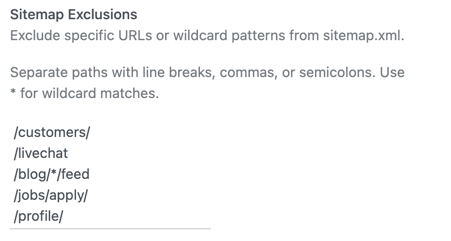
Locate the Sitemap Exclusions setting.
Enter one or more paths or glob patterns.
Save the settings.
Values can be separated by:
line breaks;
commas;
semicolons.
For example, these values are equivalent:
/customers/
/livechat
/blog/*/feed
/jobs/apply/
/profile/
/customers/, /livechat, /blog/*/feed, /jobs/apply/, /profile//customers/; /livechat; /blog/*/feed
/jobs/apply/, /profile/Lines starting with # are comments.
See the usage section for the full pattern syntax: * matches inside one path segment, ** crosses /, and a pattern ending in / or in /** excludes that path and everything below it.
The default value only covers paths that any Odoo website has. Add the paths that are specific to your own deployment, for example:
/website/info
/create-container-error
/machine-creation
/website/info is already left out of the sitemap by the core when its view is inactive; add it here when that view stays active.
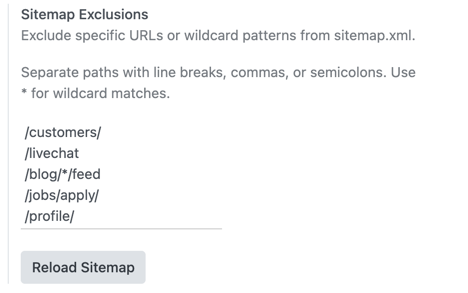
Use the Reload Sitemap button in the same settings block to clear the cached sitemap manually.
Usage
Sitemap exclusions:
Create or publish website pages as usual.
Configure the paths or patterns to exclude in Website > Configuration > Settings > Sitemap Exclusions.
Open /sitemap.xml.
Confirm that excluded URLs are absent and non-excluded public pages are still present.
Pattern syntax:
Pattern |
Matches |
Does not match |
|---|---|---|
/livechat |
/livechat |
/livechat/room |
/customers/ |
/customers, /customers/acme, /customers/acme/2024 |
/customers-list |
/blog/*/feed |
/blog/news/feed |
/blog/a/b/feed, /blog/news |
/solutions* |
/solutions, /solutions-cloud |
/solutions/cloud |
/jobs/** |
/jobs, /jobs/apply/1, /jobs/a/b/c |
/jobs-list |
In short:
* matches inside a single path segment; it never crosses a /.
** crosses /, so it matches any number of segments.
A pattern ending in / or in /** is a prefix: it excludes that path and everything below it.
Any other pattern matches that exact path. The trailing slash of the URL is ignored, so /livechat and /livechat/ are the same path.
Example:
configure /customers/;
publish a page at /customers;
publish another page at /customers/other;
open /sitemap.xml.
Both URLs are excluded, because /customers/ is a prefix. Use /customers without the trailing slash to exclude only the first one.
Ways to update the sitemap.xml:
The sitemap cache is automatically cleared when website pages are created or deleted, and when their URL, publication state, indexation, publication date or website changes.
The manual Reload Sitemap button can be used when a forced sitemap cache clear is needed.
Known issues / Roadmap
The exclusion list is a denylist evaluated after Odoo has collected every sitemap source, so it only removes URLs, never adds them. When a record is marked as indexed but its URL matches an exclusion pattern, the pattern wins and the URL stays out of /sitemap.xml.
Nothing warns about that in the record itself: a page whose Indexed toggle is on, or a published blog post, gives no hint that a global pattern is keeping it out of the sitemap. The only place where the exclusions are visible is **Website
Configuration > Settings**.
A future version could show the conflict where the record is edited, for example a message next to the Indexed toggle of website.page. Covering models from other modules, such as blog.post, belongs in bridge modules instead, to keep this module depending on website alone.
Bug Tracker
Bugs are tracked on GitHub Issues. In case of trouble, please check there if your issue has already been reported. If you spotted it first, help us to smash it by providing a detailed and welcomed feedback.
Do not contact contributors directly about support or help with technical issues.
Credits
Contributors
-
Edilio Escalona Almira e.escalona@binhex.cloud
Maintainers
This module is maintained by the OCA.

OCA, or the Odoo Community Association, is a nonprofit organization whose mission is to support the collaborative development of Odoo features and promote its widespread use.
This module is part of the OCA/website project on GitHub.
You are welcome to contribute. To learn how please visit https://odoo-community.org/page/Contribute.
Metadata
Release files for odoo-addon-website-exclude-sitemap 18.0.1.0.0.1
For a detailed explanation of source distributions (sdists) and built distributions (wheels), please see the package formats documentation.
Built distribution (wheel)
| File | Interpreter | ABI | Platform | Reset |
|---|---|---|---|---|
| odoo_addon_website_exclude_sitemap-18.0.1.0.0.1-py3-none-any.whl | Python 3 | none | any | Details |
Release files / odoo_addon_website_exclude_sitemap-18.0.1.0.0.1-py3-none-any.whl
| Download URL | odoo_addon_website_exclude_sitemap-18.0.1.0.0.1-py3-none-any.whl |
|---|---|
| Size | 94.3 kB |
| Tags | Python 3 |
|
SHA-256 checksum How to use checksums |
4292aad47962b4e09349c4edb78d559322a9f8d8909ab5054a009dbb48fe3a78
|
|
BLAKE2b-256 checksum How to use checksums |
20dffb7596de23c56faba70071420c6ee6309f3b8410b7f56a6e22454320deb4
|
| Upload date | |
|
Uploaded using Trusted Publishing? What is trusted publishing? |
No |
| Uploaded via |
twine/7.0.0 CPython/3.14.4
|














