

Website Slides Attendees Completed Time





🕒 Completed Time: Time-Based Completion Tracking per Attendee (in Hours)
This addon enhances Odoo eLearning by introducing a new metric: Completed Time, computed per attendee, which represents the sum of the completion times (in hours) of the slides they have completed.
🔧 What’s Built-In vs. What’s Added
Built-in (Odoo):
Progress Progress = Number of Completed Slides / Total Number of Slides → A simple ratio, based only on slide count.
Added by this addon:
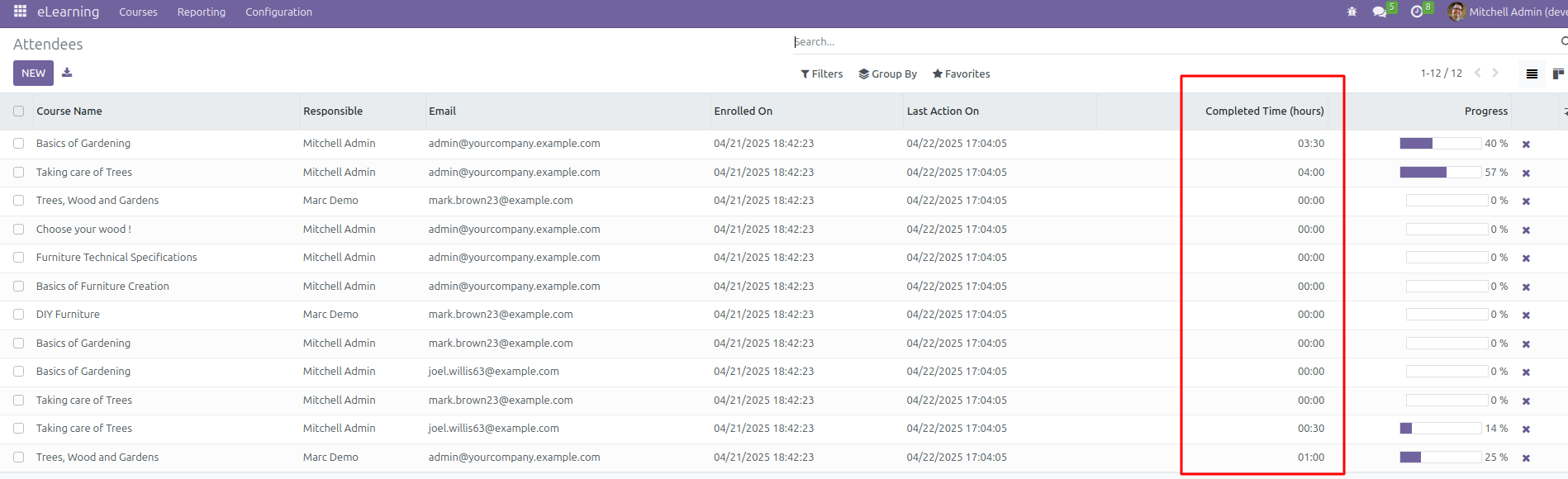
Completed Time (in hours) Completed Time = Σ(completion_time of each completed slide) → A cumulative total of time-based effort for each attendee.
💡 Why This Matters
⏱️ Duration-Aware Insight Accurately reflects how much content a learner has completed, by time spent rather than steps clicked.
👤 Per-Attendee Computation Each attendee has a personalized Completed Time value, making metrics more meaningful for trainers and reports.
📊 Actionable Training Analytics Trainers can better identify high-effort learners and tailor support accordingly.
🧪 Example
For a course with 10 slides (total 20 hours), if an attendee completes:
1 slide of 15 hours → Progress: 10% → Completed Time: 15h
This addon is ideal for serious training environments, compliance programs, and professional development, where time commitment is a better measure than simple slide count.
Table of contents
Usage
After module installation, you will see course’s completed time within attendee views.
Bug Tracker
Bugs are tracked on GitHub Issues. In case of trouble, please check there if your issue has already been reported. If you spotted it first, help us to smash it by providing a detailed and welcomed feedback.
Do not contact contributors directly about support or help with technical issues.
Credits
Contributors
Rolando Pérez rrebollo@binhex.cloud https://binhex.cloud
Maintainers
This module is maintained by the OCA.

OCA, or the Odoo Community Association, is a nonprofit organization whose mission is to support the collaborative development of Odoo features and promote its widespread use.
This module is part of the OCA/e-learning project on GitHub.
You are welcome to contribute. To learn how please visit https://odoo-community.org/page/Contribute.
1 maintainer

Release files for odoo-addon-website-slides-attendees-completed-time 16.0.1.0.0.4
For a detailed explanation of source distributions (sdists) and built distributions (wheels), please see the package formats documentation.
Built distribution (wheel)
| File | Interpreter | ABI | Platform | Reset |
|---|---|---|---|---|
| odoo_addon_website_slides_attendees_completed_time-16.0.1.0.0.4-py3-none-any.whl | Python 3 | none | any | Details |
Release files / odoo_addon_website_slides_attendees_completed_time-16.0.1.0.0.4-py3-none-any.whl
| Download URL | odoo_addon_website_slides_attendees_completed_time-16.0.1.0.0.4-py3-none-any.whl |
|---|---|
| Size | 204.5 kB |
| Tags | Python 3 |
|
SHA-256 checksum How to use checksums |
6bf08366a8a503f2e4f91684bad653ffeb4c4801f313a56820b275be7fd8632b
|
|
BLAKE2b-256 checksum How to use checksums |
9412c6fc0bab8242e6ea74de2a098d94feae8c6002841c707bacc72bfeb00eed
|
| Upload date | |
|
Uploaded using Trusted Publishing? What is trusted publishing? |
No |
| Uploaded via |
twine/6.2.0 CPython/3.12.3
|














