





This module allows to assign image or icon to individual website menu entries and also provides option to set the flag to open menu in new window from menu editing.
Table of contents
Configuration
Go to each Website, click Edit and click on menu item. The confirmation will ask you to choose whether to go to that link or edit the menu. If you select Edit the menu the enhanced menu editor will appear.
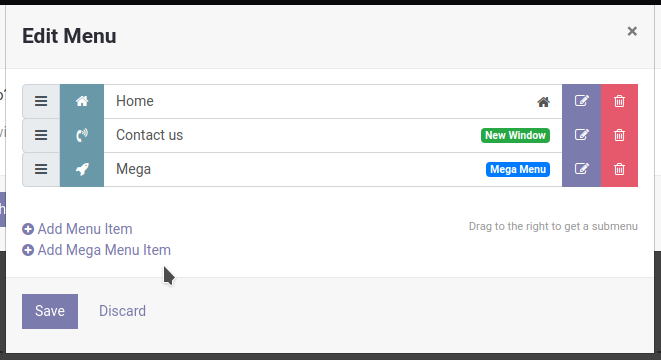
For each menu item it shows preview of icon/image (if any was selected). It also adds badge to those items that are to be opened in new window.
If you click the Edit Menu Item button enhanced menu item editing dialog.
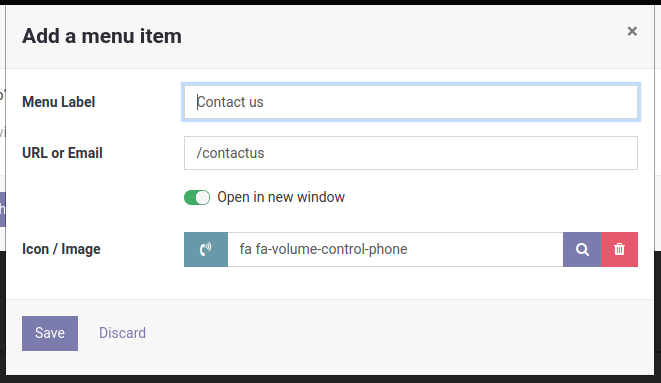
Clicking on search icon will bring up Select a Media dialog that will allow for selecting either image or font awesome icon.
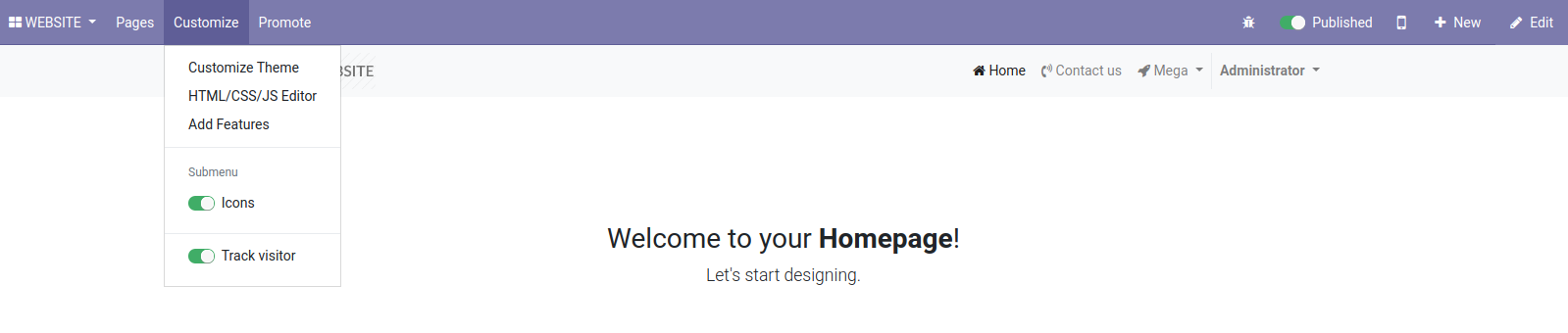
Sample website.submenu template is included to show how to render the website menu. Rendering icons can be turned off in Customize menu.
Bug Tracker
Bugs are tracked on GitHub Issues. In case of trouble, please check there if your issue has already been reported. If you spotted it first, help us smashing it by providing a detailed and welcomed feedback.
Do not contact contributors directly about support or help with technical issues.
Credits
Contributors
Radovan Skolnik <radovan@skolnik.info>
Maintainers
This module is maintained by the OCA.

OCA, or the Odoo Community Association, is a nonprofit organization whose mission is to support the collaborative development of Odoo features and promote its widespread use.
This module is part of the OCA/website project on GitHub.
You are welcome to contribute. To learn how please visit https://odoo-community.org/page/Contribute.
1 maintainer

Metadata
1 maintainer
Release files for odoo13-addon-website-menu-icon 13.0.1.0.1
For a detailed explanation of source distributions (sdists) and built distributions (wheels), please see the package formats documentation.
Built distribution (wheel)
| File | Interpreter | ABI | Platform | Reset |
|---|---|---|---|---|
| odoo13_addon_website_menu_icon-13.0.1.0.1-py3-none-any.whl | Python 3 | none | any | Details |














