
Office-Word-MCP-Server

A Model Context Protocol (MCP) server for creating, reading, and manipulating Microsoft Word documents. This server enables AI assistants to work with Word documents through a standardized interface, providing rich document editing capabilities.

Overview
Office-Word-MCP-Server implements the Model Context Protocol to expose Word document operations as tools and resources. It serves as a bridge between AI assistants and Microsoft Word documents, allowing for document creation, content addition, formatting, and analysis.
The server features a modular architecture that separates concerns into core functionality, tools, and utilities, making it highly maintainable and extensible for future enhancements.
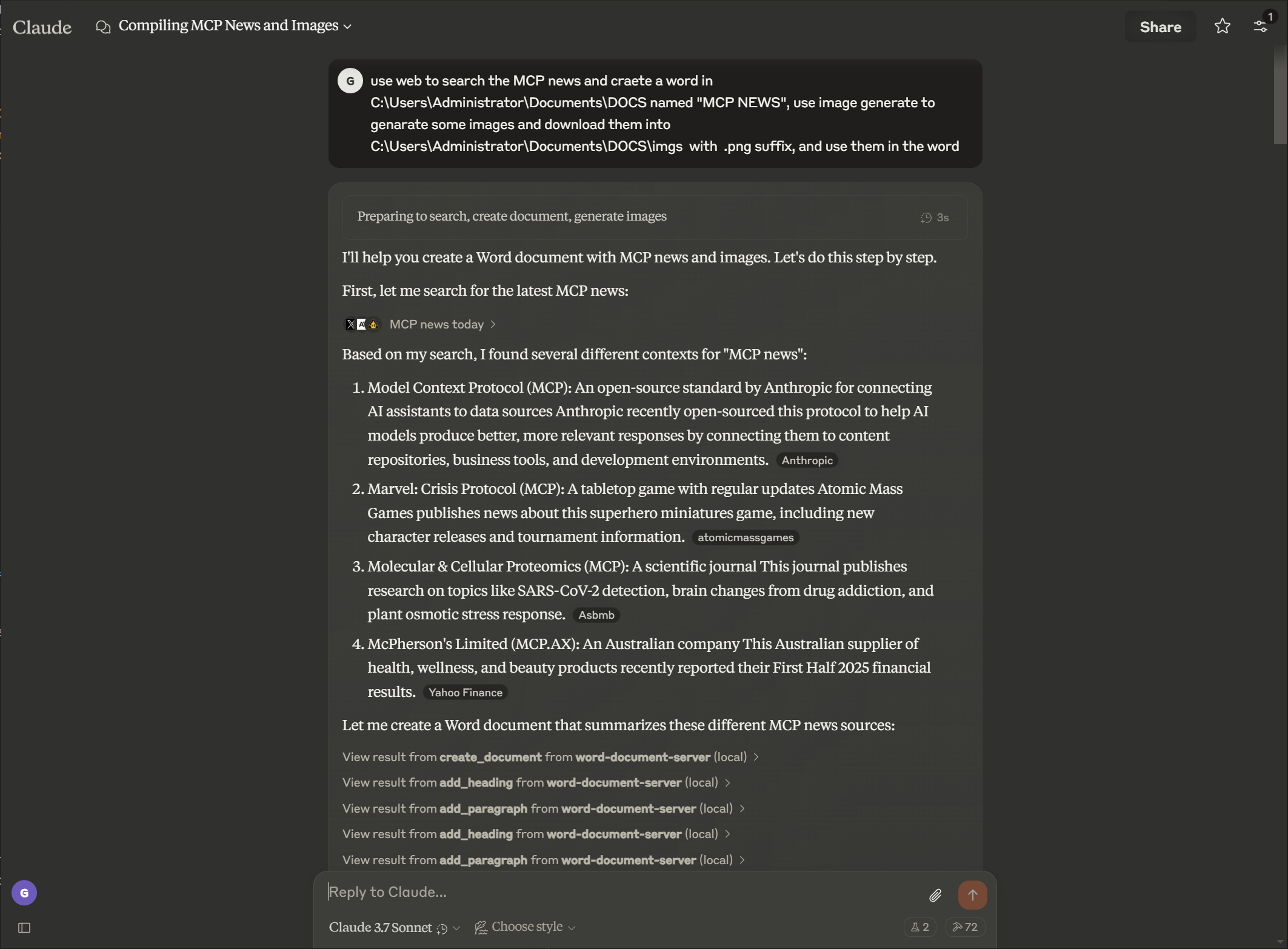
Example
Pormpt
Output

Features
Document Management
- Create new Word documents with metadata
- Extract text and analyze document structure
- View document properties and statistics
- List available documents in a directory
- Create copies of existing documents
- Merge multiple documents into a single document
- Convert Word documents to PDF format
Content Creation
- Add headings with different levels and direct formatting (font, size, bold, italic, borders)
- Insert paragraphs with optional styling and direct formatting (font, size, bold, italic, color)
- Create tables with custom data
- Add images with proportional scaling
- Insert page breaks
- Insert bulleted and numbered lists with proper XML formatting
- Add footnotes and endnotes to documents
- Convert footnotes to endnotes
- Customize footnote and endnote styling
- Create professional table layouts for technical documentation
- Design callout boxes and formatted content for instructional materials
- Build structured data tables for business reports with consistent styling
- Insert content relative to existing text or paragraph indices
Rich Text Formatting
- Format specific text sections (bold, italic, underline)
- Change text color and font properties
- Apply custom styles to text elements
- Search and replace text throughout documents
- Individual cell text formatting within tables
- Multiple formatting combinations for enhanced visual appeal
- Font customization with family and size control
- Direct formatting during content creation (paragraphs and headings)
- Reduce function calls by combining content creation with formatting
- Add section header borders for visual separation
Table Formatting
- Format tables with borders and styles
- Create header rows with distinct formatting
- Apply cell shading and custom borders
- Structure tables for better readability
- Individual cell background shading with color support
- Alternating row colors for improved readability
- Enhanced header row highlighting with custom colors
- Cell text formatting with bold, italic, underline, color, font size, and font family
- Comprehensive color support with named colors and hex color codes
- Cell padding management with independent control of all sides
- Cell alignment (horizontal and vertical positioning)
- Cell merging (horizontal, vertical, and rectangular areas)
- Column width management with multiple units (points, percentage, auto-fit)
- Auto-fit capabilities for dynamic column sizing
- Professional callout table support with icon cells and styled content
Advanced Document Manipulation
- Delete paragraphs
- Insert content relative to specific text or paragraph indices
- Insert bulleted and numbered lists with proper XML numbering structure
- Insert headers and paragraphs before or after target locations
- Create custom document styles
- Apply consistent formatting throughout documents
- Format specific ranges of text with detailed control
- Flexible padding units with support for points and percentage-based measurements
- Clear, readable table presentation with proper alignment and spacing
Document Protection
- Add password protection to documents
- Implement restricted editing with editable sections
- Add digital signatures to documents
- Verify document authenticity and integrity
Comment Extraction
- Extract all comments from a document
- Filter comments by author
- Get comments for specific paragraphs
- Access comment metadata (author, date, text)
Installation
Installing via Smithery
To install Office Word Document Server for Claude Desktop automatically via Smithery:
npx -y @smithery/cli install @GongRzhe/Office-Word-MCP-Server --client claude
Prerequisites
- Python 3.8 or higher
- pip package manager
Basic Installation
# Clone the repository
git clone https://github.com/GongRzhe/Office-Word-MCP-Server.git
cd Office-Word-MCP-Server

# Install dependencies
pip install -r requirements.txt
Using the Setup Script
Alternatively, you can use the provided setup script which handles:
- Checking prerequisites
- Setting up a virtual environment
- Installing dependencies
- Generating MCP configuration
python setup_mcp.py
Usage with Claude for Desktop
Configuration
Method 1: After Local Installation
- After installation, add the server to your Claude for Desktop configuration file:
{
  "mcpServers": {
    "word-document-server": {
      "command": "python",
      "args": ["/path/to/word_mcp_server.py"]
    }
  }
}
Method 2: Without Installation (Using uvx)
- You can also configure Claude for Desktop to use the server without local installation by using the uvx package manager:
{
  "mcpServers": {
    "word-document-server": {
      "command": "uvx",
      "args": ["--from", "office-word-mcp-server", "word_mcp_server"]
    }
  }
}
-
Configuration file locations:
- macOS:
~/Library/Application Support/Claude/claude_desktop_config.json - Windows:
%APPDATA%\Claude\claude_desktop_config.json
- macOS:
-
Restart Claude for Desktop to load the configuration.
Example Operations
Once configured, you can ask Claude to perform operations like:
- "Create a new document called 'report.docx' with a title page"
- "Add a heading and three paragraphs to my document"
- "Add my name in Helvetica 36pt bold at the top of the document"
- "Add a section heading 'Summary' in Helvetica 14pt bold with a bottom border"
- "Add a paragraph in Times New Roman 14pt with italic blue text"
- "Insert a bulleted list after the paragraph containing 'Introduction'"
- "Insert a numbered list with items: 'First step', 'Second step', 'Third step'"
- "Add bullet points after the 'Summary' heading"
- "Insert a 4x4 table with sales data"
- "Format the word 'important' in paragraph 2 to be bold and red"
- "Search and replace all instances of 'old term' with 'new term'"
- "Create a custom style for section headings"
- "Apply formatting to the table in my document"
- "Extract all comments from my document"
- "Show me all comments by John Doe"
- "Get comments for paragraph 3"
- "Make the text in table cell (1,2) bold and blue with 14pt font"
- "Add 10 points of padding to all sides of the header cells"
- "Create a callout table with a blue checkmark icon and white text"
- "Set the first column width to 50 points and auto-fit the remaining columns"
- "Apply alternating row colors to make the table more readable"
API Reference
Document Creation and Properties
create_document(filename, title=None, author=None)
get_document_info(filename)
get_document_text(filename)
get_document_outline(filename)
list_available_documents(directory=".")
copy_document(source_filename, destination_filename=None)
convert_to_pdf(filename, output_filename=None)
Content Addition
add_heading(filename, text, level=1, font_name=None, font_size=None,
            bold=None, italic=None, border_bottom=False)
add_paragraph(filename, text, style=None, font_name=None, font_size=None,
              bold=None, italic=None, color=None)
add_table(filename, rows, cols, data=None)
add_picture(filename, image_path, width=None)
add_page_break(filename)
Advanced Content Manipulation
# Insert content relative to existing text or paragraph index
insert_header_near_text(filename, target_text=None, header_title=None,
                       position='after', header_style='Heading 1',
                       target_paragraph_index=None)

insert_line_or_paragraph_near_text(filename, target_text=None, line_text=None,
                                   position='after', line_style=None,
                                   target_paragraph_index=None)

# Insert bulleted or numbered lists with proper XML formatting
insert_numbered_list_near_text(filename, target_text=None, list_items=None,
                              position='after', target_paragraph_index=None,
                              bullet_type='bullet')
# bullet_type options:
#   'bullet' - Creates bulleted list with bullets (•)
#   'number' - Creates numbered list (1, 2, 3, ...)
Content Extraction
get_document_text(filename)
get_paragraph_text_from_document(filename, paragraph_index)
find_text_in_document(filename, text_to_find, match_case=True, whole_word=False)
Text Formatting
format_text(filename, paragraph_index, start_pos, end_pos, bold=None,
            italic=None, underline=None, color=None, font_size=None, font_name=None)
search_and_replace(filename, find_text, replace_text)
delete_paragraph(filename, paragraph_index)
create_custom_style(filename, style_name, bold=None, italic=None,
                    font_size=None, font_name=None, color=None, base_style=None)
Table Formatting
format_table(filename, table_index, has_header_row=None,
             border_style=None, shading=None)
set_table_cell_shading(filename, table_index, row_index, col_index,
                      fill_color, pattern="clear")
apply_table_alternating_rows(filename, table_index,
                            color1="FFFFFF", color2="F2F2F2")
highlight_table_header(filename, table_index,
                      header_color="4472C4", text_color="FFFFFF")

# Cell merging tools
merge_table_cells(filename, table_index, start_row, start_col, end_row, end_col)
merge_table_cells_horizontal(filename, table_index, row_index, start_col, end_col)
merge_table_cells_vertical(filename, table_index, col_index, start_row, end_row)

# Cell alignment tools
set_table_cell_alignment(filename, table_index, row_index, col_index,
                        horizontal="left", vertical="top")
set_table_alignment_all(filename, table_index,
                       horizontal="left", vertical="top")

# Cell text formatting tools
format_table_cell_text(filename, table_index, row_index, col_index,
                      text_content=None, bold=None, italic=None, underline=None,
                      color=None, font_size=None, font_name=None)

# Cell padding tools
set_table_cell_padding(filename, table_index, row_index, col_index,
                      top=None, bottom=None, left=None, right=None, unit="points")

# Column width management
set_table_column_width(filename, table_index, col_index, width, width_type="points")
set_table_column_widths(filename, table_index, widths, width_type="points")
set_table_width(filename, table_index, width, width_type="points")
auto_fit_table_columns(filename, table_index)
Comment Extraction
get_all_comments(filename)
get_comments_by_author(filename, author)
get_comments_for_paragraph(filename, paragraph_index)
Troubleshooting
Common Issues
-
Missing Styles
- Some documents may lack required styles for heading and table operations
- The server will attempt to create missing styles or use direct formatting
- For best results, use templates with standard Word styles
-
Permission Issues
- Ensure the server has permission to read/write to the document paths
- Use the
copy_documentfunction to create editable copies of locked documents - Check file ownership and permissions if operations fail
-
Image Insertion Problems
- Use absolute paths for image files
- Verify image format compatibility (JPEG, PNG recommended)
- Check image file size and permissions
-
Table Formatting Issues
- Cell index errors: Ensure row and column indices are within table bounds (0-based indexing)
- Color format problems: Use hex colors without '#' prefix (e.g., "FF0000" for red) or standard color names
- Padding unit confusion: Specify "points" or "percent" explicitly when setting cell padding
- Column width conflicts: Auto-fit may override manual column width settings
- Text formatting persistence: Apply cell text formatting after setting cell content for best results
Debugging
Enable detailed logging by setting the environment variable:
export MCP_DEBUG=1  # Linux/macOS
set MCP_DEBUG=1     # Windows
Contributing
Contributions are welcome! Please feel free to submit a Pull Request.
- Fork the repository
- Create your feature branch (
git checkout -b feature/amazing-feature) - Commit your changes (
git commit -m 'Add some amazing feature') - Push to the branch (
git push origin feature/amazing-feature) - Open a Pull Request
License
This project is licensed under the MIT License - see the LICENSE file for details.
Acknowledgments
- Model Context Protocol for the protocol specification
- python-docx for Word document manipulation
- FastMCP for the Python MCP implementation
Note: This server interacts with document files on your system. Always verify that requested operations are appropriate before confirming them in Claude for Desktop or other MCP clients.
1 maintainer

Metadata
1 maintainer
Release files for office-word-mcp-server 1.1.11
For a detailed explanation of source distributions (sdists) and built distributions (wheels), please see the package formats documentation.
Source distribution (sdist)
| File | Size | Uploaded | |
|---|---|---|---|
| office_word_mcp_server-1.1.11.tar.gz | 91.2 kB | Details |
Built distribution (wheel)
| File | Interpreter | ABI | Platform | Reset |
|---|---|---|---|---|
| office_word_mcp_server-1.1.11-py3-none-any.whl | Python 3 | none | any | Details |
Total release size: 158.3 kB
Release files / office_word_mcp_server-1.1.11.tar.gz
| Download URL | office_word_mcp_server-1.1.11.tar.gz |
|---|---|
| Size | 91.2 kB |
| Tags | Source |
|
SHA-256 checksum How to use checksums |
65ce9af6bff6f148f0fb1b98da9e3e0435bbc24532c81118241e6f4c2d2eabf1
|
|
BLAKE2b-256 checksum How to use checksums |
4b7c4e059ba0fb841939fa1eebcf98e7248aba95fab62a49a324b5e2d93407be
|
| Upload date | |
|
Uploaded using Trusted Publishing? What is trusted publishing? |
No |
| Uploaded via |
twine/6.2.0 CPython/3.11.14
|
Release files / office_word_mcp_server-1.1.11-py3-none-any.whl
| Download URL | office_word_mcp_server-1.1.11-py3-none-any.whl |
|---|---|
| Size | 67.1 kB |
| Tags | Python 3 |
|
SHA-256 checksum How to use checksums |
ba0244686b682aaa984f4c640f1df36c6153f9a3d31cd3df56d069681e91aca5
|
|
BLAKE2b-256 checksum How to use checksums |
5105606d791a7f7baae7833a2e2190c6cbf0124e52e113bbf3aa0a7357ffbf6d
|
| Upload date | |
|
Uploaded using Trusted Publishing? What is trusted publishing? |
No |
| Uploaded via |
twine/6.2.0 CPython/3.11.14
|














