
Sync SDK
Send changes made offline to a central database, retry safely after connection failures, and pull server changes back to the device.
Beta: Core durability and database guarantees are tested. Public APIs may change before version 1.0.
Your application chooses the records, fields, database, authentication, and access rules. Sync SDK supplies the durable device outbox, synchronization loop, gateway, conflict checks, and database adapters.
Try it locally
Run the complete pipeline against temporary SQLite databases:
uv sync --extra sqlite
uv run --extra sqlite python examples/pluggable_tasks.py
The example registers a task table, queues one offline change, synchronizes it through an in-process gateway, and prints the device and server records. It removes its temporary files when finished. See the example source.
Install
Install the transport, server integration, and database adapter your application uses:
# Recommended production gateway
pip install 'offline-sync-sdk[http,fastapi,postgres]'

# Other supported gateway databases
pip install 'offline-sync-sdk[http,fastapi,mysql]'
pip install 'offline-sync-sdk[http,fastapi,mongodb]'

# Local development or a small single-instance gateway
pip install 'offline-sync-sdk[http,fastapi,sqlite]'

# Optional OpenTelemetry support
pip install 'offline-sync-sdk[http,fastapi,postgres,observability]'
Python 3.12 or newer is required. The device outbox uses Python's built-in SQLite support. You provide the gateway database connection and credentials.
Integration overview
| Part | What you add |
|---|---|
| Server | Register records, build a gateway, and mount its routes. |
| Device | Open the store, create the client, and enqueue changes. |
| Worker | Run continuously or schedule one synchronization cycle. |
How it works
flowchart TB
    subgraph device["Device"]
        direction LR
        app["Application"]
        client["SyncClient<br/>enqueue · sync_once · run"]
        local[("SQLiteStore<br/>outbox · synced records<br/>cursor · retry state")]
        local_note["enqueue: outbox only<br/>pull: records + cursor atomically"]

        app -->|"enqueue mutation"| client
        client -->|"durable enqueue<br/>acknowledge · retry state"| local
        local -->|"FIFO pending batch<br/>cursor"| client
        local -->|"read server-derived state"| app
        local --- local_note
    end

    subgraph transport["Transport"]
        direction LR
        http["HTTPTransport<br/>push · pull<br/>retry transient failures"]
        network["Network<br/>offline · timeout · lost response"]
    end

    subgraph host["Host application"]
        direction LR
        access["Authentication<br/>authorization · tenant scope"]
        routes["FastAPI sync routes"]
        gateway["SyncGateway<br/>validation · conflicts · idempotency"]

        access --> routes --> gateway
    end

    subgraph server["Server database adapter: PostgreSQL · MySQL · SQLite · MongoDB"]
        direction LR
        transaction["One adapter transaction<br/>whole batch commits or rolls back"]
        records[("Business records<br/>+ sync versions")]
        results[("Processed mutation results<br/>for idempotent replay")]
        feed[("Ordered change feed<br/>+ sequence clock")]
        capture["Optional SQL change capture<br/>direct writes · triggers · cascades"]
    end

    client <-->|"push batches<br/>pull pages"| http
    http <--> network <--> access
    client -.->|"DirectTransport<br/>(same process)"| gateway

    gateway --> transaction
    transaction -->|"accepted writes"| records
    transaction -->|"applied · conflict · rejected results"| results
    transaction -->|"accepted changes"| feed
    feed -->|"changes after cursor"| gateway
    records -.->|"poll selected fields"| capture
    capture -.->|"append detected changes"| feed

    retry["Retryable failures keep mutations pending<br/>stable IDs make replay safe"]
    http --- retry
- The application queues a mutation in the device outbox.
- The client sends pending mutations in bounded FIFO batches.
- The gateway validates a batch and applies it in one database transaction.
- Each mutation result is saved for idempotent replay. Accepted changes also enter the ordered server feed.
- The device acknowledges outbox results and pulls feed pages after its cursor.
- Each page updates local records and its cursor in one SQLite transaction.
- After a failure or restart, synchronization resumes from the saved outbox, retry state, and cursor.
Add Sync SDK to an application
The following path uses PostgreSQL or another SQLAlchemy-supported backend. See the MongoDB guide for document collection mapping.
1. Register records and fields
Use a new SQLAlchemy table or one your application already owns:
from sqlalchemy import Column, Integer, MetaData, String, Table
from sync_sdk.adapters.sqlalchemy_config import SQLAlchemyConfig

metadata = MetaData()
tasks = Table(
    "my_tasks",
    metadata,
    Column("id", Integer, primary_key=True),
    Column("title", String(200), nullable=False),
    Column("private_note", String(200), server_default="private"),
)

config = SQLAlchemyConfig()
task_binding = config.register_table(
    "tasks",
    tasks,
    fields={"title": "title"},
)
tasks is the name sent over sync, while my_tasks is the database table.
Only title is synchronized; private_note stays on the server. If fields is
omitted, every non-key column is included.
2. Initialize storage and build the gateway
from sqlalchemy.ext.asyncio import async_sessionmaker, create_async_engine

engine = create_async_engine("postgresql+asyncpg://user:pass@localhost/app")
sessions = async_sessionmaker(engine, expire_on_commit=False)

await config.create_tables(engine)
gateway = config.build(sessions)
create_tables() creates registered tables that are missing and the SDK tracking
tables. It does not alter existing tables. Use application migrations for schema
changes. If the application already creates its business tables, initialize only
the SDK metadata:
from sync_sdk.adapters.sqlalchemy import initialize_sync_metadata

await initialize_sync_metadata(engine)
Run initialization once before starting sync workers.
3. Mount the gateway routes
from fastapi import FastAPI
from sync_sdk.integrations.fastapi import create_sync_router

app = FastAPI()
app.include_router(create_sync_router(lambda: gateway, prefix="/v1/sync"))
The host application must authenticate these routes and enforce authorization and tenant isolation. A gateway exposes the full change feed of its configured store.
4. Queue and synchronize device changes
import httpx
from sync_sdk import SQLiteStore, SyncClient
from sync_sdk.adapters.http import HTTPTransport

with SQLiteStore("device.db", client_id="device-1") as local:
    async with httpx.AsyncClient(
        base_url="https://api.example.com",
        timeout=10,
    ) as http:
        sync = SyncClient(local, transport=HTTPTransport(http))
        sync.enqueue(
            entity="tasks",
            entity_id="1",
            operation="create",
            payload={"title": "Offline edit"},
            base_version=0,
        )
        report = await sync.sync_once()
        print(report, local.results())
Call enqueue() once for every application change. Do not enqueue the same logical
change again after a send failure; the pending mutation keeps its stable ID and is
retried safely.
sync_once() performs a bounded amount of push and pull work. Use the continuous
worker during the application lifetime:
await sync.run(poll_interval=1)
Reopen the same SQLite file with the same client ID after a restart. Use one sync
worker per local file, on the thread that opened it. DirectTransport(gateway) can
replace HTTP when the client and gateway run in the same process.
Consistency and failure behavior
| Behavior | Guarantee |
|---|---|
| Local enqueue | The mutation commits to SQLite before enqueue() returns. |
| Lost response | The mutation remains pending and replays with the same ID. |
| Duplicate ID | Stored results prevent duplicate application. |
| Gateway batch | Data and sync metadata commit or roll back together. |
| Feed order | Sequences are strictly increasing and commit-ordered. |
| Device checkpoint | Pulled records, deletes, and the cursor commit together. |
base_version is the last server version known by the application. A different
server version returns conflict; omitting base_version skips the default
version check. Results are applied, conflict, or rejected. The latter two are
acknowledged and require the application to create a new mutation after resolving
the problem.
Connection failures, HTTP 408/429, and 5xx responses schedule a retry with
exponential backoff and jitter. Retry-After can extend the wait. Other errors are
raised to the application.
The local record view contains changes pulled from the server. enqueue() does
not apply an optimistic update to that view; applications that need immediate
local UI changes should maintain their own local state.
Capture writes made directly to SQL
The optional SQL change-capture worker detects committed inserts, updates, and deletes made outside the gateway, including selected trigger effects and cascading deletes:
import asyncio

capture = config.build_change_capture(sessions)
await capture.capture_once()  # establish a baseline; existing rows are not emitted
capture_task = asyncio.create_task(capture.run(interval=1.0))
The worker polls the selected fields of every registered table. Multiple writes to one row between scans appear as one final-state change. Large or high-write tables may need a native transaction-log CDC adapter instead. MongoDB direct writes are not captured by this SQL worker.
Choose a gateway database
| Backend | Recommended use | Requirement |
|---|---|---|
| PostgreSQL | Production default | Row locking and transactions |
| MySQL | Existing MySQL deployments | Transactional engine |
| MongoDB | Document applications | Replica set or sharded cluster |
| SQLite | Development and small gateways | One local file |
Every adapter implements the same gateway contract. SQL and MongoDB adapters serialize sequence allocation so a cursor cannot skip a late-committing change. This favors correctness over maximum concurrent write throughput.
Performance evidence
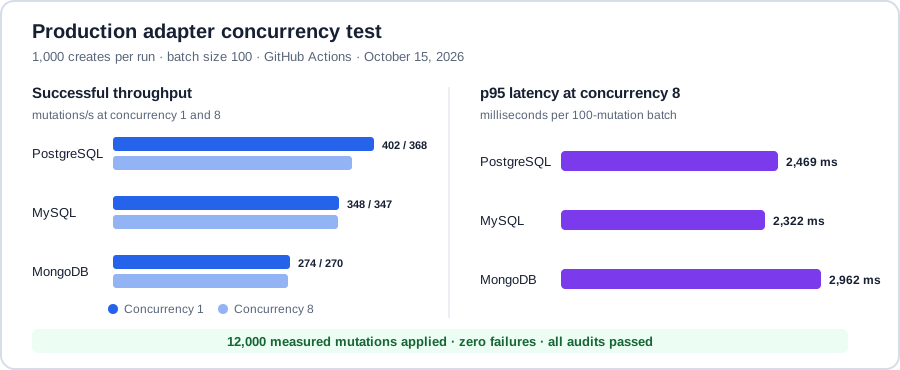
PostgreSQL 16, MySQL 8.4, and MongoDB 8.0 applied all 12,000 measured mutations across concurrency levels 1, 2, 4, and 8 with zero failures. Rising latency shows batches queuing behind each adapter's shared sequence clock.
Run a SQLite smoke benchmark:
uv run --extra sqlite python benchmarks/sync_throughput.py \
  --mutations 1000 --warmup 100 --batch-size 100 --concurrency 1 \
  --fail-on-errors --output benchmark-sqlite.json
The benchmark guide defines the metrics, environment, correctness audit, and commands for every backend.
Observability
Install the observability extra and configure OpenTelemetry once at startup:
from sync_sdk.adapters.opentelemetry import setup_signoz

monitoring = setup_signoz("my-sync-service")
sync = SyncClient(local, transport=transport, telemetry=monitoring.telemetry)
gateway = config.build(sessions, telemetry=monitoring.telemetry)
Set OTEL_EXPORTER_OTLP_ENDPOINT for the collector and call
monitoring.shutdown() during application shutdown. Monitoring failures do not
stop synchronization, and payloads or record identifiers are not used as metric
labels. See the
observability guide
for metrics, traces, SigNoz setup, and alert suggestions.
Test and develop
Run the normal suite:
uv sync --locked --group dev --all-extras
uv run pytest -q
GitHub Actions runs the suite on Python 3.12, 3.13, and 3.14, builds and installs the package, and verifies live PostgreSQL, MySQL, and MongoDB adapters. The testing report records exact versions, commands, expected skips, measured results, and release checks.
The app/ directory contains a sample FastAPI gateway:
uv run --extra gateway alembic upgrade head
uv run --extra gateway uvicorn app.main:app --reload
Current scope
- The host application owns authentication, authorization, tenant isolation, database credentials, schema migrations, backups, and retention.
- Existing server rows are not emitted automatically. The first SQL capture scan records them as its baseline.
- SQL change capture scans registered tables; native transaction-log CDC is not included.
- MongoDB is the ready-to-use NoSQL adapter. Its gateway writes require multi-document transaction support.
- The SDK provides at-least-once delivery attempts with idempotent server processing; permanent validation or authorization errors require application handling.
For composite keys, linked tables, custom schemas, custom adapters, and metadata tables, see the setup and adapter guide.
Contributing and security
See CONTRIBUTING.md for development setup and DCO sign-off. Report vulnerabilities privately through the process in SECURITY.md.
License
Sync SDK is available under the MIT License.
1 maintainer

Metadata
1 maintainer
Release files for offline-sync-sdk 0.2.0
For a detailed explanation of source distributions (sdists) and built distributions (wheels), please see the package formats documentation.
Source distribution (sdist)
| File | Size | Uploaded | |
|---|---|---|---|
| offline_sync_sdk-0.2.0.tar.gz | 71.7 kB | Details |
Built distribution (wheel)
| File | Interpreter | ABI | Platform | Reset |
|---|---|---|---|---|
| offline_sync_sdk-0.2.0-py3-none-any.whl | Python 3 | none | any | Details |
Total release size: 107.2 kB
Release files / offline_sync_sdk-0.2.0.tar.gz
| Download URL | offline_sync_sdk-0.2.0.tar.gz |
|---|---|
| Size | 71.7 kB |
| Tags | Source |
|
SHA-256 checksum How to use checksums |
25df71ff3e3c8d36d9664794a9105fb0edacd77f41ac2e20044738a58be34dc2
|
|
BLAKE2b-256 checksum How to use checksums |
41be079a569318c0864264a19e3ff6266b893bf20919fac00f81923f3d0a13be
|
| Upload date | |
|
Uploaded using Trusted Publishing? What is trusted publishing? |
Yes |
| Uploaded via |
twine/7.0.0 CPython/3.13.14
|
Provenance
Provenance describes where a file came from. On PyPI, provenance is shared via attestations, which provide a verifiable record of the build or publishing details. View details, limitations and caveats.


PyPI Publish Attestation
PyPI verified that this artifact, at this checksum, originated from the publisher listed below.
Signed by GitHub Actions, verified by PyPI on Oct 16, 2026.
Transparency logRelease files / offline_sync_sdk-0.2.0-py3-none-any.whl
| Download URL | offline_sync_sdk-0.2.0-py3-none-any.whl |
|---|---|
| Size | 35.5 kB |
| Tags | Python 3 |
|
SHA-256 checksum How to use checksums |
a0532e8b3049d0138c73caf766fdf2d735c5d9b12fd3de7aa27da65fdc9c9c48
|
|
BLAKE2b-256 checksum How to use checksums |
de2ce8fc72f76c511aedea7d964100392607e0af919baba3868bae2f58f2d3f7
|
| Upload date | |
|
Uploaded using Trusted Publishing? What is trusted publishing? |
Yes |
| Uploaded via |
twine/7.0.0 CPython/3.13.14
|
Provenance
Provenance describes where a file came from. On PyPI, provenance is shared via attestations, which provide a verifiable record of the build or publishing details. View details, limitations and caveats.
PyPI Publish Attestation
PyPI verified that this artifact, at this checksum, originated from the publisher listed below.
Signed by GitHub Actions, verified by PyPI on Oct 16, 2026.
Transparency log












