

OF-Scraper-Community
Download what you're subscribed to on OnlyFans and Fansly, from the command line.
A community-maintained fork of datawhores/OF-Scraper, with the fixes users have reported since upstream stopped updating.







Install · Getting started · Docs · FAQ · Reference · Releases · Report a problem
OF-Scraper can't get past paywalls. You need a subscription to a creator, and you can only download what your account can already see.
Why this fork
Upstream hasn't been updated since April 2026. This fork keeps it working:
| 🔐 DRM video | Protected videos download and decrypt again, with ffmpeg 6, 7 and 8+. |
| 🌐 Fansly | Posts, messages, purchases, labels (profile walls) and livestreams, alongside OnlyFans. |
| 🐍 Python 3.11 to 3.15 | Tested in CI on the oldest and newest supported versions. |
| 🛠️ Bug fixes | Dozens of reported bugs fixed, with tests that guard them. See the releases. |
| 📖 Full reference | Every command, option, setting and database table documented. |
Install
This fork is on PyPI as ofscraper-community. The command is still ofscraper.
Requirements:
- Python 3.11 or higher.
- ffmpeg 6 or newer, only for protected (DRM) videos.
With uv (recommended)
uv tool install ofscraper-community
With pipx
pipx install ofscraper-community
With pip
pip install ofscraper-community
Without Python: download the Windows, macOS or Linux build from the latest release.
Docker
docker pull ghcr.io/cloakedkeys/of-scraper-community:latest
Updating
Run the command that matches how you installed it:
uv tool upgrade ofscraper-community
pipx upgrade ofscraper-community
pip install -U ofscraper-community
Installed as ofscraper?
datawhores/OF-Scraper releases this same code to PyPI as ofscraper. The two packages are released separately, so either one can be a version ahead of the other for a while. Version 3.14.7 and older are upstream's old code, without these fixes.
- To keep
ofscraper: update it withuv tool upgrade ofscraper,pipx upgrade ofscraper, orpip install -U ofscraper. - To switch to
ofscraper-community: both packages install the sameofscrapercommand, so keep only one:- Uninstall
ofscraperusing the tool you installed it with:- pip:
pip uninstall ofscraper - uv (including the fork installed from GitHub before it was on PyPI):
uv tool uninstall ofscraper - pipx:
pipx uninstall ofscraper
- pip:
- Install
ofscraper-communityas above. If pip already has both, uninstall both first, then installofscraper-communityagain.
- Uninstall
Unreleased changes
To get what's on main before it's released, install from this repo. To update, run the same command again.
uv tool install --force git+https://github.com/cloakedkeys/OF-Scraper-Community
pip install git+https://github.com/cloakedkeys/OF-Scraper-Community
Getting started
Run ofscraper and follow the prompts. The first run asks for your auth details and creates a config file in ~/.config/ofscraper/.
📖 Read the docs for setup, auth, config options, commands and the full technical reference.
Check table
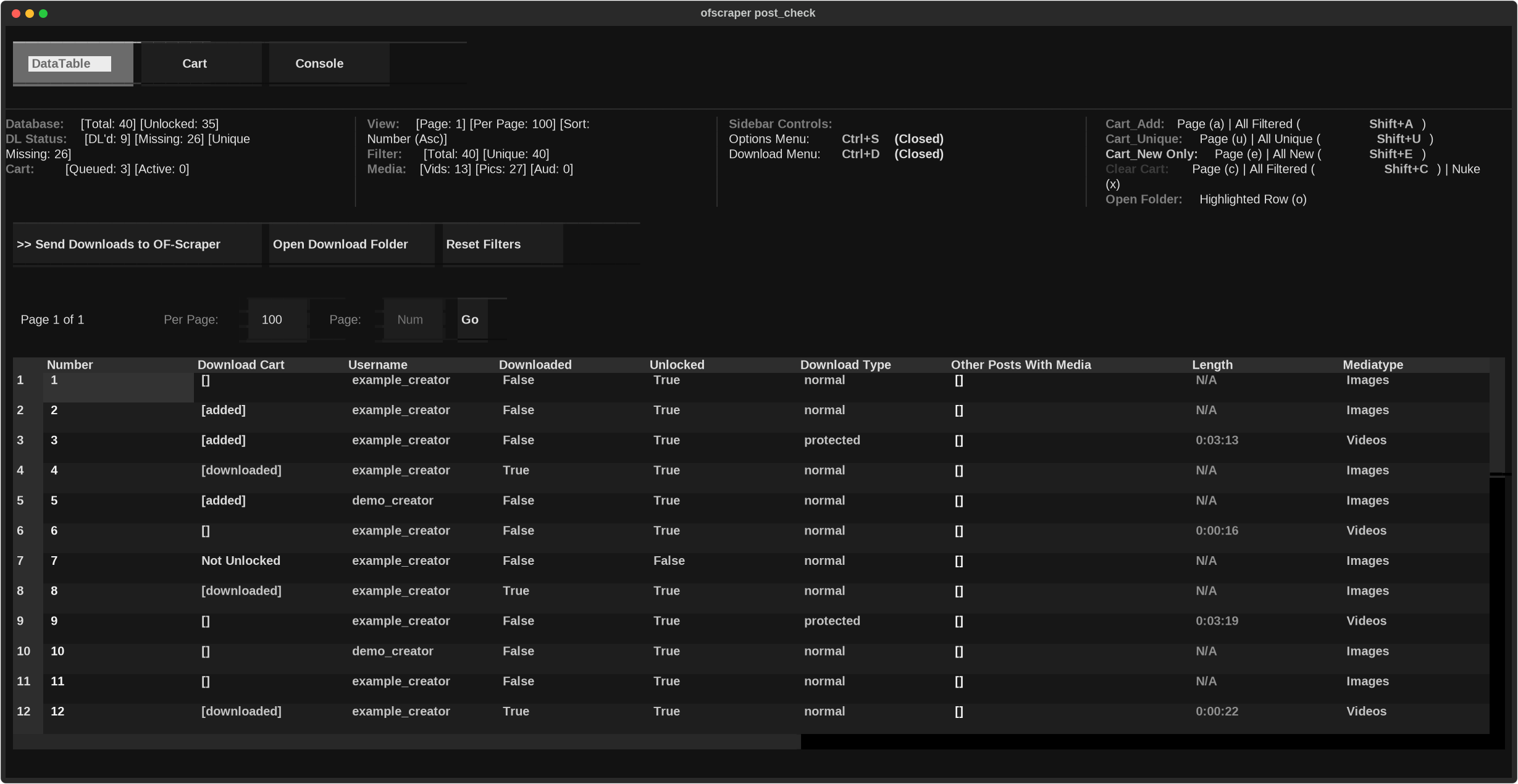
The check table lists a creator's media so you can filter it, pick what you want and download only that. It's for OnlyFans only.
Opening it
- From the menu: run
ofscraper, choose Perform Action(s), then Browse and pick media (check table). Pick the creators, then the table: Posts, Messages, Paid, or Stories. When you close the table, any downloads you sent from it finish, then you're back at the menu. - From the command line: run
ofscraper post_check,msg_check,paid_check, orstory_check, with-u(usernames, or links forpost_checkandmsg_check) or-f(a file with one entry per line).
The menu uses the commands' defaults: a creator's saved post list when there is one, and for Posts the Timeline, Pinned, Archived, and Streams areas. To fetch a fresh list or pick other areas, use the command with --force or --check-area.
Tabs
- DataTable: every media item, a page at a time. Click a column header to sort by it.
- Cart: what you've picked. The Download Text and Text Only (Skip Media) boxes apply to the next send.
- Console: the log, including download progress.
Sidebars (DataTable tab)
- Ctrl+S opens the options sidebar with filters for: text, media ID, post ID, post media count, price, post date, length, downloaded, unlocked, media type, response type, download type, and username. Press Filter to apply them. Clear Filters, or the Reset Filters button, clears them.
- Ctrl+D opens the download sidebar to set the minimum and maximum file size to download. Changes apply right away.
- Press the same key again to close a sidebar.
- With a cell highlighted, press
;or'to copy its value into that column's filter, then press Filter to apply it.
Cart keys (DataTable tab)
These shortcuts work when both sidebars are closed:
| Key | Adds to the cart |
|---|---|
a / Shift+A |
This page / everything the filters show |
u / Shift+U |
Same, but each media item once |
e / Shift+E |
Same, but only media that isn't downloaded yet |
| Key | Removes from the cart |
|---|---|
c / Shift+C |
This page / everything the filters show |
x |
Everything |
- Mouse: click a row's Download Cart cell to add or remove it, or click the Download Cart header to add the page.
- Cart tab: click
[added]to remove a row, presscto remove the page, or pressx/Shift+Cto empty the cart.
Locked media can't be added, by key or by mouse.
Downloading
Press >> Send Downloads to OF-Scraper (on the DataTable or Cart tab). The table switches to the Console, and each row's Download Cart cell shows [downloading], then [downloaded], [skipped], or [failed]. You can keep picking and send more while it downloads.
Opening the download folder
- Press
o(DataTable tab, sidebars closed) to open the highlighted row's folder. For a downloaded file, that opens the folder holding it, with the file selected where the file manager supports it. Otherwise it opens the creator's download folder. - Click Open Download Folder to open the highlighted row's creator's download folder.
Press Ctrl+Q to close the table.
FAQ
Auth keeps failing, or it says "Double check auth info"
- Copy every value (
sess,auth_id,x-bc,user_agent) again from the same browser while you're logged in to OnlyFans. They expire when you log out. user_agentmust match that browser exactly.- Make sure you're on the latest version of this fork.
- To stop the auth prompt from looping, add
--auth-failand the run quits on an auth error instead.
"No accounts found during scan"
Usually an auth problem, so check the auth answer above first. Then check you have an active subscription to the model, and that you aren't filtering it out with options like --expired-subscription.
Protected videos don't download, or leave .part / tempvid files
These videos need a CDM to decrypt them.
- Set up
cdm_optionsin your config. See the CDM guide. - Install ffmpeg 6 or newer and put its full path in
binary_options→ffmpeg. - Paths copied with Windows' "Copy as path" (with quotes) work.
Files download fine but are counted as "failed"
Fixed in 3.15.0. This mostly happened when saving to a mapped or network drive. Update to the latest version.
Some messages or new posts are missing
A bug that skipped messages when using --after is fixed in 3.15.0. Update, then run again. To rescan a date range, add --after YYYY-MM-DD. Add --force-all as well if you want files you already have downloaded again.
ffmpeg isn't found even though it's installed
Put the full path to the ffmpeg program in binary_options → ffmpeg in your config, for example C:\ffmpeg\bin\ffmpeg.exe. An empty setting means "not set".
It says to update to 3.14.7
3.14.7 is the last of upstream's old ofscraper releases on PyPI, and it's older than this fork's code. Version 3.15.0 and later no longer show that message. From 3.16.2 the update check looks up ofscraper-community; from 3.17.0 it looks up the package you installed (ofscraper-community, or ofscraper, which datawhores/OF-Scraper now publishes from the same code).
Two files saved with the same name overwrote each other
Newer versions save the second one as name_<media_id> instead. To recover files lost to this in older versions, see Collision Recovery.
Fork-only features
-
Skip a model during
--scrape-paid:--excluded-usernamenow works with--scrape-paid. Separate several names with commas.ofscraper --scrape-paid --excluded-username modelname,othermodel
-
Start the next daemon pass early (Docker/Linux): while the daemon is waiting between passes, send
SIGUSR1.docker kill --signal=SIGUSR1 <container>
-
Organize downloads in Stash: copy each download's creator, date, caption and source into Stash. See Stash.
-
Keep the database in PostgreSQL: as an option, one PostgreSQL database can replace the per-creator SQLite files. See PostgreSQL.
-
Move a creator's files after a rename: move the files saved under a creator's old name to their current name's folder, and update the database to match. See Moving files.
Reporting a problem
Open an issue in this repo, not upstream's.
Include a debug log. Run with --log debug, then attach the newest file from ~/.config/ofscraper/logging/. Check it for personal details before posting.
The GUI is a separate project: cjb900/OF-Scraper-GUI.
Disclaimer
This tool isn't affiliated with, endorsed by or sponsored by OnlyFans or Fansly. All OnlyFans trademarks belong to Fenix International Limited. You use it at your own risk and are responsible for how you use it.
Credits
OF-Scraper was created by datawhores and its contributors. This fork builds on their work.
1 maintainer

Metadata
1 maintainer
Release files for ofscraper-community 3.18.0
For a detailed explanation of source distributions (sdists) and built distributions (wheels), please see the package formats documentation.
Source distribution (sdist)
| File | Size | Uploaded | Provenance | Actions |
|---|---|---|---|---|
| ofscraper_community-3.18.0.tar.gz | 2.3 MB | With provenance | Details for ofscraper_community-3.18.0.tar.gz |
Built distribution (wheel)
| File | Interpreter | ABI | Platform | Actions Reset |
|---|---|---|---|---|
| ofscraper_community-3.18.0-py3-none-any.whl | Python 3 | none | any | Details for ofscraper_community-3.18.0-py3-none-any.whl |
Total release size: 3.0 MB
Release files / ofscraper_community-3.18.0.tar.gz
| Download URL | ofscraper_community-3.18.0.tar.gz |
|---|---|
| Size | 2.3 MB |
| Tags | Source |
|
SHA-256 checksum How to use checksums |
73c42f9aef29ba509fd3c600e11aa0d74331da4b564c4e78a837e6b8b6c72b00
|
|
BLAKE2b-256 checksum How to use checksums |
406f78e94c4c799eb27dbf9666b075a03b6bce59c75d96a1e36592312cbfed71
|
| Upload date | |
|
Uploaded using Trusted Publishing? What is trusted publishing? |
Yes |
| Uploaded via |
twine/7.0.0 CPython/3.13.16
|
Provenance
Provenance describes where a file came from. On PyPI, provenance is shared via attestations, which provide a verifiable record of the build or publishing details. View details, limitations and caveats.


PyPI Publish Attestation
PyPI verified that this artifact, at this checksum, originated from the publisher listed below.
Signed by GitHub Actions, verified by PyPI on Nov 23, 2026.
Transparency logRelease files / ofscraper_community-3.18.0-py3-none-any.whl
| Download URL | ofscraper_community-3.18.0-py3-none-any.whl |
|---|---|
| Size | 706.3 kB |
| Tags | Python 3 |
|
SHA-256 checksum How to use checksums |
0e4452f56bc2f7f71bb9fbfbcec65d32b053ecb175bdf44104745ead020aa7f7
|
|
BLAKE2b-256 checksum How to use checksums |
65df7ff7225ccc354462dda831d25aad5ac16a1ff3b10b0c4541f8611e3afd76
|
| Upload date | |
|
Uploaded using Trusted Publishing? What is trusted publishing? |
Yes |
| Uploaded via |
twine/7.0.0 CPython/3.13.16
|
Provenance
Provenance describes where a file came from. On PyPI, provenance is shared via attestations, which provide a verifiable record of the build or publishing details. View details, limitations and caveats.
PyPI Publish Attestation
PyPI verified that this artifact, at this checksum, originated from the publisher listed below.
Signed by GitHub Actions, verified by PyPI on Nov 23, 2026.
Transparency logSecurity for ofscraper-community 3.18.0
Provenance
Provenance describes where a file came from. On PyPI, provenance is shared via attestations, which provide a verifiable record of the build or publishing details. View details, limitations and caveats.
Full provenance
Both files in this release have been uploaded with provenance metadata.
Attestation for ofscraper_community-3.18.0.tar.gz
PyPI Publish Attestation
PyPI verified that this artifact, at this checksum, originated from the publisher listed below.
Signed by GitHub Actions, verified by PyPI on Nov 23, 2026.
Transparency logA note on package security
PyPI is a repository for distributing packages, not a service for auditing them. While third-party security researchers and our staff do their best to detect and remove malicious packages, PyPI cannot guarantee the quality, security or suitability of any given package.
To learn more about protecting yourself from malicious actors, visit our package security documentation.














