
Welcome to ogs5py






Purpose
ogs5py is A python-API for the OpenGeoSys 5 scientific modeling package.
Installation
You can install the latest version with the following command:
pip install ogs5py
Or with conda:
conda install ogs5py
Citation
If you are using ogs5py in your publication please cite our paper:
Müller, S., Zech, A. and Heße, F.: ogs5py: A Python-API for the OpenGeoSys 5 Scientific Modeling Package. Groundwater, 59: 117-122. https://doi.org/10.1111/gwat.13017, 2021.
You can cite the Zenodo code publication of ogs5py by:
Sebastian Müller. GeoStat-Framework/ogs5py. Zenodo. https://doi.org/10.5281/zenodo.2546767
If you want to cite a specific version, have a look at the Zenodo site.
Documentation for ogs5py
You can find the documentation under ogs5py.readthedocs.io.
Further Information
- General homepage: https://www.opengeosys.org/ogs-5
- OGS5 Repository: https://github.com/ufz/ogs5
- Keyword documentation: https://ogs5-keywords.netlify.com
- OGS5 Benchmarks: https://github.com/ufz/ogs5-benchmarks
- ogs5py Benchmarks: https://github.com/GeoStat-Framework/ogs5py_benchmarks
Tutorials and Examples
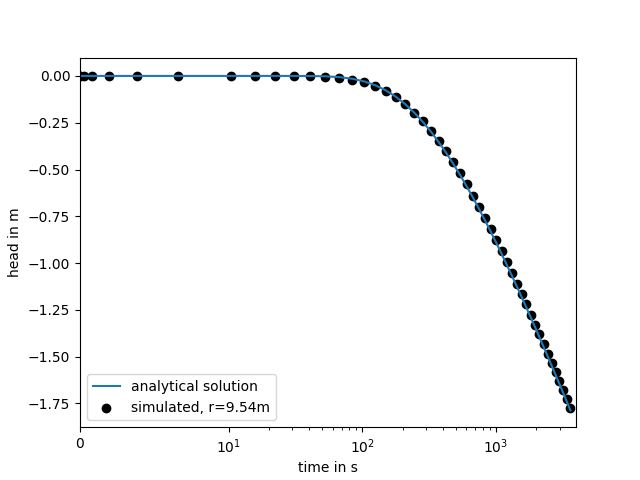
In the following a simple transient pumping test is simulated on a radial symmetric mesh. The point output at the observation well is plotted afterwards. For more details on this example, see: Tutorial 1
from ogs5py import OGS, specialrange, generate_time
from matplotlib import pyplot as plt

# discretization and parameters
time = specialrange(0, 3600, 50, typ="cub")
rad = specialrange(0, 1000, 100, typ="cub")
obs = rad[21]
angles = 32
storage = 1e-3
transmissivity = 1e-4
rate = -1e-3
# model setup
model = OGS(task_root="pump_test", task_id="model")
# generate a radial mesh and geometry ("boundary" polyline)
model.msh.generate("radial", dim=2, rad=rad, angles=angles)
model.gli.generate("radial", dim=2, rad_out=rad[-1], angles=angles)
model.gli.add_points([0.0, 0.0, 0.0], "pwell")
model.gli.add_points([obs, 0.0, 0.0], "owell")
model.bc.add_block(  # boundary condition
    PCS_TYPE="GROUNDWATER_FLOW",
    PRIMARY_VARIABLE="HEAD",
    GEO_TYPE=["POLYLINE", "boundary"],
    DIS_TYPE=["CONSTANT", 0.0],
)
model.st.add_block(  # source term
    PCS_TYPE="GROUNDWATER_FLOW",
    PRIMARY_VARIABLE="HEAD",
    GEO_TYPE=["POINT", "pwell"],
    DIS_TYPE=["CONSTANT_NEUMANN", rate],
)
model.ic.add_block(  # initial condition
    PCS_TYPE="GROUNDWATER_FLOW",
    PRIMARY_VARIABLE="HEAD",
    GEO_TYPE="DOMAIN",
    DIS_TYPE=["CONSTANT", 0.0],
)
model.mmp.add_block(  # medium properties
    GEOMETRY_DIMENSION=2,
    STORAGE=[1, storage],
    PERMEABILITY_TENSOR=["ISOTROPIC", transmissivity],
)
model.num.add_block(  # numerical solver
    PCS_TYPE="GROUNDWATER_FLOW",
    LINEAR_SOLVER=[2, 5, 1e-14, 1000, 1.0, 100, 4],
)
model.out.add_block(  # point observation
    PCS_TYPE="GROUNDWATER_FLOW",
    NOD_VALUES="HEAD",
    GEO_TYPE=["POINT", "owell"],
    DAT_TYPE="TECPLOT",
)
model.pcs.add_block(  # set the process type
    PCS_TYPE="GROUNDWATER_FLOW", NUM_TYPE="NEW"
)
model.tim.add_block(  # set the timesteps
    PCS_TYPE="GROUNDWATER_FLOW",
    **generate_time(time)
)
model.write_input()
model.run_model()
OGS5 executable
To obtain an OGS5 executable, ogs5py brings a download routine:
from ogs5py import download_ogs
download_ogs()
Then a executable is stored in the ogs5py config path and will be called when a model is run.
You can pass a version statement to the download_ogs routine, to
obtain a specific version (5.7, 5.7.1 (win only) and 5.8).
For OGS 5.7 there are executables for Windows/Linux and MacOS.
For "5.8" there are no MacOS pre-builds.
If you have compiled your own OGS5 version, you can add your executable to the ogs5py config path with:
from ogs5py import add_exe
add_exe("path/to/your/ogs/exe")
Otherwise you need to specify the path to the executable within the run command:
model.run_model(ogs_exe="path/to/ogs")
Requirements:
Contact
You can contact us via info@geostat-framework.org.
License
MIT © 2018-2023 (inspired by Falk Hesse and Miao Jing)
This project is based on OGSPY.
3 maintainers


Metadata
3 maintainers
Release files for ogs5py 1.3.0
For a detailed explanation of source distributions (sdists) and built distributions (wheels), please see the package formats documentation.
Source distribution (sdist)
| File | Size | Uploaded | Provenance | Actions |
|---|---|---|---|---|
| ogs5py-1.3.0.tar.gz | 99.3 kB | Without provenance | Details for ogs5py-1.3.0.tar.gz |
Built distribution (wheel)
| File | Interpreter | ABI | Platform | Actions Reset |
|---|---|---|---|---|
| ogs5py-1.3.0-py3-none-any.whl | Python 3 | none | any | Details for ogs5py-1.3.0-py3-none-any.whl |
Total release size: 230.9 kB
Release files / ogs5py-1.3.0.tar.gz
| Download URL | ogs5py-1.3.0.tar.gz |
|---|---|
| Size | 99.3 kB |
| Tags | Source |
|
SHA-256 checksum How to use checksums |
3f09efb652e649db4cb4b487431390736ca6b25fc906f3cba9539210c608fa10
|
|
BLAKE2b-256 checksum How to use checksums |
e2b4cbd7cd1f97832abec71f8ce7d7c7e7238bb54426896b494e3fbd07cb77bb
|
| Upload date | |
|
Uploaded using Trusted Publishing? What is trusted publishing? |
No |
| Uploaded via |
twine/4.0.1 CPython/3.11.3
|
Release files / ogs5py-1.3.0-py3-none-any.whl
| Download URL | ogs5py-1.3.0-py3-none-any.whl |
|---|---|
| Size | 131.6 kB |
| Tags | Python 3 |
|
SHA-256 checksum How to use checksums |
dbccf13921fccf68fed1315e6b0d6bc74171eaadab49ab8b6c977896aa3f9a0d
|
|
BLAKE2b-256 checksum How to use checksums |
846c942ccb57a0c747e3b68bc1f78794b9752ebdabce3d75dae82df7ba2c681c
|
| Upload date | |
|
Uploaded using Trusted Publishing? What is trusted publishing? |
No |
| Uploaded via |
twine/4.0.1 CPython/3.11.3
|
Security for ogs5py 1.3.0
Provenance
Provenance describes where a file came from. On PyPI, provenance is shared via attestations, which provide a verifiable record of the build or publishing details. View details, limitations and caveats.
No provenance found
None of the files in this release were uploaded with provenance metadata.
A note on package security
PyPI is a repository for distributing packages, not a service for auditing them. While third-party security researchers and our staff do their best to detect and remove malicious packages, PyPI cannot guarantee the quality, security or suitability of any given package.
To learn more about protecting yourself from malicious actors, visit our package security documentation.














