
Open-source, OpenAI-compatible API server with pluggable providers for any model and any infrastructure
Verified details
These details have been verified by PyPIProject links
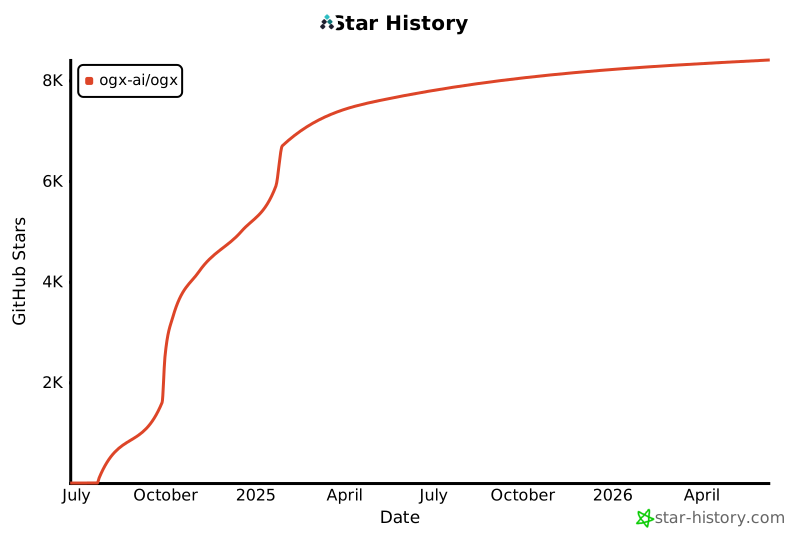
GitHub Statistics
Maintainers


Project description
OGX









Quick Start | Documentation | OpenAI API Compatibility | Discord
[!IMPORTANT] Llama Stack is now OGX. The name changed, and so did the mission — model-agnostic, multi-SDK, production-grade. Read the full announcement →
Open-source agentic API server for building AI applications. OpenAI-compatible. Any model, any infrastructure.

OGX is a drop-in replacement for the OpenAI API that you can run anywhere — your laptop, your datacenter, or the cloud. Use any OpenAI-compatible client or agentic framework. Swap between Llama, GPT, Gemini, Mistral, or any model without changing your application code.
from openai import OpenAI

client = OpenAI(base_url="http://localhost:8321/v1", api_key="fake")
response = client.chat.completions.create(
    model="llama-3.3-70b",
    messages=[{"role": "user", "content": "Hello"}],
)
What you get
- Chat Completions & Embeddings — standard
/v1/chat/completions,/v1/completions, and/v1/embeddingsendpoints, compatible with any OpenAI client - Responses API — server-side agentic orchestration with tool calling, MCP server integration, and built-in file search (RAG) in a single API call (learn more)
- Vector Stores & Files —
/v1/vector_storesand/v1/filesfor managed document storage and search - Batches —
/v1/batchesfor offline batch processing - Open Responses conformant — the Responses API implementation passes the Open Responses conformance test suite
- Multi-SDK support — use the Anthropic SDK (
/v1/messages) or Google GenAI SDK (/v1alpha/interactions) natively alongside the OpenAI API
Use any model, use any infrastructure
OGX has a pluggable provider architecture. Develop locally with Ollama, deploy to production with vLLM, or connect to a managed service — the API stays the same.
See the provider documentation for the full list.
Get started
Install and run a OGX server:
# One-line install
curl -LsSf https://github.com/ogx-ai/ogx/raw/main/scripts/install.sh | bash

# Or install via uv
uv pip install ogx[starter]

# Start the server (uses the starter distribution with Ollama)
uv run ogx stack run starter
Then connect with any OpenAI, Anthropic, or Google GenAI client — Python, TypeScript, curl, or any framework that speaks these APIs.
See the Quick Start guide for detailed setup.
Resources
- Documentation — full reference
- OpenAI API Compatibility — endpoint coverage and provider matrix
- Getting Started Notebook — text and vision inference walkthrough
- Contributing — how to contribute
Client SDKs:
OGX provides official client SDKs for Python and TypeScript:
| Language | SDK | Package |
|---|---|---|
| Python | ogx-client-python |  |
| TypeScript | ogx-client-typescript |  |
Alternative Python SDK:
For users who prefer an OpenAPI Generator-based SDK, an alternative Python client is available:
- ogx-open-client — Auto-generated from OpenAPI spec, provides similar functionality with a different generation approach
- Usage Examples — End-to-end code examples for all major features
- Strategy & Rationale — Why two SDKs, when to use which, and long-term plans
The official ogx_client SDK is recommended for most use cases. The ogx_open_client package offers an alternative for teams with specific OpenAPI tooling requirements.
Community
We hold regular community calls every Thursday at 09:00 AM PST — see the Community Event on Discord for details.
Thanks to all our amazing contributors!
Project details
Verified details
These details have been verified by PyPIProject links
GitHub Statistics
Maintainers
Release history Release notifications | RSS feed


Download files
Download the file for your platform. If you're not sure which to choose, learn more about installing packages.
Source Distribution
Built Distribution
Filter files by name, interpreter, ABI, and platform.
If you're not sure about the file name format, learn more about wheel file names.
Copy a direct link to the current filters
File details
Details for the file ogx-1.1.2.tar.gz.
File metadata
- Download URL: ogx-1.1.2.tar.gz
- Upload date:
- Size: 17.4 MB
- Tags: Source
- Uploaded using Trusted Publishing? Yes
- Uploaded via: twine/6.1.0 CPython/3.13.13
File hashes
| Algorithm | Hash digest | |
|---|---|---|
| SHA256 |
34967275cc7c667aa82c68cc4fc00d560ca65bb66f0ce74ff9894c77c2c3ee20
|
|
| MD5 |
5dc74278a72854224420832d3fcc8413
|
|
| BLAKE2b-256 |
0707867dc93ac014b9d8ea6a81bb9b4a04e11fb172ea3a8c004fca2167988485
|
Provenance
The following attestation bundles were made for ogx-1.1.2.tar.gz:
Publisher:
pypi.yml on ogx-ai/ogx
-
Statement:
-
Statement type:
https://in-toto.io/Statement/v1 -
Predicate type:
https://docs.pypi.org/attestations/publish/v1 -
Subject name:
ogx-1.1.2.tar.gz -
Subject digest:
34967275cc7c667aa82c68cc4fc00d560ca65bb66f0ce74ff9894c77c2c3ee20 - Sigstore transparency entry: 1852122436
- Sigstore integration time:
-
Permalink:
ogx-ai/ogx@735400a852a9f7fa4a3fb047e86f5dd5ae8da343 -
Branch / Tag:
refs/tags/v1.1.2 - Owner: https://github.com/ogx-ai
-
Access:
public
-
Token Issuer:
https://token.actions.githubusercontent.com -
Runner Environment:
github-hosted -
Publication workflow:
pypi.yml@735400a852a9f7fa4a3fb047e86f5dd5ae8da343 -
Trigger Event:
release
-
Statement type:
File details
Details for the file ogx-1.1.2-py3-none-any.whl.
File metadata
- Download URL: ogx-1.1.2-py3-none-any.whl
- Upload date:
- Size: 733.8 kB
- Tags: Python 3
- Uploaded using Trusted Publishing? Yes
- Uploaded via: twine/6.1.0 CPython/3.13.13
File hashes
| Algorithm | Hash digest | |
|---|---|---|
| SHA256 |
a6ac6d8ee231173d1252d84125a1846ee3dc4a3e0278b2958a9f454fa0f98609
|
|
| MD5 |
ab066857c4e17f785e5b1dd331d9400d
|
|
| BLAKE2b-256 |
9ab5146b77ba380c815a7f45df702e3ead28716ff5f5618cdfdb41e105e21a04
|
Provenance
The following attestation bundles were made for ogx-1.1.2-py3-none-any.whl:
Publisher:
pypi.yml on ogx-ai/ogx
-
Statement:
-
Statement type:
https://in-toto.io/Statement/v1 -
Predicate type:
https://docs.pypi.org/attestations/publish/v1 -
Subject name:
ogx-1.1.2-py3-none-any.whl -
Subject digest:
a6ac6d8ee231173d1252d84125a1846ee3dc4a3e0278b2958a9f454fa0f98609 - Sigstore transparency entry: 1852122511
- Sigstore integration time:
-
Permalink:
ogx-ai/ogx@735400a852a9f7fa4a3fb047e86f5dd5ae8da343 -
Branch / Tag:
refs/tags/v1.1.2 - Owner: https://github.com/ogx-ai
-
Access:
public
-
Token Issuer:
https://token.actions.githubusercontent.com -
Runner Environment:
github-hosted -
Publication workflow:
pypi.yml@735400a852a9f7fa4a3fb047e86f5dd5ae8da343 -
Trigger Event:
release
-
Statement type:






