

Oh My Cassette
Edit video by talking to the Cassette agent from Claude Code, Codex, OpenCode or Hermes.
A small MCP bridge on PyPI. The editing tools come from the Cassette MCP service, so they stay current without a plugin update.



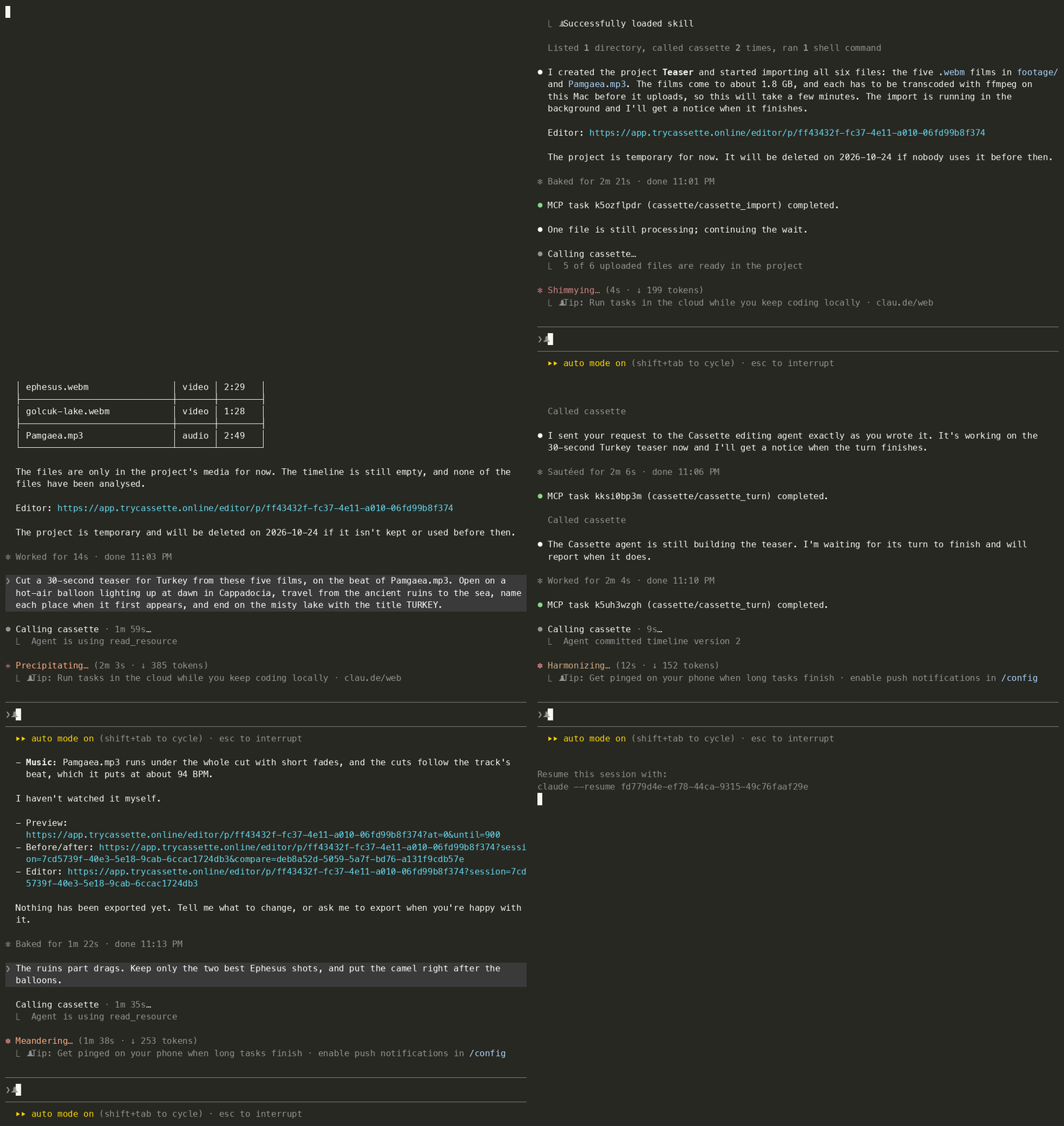
One Claude Code session, typed as you see it. Five 4K travel films (10½ minutes of footage) and a song go in, a
four-sentence brief and a one-line revision go to the Cassette agent word for word, and a 30-second 1080p MP4 lands in
cassette-exports/. Waits are fast-forwarded: in real time the import took 4½ minutes, the first cut 9½, the revision
3½ and the export 1.
Cut a 30-second teaser for Turkey from these five films, on the beat of Pamgaea.mp3. Open on a hot-air balloon lighting up at dawn in Cappadocia, travel from the ancient ruins to the sea, name each place when it first appears, and end on the misty lake with the title TURKEY.
The ruins part drags. Keep only the two best Ephesus shots, and put the camel right after the balloons.

Watch the teaser it made (MP4, 30 s, with sound). Footage and music credits are below.
Install in 30 seconds
You need uv (it fetches Python and the package on first start) and ffmpeg to import video.
# Claude Code
claude plugin marketplace add Cassette-Editor/oh-my-cassette
claude plugin install oh-my-cassette@cassette-editor
# Codex
codex plugin marketplace add https://github.com/Cassette-Editor/oh-my-cassette.git
codex plugin add oh-my-cassette@cassette-editor
# Hermes
hermes mcp add cassette --command uvx --args oh-my-cassette==0.5.1
OpenCode and any other MCP host: see Install below. Run uvx oh-my-cassette==0.5.1 login and complete the
email-code sign-in in your browser. Then restart your agent if it cannot refresh its tool list, and say:
Start a new Cassette project and import the clips in ./footage, then cut a 30-second travel video with a title at the start.
Upgrading from 0.4
0.5 is a rewrite. The 0.4 plugin carried its own editing runtime, music search and Hermes gateway; 0.5 is a thin bridge to the Cassette MCP service, and the tools your agent sees are the service's.
- Sign in again with
uvx oh-my-cassette==0.5.1 login. 0.4 passwords and tokens are not used. - Tools are new. Projects, editing turns, questions, plans, undo, media, analysis and export come from the service,
with their own descriptions; the 0.4 tool names (
cassette_run_job,cassette_ingest_media,cassette_match_bgm, …) are gone. Reinstall the plugin, or point your host config atuvx oh-my-cassette==0.5.1. - Projects live in your Cassette account, the same ones you open on the web or in Cassette for Mac, and the editor link each answer carries opens the project you are working on. 0.4 sessions do not carry over.
- Hermes is a plain MCP host now; remove the 0.4 gateway plugin.
Projects and retention
A project the bridge starts is a cloud project that Cassette deletes, with its media, after three idle days; every use
pushes that back, and each answer says when it is due (retention_expires_at). Exported files are already on your
machine in cassette-exports/ and stay there. A project made in Cassette for Mac is kept, and the bridge can open, edit
and export it while that Mac is online, but its media are imported in the app.
Overview
Oh My Cassette connects your coding agent to the Cassette editing agent. It is a local stdio MCP server
that relays to the Cassette MCP service (CASSETTE_MCP_URL), which in turn calls the Cassette backend:
Claude Code / Codex / OpenCode / Hermes ──stdio──▶ oh-my-cassette ──HTTP──▶ Cassette MCP service ──▶ Cassette backend
- The tools are the service's. Whatever it lists (projects, editing turns, questions, undo, export) is what your agent sees, with the service's own descriptions and workflow instructions. When Cassette changes, the tools change with it; the plugin does not need a release.
- The bridge adds only what needs your machine. Local files named in a call are prepared and
uploaded first (only from the workspace, media types only): video is transcoded with ffmpeg into the
renditions the service declares, and audio or images it does not take as they are get converted.
Each file uploads while the next one is prepared, in parts, four transfers at a time; a file whose
upload was interrupted picks up its earlier import when you import it again.
Exported files are downloaded into
cassette-exports/. The workspace identity travels with each call so the service can remember a project per directory. - Long work never times out the host. Every call waits a bounded time; slow local preparation
answers
preparingand keeps going in the background, and the next identical call picks it up. - It survives deploys. It reconnects on its own, sends a call that names its request again when
the connection drops or the service turns it away, resumes interrupted downloads, reports
bridge.*errors with aretryableflag (andretry_after_secondswhen the service said when), and, while the service is unreachable or refuses the token, lists a singlecassette_bridge_statustool that says why.
The rules between the plugin and the service are defined in
src/oh_my_cassette/contract.py; oh-my-cassette check verifies a
service against them.
Requirements
- An invited Cassette account and a Cassette MCP service that implements contract v1. Check it with
uvx oh-my-cassette==0.5.1 check --url <endpoint>. While the service is unreachable or refuses the token, onlycassette_bridge_statusis listed. - uv 0.5 or newer.
uvx oh-my-cassette==0.5.1resolves Python 3.11 or newer by itself. - ffmpeg (with ffprobe) to import video:
brew install ffmpeg,sudo apt install ffmpegorwinget install ffmpeg. Video is transcoded on your machine before it uploads. A build withzscalealso tone-maps HDR footage properly.
Which formats a tool accepts, and how files are prepared before upload, is declared by the service (video, audio and image types at most).
Configuration
Sign in once with oh-my-cassette login, using the Cassette account of your projects: the browser asks for the emailed code and your consent. One sign-in reaches every project of the account, whether it was made on the web or in Cassette for Mac. A project whose media lie on a Mac opens in the app on that Mac; reading its pictures or sound and exporting it need that Mac online, and its media are imported there. Login, status and logout use your operating-system keyring; no token needs to be copied. Environment variables below are optional overrides.
| Variable | Default | Meaning |
|---|---|---|
CASSETTE_MCP_URL |
the saved connection, otherwise https://mcp.trycassette.online/mcp |
Explicit MCP endpoint override. |
CASSETTE_AUTH_TOKEN |
unset | Advanced bearer-token override. Normally use login; the same account, scope and resource checks apply. Never place it in shared configuration. |
CASSETTE_WORKSPACE |
the directory the host starts the server in | Where relative paths resolve, where local files may come from, and the directory the service may remember a project for. A host that starts the server in the whole disk or your home folder gives it no files to read until you set this, or CASSETTE_ALLOWED_ROOTS. |
CASSETTE_ALLOWED_ROOTS |
unset | Extra directories local files may come from (:-separated; ; on Windows). |
CASSETTE_DOWNLOAD_DIR |
<workspace>/cassette-exports |
Where exported files are saved. The default must stay inside the workspace: a cassette-exports symlink leading elsewhere is refused. |
CASSETTE_MAX_UPLOAD_MB / CASSETTE_MAX_DOWNLOAD_MB |
4096 / 16384 |
Size limits per file. |
CASSETTE_UPLOAD_ANY_TYPE |
off | Allow non-media uploads when a tool accepts them. |
CASSETTE_LOCAL_WAIT_SEC |
240 |
How long one call waits for local preparation and upload before it answers preparing. |
CASSETTE_FFMPEG / CASSETTE_FFPROBE |
from PATH |
The ffmpeg and ffprobe programs used to prepare local media. |
CASSETTE_TEMP_DIR |
the system temp directory | Where each upload makes its own private directory (oh-my-cassette-job-*) for prepared files until they are uploaded. |
CASSETTE_CONNECT_TIMEOUT_SEC |
10 |
How long to wait for the service when connecting. |
CASSETTE_MCP_HOST |
unset | The host name sent to the service when the host does not identify itself. |
OH_MY_CASSETTE_LOG |
WARNING |
Log level on stderr. |
Install
Claude Code
Plugin (recommended): the two commands at the top. The plugin uses the connection saved by oh-my-cassette login and starts uvx oh-my-cassette==0.5.1 with a 10-minute tool timeout.
Project scope without the plugin: copy .mcp.json into your project, or run:
claude mcp add --transport stdio cassette -- uvx oh-my-cassette==0.5.1
The skill lives in skills/cassette-video-edit/SKILL.md and ships with the plugin.
Codex
Plugin: the two commands at the top (.codex-plugin/plugin.json declares the server inline with tool_timeout_sec: 600 and passes the CASSETTE_* variables through from your shell). Or add the server directly:
codex mcp add cassette -- uvx oh-my-cassette==0.5.1
OpenCode
Add to opencode.json (project or ~/.config/opencode/opencode.json):
{
  "mcp": {
    "cassette": {
      "type": "local",
      "command": ["uvx", "oh-my-cassette==0.5.1"],
      "timeout": 600000
    }
  }
}
Then copy the skill so OpenCode loads it:
mkdir -p ~/.config/opencode/skills/cassette-video-edit
curl -fsSL https://raw.githubusercontent.com/Cassette-Editor/oh-my-cassette/v0.5.1/skills/cassette-video-edit/SKILL.md \
  -o ~/.config/opencode/skills/cassette-video-edit/SKILL.md
OpenCode has no MCP elicitation, which is fine: the editing agent's questions come back as ordinary tool results, and the service's tools say how to answer them.
Hermes
hermes mcp add cassette --command uvx --args oh-my-cassette==0.5.1

mkdir -p ~/.hermes/skills/cassette-video-edit
curl -fsSL https://raw.githubusercontent.com/Cassette-Editor/oh-my-cassette/v0.5.1/skills/cassette-video-edit/SKILL.md \
  -o ~/.hermes/skills/cassette-video-edit/SKILL.md
Set mcp_servers.cassette.timeout: 600 in ~/.hermes/config.yaml so a call's bounded waits fit. Hermes is a plain MCP host here: the 0.4 gateway/plugin layer is gone.
Any other MCP host
Command uvx, args ["oh-my-cassette==0.5.1"], stdio transport, a tool timeout of 10 minutes, and the environment variables above. No uv? pipx run oh-my-cassette==0.5.1 works too.
How a turn looks
you:    Import intro.mp4 and beach.mov, then make a 20-second cut with the title "Kota Kinabalu".
agent:  (calls the service's import tool with ["intro.mp4", "beach.mov"])
        bridge: transcodes both videos, uploads them, passes the service media references
        (calls the service's editing tool with your sentence, verbatim; progress streams while it runs)
        "Done. Added a 20 s cut from both clips with the title at the start (v0→v3). Open it: <editor link>"
you:    Export it.
agent:  (calls the service's export tool)
        bridge: downloads the MP4 to cassette-exports/kota-kinabalu.mp4
The editor link comes from the service: open it in a browser to watch the run live and take over by hand.
Check a service
uvx oh-my-cassette==0.5.1 check --url http://127.0.0.1:8790/mcp --upload \
  --arguments '{"project_id": "<a test project>"}'
Prints one line per check (transport and token, contract declaration, instructions, tool schemas,
local-file and prepare declarations, and with --upload a real upload round trip; --arguments
are the file tool's other arguments for it) and exits 1 on any failure. --json gives
machine-readable output for the service's CI. The service must speak MCP 2026-07-28; one that only
answers the handshake-era initialize fails the transport check, and the bridge refuses it with
bridge.protocol_unsupported.
Update
Bump the pin in your host config (oh-my-cassette==<new version>) or reinstall the plugin; uvx fetches the new wheel on next start. Releases: CHANGELOG.md.
Development
git clone https://github.com/Cassette-Editor/oh-my-cassette && cd oh-my-cassette
uv sync --group dev
uv run pytest -q                                   # reference service on loopback, no network; needs ffmpeg
uv run oh-my-cassette                              # the bridge itself (stdio)
uv run oh-my-cassette check --url <endpoint>       # conformance check
tests/reference_remote.py is an executable reference service for the contract;
RELEASING.md has the PyPI release flow.
Credits
The demo footage is by yasin ilcebay, licensed CC BY 3.0, from Wikimedia Commons: Aizanoi Temple of Zeus, Cappadocia, Datça, Ephesus and Gölcük Lake. The teaser trims and reorders it, and adds place names, a title and music.
The music is "Pamgaea" by Kevin MacLeod (incompetech.com)
Licensed under Creative Commons: By Attribution 4.0
https://creativecommons.org/licenses/by/4.0/
The teaser uses an excerpt of it.
License
The code is MIT. Oh My Cassette is the client; the Cassette service has its own terms.
The demo recording (assets/demo-claude-code.gif), the teaser frames (assets/turkey-teaser.jpg)
and the teaser video attached to the release contain the works credited above. They are not covered
by the MIT license and remain under their own licenses (CC BY 3.0 for the footage, CC BY 4.0 for
the music).
MCP registry: mcp-name: io.github.Cassette-Editor/oh-my-cassette
1 maintainer

Metadata
1 maintainer
Release files for oh-my-cassette 0.5.1
For a detailed explanation of source distributions (sdists) and built distributions (wheels), please see the package formats documentation.
Source distribution (sdist)
| File | Size | Uploaded | Provenance | |
|---|---|---|---|---|
| oh_my_cassette-0.5.1.tar.gz | 57.5 kB | With provenance | Details |
Built distribution (wheel)
| File | Interpreter | ABI | Platform | Reset |
|---|---|---|---|---|
| oh_my_cassette-0.5.1-py3-none-any.whl | Python 3 | none | any | Details |
Total release size: 124.2 kB
Release files / oh_my_cassette-0.5.1.tar.gz
| Download URL | oh_my_cassette-0.5.1.tar.gz |
|---|---|
| Size | 57.5 kB |
| Tags | Source |
|
SHA-256 checksum How to use checksums |
e1289f5126f56129217f9c8db7e970f99ea761457a86b14d5e2bc822a99de115
|
|
BLAKE2b-256 checksum How to use checksums |
7fc271ff6d2e9b787b25e1efcba5cb1b9824010d2b963cd0565b0cb1cc139ab7
|
| Upload date | |
|
Uploaded using Trusted Publishing? What is trusted publishing? |
Yes |
| Uploaded via |
twine/7.0.0 CPython/3.13.14
|
Provenance
Provenance describes where a file came from. On PyPI, provenance is shared via attestations, which provide a verifiable record of the build or publishing details. View details, limitations and caveats.


PyPI Publish Attestation
PyPI verified that this artifact, at this checksum, originated from the publisher listed below.
Signed by GitHub Actions, verified by PyPI on Oct 21, 2026.
Transparency logRelease files / oh_my_cassette-0.5.1-py3-none-any.whl
| Download URL | oh_my_cassette-0.5.1-py3-none-any.whl |
|---|---|
| Size | 66.7 kB |
| Tags | Python 3 |
|
SHA-256 checksum How to use checksums |
e1eaa6dbd0dfd9e27acc59d083f858bdf69713eac2a8837ae2dad0674faa8318
|
|
BLAKE2b-256 checksum How to use checksums |
1b744bace81276e9f0eb6087898758b65b658bdf51851344dee3d4f0a5133d0a
|
| Upload date | |
|
Uploaded using Trusted Publishing? What is trusted publishing? |
Yes |
| Uploaded via |
twine/7.0.0 CPython/3.13.14
|
Provenance
Provenance describes where a file came from. On PyPI, provenance is shared via attestations, which provide a verifiable record of the build or publishing details. View details, limitations and caveats.
PyPI Publish Attestation
PyPI verified that this artifact, at this checksum, originated from the publisher listed below.
Signed by GitHub Actions, verified by PyPI on Oct 21, 2026.
Transparency logSecurity for oh-my-cassette 0.5.1
Provenance
Provenance describes where a file came from. On PyPI, provenance is shared via attestations, which provide a verifiable record of the build or publishing details. View details, limitations and caveats.
Full provenance
All 2 files in this release have been uploaded with provenance metadata.
Attestation for oh_my_cassette-0.5.1.tar.gz
PyPI Publish Attestation
PyPI verified that this artifact, at this checksum, originated from the publisher listed below.
Signed by GitHub Actions, verified by PyPI on Oct 21, 2026.
Transparency logA note on package security
PyPI is a repository for distributing packages, not a service for auditing them. While third-party security researchers and our staff do their best to detect and remove malicious packages, PyPI cannot guarantee the quality, security or suitability of any given package.














