
English | 简体中文 | 日本語 | ภาษาไทย






part of the cis-* family: cis-image · cis-host · cis-cloud
cis-host
Ansible playbooks and a local CLI that run the CIS security benchmarks against 10 Linux distributions and 4 Windows Server versions. Two modes — scan (read-only assessment) and apply (remediate) — each producing per-host HTML reports with structured audit logs. 4,400+ rules, zero third-party dependencies.
Table of Contents
- Quick Start
- Architecture
- Workflow
- Suites
- Audit Logging
- Reports
- Fine-Grained Execution
- Audit / Gate Mode
- Fleet Scan
- Drift Detection, Verification & Watch
- Tailoring, Waivers, and Dry-Run
- Export Formats
- Privilege Modes
- Directory Structure
- Notes
- Roadmap
- CIS Benchmarks Disclaimer
- License
Quick Start
Install from source (recommended)
git clone https://github.com/susunola/cis-host.git
cd cis-host
pip install -e .
This installs the cis-host command.
Run
# List supported OS presets
cis-host list

# L1 scan (read-only)
cis-host scan --os rhel9 --profile L1 --output output/

# L1 apply (remediate)
cis-host apply --os ubuntu2204 --profile L1 --output output/

# Audit / gate mode (exit non-zero on findings)
cis-host audit --os rhel9 --profile L1 --output output/

# Fleet scan across multiple hosts (local tagged mode by default)
cis-host fleet scan --os rhel9 --fleet-hosts web1,web2,db1 --output output/

# Tailor rule inputs and waive exceptions
cis-host scan --os rhel9 --variables '{"min_len": 14}' \
  --waivers '{"1.1.1.1": "legacy app exception"}'

# Dry-run remediation
cis-host apply --os rhel9 --simulate

# Drift detection: compare two scan results (baseline vs latest)
cis-host diff output/result-before.json output/result-after.json --exit-code

# Periodic watch: scan every 6h, report only when configuration drifts
cis-host watch --os rhel9 --interval 21600 --alert-cmd "curl -fsS https://hooks.example.com/alert"

# L2 full apply + allow disruptive rules + audit log
cis-host apply --os tencentos4 --profile L2 --allow-disruptive \
  --audit-log output/audit.log --output output/

# Scan only specific rules
cis-host scan --os sles15 --include "1.1.1,1.1.2,5.2" --output output/
--os values: tencentos3 tencentos4 · rhel8 rhel9 rhel10 · sles15 sles16 · ubuntu2004 ubuntu2204 ubuntu2404 · win2016 win2019 win2022 win2025
Configuration file
Create cis-host.toml in the working directory (or point to another path with --config / $CIS_HOST_CONFIG):
[profile]
os = "rhel9"
profile = "L1"
platform = "server"

[rules]
# Accepts comma-separated strings or TOML arrays
include = []
exclude = []
sections = ["1.1", "5"]
families = []

[output]
format = "both"     # html | cli | both
directory = "./output"
strict = false      # exit non-zero when residual failures remain

[engine]
timeout = 600
allow_disruptive = false
backup_dir = ""

# Tailor rule inputs (keys must match rule params)
[variables]
# min_len = 14

# Waive specific rules
[waivers]
# "1.1.1.1" = "legacy app"

# Fleet scan defaults
[fleet]
hosts = []
remote = false
user = "root"
remote_engine = "/opt/cis-host/cis_engine.py"
CLI arguments always override config-file values.
Via Ansible
ansible-playbook -i cis-rhel9-ansible/inventory/hosts.ini cis-rhel9-ansible/scan.yml

ansible-playbook -i cis-rhel9-ansible/inventory/hosts.ini cis-rhel9-ansible/apply.yml \
  -e cis_profile=L2 -e cis_allow_disruptive=true
Architecture
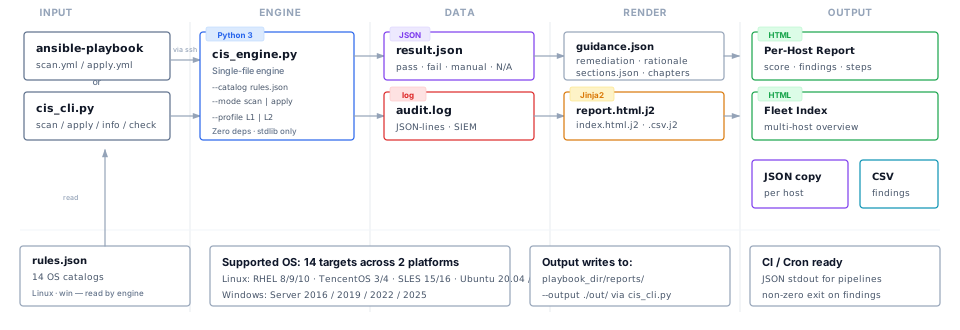
Each suite ships a single-file engine (Python 3 on Linux, PowerShell on Windows) with zero third-party dependencies. Ansible handles file transfer, remote execution, and Jinja2 report rendering. The engine produces result.json and an optional audit.log (JSON-lines) suitable for SIEM ingestion.
Workflow
scan (read-only)
- Preflight — validate target: Python 3.6+ (PowerShell 5.1+ on Windows), root/Administrator privileges.
- Push — copy engine + catalog (
rules.json,guidance.json,sections.json) to/tmp/cis-scan/(C:\Windows\Temp\cis-scanon Windows). - Run — engine iterates rules in
--mode scan, collects evidence, writesresult.json. Nothing is modified. - Fetch — pull
result.json(andaudit.logif enabled) back to control machine. - Report — Jinja2 renders
result.json+ host facts (hostname, IP, MAC, OS, kernel) into an HTML report.
apply (remediate)
Steps 1, 2, 4, 5 are identical. Step 3 differs:
- Engine runs in
--mode apply. For each failing rule in a remediable family: backs up the original file to/var/backups/cis-<os>/, applies the fix, then re-checks the rule to confirm. Rules requiring reboot/service restart are skipped unlesscis_allow_disruptive=true. Every action is recorded in the audit log.
Reports show the current assessment. If an apply run introduces regressions, the report surfaces them in a dedicated block.
Suites
| Suite | Benchmark | Engine | Rules |
|---|---|---|---|
cis-tencentos3-ansible/ |
CIS TencentOS Linux 3 v1.0.0 | Python 3 | 322 |
cis-tencentos4-ansible/ |
CIS TencentOS Linux 4 v1.0.0 | Python 3 | 275 |
cis-rhel8-ansible/ |
CIS RHEL 8 v4.0.0 | Python 3 | 322 |
cis-rhel9-ansible/ |
CIS RHEL 9 v2.0.0 | Python 3 | 297 |
cis-rhel10-ansible/ |
CIS RHEL 10 v1.0.1 | Python 3 | 328 |
cis-sles15-ansible/ |
CIS SLES 15 v2.0.1 | Python 3 | 286 |
cis-sles16-ansible/ |
CIS SLES 16 v1.0.0 | Python 3 | 336 |
cis-ubuntu2004-ansible/ |
CIS Ubuntu 20.04 LTS v3.0.0 | Python 3 | 312 |
cis-ubuntu2204-ansible/ |
CIS Ubuntu 22.04 LTS v3.0.0 | Python 3 | 306 |
cis-ubuntu2404-ansible/ |
CIS Ubuntu 24.04 LTS v2.0.0 | Python 3 | 332 |
cis-win2016-ansible/ |
CIS Windows Server 2016 v3.0.0 | PowerShell | 337 |
cis-win2019-ansible/ |
CIS Windows Server 2019 v3.0.0 | PowerShell | 338 |
cis-win2022-ansible/ |
CIS Windows Server 2022 v3.0.0 | PowerShell | 342 |
cis-win2025-ansible/ |
CIS Windows Server 2025 v2.1.0 | PowerShell | 360 |
Each suite is self-contained: its own inventory, group_vars, scan.yml / apply.yml, role tree, and templates.
Audit Logging
When --audit-log is set, the engine writes one JSON line per rule execution — append-safe, newline-delimited JSON, compatible with log aggregators, SIEM platforms, and compliance auditors.
| Field | Description |
|---|---|
ts |
ISO-8601 UTC timestamp with millisecond precision |
host |
Target hostname |
version |
Engine version |
mode |
scan or apply |
profile |
L1 or L2 |
rule |
CIS rule ID (e.g. 1.1.1.1) |
title |
Human-readable rule title |
status |
pass, fail, manual, error, notapplicable |
apply_status |
applied, already, skipped_disruptive, failed, n/a |
detail |
Evidence or remediation summary (truncated to 200 chars) |
duration_ms |
Execution time in milliseconds |
# Via CLI
python3 cis_cli.py scan --os rhel9 --audit-log output/audit-$(hostname).log

# Via Ansible
ansible-playbook ... -e cis_audit_log=/var/log/cis-audit.log
Reports
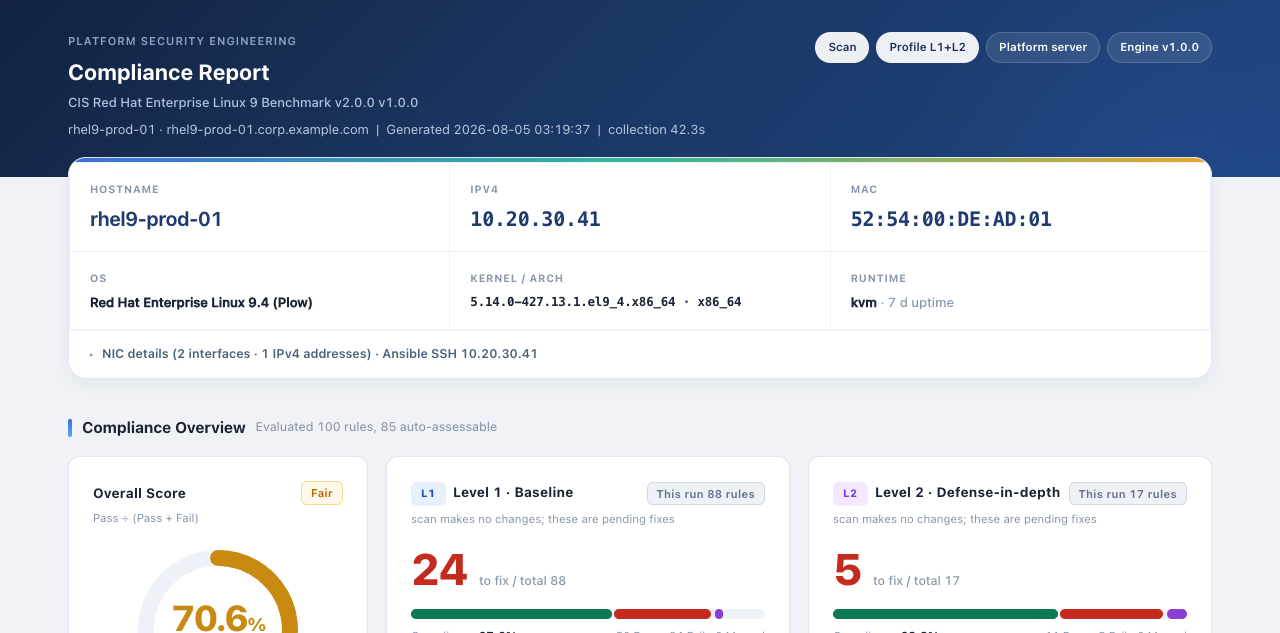
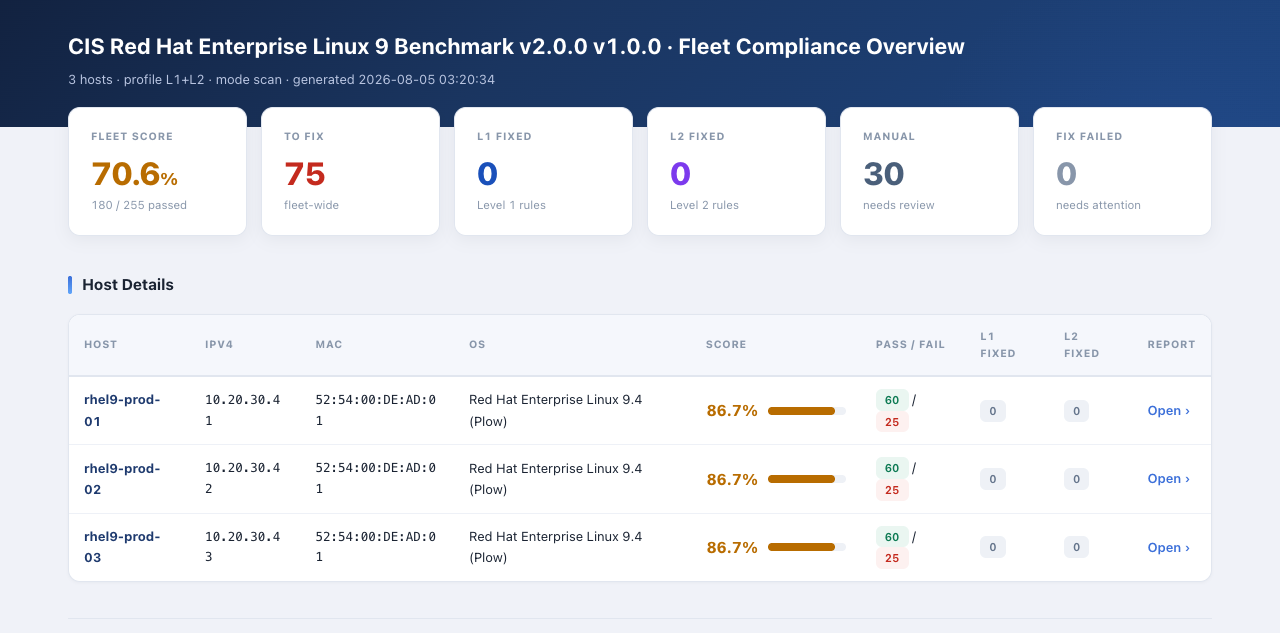
Two HTML reports are produced. Both are static, self-contained, print-ready, and load zero third-party assets.
| Report | Template | When rendered |
|---|---|---|
| Per-host | report.html.j2 |
Every run (scan or apply) |
| Fleet index | index.html.j2 |
Multi-host inventory, or cis_report_index=true |
A findings.csv.j2 template is also available — enable with cis_report_csv=true.
Per-host report — a single host's complete compliance posture:
- Score banner with traffic-light coloring (green ≥ 90, amber ≥ 70, red otherwise)
- Hardening Index — a weighted score that reflects the risk of each rule, so high-impact failures stand out
- System facts (hostname, IP, MAC, OS, kernel, arch, virtualization, uptime)
- Findings table with status, family, level, evidence, remediation hint, and CIS page reference
- Sort by rule ID or by priority (risk weight) for faster triage
- Filters by status / family / level / section
- Regression block in
applymode for rules that fail post-remediation re-check - Waived badge with reason when a rule is excepted via
--waiversor[waivers] - Before/After diff in apply mode showing each remediated rule's prior status
Fleet index — multi-host compliance dashboard:
- Aggregate pass percentage across all hosts
- Stat cards: to-fix, L1 fixed, L2 fixed, manual review, fix failed, host count
- Per-host score bar, pass/fail pills, applied counts, deep-link to per-host report
Fine-Grained Execution
| Parameter | Purpose |
|---|---|
--mode scan / --mode apply |
Read-only check / remediate |
--profile L1 / --profile L2 |
Baseline / defense-in-depth |
--include 1.1.1,1.1.2,5.2 |
Run only these rules |
--exclude 1.5,1.6 |
Skip these rules |
--sections 1,5 |
Run rules whose IDs start with these prefixes |
--families sysctl,kmod |
Run rules from these remediable families |
--audit-log audit.log |
Write structured audit trail |
When using Ansible, corresponding variables are in each suite's README under "Key Variables."
Audit / Gate Mode
cis-host audit is a strict, CI-friendly scan that exits non-zero when any rule fails or errors. It produces the same HTML/JSON reports as scan plus a concise audit-gate-<host>-<profile>.json artifact:
cis-host audit --os rhel9 --profile L1 --output output/
# exit 0 if fully compliant, exit 2 if failures remain
Fleet Scan
cis-host fleet scan repeats a scan across multiple hosts and aggregates the results into a single fleet HTML report and JSON file.
# Local tagged mode — runs on this machine, tags each result with the host name
cis-host fleet scan --os rhel9 --fleet-hosts web1,web2,db1

# Remote SSH mode — run engine on each host (configure [fleet] in cis-host.toml)
cis-host fleet scan --os rhel9 --fleet-remote
Remote mode requires the engine and catalog to already exist on the target hosts. See cis-host.toml.example for the [fleet] layout.
Drift Detection, Verification & Watch
cis-host diff compares two scan result JSONs and classifies every rule change — new failures (drift), regressions, recoveries, and waiver transitions — as a CLI summary and a self-contained HTML report. Use --exit-code in CI to fail the pipeline when drift appears:
cis-host diff output/result-2026-01-01.json output/result-2026-02-01.json --exit-code
Apply verification — after cis-host apply, a pre/post scan comparison reports which rules were actually fixed, which are still failing, and — critically — which rules regressed because the remediation itself broke them. A standalone verify-*.html report is written alongside the apply report.
cis-host watch runs a periodic scan loop with change-only, de-duplicated alerting (edge-triggered like Wazuh SCA): a rule is alerted when it starts failing and only again when it clears — a persistent failure never re-pages. Quiet runs print a single line; --json emits one machine-readable event per line for SIEM/automation:
cis-host watch --os rhel9 --interval 21600 --alert-cmd "curl -fsS https://hooks.example.com/alert"
cis-host watch --os rhel9 --interval 3600 --json          # event stream
Waiver hygiene — waivers may carry approval metadata; expired or malformed entries are flagged at scan time, and a waiver whose rule id does not exist in the catalog (a silent no-op) is called out:
cis-host scan --os rhel9 --waivers '{"1.1.1.1": {"reason": "legacy app", "approved_by": "alice", "expires": "2026-12-31"}}'
Tailoring, Waivers, and Dry-Run
- Variables — override rule parameters without editing the catalog:
cis-host scan --os rhel9 --variables '{"min_len": 14}'
- Waivers — mark specific rules as excepted with an audit reason:
cis-host scan --os rhel9 --waivers '{"1.1.1.1": "legacy app exception"}'
- Simulate — dry-run apply mode that reports what would change without touching the system:
cis-host apply --os rhel9 --simulate
Export Formats
Result JSON can be converted to common compliance / CI formats:
python3 scripts/export_sarif.py   output/result-scan-*.json output/findings.sarif
python3 scripts/export_xccdf.py   output/result-scan-*.json output/findings.xccdf.xml
python3 scripts/export_junit.py   output/result-scan-*.json output/findings.junit.xml
python3 scripts/export_prometheus.py output/result-scan-*.json
python3 scripts/append_history.py output/result-scan-*.json history.jsonl
Privilege Modes
apply requires root-equivalent privileges — UID 0 on Linux (via sudo or direct root) or Administrator on Windows.
Linux scan — coverage by privilege level
| Check family | Root | Non-root + caps¹ | Plain user |
|---|---|---|---|
| Packages, services, processes | ✅ | ✅ | ✅ |
| File perms (non-root files) | ✅ | ✅ | ✅ |
Kernel params (/proc/sys/) |
✅ | ✅² | ❌ |
| File perms (root-only files) | ✅ | ✅³ | ❌ |
SSH config (sshd -T) |
✅ | ✅⁴ | ❌ |
Audit rules (auditctl -l) |
✅ | ✅⁴ | ❌ |
| Sudoers, shadow, logs | ✅ | ✅³ | ❌ |
¹ Non-root + caps = regular user granted specific privileges via capability or sudo.
² Needs cap_sys_ptrace. ³ Needs cap_dac_read_search. ⁴ Needs sudo for the specific command.
Set up a non-root scan user (Linux):
# Option A — capability-based (persistent)
sudo setcap cap_sys_ptrace,cap_dac_read_search+ep $(which python3)

# Option B — sudo rules for specific commands
# /etc/sudoers.d/cis-scan
cis-scanner ALL=(ALL) NOPASSWD: /usr/sbin/sshd -T *
cis-scanner ALL=(ALL) NOPASSWD: /usr/sbin/auditctl -l
Windows
Scan works as non-Admin with RemoteSigned execution policy. Apply requires Administrator — use -RunAsAdministrator or Ansible become: true.
Directory Structure
cis-host/
├── cis_cli.py                      # Local CLI (--os switches targets)
├── cis_host_diff.py                  # Drift detection / verification / watch logic
├── cis_host_config.py                # cis-host.toml loader & merge
├── docs/
│   ├── architecture.svg
│   └── screenshots/
├── scripts/                        # SARIF/XCCDF/JUnit/Prometheus exporters
├── tests/                          # pytest suite (engine, CLI, drift, exporters)
├── cis-tencentos3-ansible/         # TencentOS 3
├── cis-tencentos4-ansible/         # TencentOS 4
├── cis-rhel8-ansible/              # RHEL 8
├── cis-rhel9-ansible/              # RHEL 9
├── cis-rhel10-ansible/             # RHEL 10
├── cis-sles15-ansible/             # SLES 15
├── cis-sles16-ansible/             # SLES 16
├── cis-ubuntu2004-ansible/         # Ubuntu 20.04 LTS
├── cis-ubuntu2204-ansible/         # Ubuntu 22.04 LTS
├── cis-ubuntu2404-ansible/         # Ubuntu 24.04 LTS
├── cis-win2016-ansible/            # Windows Server 2016
├── cis-win2019-ansible/            # Windows Server 2019
├── cis-win2022-ansible/            # Windows Server 2022
└── cis-win2025-ansible/            # Windows Server 2025
    ├── ansible.cfg
    ├── scan.yml | apply.yml | site.yml
    ├── inventory/  group_vars/
    ├── reports/                    # HTML / JSON / CSV / audit output
    └── roles/cis_<os>/
        ├── files/   engine, rules.json, guidance.json, sections.json
        ├── tasks/   preflight, run, report, gate
        └── templates/  report.html.j2, index.html.j2, findings.csv.j2
Notes
applymodifies configuration files in place. Originals are backed up to/var/backups/cis-<os>/.- Rules marked
disruptive(reboot, remount, service restart) are skipped by default. Pass-e cis_allow_disruptive=trueto opt in. Run during a maintenance window. - Six families are intentionally never auto-remediated (require human judgment):
bootloader_password,info_only,manual,partition,root_access,sshd_access. The engine reports them but does not modify. - Linux engines auto-detect the package manager (dnf/yum, apt, zypper) and distro family at runtime.
- Before running
applyin production, runscanin a test environment, review the report, then proceed.
Roadmap
- CI pipeline for per-suite regression testing
cis-host diff— compare two scan results and show drift between runs ✅ (implemented)cis-host watch— periodic scan mode with alerting on new failures ✅ (implemented)- Molecule-based integration tests for every Linux role (
molecule testin each role directory) - macOS CIS benchmark support
CIS Benchmarks Disclaimer
Independent project — cis-host is not affiliated with, sponsored by, or endorsed by the Center for Internet Security (CIS).
License
Automation scripts are licensed under the MIT License. CIS Benchmark content is copyright © Center for Internet Security, Inc. and used under their terms of use.
1 maintainer

Download files
Download the file for your platform. If you're not sure which to choose, learn more about installing packages.
Source Distribution
Built Distribution
Filter files by name, interpreter, ABI, and platform.
If you're not sure about the file name format, learn more about wheel file names.
Copy a direct link to the current filters
File details
Details for the file ohbs_host-1.3.0.tar.gz.
File metadata
- Download URL: ohbs_host-1.3.0.tar.gz
- Upload date:
- Size: 55.2 kB
- Tags: Source
- Uploaded using Trusted Publishing? No
- Uploaded via:
twine/7.0.0 CPython/3.13.12
File hashes
| Algorithm | Hash digest | |
|---|---|---|
| SHA256 |
0514a44068691b5055c9abf465f7ef16bb3e300c3301af21abf55cd30fe7f391
|
|
| MD5 |
2c796401f38e5086be5edc5521391e45
|
|
| BLAKE2b-256 |
56233c895de61ad75153824e11e4c2f31f72074f1bbcb2856a4cefe12e1780b5
|
File details
Details for the file ohbs_host-1.3.0-py3-none-any.whl.
File metadata
- Download URL: ohbs_host-1.3.0-py3-none-any.whl
- Upload date:
- Size: 39.7 kB
- Tags: Python 3
- Uploaded using Trusted Publishing? No
- Uploaded via:
twine/7.0.0 CPython/3.13.12
File hashes
| Algorithm | Hash digest | |
|---|---|---|
| SHA256 |
9aff1f0d64e9814a6f279f4b4e5d1daee00df5af77aaae83552da1017bac68f8
|
|
| MD5 |
e6a0e199311e92f6de2ac77307e5b4d3
|
|
| BLAKE2b-256 |
03827660f6118bb321ff7878ea11b7aa7b2f652a35ac99e303f4db2d7180b573
|







