
Django DRF OIDC Auth library: Securely authenticate users using OIDC in Django DRF. Supports Code Flow and Code Flow With PKCE. Easy integration with React Js or any front-end framework.

Project description
Overview
Django DRF OIDC Auth library Securely authenticate users using OIDC in Django DRF. It Supports Code Flow and Code Flow With PKCE. Easy integration with React Js or any front-end framework.
Installation
Install using pip...
pip install oidc_drf
Add 'oidc_drf' to your INSTALLED_APPS setting.
INSTALLED_APPS = [
    ...
    'oidc_drf',
]
Configure the following settings in your Django project's settings module:
OIDC_RP_CLIENT_ID = '' # required
OIDC_RP_CLIENT_SECRET = '' # optional if public client
OIDC_OP_JWKS_ENDPOINT = None # defalut None
OIDC_OP_AUTHORIZATION_ENDPOINT = ''# required
OIDC_OP_TOKEN_ENDPOINT = ''# required
OIDC_OP_USER_ENDPOINT = '' # required
OIDC_OP_LOGOUT_ENDPOINT ='' # required

OIDC_AUTHENTICATION_SSO_CALLBACK_URL = '' # required - identity provider will redirect you to this url after login
OIDC_LOGOUT_REDIRECT_URL = '' # required - identity provider will redirect you to this url after logout

# Django Rest Framework settings
REST_FRAMEWORK = {
    'DEFAULT_AUTHENTICATION_CLASSES': [
        'oidc_drf.drf.OIDCAuthentication',  # This is important to be the first one
    ],
}

# Authentication backends
AUTHENTICATION_BACKENDS = [
    'oidc_drf.backends.OIDCAuthenticationBackend',
]
Next, edit your urls.py and add the following:
from django.urls import path, include

urlpatterns = [
    # ...
    path('oidc/', include('oidc_drf.urls')),
    # ...
]
finnaly run the migrations commands
python3 manage.py makemigrations
python3 manage.py migrate
That's it, we're done!
EXTRA SETTINGS
those settings are optional and populated with default values.
OIDC_USE_NONCE = True # defalut true
OIDC_USE_PKCE = True # defalut true

OIDC_USERNAME_CLAIM = 'preferred_username' # defalut 'preferred_username'
OIDC_RP_SIGN_ALGO = 'RS256' # defalut RS256
OIDC_RP_SCOPES = 'openid email' # defalut openid email
OIDC_RP_IDP_SIGN_KEY = None # defalut None
OIDC_VERIFY_SSL = True # defalut True
OIDC_TIMEOUT = None # defalut None
OIDC_PROXY = None # defalut None
OIDC_USERNAME_ALGO = None # defalut None
OIDC_USE_ENCODED_USERNAME = None # defalut None
OIDC_CREATE_USER = True # defalut True, Enables or disables automatic user creation during authentication
OIDC_VERIFY_KID = True # defalut True
OIDC_ALLOW_UNSECURED_JWT = False # defalut False
returning unsecured JWT tokens and RP wants to accept them.
OIDC_TOKEN_USE_BASIC_AUTH = False # defalut False

# you can map the info comming back from the IDP to user model
# defalut is {}
OIDC_FIELD_MAPPING = {
    'field_in_my_user_model': 'field_in_in_oidc',
    'first_name': 'given_name',
    'last_name': 'family_name',
}
Django Admin
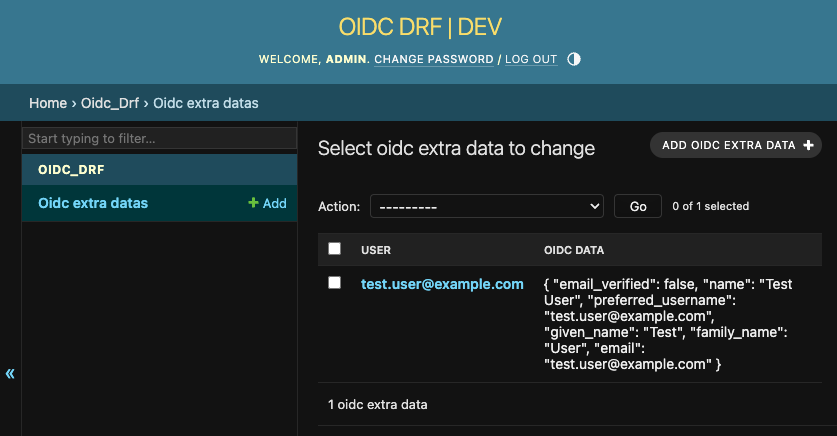
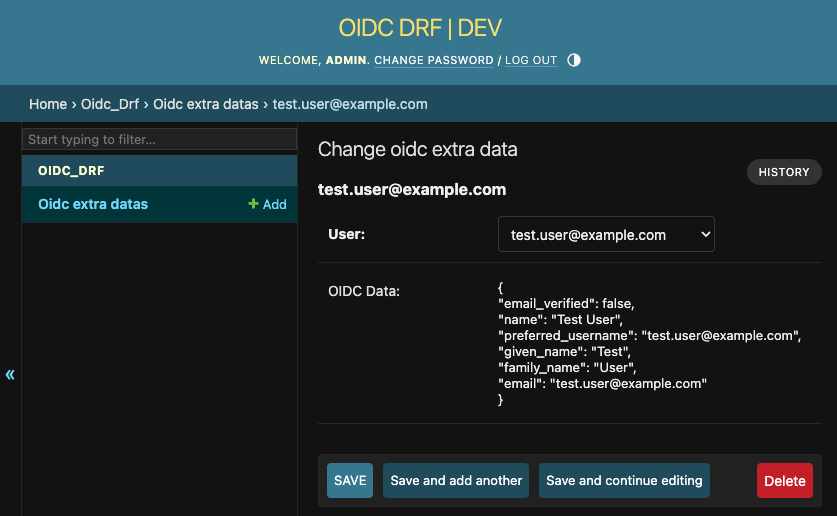
To view the info or fields comming back from the IDP in order to do proper mapping for OIDC_FIELD_MAPPING, all the data saved under the user model as oidc extra data.
Below: Screenshot from the django admin
REST APIs
The REST API to the OIDC DRF is described below.
AUTH ENDPOINT
Request
GET /oidc/auth/
curl --location 'http://localhost:8000/oidc/auth?code_challenge=4qZTfBVpD5xkxUIw0srf5rVV5H418hr-xQJLAd4c2Ss&code_challenge_method=S256&nonce=cFYLOJXZ8CANDC1SdQbvfUobixJdgUIc'
Response
Status: 200 OK
{
    "redirect_url": "http://127.0.0.1:8080/realms/mol/protocol/openid-connect/auth?response_type=code&client_id=mowaamah&redirect_uri=http%3A%2F%2Flocalhost%3A3000%2Fcallback&scope=openid+email&state=rhG5l83rwd81SytApbl7MzrTDBFRXqbo&nonce=cFYLOJXZ8CANDC1SdQbvfUobixJdgUIc&code_challenge=4qZTfBVpD5xkxUIw0srf5rVV5H418hr-xQJLAd4c2Ss0&code_challenge_method=S256"
}
CALLBACK ENDPOINT
Request
POST /oidc/callback/
curl --location 'http://localhost:8000/oidc/callback/?state=alksdfjlka&session_state=alsdjflajsdk&code=alsdjflaksdflkjls' \
--header 'Content-Type: application/json' \
--data '{
        "nonce": "cFYLOJXZ8CANDC1SdQbvfUobixJdgUIc",
        "code_verifier": "cNa9FYCujvVibPnosk1Fk3wvPPisaTjE8Ns83X0UcGsNlEfIUc3j49hFftYPEGAb"
}'
Response
Status: 200 OK
{
   "access":"jwt access token",
   "refresh":"jwt refresh token",
   "oidc_id_token":"jwt id token",
}
REFRESH ENDPOINT
Request
POST /oidc/refresh/
curl --location 'http://localhost:8000/oidc/refresh/' \
--header 'Content-Type: application/json' \
--data '{
    "refresh": "jwt refresh token",
    "code_verifier": "cNa9FYCujvVibPnosk1Fk3wvPPisaTjE8Ns83X0UcGsNlEfIUc3j49hFftYPEGAb"
    }'
Response
Status: 200 OK
{
   "access":"jwt access token",
   "refresh":"jwt refresh token",
   "oidc_id_token":"jwt id token",
}
LOGOUT ENDPOINT
Request
POST /oidc/logout/
curl --location 'http://localhost:8000/api/v1/oidc/logout' \
--data '{"oidc_id_token": "jwt id token"}'
Response
Status: 200 OK
{
    "message": "Logout OIDC successful"
}
Release history Release notifications | RSS feed


Download files
Download the file for your platform. If you're not sure which to choose, learn more about installing packages.
Source Distribution
Built Distribution
Filter files by name, interpreter, ABI, and platform.
If you're not sure about the file name format, learn more about wheel file names.
Copy a direct link to the current filters
File details
Details for the file oidc_drf-1.2.10.tar.gz.
File metadata
- Download URL: oidc_drf-1.2.10.tar.gz
- Upload date:
- Size: 14.2 kB
- Tags: Source
- Uploaded using Trusted Publishing? No
- Uploaded via: twine/4.0.2 CPython/3.9.16
File hashes
| Algorithm | Hash digest | |
|---|---|---|
| SHA256 |
cb6d4e160e4e1d51a08b3f9b857e8d694bb08b9436bf147619dd5597fb270954
|
|
| MD5 |
1edf32c489ee346d7478392b943eba47
|
|
| BLAKE2b-256 |
3440205b1037399c0290a205f8653f158ea5a4f1d670968b4277b7d9bb2a1f93
|
File details
Details for the file oidc_drf-1.2.10-py3-none-any.whl.
File metadata
- Download URL: oidc_drf-1.2.10-py3-none-any.whl
- Upload date:
- Size: 14.4 kB
- Tags: Python 3
- Uploaded using Trusted Publishing? No
- Uploaded via: twine/4.0.2 CPython/3.9.16
File hashes
| Algorithm | Hash digest | |
|---|---|---|
| SHA256 |
b5f69c2a66e983dbeb176da955924201143ed9d470b61d91683367f5714bf30e
|
|
| MD5 |
ad40948f4bd6d67eb2777bf7b819e64d
|
|
| BLAKE2b-256 |
c086575b533897ca4d769f07c14e026cc60a635e850d8ecd9ad83bb390954afa
|






