
oilpaint




A small Python API that mimics oil painting. You describe strokes (a spline, a paint, an amount of paint, a brush width and pressure) and the library simulates how the paint is laid down, picked up, dragged and mixed on the canvas. Colors mix like real pigments (blue + yellow gives green, not grey), using spectral Kubelka-Munk theory.
Install with pip install oilpaint (Python 3.11 or newer).
Dependencies: numpy and numba (the stroke engine is compiled; the first
stroke after installing takes about 20 seconds while it compiles, and the
result is cached). Pillow is optional, for Canvas.to_pil().
Quick start
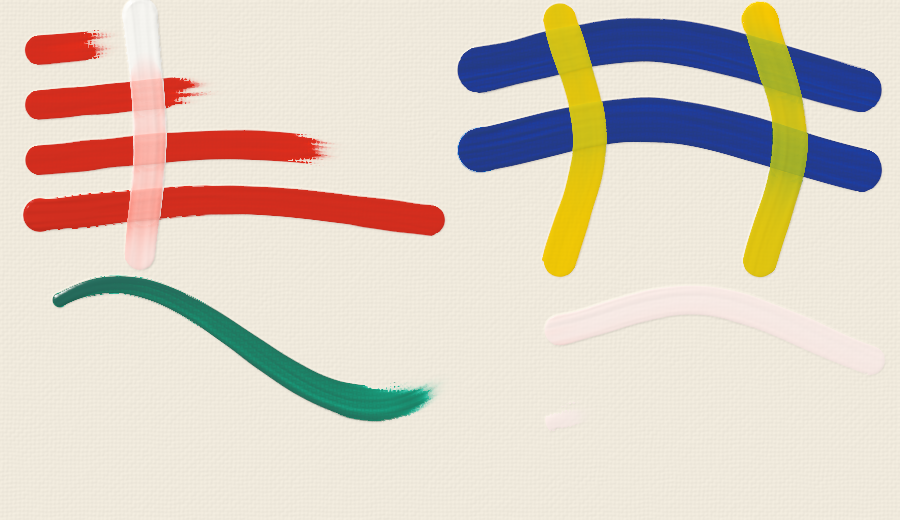
from oilpaint import Canvas, Paint

canvas = Canvas(600, 400)

blue = Paint("#23399b", opacity=0.5)
yellow = Paint("#f7c600")

# A stroke: a smooth spline through these points, a paint, an amount of paint.
canvas.stroke([(60, 140), (250, 100), (540, 170)], paint=blue, amount=12, width=50)

# Cross it while it's wet. Pressure decides how much the colors churn together.
canvas.stroke([(200, 30), (230, 200), (190, 370)], paint=yellow, amount=10, width=40, pressure=0.2)
canvas.stroke([(400, 30), (430, 200), (390, 370)], paint=yellow, amount=10, width=40, pressure=0.9)

# No paint = a clean brush that drags and blends what's wet.
canvas.stroke([(80, 300), (560, 300)], width=40, pressure=0.6)

canvas.save("painting.png")
Run python examples/demo.py to regenerate the demo images in examples/output/;
see Development for the tests and checks.
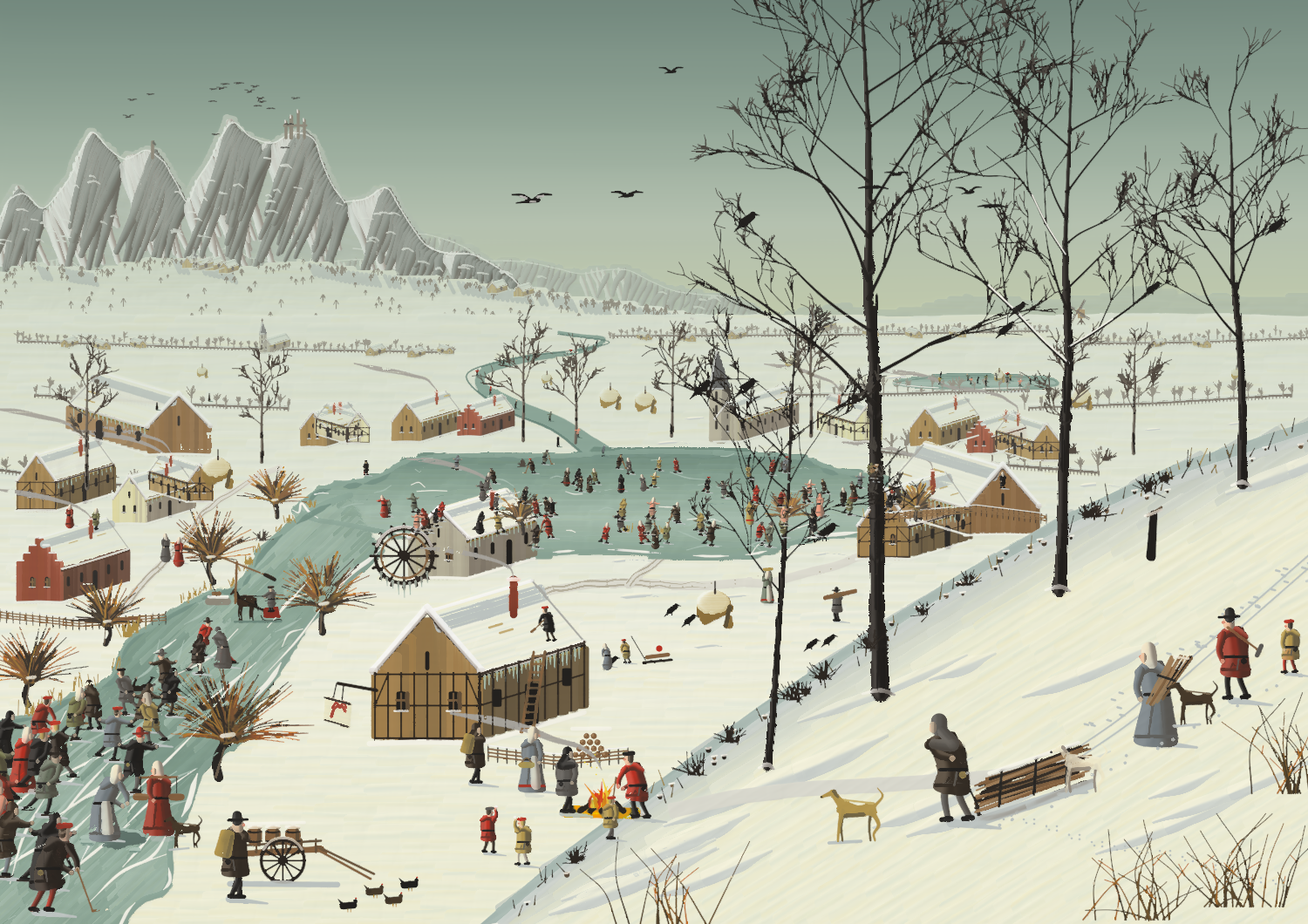
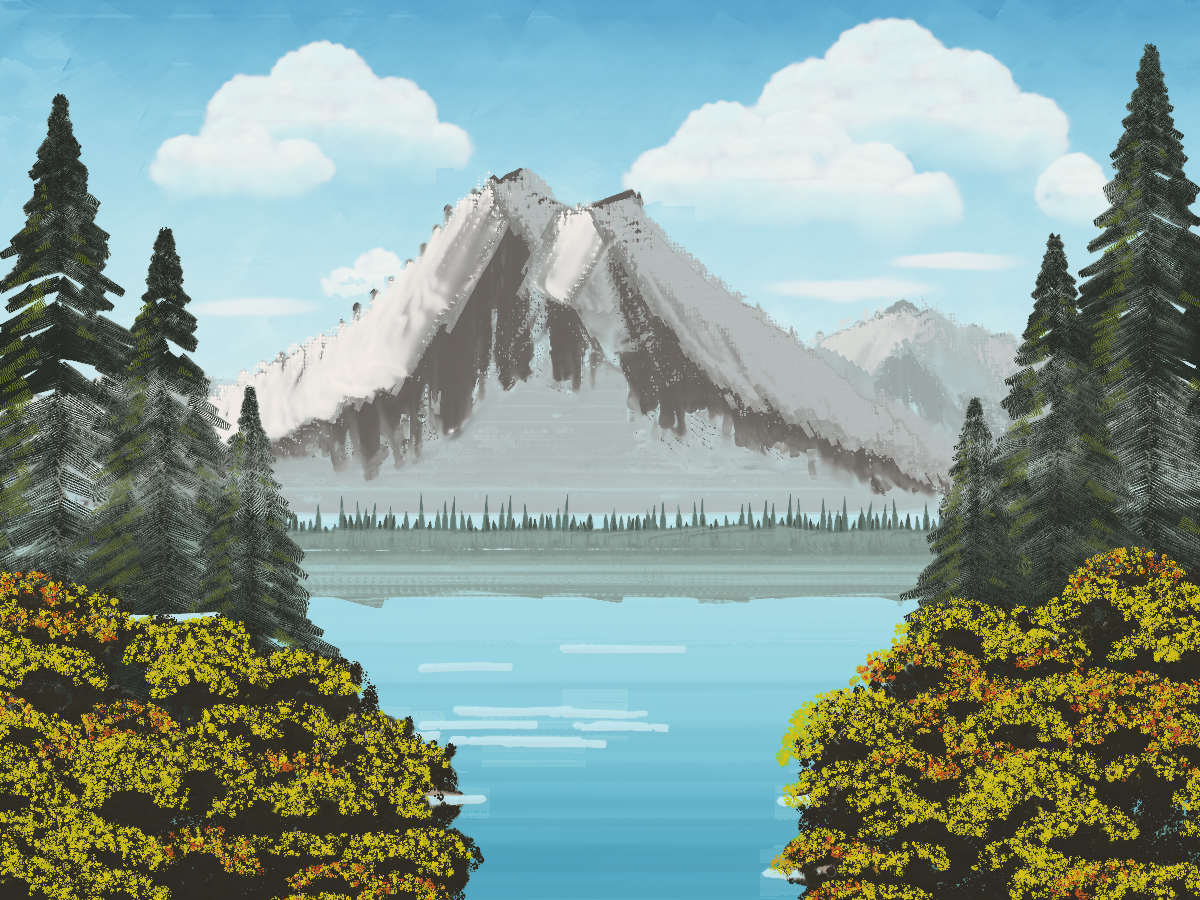
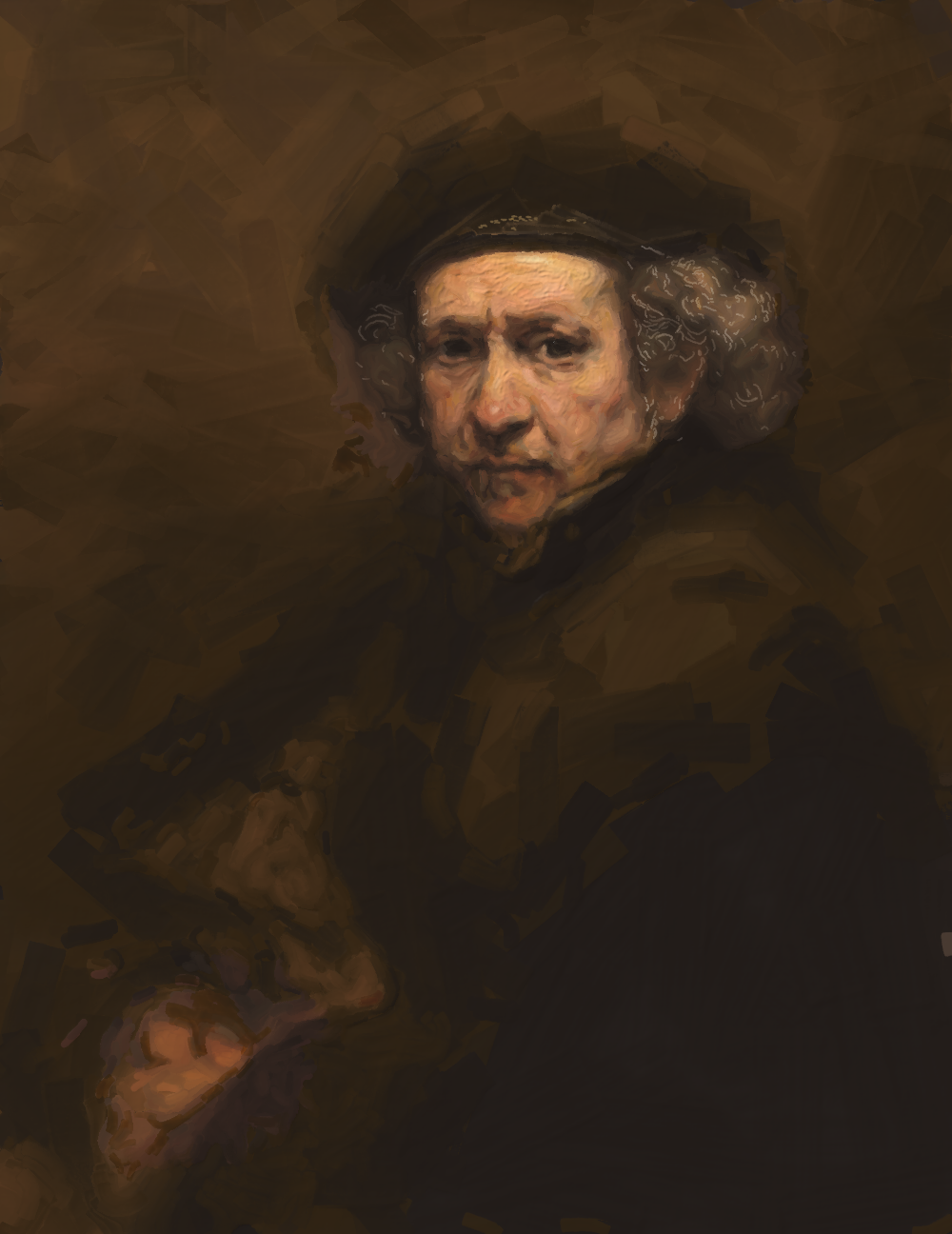
Three paintings made with it
Each is a single script where every mark is a canvas.stroke(...); numpy only
decides where the strokes go.
Each was also made a different way. The Bruegel is painted from memory: a winter village made up in his manner, with no picture to look at. The Bob Ross follows his method, step by step as he taught it on television, rather than any particular painting. The Rembrandt copies one real painting, matching a photograph of it as closely as the strokes allow.
examples/bruegel_winter.py: a winter village in the manner of Pieter Bruegel the Elder, painted thinly on an oak panel with soft sable brushes, back to front, letting layers dry (about 21,000 strokes, ~2 minutes).examples/bob_ross_style.py: a mountain lake painted wet-on-wet in the manner of Bob Ross, in the order he worked on the show: Liquid White over the whole canvas; the sky in criss-cross strokes with a two-inch brush; clouds scrubbed in and blended; the mountain cut in with the knife, its snow laid on with almost no pressure so it breaks; a misty tree line tapped in; evergreens built with the fan brush from the top down; happy little bushes tapped dark and then highlighted; water lines cut with the knife edge (~3.5 minutes).examples/rembrandt_self_portrait.py: a study after Rembrandt's Self-Portrait of 1659 (National Gallery of Art, Washington; public domain), painted from a reproduction (examples/reference) the way he worked: a warm brown ground; a monochrome "dead colouring" left to dry; the background, coat and beret brushed in thin and fluid, then softened with a mop; the head worked up wet-into-wet from big brushes to small, each stroke following the form (Reference.trace) in a colour mixed from his palette (palette.matchwithpalette.OLD_MASTER); the lights piled up in stiff lead white; the hair in thin strokes following the swirl of its curls, the curls themselves traced from a close-up of the head, scratched into the wet paint with the brush handle or drawn on with a liner; transparent glazes over the dried shadows (about 18,000 strokes, ~6 minutes;REMBRANDT_SCALE=0.5for a quick half-size version).
API
Paint(color, opacity=1.0, strength=1.0, name=None, body=None)
color: how the paint looks brushed out at normal thickness on white canvas. Use"#rrggbb", a float triple in 0..1, or an int triple in 0..255.opacity: 0..1, how much it hides what's underneath. 1 is a body color, ~0.3 a glazing color, 0 a pure dye.strength: tinting strength, i.e. how much it dominates mixtures.body: 0..1, how stiff the paint is (default 0.7, paint from the tube). Stiff paint holds the marks of the tool: ridges, peaks, bristle grooves. Fluid paint (thinned with medium) levels out smooth. See Impasto below.
Useful members:
-
Paint.mix((a, 1), (b, 3))mixes paints by volume on the palette. -
paint.appearance(thickness, over=color)gives the color of a layer over a ground. -
paint.masstoneis the color straight from the tube. -
mix_colors(["#1b3fa0", "#f5d000"])gives the hex color of a quick palette mix. -
oilpaint.palettehas ready-made paints:TITANIUM_WHITE,CADMIUM_YELLOW,ULTRAMARINE_BLUE,ALIZARIN_CRIMSON,PHTHALO_BLUE,BURNT_UMBER, … It also hasMEDIUM, a clear, fluid medium for thinning paint into a glaze:Paint.mix((ALIZARIN_CRIMSON, 1), (MEDIUM, 3)), andIMPASTO_MEDIUM, a stiff gel that makes paint hold sharp ridges:Paint.mix((CADMIUM_RED, 2), (IMPASTO_MEDIUM, 1)). Mixing averages the body by volume;paint.with_body(0.9)gives a stiffer copy. -
palette.OLD_MASTERis a 17th-century Dutch palette:LEAD_WHITE(warmer, more translucent and much stiffer than titanium white: it holds thick, broken lights),LEAD_TIN_YELLOW,YELLOW_OCHRE,RED_OCHRE,VERMILION,RED_LAKE(a transparent crimson),RAW_UMBER,BURNT_UMBER,CASSEL_EARTH(a transparent brown for glazing shadows),BONE_BLACKandSMALT(a weak, greyish blue). -
palette.match(color, paints, max_paints=3, thickness=1.0, over="#ffffff")mixes the given paints to match a colour, the way a painter does on the palette, with the same pigment physics as the canvas. It returns the mixedpaint, the recipepartsand theerror(CIELAB delta E):m = palette.match("#c89070", palette.OLD_MASTER, over="#5a4532") m.parts # [(Lead White, 1.0), (Lead-Tin Yellow, 1.6), (Red Lake, 3.9)] m.error # 0.6
Match over the colour you will paint on: a transparent mix that only looks right over white won't be chosen then. Offering fewer paints (the ones you would use for flesh, say) gives more painterly recipes.
canvas.stroke(path, paint, amount=6, width=None, pressure=0.5, brush=None, **options)
| parameter | meaning |
|---|---|
path |
List of (x, y) points: a smooth Catmull-Rom spline passes through them. Or a CatmullRom, Bezier (anchor, handle, handle, anchor, …) or Polyline. One point makes a dab: pressed firmly, a solid mark; tapped lightly (pressure below about 0.4), only the bristle tips touch and the mark breaks into a stipple (bushes, foliage), and a soft brush gives a dab feathered all round. |
paint |
A Paint or a color. None uses a clean brush (blending), or the given brush. A list loads several paints: [(paint, amount[, across[, depth]]), ...] (see Brush). |
amount |
Paint on the brush, in "brush widths of solid stroke": amount=6 covers about 6 widths before the brush runs dry and starts to break up. Small brushes need bigger amounts to go as far (they also hold more for their size). Loading a brush beyond what its hair holds (roughly amount 10 to 15 and up for a brush 20 px or wider, depending on the hair) puts a glob of paint on it that goes on thick: impasto. |
brush |
The tool: a BrushType (e.g. brushes.FLAT_HOG, see below), or a Brush that keeps leftover paint and dirt between strokes. Default: a medium round. |
width |
Brush width in px; defaults to the brush's own size. A number, one value per control point, or f(u) with u in 0..1 along the stroke. |
pressure |
0..1, same forms as width. Light pressure lays paint on top of wet paint. Heavy pressure releases more paint and churns it into the wet paint below. Soft, pointed brushes also get wider under pressure. An overloaded brush pressed hard squeezes paint out into ridges at its edges. A knife's pressure sets how thick its slab is: light leaves it thick, hard scrapes close to the canvas. |
angle |
Brush angle in degrees, same forms as width: 0 drags a flat broadside, 90 on its edge. Vary it to twist the brush mid-stroke. |
follow_path |
True: the angle turns with the stroke. False: the angle is fixed on the canvas, like a calligraphy nib. |
roll |
Round brushes only: how far the brush is rolled between the fingers, in degrees, same forms as width. Rolling turns a different side of the bundle to the canvas (see Brush). |
mixing |
How readily the stroke stirs into the wet paint below. |
pickup |
How much wet paint the brush lifts and carries along (brushes; a knife drags wet paint instead). A brush barely touching lifts much less than one pressed into the paint. |
drag |
How much wet paint the brush pushes ahead (brushes). |
smear |
How long picked-up color lingers on the brush tip, roughly in widths. |
blending |
How readily the paints loaded on the brush merge into each other during the stroke. |
streaks |
Brush-hair streak texture, 0..1. |
taper |
Feathered ends: fraction of the length where the brush is lowered/lifted. |
lift |
0..1, how the tool leaves the paint at the end: 0 slides off cleanly, higher pulls the paint up into streaks and torn ridges along the pull, as a knife lifted off thick paint does (1 gives a stucco-like texture). Default 0.3 for knives, 0 for brushes. |
seed |
Seed for the stroke's texture. |
mixing, pickup, drag, smear, streaks, taper, lift, angle
and follow_path default to the brush type's own character; pass them to
override it for one stroke.
stroke() returns the Brush it used. You can also build a Stroke(...)
dataclass with the same fields and call canvas.paint(stroke1, stroke2, ...).
Brushes
oilpaint.brushes is a rack of ready-made tools:
| preset | what it is |
|---|---|
ROUND, ROUND_HOG, ROUND_SABLE |
Rounds. Pointed rounds paint thin lines with a light touch and swell under pressure. |
LINER, RIGGER |
Ultra-fine rounds for outlines and long, fine lines (branches, rigging). amount is measured in brush widths, so load these generously, e.g. amount=200 for a 500 px line. |
MOP |
Very large, very soft and absorbent: soft blending, feathered edges. |
DEER_FOOT |
A round cut on a slant, for stippling foliage and texture. |
FLAT_HOG, FLAT_SABLE |
Long flats: square ends, broad strokes, thin lines when turned on edge. |
BRIGHT |
A short, stiff flat: controlled strokes, pushes stiff paint. |
ANGLED, DAGGER |
Flats with bristles cut on a bias: the toe touches first; daggers taper sharply. |
BLENDER |
A wide soft flat for glazes and smooth gradients. |
FILBERT_HOG, FILBERT_SABLE |
Flats with an oval tip: broad strokes, or petals and leaves (press, then lift). |
FAN_HOG, FAN_SOFT |
Separate bristle clumps: grass, hair, foliage, or feathering. |
PALETTE_KNIFE, KNIFE_…, SCRAPER |
Painting knives: rigid steel blades of different shapes (see Knives below). |
RAG |
Lifts wet paint without laying any down: wipe out lights or correct mistakes. |
BRUSH_HANDLE |
The other end of the brush, scratched through wet paint (sgraffito): a groove down to the paint beneath, deeper with more pressure. |
from oilpaint import BrushType, brushes

canvas.stroke(path, "#1d3f9a", brush=brushes.FLAT_HOG)                 # 24 px hog flat
canvas.stroke(path, "#1d3f9a", brush=brushes.FLAT_HOG.sized(48))       # a bigger one
canvas.stroke(path, "#1d3f9a", brush=brushes.FLAT_HOG, angle=lambda u: 90 * u)   # twist into a ribbon

# make your own: shape + size + hair, then tweak any property
soft_flat = brushes.make("flat", 30, hair="sable", length=0.8)
grass_fan = brushes.make("fan", 40, hair="hog", clumps=12)
nib = brushes.FLAT_SABLE.with_(angle=40, follow_path=False)            # calligraphy
custom = BrushType(shape="filbert", width=26, aspect=0.45, stiffness=0.6, capacity=1.4)
BrushType fields:
| field | meaning |
|---|---|
shape |
Brushes: round, flat (square ends), filbert (flat with an oval tip), fan (spread of separate clumps). Knives: trowel, pear, straight, angled, spoon. |
width |
Default width in px (for a knife, the blade's length). |
aspect |
Footprint thickness relative to width: 1 for a round, ~0.2 for a flat. For a knife, the blade's width relative to its length. |
angle, follow_path |
Default orientation (see stroke). |
stiffness |
0 = very soft (sable, squirrel) … 1 = very stiff (hog, knife). Stiff tools leave stronger ridges and ragged edges, push more paint and blend less. |
bristles |
Density: 0 = sparse and coarse (bold streaks, dry-brush breakup) … 1 = dense and fine (smooth). |
capacity |
How much paint sits in the tip: above 1 ("fat") the brush keeps colour it picked up and smears it further; below 1 it is quickly cleaned by its own fresh paint. (How far a stroke reaches is set by amount.) |
spread |
How much the brush widens under pressure. |
clumps |
Number of separate bristle clumps (fans), or teeth on a comb knife. |
slant |
Bristles cut on a bias (angled ~0.5, dagger ~0.9): the toe touches first. |
softness |
Feathered edges and ends (mops, blenders). |
taper |
Default feathered ends for strokes made with it. |
deposits |
False for tools that only lift paint (the rag). |
dig |
0..1: how deep a point cuts into the wet paint under it (1: down to the dry paint or canvas), pushing it aside into low ridges (the brush handle). |
blending |
How readily different paints loaded on the brush merge as it is used. |
streaks, pickup, drag, mixing, rough |
Explicit overrides of the behavior otherwise derived from stiffness and bristles. |
brushes.make(shape, width, hair, length) picks sensible values from the
hair (hog, mongoose, synthetic, sable, squirrel) and the bristle
length (0 = short like a bright: stiffer, smaller tip capacity; 1 = long:
springier, larger tip capacity). brushes.catalog() lists the presets.
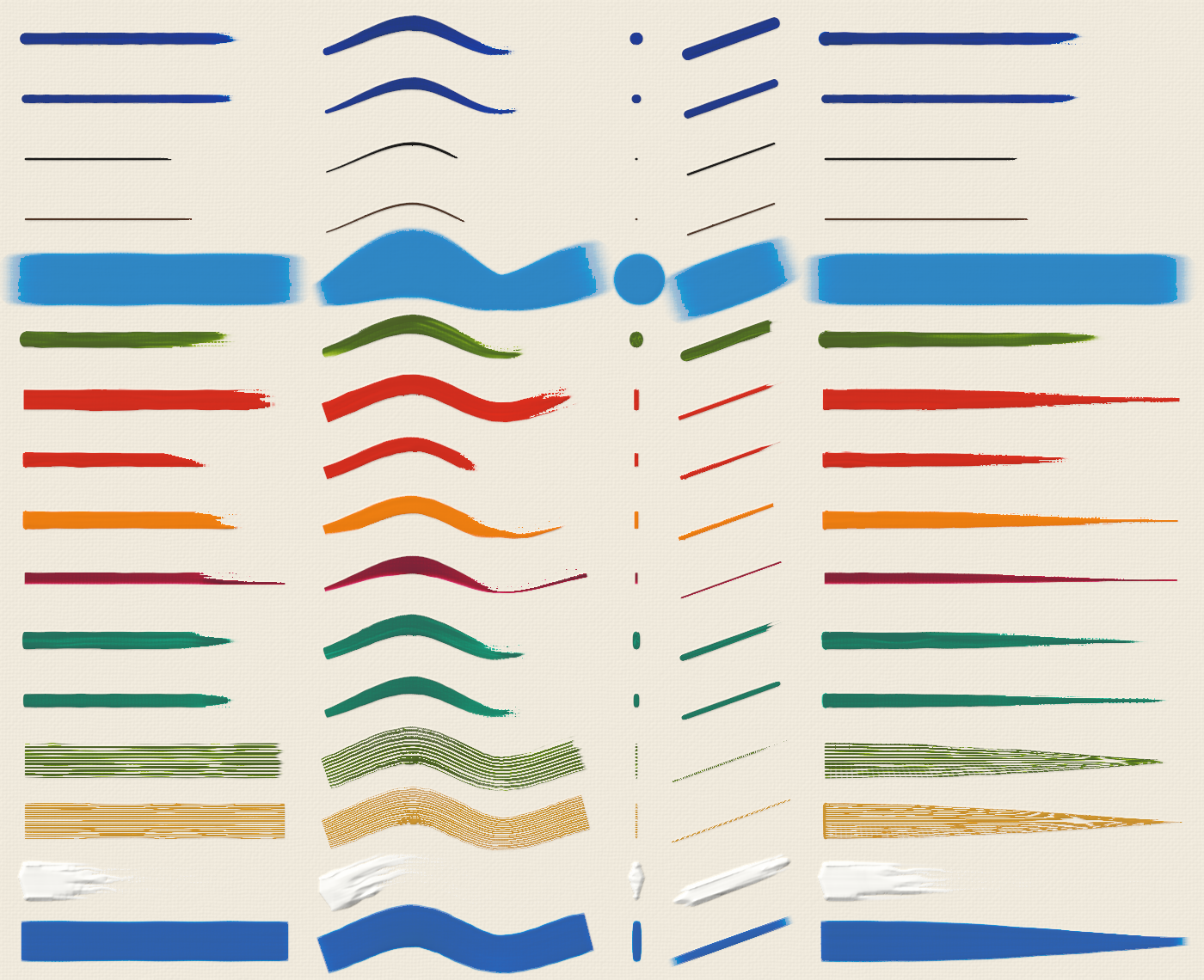
Each preset, top to bottom (ROUND … BLENDER, in the order of the table):
a straight stroke, an S with light → heavy → light pressure, a dab, a stroke
on the brush's edge, and a stroke that twists from broadside to edge-on.
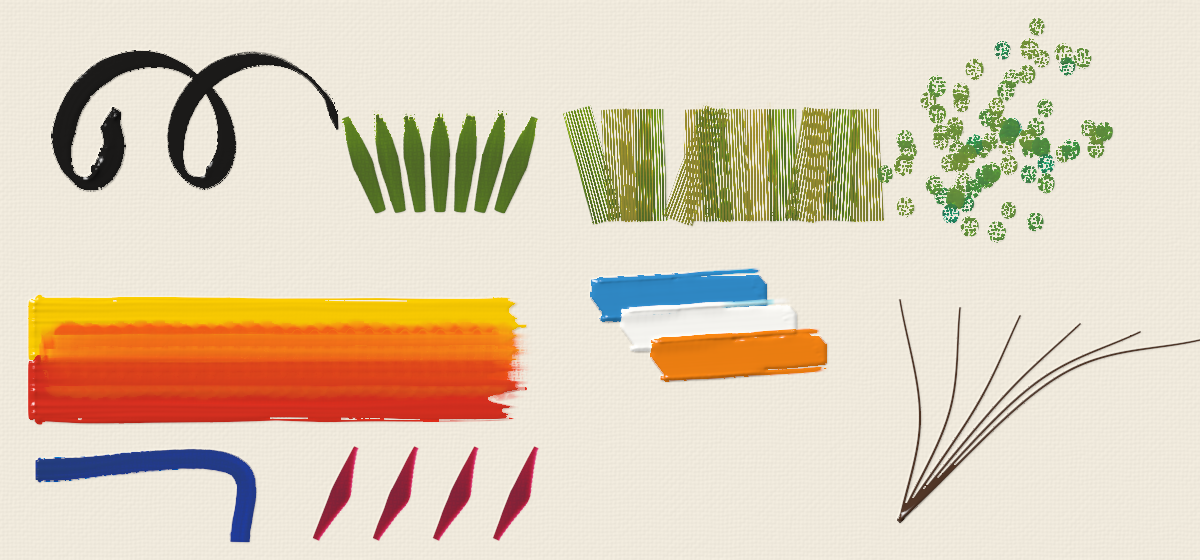
Calligraphy with a flat at a fixed angle, filbert leaves, hog-fan grass, deer-foot stippling, a mop blending two wet colors, palette-knife slabs, rigger branches, an angled flat cutting a corner, dagger strokes.
Painting from a reference: Reference(image, width, height, box=None)
A photo, a sketch or a painting to study, fitted to the canvas. It answers what a painter looks for before each stroke, at the scale of the brush:
| method | answer |
|---|---|
color(x, y, scale=0) |
The sRGB colour there, softened over scale px (a big brush sees big shapes). |
value(x, y, scale=0) |
The lightness there (CIE L*, 0..1). |
direction(x, y, scale=4) |
(angle, strength): which way the forms run there (along edges and lines of equal light), so strokes can follow the form, and how clear that is. |
detail(x, y, scale=4) |
How busy it is there: a cue for a smaller brush. |
trace(x, y, length, scale=4, tolerance=0.08, bend=1.0) |
A curved stroke path from the point, following the forms while the colour stays the same. |
All of them take arrays of points as well.
from oilpaint import Reference, palette

ref = Reference("portrait.jpg", canvas.width, canvas.height)
x, y = 420, 310
path = ref.trace(x, y, length=60, scale=6)
paint = palette.match(ref.color(x, y, 6), palette.OLD_MASTER, over="#5e4430").paint
canvas.stroke(path, paint=paint, width=14)
Canvas(width, height, ground=None, texture=None, weave=None, seed=None, surface=None)
surfaceis what you paint on (see Surfaces below). Default: a generic primed canvas.groundoverrides the surface's priming color, or is an(H, W, 3)sRGB image to paint over.textureandweaveare shortcuts for the surface'sreliefandscale.canvas.dry()lets everything dry. Later strokes stop mixing with it and glazes layer over it optically.canvas.render(lighting=True, light=(-0.6, -0.8, 1.1), relief=1.0, gloss=1.0)returns an(H, W, 3)sRGB float image, lit to show impasto and the surface texture: shading of the relief, cast shadows, darker hollows and the gloss of oil.lightis the direction of the light (x, y, z; y points down the image): a smaller z rakes across the surface and brings out the relief (the impasto images here use(-0.6, -0.8, 0.7)).reliefscales the height of the paint,glossthe highlights.canvas.surface_height()is the height map used for lighting, in pixels.canvas.save("out.png", **render_options)andcanvas.to_pil()export the image.canvas.color_at(x, y),canvas.thickness,canvas.wet_thicknessandcanvas.reflectance()let you inspect the paint.
Surfaces
oilpaint.surfaces has ready-made supports:
| preset | what it is |
|---|---|
CANVAS |
The original generic primed canvas (the default). |
LINEN_FINE |
Fine, oil-primed linen: irregular threads with slubs, moderate tooth, barely absorbent. |
LINEN_COARSE |
Coarse linen: big uneven threads; a lightly dragged stroke breaks up on them (scumbling). |
COTTON_DUCK |
Cotton with acrylic gesso: an even, mechanical weave; bright and slightly absorbent. |
CANVAS_BOARD |
Fine cotton on card: light, even texture; fairly absorbent. |
OIL_PAPER |
Felted paper fibres with a pronounced tooth; absorbent. |
GESSO_PANEL |
Oak panel with a chalk gesso, as used by the Flemish masters: smooth, very absorbent, with priming brushmarks and a hint of wood grain. |
COPPER |
Glass-smooth and very slick; nothing is absorbed; the warm metal glows through thin paint. |
from oilpaint import Canvas, Surface, surfaces

canvas = Canvas(1200, 800, surface=surfaces.GESSO_PANEL)
canvas = Canvas(1200, 800, surface=surfaces.LINEN_FINE.with_(toning="#c49a6c"))      # toned ground
canvas = Canvas(1200, 800, surface=Surface(texture="twill", scale=5, tooth=0.6, absorbency=0.3))
Surface fields:
| field | meaning |
|---|---|
texture |
linen, cotton, twill, paper, wood, smooth, or canvas (the original weave). |
scale |
Texture size in px: thread spacing, paper tooth, or wood-ring spacing. |
irregularity |
Woven textures: 0 = perfectly even threads … 1 = very irregular. |
angle |
Wood-grain direction in degrees. |
relief |
How deep the texture is, under the light and through thin paint. |
tooth |
0..1, how much the surface grips the brush. A rough tooth breaks up lightly pressed or dry strokes and pulls paint off the brush; a smooth one lets strokes glide unbroken. |
absorbency |
0..1, how much the priming drinks oil. Paint drags, blends less and runs out sooner on an absorbent ground, and thin paint "sinks in": it goes matte, and darks look lighter and duller. |
slickness |
0..1, how freely wet paint slides and lifts off the bare surface. Paint wipes cleanly off a slick surface and leaves a stain in an absorbent one. 0.5 is neutral. |
ground |
Priming color. |
toning, toning_strength |
A transparent toned layer (imprimatura) brushed over the priming. |
priming_marks, priming_angle |
Visible brushmarks in the priming, and their direction. |
surfaces.catalog() lists the presets. Scales assume about 1 px ≈ 0.3 mm;
use .with_(scale=...) to match other canvas sizes.
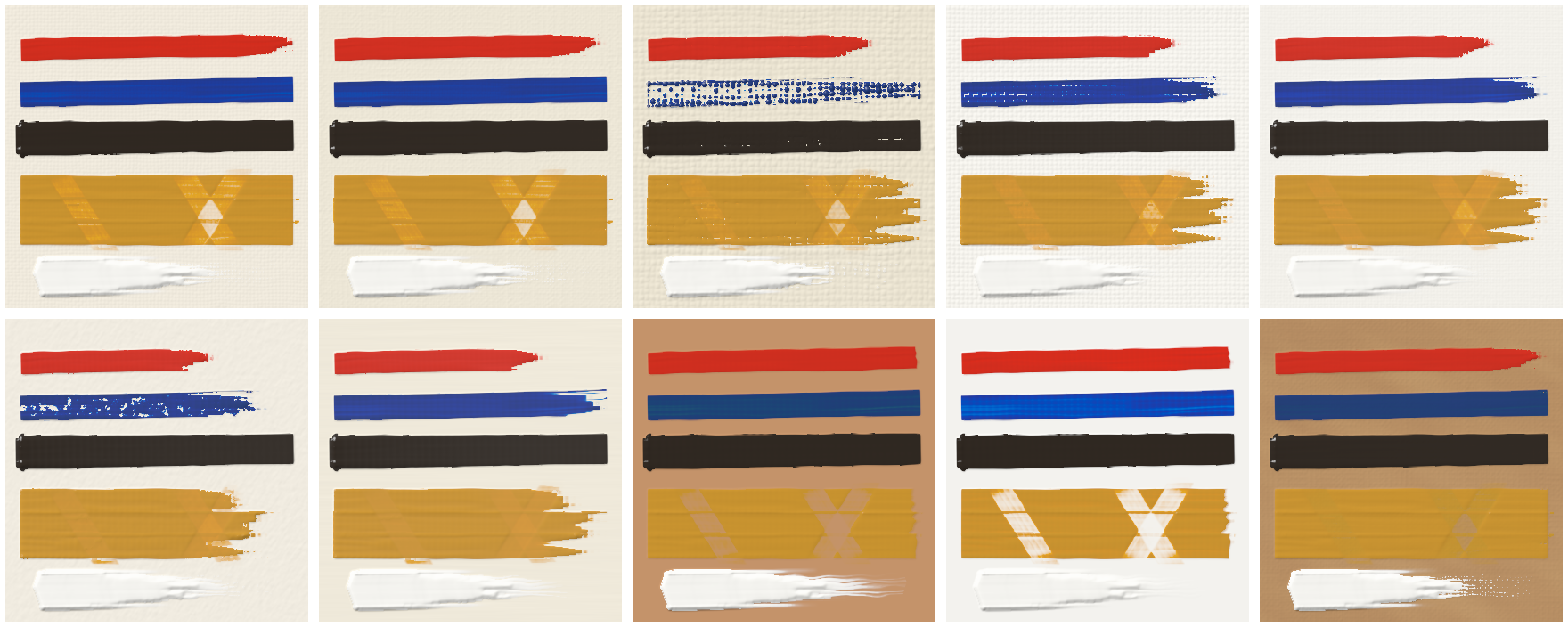
The same marks on each surface, left to right and top to bottom: canvas, fine
linen, coarse linen, cotton duck, canvas board, oil paper, gesso panel, copper,
and fine linen with a toned ground. The marks are: a loaded hog flat, the same
brush dragged lightly (it breaks up on coarse linen and paper), a dark (it sinks
in on absorbent grounds), an ochre patch wiped back with the RAG tool (clean
on copper and oil-primed linen, a stain on gesso and paper), and a palette-knife
slab.
Brush: loading one or several paints
A Brush is one physical brush with paint on it: a BrushType plus its
current load and dirt. Paint sits in narrow bristle columns across the brush,
each in three layers from the point to the ferrule: the tip, the belly and the
heel. So a brush can carry several paints at once: side by side, tip over
belly, deep in the heel, or only partly mixed. It keeps them (and any paint it
picks up) between strokes. On a round brush the columns go around the bundle,
so it has a front and a back that you can turn to the canvas by rolling it.
from oilpaint import Brush, brushes, palette as P

brush = Brush(brushes.FLAT_SABLE)
brush.load(P.CADMIUM_RED, amount=8)                        # the whole brush
brush.load(P.TITANIUM_WHITE, amount=3, across="left")      # double-load one side
brush.load(P.CADMIUM_YELLOW, amount=0.5, depth="tip")      # touch the tips into yellow
brush.work(1)                                              # stroke it on the palette to soften the join
canvas.stroke(path1, brush=brush)
canvas.stroke(path2, brush=brush)                          # carries on with what's left
brush.clean()

# or in one call
canvas.stroke(path, brush=brushes.FLAT_SABLE,
              paint=[(P.CADMIUM_RED, 8), (P.TITANIUM_WHITE, 3, "left"), (P.CADMIUM_YELLOW, 0.5, None, "tip")])

# several paints picked up together, only partly mixed: a marbled stroke
Brush(brushes.FILBERT_HOG).load_mix([(P.CADMIUM_RED, 1), (P.TITANIUM_WHITE, 2)], amount=8, mixing=0.3)

# a round with red on one side and yellow on the other, rolled one full turn along the stroke
rnd = Brush(brushes.ROUND).load(P.CADMIUM_RED, 10, across="left").load(P.CADMIUM_YELLOW, 10, across="right")
canvas.stroke(path, brush=rnd, roll=lambda u: 360 * u)

# dipped all the way to the ferrule: part of the paint lodges in the heel
deep = Brush(brushes.FLAT_HOG).load(P.BURNT_SIENNA, 8, depth=1.0)
canvas.stroke(path1, brush=deep, pressure=0.4)             # runs dry early
canvas.stroke(path2, brush=deep, pressure=0.95)            # pressing hard squeezes some out of the heel
| method / setting | meaning |
|---|---|
load(paint, amount, across=None, depth="belly") |
across says where on the brush: "left", "right", "center", "edges", ("left", 0.3) (leftmost 30%), (0.2, 0.6) (a band, 0 = left edge, 1 = right edge), a function of x in 0..1, or one weight per column. Left and right are the brush's own sides, as seen looking along the stroke. On a round, "left" and "right" are the two sides of the bundle; roll then turns them. depth: "tip" (just touched: comes off first), "belly" (dipped in normally: the bulk of the load), "heel" (worked up to the ferrule), or a number, how far the brush went into the paint, 0..1 of the hair length: 0.1 loads the tip, 0.5 tip and belly, 1.0 all three layers. |
load_mix(parts, amount, mixing=0.5) |
Several paints picked up together. mixing 1 = fully mixed (like Paint.mix), lower = left in streaks across the bristles, so the stroke comes out marbled. |
work(passes, pressure=0.5) |
Stroke the brush back and forth on the palette without painting: its paints blend side to side, tip with belly, and a little with the heel. |
| heel | Paint in the heel doesn't flow out by itself. Some of it is squeezed into the belly when the brush touches down (more when pressed hard) and whenever the pressure increases during a stroke; the rest stays in the brush until it is cleaned. It also counts in brush.volume and brush.colors("heel"). |
BrushType.blending / Stroke(blending=...) |
How readily the paints on the brush merge as it is used (0..1). Low keeps a double-loaded brush crisply two-toned for a long stroke (soft synthetic flats); high blends within a few widths (scrubby hog). Pressure speeds it up. Default: from stiffness. |
brush.colors(depth="all") |
The colour of each bristle column, left to right (around the bundle on a round): what is on the brush now. depth can be "tip", "belly", "heel" or "all". |
What painters do with it:
- Double loading (one-stroke painting): a flat loaded with a dark on one
side and a light on the other models a form in a single stroke: petals,
leaves, ribbons, folds of cloth, the lit and shaded side of a branch.
Twisting the brush half a turn (
anglefrom 0 to 180) flips which colour leads: a folded ribbon or a curling leaf. - Triple loading: three bands across a wide flat for skies, sunsets and water in one sweep.
- Tip loading: dip the tip in a second colour for strokes that start with one colour and change into another: leaves with yellow tips, highlights that melt into the local colour.
- Brush mixing / broken colour: pick up two or three paints without fully
mixing them (
load_mix, lowmixing): marbled, vibrating strokes, as in Sargent or the Impressionists. - Softening the join:
work()on the palette, a higherblending, or more pressure, from a crisp edge to a smooth gradient across the stroke. - Dirty brush: not cleaning between strokes carries colour from one area into the next for colour harmony; paint picked up from the canvas stays on the side of the brush that touched it.
- Fans and knives: a double-loaded hog fan puts light and dark blades in every flick of grass; a double-loaded palette knife lays two-tone slabs.
- Rolling a round: rolling the brush between the fingers as it moves turns a different side of the bundle to the canvas. With two or three colours loaded around it, a slow roll moves the colours from one edge of the line to the other, and a quick roll twists them into a spiral: branches, twigs, ropes, twisted cloth. Rolling also keeps the brush from flattening and brings fresh paint from the back to the front.
- Dip depth: a brush dipped only at the tip lays a short, clean stroke and cleans easily. Dipped to the ferrule, part of the paint lodges in the heel: the stroke runs dry sooner, but pressing hard later squeezes more paint out (scrubbing, or reviving a stroke that is breaking up). Leftover paint in the heel also tints later strokes until the brush is cleaned, which is why painters avoid loading to the ferrule.
- Layered loads: a dark worked deep into the brush, a mid-tone in the belly and a light touched on the tip come out one after the other: one stroke that starts light and darkens, or a stroke you can revive with a darker colour by pressing.
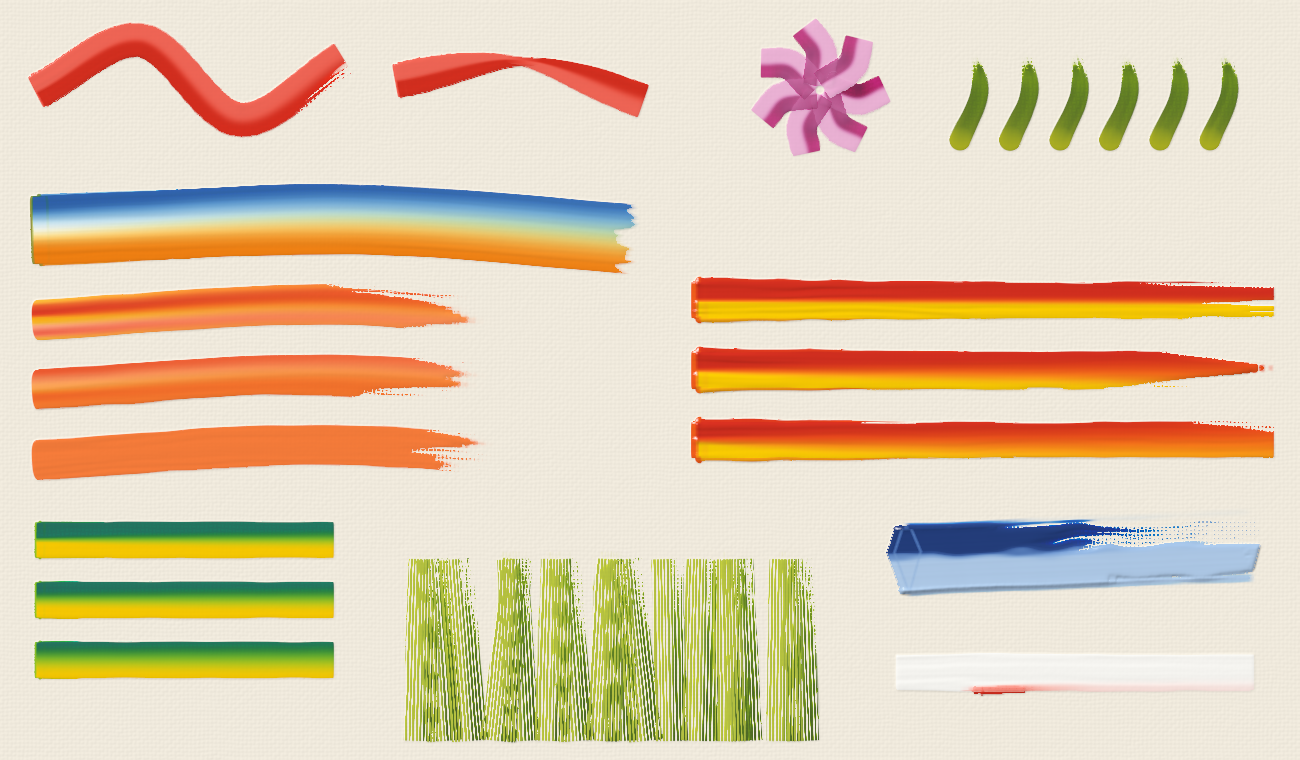
Top: a double-loaded flat (red with a white edge), the same twisted half a turn, one-stroke petals, tip-loaded leaves. Then a triple-loaded sky stroke; partly mixed pickups at mixing 0.15, 0.45 and 1.0 (left); the same red/yellow double load at blending 0.05, 0.4 and 1.0 (right); a viridian/yellow load worked 0, 2 and 6 times on the palette; double-loaded fan grass; a two-tone knife slab; and a white stroke whose lower side picked up wet red.
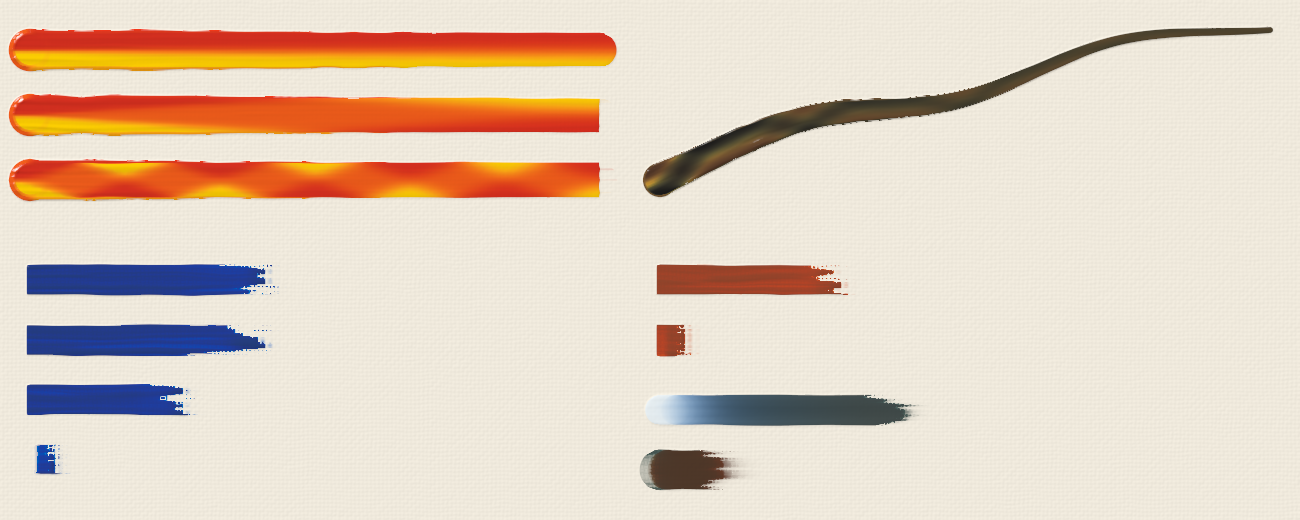
Top left: a round loaded red on one side and yellow on the other, not rolled, rolled half a turn, and rolled three turns along the stroke. Top right: a hog round loaded with umber, ochre and black around the bundle, rolled back and forth along a tapering branch. Bottom left: the same amount of blue on a flat dipped to 0.1, 0.5 and 1.0 of its length, and worked into the heel only. Bottom right: a flat dipped to the ferrule, painted once lightly and then pressed hard (only the squeezed-out heel paint comes off); a round with umber in the heel, blue in the belly and white on the tip, painted once, then pressed hard to squeeze out the umber.
Impasto: thick paint and relief
Thin paint gives colour; thick paint also gives shape. Paint has a height on the canvas, and the tools push it around:
- Load. A normal load lays a normal film. Beyond what the hair holds, the extra sits on the brush as a glob that goes on thick, and the bristles comb it into grooves and ridges.
- Pressure. Pressing an overloaded brush or knife squeezes paint out at its edges into ridges. Light pressure leaves a thick deposit; heavy pressure spreads it thin and pushes the excess aside.
- Ploughing. Dragging a tool through thick wet paint pushes the paint above it aside into ridges and ahead of it, and leaves a pile where it lifts.
- Body. How long the marks last depends on the paint's
body. Paint thinned withMEDIUMflows and levels out; tube paint keeps its bristle marks; paint stiffened withIMPASTO_MEDIUMholds sharp ridges. Even stiff paint slumps a little where it stands as a sheer cliff.
from oilpaint import Paint, brushes, palette as P

# an overloaded hog flat, pressed firmly: bristle grooves, ridges along both edges
canvas.stroke(path, P.CADMIUM_RED, amount=45, brush=brushes.FLAT_HOG.sized(36), pressure=0.8)
# the same load thinned with medium: smooth, almost no relief
canvas.stroke(path, Paint.mix((P.CADMIUM_RED, 1), (P.MEDIUM, 3)), amount=45, brush=brushes.FLAT_HOG.sized(36))
canvas.save("impasto.png", light=(-0.6, -0.8, 0.7))     # a raking light shows the relief
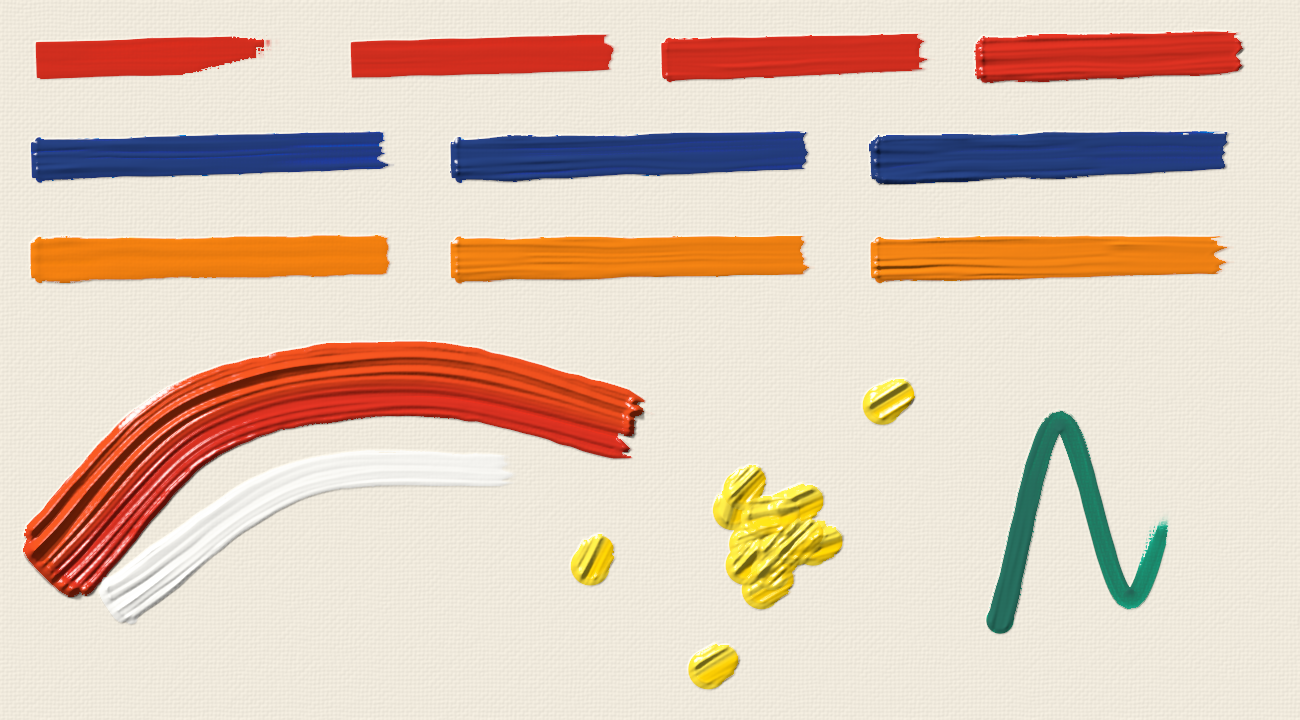
Top: the same hog flat loaded with amount 6, 15, 30 and 60. The colour is
the same; the relief grows. Second row: an overloaded flat (amount=45) at
pressure 0.2, 0.55 and 0.9, squeezing more and more paint into ridges at its
edges. Third row: the same load of orange thinned 1:3 with medium (levels
out), straight from the tube, and stiffened with impasto medium (crisp
grooves). Below: a heavily loaded two-colour filbert with white dragged
through it wet, thick dabs with a hog round, and an overloaded round.
Knives
A painting knife is a rigid steel blade. It doesn't hold paint in hair: the paint is a film under the blade, and the blade rides on it. Everything under the blade is filled up to the blade and everything above it is pushed away, so:
-
Pressure sets the thickness. A light touch leaves a thick, smooth slab with crisp edges. Pressing harder lays it thinner, with the excess squeezed into lips along the sides. Pressing hard scrapes close to the canvas: the blade rides on the tops of the threads and the paint is left only in the weave.
-
Barely touching (pressure below about 0.3), the blade skims: only the bead of paint on its edge touches the high points of what is underneath, in streaks along the blade's nicks and on the threads. That is how snow goes on a mountain over the wet dark ("let it break").
-
Running out. As the paint under the blade runs low the blade sinks: the slab thins out and finally only catches the high points, tearing into a streaky tail with the canvas showing through. A smaller load gives a stroke that starts thick and tears out before it ends.
-
Colour streaks. Paint on a blade isn't held in lanes the way bristles hold it: two or three paints loaded side by side (or picked up partly mixed with
load_mix) come out as bands that waver and merge along the stroke. -
Over wet paint. The blade rides on the wet paint already there and sinks into it the harder you press (less into stiff paint). A light touch lays a clean skin of new colour on top without mixing. Harder pressure cuts into the paint below, pushes it into ridges and drags it along. Where the blade cuts into the lower layer, the two fold into each other in streaks.
-
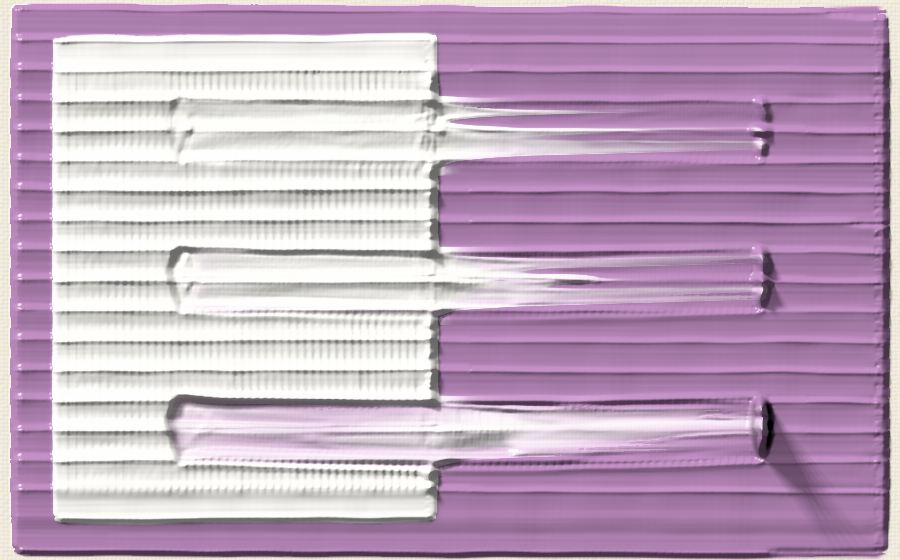
A dry knife dragged across. Say white knifed over wet purple, then a clean knife pulled from the white out across its edge into the purple:
- a light touch skims and pulls a few streaks of white across;
- a firm one drags the white out over the purple in a smear that fades from white through lavender to purple;
- pressing hard scrapes a channel down through both layers and carries the mixture along, piling it where the knife lifts.
A thick purple field with white knifed over its left half while wet, then a clean knife dragged from the white out into the purple at pressure 0.3, 0.6 and 0.9.
-
Over dry ridges. The blade skims the high points and leaves the hollows: broken colour.
-
Lifting off. A knife lifted off thick paint pulls it up into torn ridges and peaks (
lift). -
Comb knives. The teeth score grooves into wet paint and push it into ridges between them (sgraffito).
-
Edge lines. For lines with the edge of the blade, use a blade with a tiny
aspect(the blade held upright, only its edge touching) and dab it. For example,canvas.stroke([(x, y)], paint, amount=80, brush=brushes.KNIFE_STRAIGHT.with_(aspect=0.04), angle=80, follow_path=False)lays a line the length of the blade at 80° from horizontal: grass, stems, masts.
| preset | blade | for |
|---|---|---|
PALETTE_KNIFE |
medium diamond trowel | the all-rounder: slabs pulled sideways, petals with the tip |
KNIFE_TROWEL |
large trowel | covering areas with thick, flat planes of colour |
KNIFE_SMALL |
small trowel | details, small petals and leaves, dots, highlights |
KNIFE_PEAR |
teardrop, round tip | rounded petals and dabs |
KNIFE_STRAIGHT |
long straight blade | long sharp edges, lines on its edge, skies, scraping |
KNIFE_ANGLED |
end cut on a slant | crisp angled edges, corners |
KNIFE_SPOON |
small oval | round dabs, flower centres |
KNIFE_COMB |
serrated edge | parallel grooves scored into wet paint |
SCRAPER |
wide, stiff | scraping back to the canvas, big flat planes |
from oilpaint import brushes

canvas.stroke(path, "#e8c040", amount=40, brush=brushes.PALETTE_KNIFE, pressure=0.3)   # a thick slab
canvas.stroke(path, "#e8c040", amount=40, brush=brushes.PALETTE_KNIFE, pressure=0.9)   # scraped thin
# a petal: the flat of a pear knife pressed down at the outer edge and pulled in towards the
# centre, easing off: the mark narrows as less of the blade touches
canvas.stroke([(outer_x, outer_y), (centre_x, centre_y)], paint=[("#f6f5f0", 10), ("#f7c600", 3, "right")],
              brush=brushes.KNIFE_PEAR, angle=10, width=[36, 12], pressure=[0.3, 0.55])
# a swatch that tears out: partly mixed paints, not too much of them
from oilpaint import Brush
knife = Brush(brushes.PALETTE_KNIFE.sized(90)).load_mix([("#b8246e", 2), ("#f6f5f0", 1)], 12, mixing=0.25)
canvas.stroke([(430, 100), (60, 102)], brush=knife, pressure=[0.25, 0.55])
# make your own: shape, blade length, flexibility (0 stiff .. 1 very flexible), teeth
my_knife = brushes.knife("trowel", 50, flex=0.7)
Do the different knives make a difference? Yes, though less than the way they're held:
- Shape. The blade's outline is the shape of the mark. A diamond trowel leaves pointed ends and a pear leaves rounded ones. A long straight blade gives long straight edges and lines.
- Size. The blade's size sets the scale: a small trowel for petals and dots, a large one or a scraper for planes.
- Flexibility. A flexible blade bends under pressure, follows the surface and spreads thinner. A stiff one rides on the high points, lays thicker slabs and scrapes cleanly.
- Handle. A cranked (offset) handle keeps the knuckles out of the wet paint; it changes nothing in the mark, so it isn't modelled.
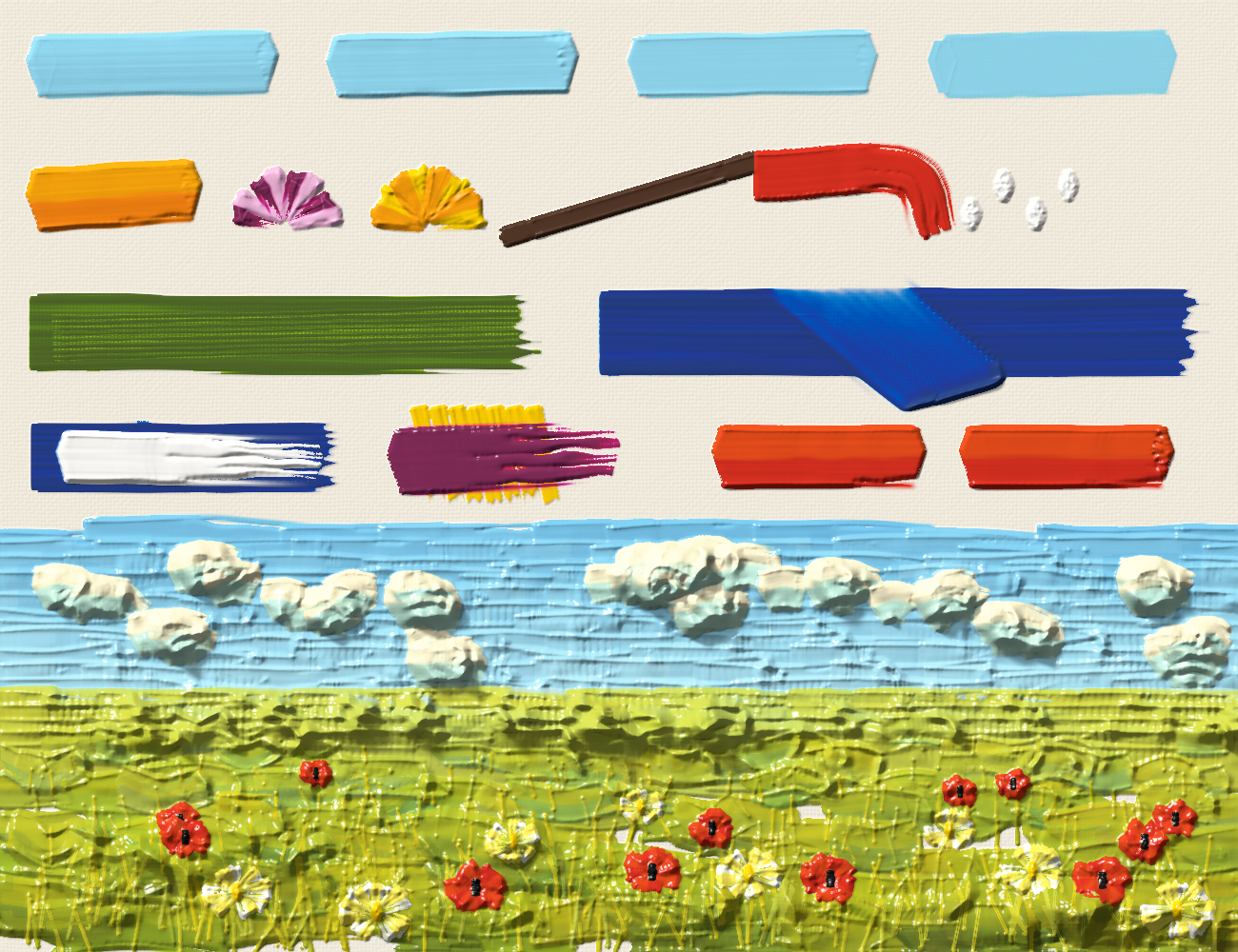
Top: a palette knife at pressure 0.15, 0.4, 0.7 and 0.95, from a thick slab
to paint scraped into the weave. Second row: the large trowel, small-trowel
and pear-knife petals (each pulled in towards the centre), a line with a straight blade pulled along its
length, the angled blade turning a corner, spoon dabs. Third row: a comb
scoring grooves into wet green, and the scraper taking wet blue back to the
canvas. Fourth row: white laid on wet blue with a light touch, magenta
skimmed over dry ridges of yellow, and a double-loaded slab lifted off
cleanly (lift=0) and pulled up (lift=1). Below: a small field of flowers,
all knife work: sky in long pulls with clouds twisted on thick, a field of
overlapping pulls, grass dabbed with the edge of a blade, poppy and daisy
petals pulled in towards their centres.
How it works
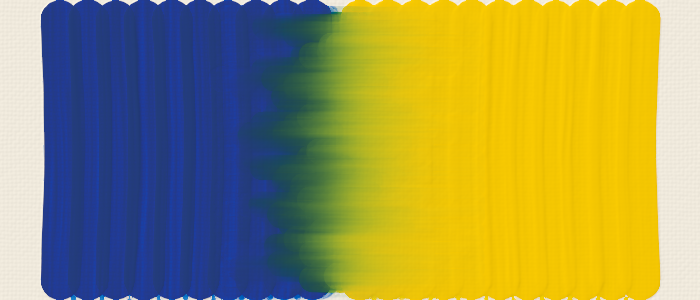
Color is spectral. Each paint is turned into a smooth reflectance spectrum
(24 bands, 400–700 nm) using Scott Burns' method, then into Kubelka-Munk
absorption K(λ) and scattering S per unit volume. S is set from the
paint's lightness and opacity, and K is solved so that a normal-thickness
layer over white reproduces exactly the color you asked for. Mixing adds K
and S by volume; that's why mixes behave like pigments (darker, subtractive,
complementaries going to near-black, white making tints rather than washing
out).
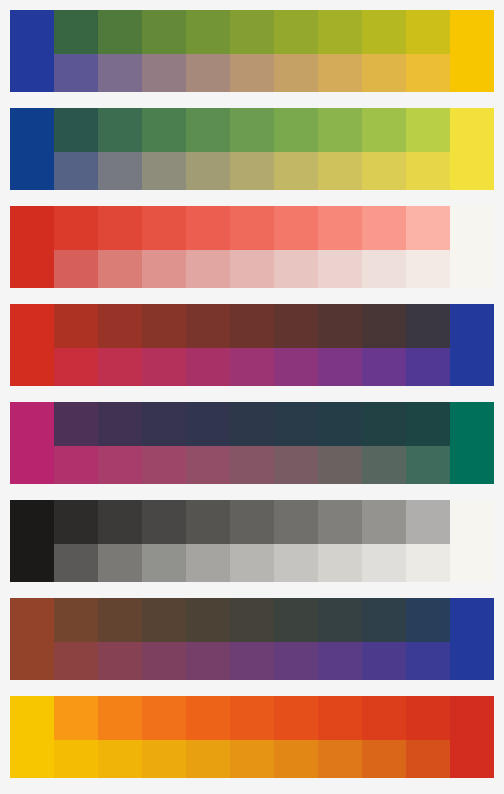
In each pair of rows, the top row is paint mixing and the bottom row is naive RGB averaging.
Layers have thickness. The canvas stores, per pixel, a dry ground spectrum
and two wet sublayers: under (older wet paint) and top (the latest
stroke). Rendering uses the finite-thickness Kubelka-Munk formula, so thin
paint lets the underlayer show through, transparent paints glaze, and opaque
paints cover. Each pixel also records how much of it the brush actually
covered, computed from the exact footprint, so stroke edges and lines thinner
than a pixel are anti-aliased: an edge pixel is half covered by a normal
layer of paint rather than fully covered by an impossibly thin one. Paint too
thin to form a film (dry-brush specks, smears) also renders as partial
coverage. A new stroke only buries the wet paint under it where it lays a
covering film: along the feathered edge of a soft brush, a faint trace of
paint stirs into the wet layer instead. So white scrubbed over white on a wet
blue sky stays white where the strokes overlap; it doesn't leave a blue ring
at every soft edge.
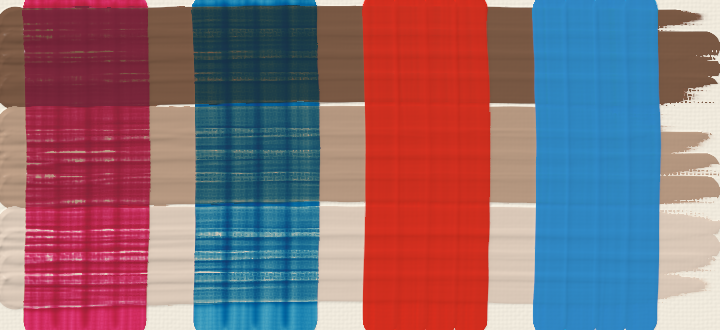
Left two columns: transparent glazes over a dried value study. Right two columns: opaque paints that hide it.
The brush moves paint around. The brush is a footprint (round, rectangular, oval-tipped or a fan of clumps; no individual bristles). Its paint sits in 24 columns across it (around the bundle on a round, mapped to the footprint through the current roll), each with a tip, a belly (reservoir) and a heel that only gives paint up when squeezed. At each step along the spline it does four things:
- It pushes some of the wet paint ahead of it (drag).
- It lifts some of the wet paint into its tip (pickup).
- It lays down a mix of what the tip holds (deposit), refilling the tip from
the reservoir. Neighbouring columns and layers slowly share their paint as
the brush flexes (the
blendingsetting). - It stirs the new paint into the wet paint below, more with more pressure.
Together this gives smears that fade over a short distance, dirty brushes, streaky wet-into-wet blends, and strokes that run dry and break up on the canvas tooth.
Paint has height and gets pushed around. The underside of the tool sits at a level above the canvas. For bristles, that's about the thickness they lay, lower along the hair lines. For a knife, it's the blade resting on the highest points below it (thread tops, dry ridges, and wet paint from earlier strokes, which it sinks into under pressure), plus a gap set by pressure, and no higher than the paint film under it. The blade is rigid along the direction it moves, so its height varies only along its length. Wet paint standing above that level is shifted:
- partly out past the edges, into ridges with anti-aliased edges;
- the rest ahead of the tool, where it piles up when the tool lifts;
- for brushes, partly onto the brush (pickup).
A tool carrying more paint than it holds squeezes the extra out at its edges, more under pressure. A knife then fills the space under its blade up to that level. Thick brush paint likewise fills the hollows of the weave under it rather than coating them evenly. After each stroke the paint settles: wherever it is steeper than its body can hold, it flows downhill.
Under a knife, wet paint flows. The blade drags the wet paint it touches, as a thin film between the moving blade and the still canvas. Paint near the blade travels almost with it, paint at the canvas hardly moves, and paint above the blade is bulldozed ahead. Near the edges of the mark, some of the paint that was lying there spills out sideways into lips: a narrow mark spills most of what it cuts through, a wide scraper only at its ends, and a heap the blade is pushing along rides with it instead of leaving trails. A knife doesn't pick wet paint up as it goes (the flow carries it), so it doesn't get dirty the way a brush does: the scraped paint is left where the knife lifts.
- Layers keep their order. Each wet layer moves at its own speed, so white dragged over purple stays on top of it.
- Viscosity. Neighbouring paint drags each other along, so the speeds vary smoothly.
- Small steps. The paint is moved by fluxes between neighbouring pixels in steps of under a pixel, so nothing is lost and the pile in front of the blade travels smoothly.
- Resting level. The blade rests on the high points under it, bends to follow the surface over a span set by its stiffness, and sinks into the paint by a share of its thickness that grows with pressure.
- Its own load. The blade glides on the fresh paint it lays.
Paint volume is conserved throughout. Each step integrates the brush's exact sweep over each pixel, so the result doesn't depend on the step size. The footprint is swept at its current angle and size (both can change along the stroke), which is what makes a flat's square ends, its thin edge and its twisted ribbons.
Light. Rendering lights the same surface the paint is pushed around on: the canvas weave, dried paint and wet paint. Thin strokes get soft shoulders; impasto keeps every ridge and groove. It then shades it with the light, casts shadows from ridges onto the paint behind them, darkens deep hollows, and adds the gloss of oil, sharper while it's wet.
Limitations
- No bristle-level simulation or drying over time (
dry()is all-or-nothing). Absorbency acts immediately rather than as the paint dries, and wet paint settles right after each stroke rather than over minutes. - Each pixel keeps two wet layers (the latest one and everything wet beneath it). A third wet layer is merged into one of them: new paint goes on top where it covers (a faint trace stirs into the top layer instead), while paint that is only pushed around merges with the layer it is most like. Very complex wet layering (three different colours stacked, then scraped) loses some of its structure.
- Wet paint under a knife flows as a thin film along the knife's direction of travel only, and brushes still move paint by simpler rules (pickup, smear, bow wave). Paint folding over itself or swirling sideways (marbling) isn't simulated.
- Knives lie flat on the canvas (or, with a tiny
aspect, on their edge); the tilt of the blade (spreading with the trailing edge down vs scraping with the leading edge) is folded into pressure. - Paint optics are derived from RGB colors, not measured pigment data. If you
have measured spectra,
Paint.from_optics(K, S)accepts them directly. - Speed: about a millisecond for a small brush stroke, tenths of a second for a big heavily loaded one or a knife stroke. Memory is about 0.3 KB per pixel (a 1000×750 canvas needs ~250 MB).
Development
Python 3.11 to 3.15. The checks run with uv and tox:
uv run tox            # every Python version: formatting, lint, types and tests
uv run tox -e check   # the same, once, on the current Python
uv run pytest         # just the tests
make coverage         # test coverage, with an HTML report in htmlcov/
make spell            # spelling (cspell; needs Node.js)
make pre-push         # tox, and the spelling of the files you changed
Formatting is black and ruff format (88 columns), lint is ruff, types are
pyright. CI runs the spell check, then the tox checks on each Python version
and the coverage (sent to Codecov), on every pull request and every push to
main. The coverage leaves out the compiled engine (oilpaint/_engine.py):
coverage.py can't see inside numba-compiled code, though every test runs it.
1 maintainer

Metadata
1 maintainer
Release files for oilpaint 0.1.0
For a detailed explanation of source distributions (sdists) and built distributions (wheels), please see the package formats documentation.
Source distribution (sdist)
| File | Size | Uploaded | Provenance | Actions |
|---|---|---|---|---|
| oilpaint-0.1.0.tar.gz | 124.3 kB | With provenance | Details for oilpaint-0.1.0.tar.gz |
Built distribution (wheel)
| File | Interpreter | ABI | Platform | Actions Reset |
|---|---|---|---|---|
| oilpaint-0.1.0-py3-none-any.whl | Python 3 | none | any | Details for oilpaint-0.1.0-py3-none-any.whl |
Total release size: 222.2 kB
Release files / oilpaint-0.1.0.tar.gz
| Download URL | oilpaint-0.1.0.tar.gz |
|---|---|
| Size | 124.3 kB |
| Tags | Source |
|
SHA-256 checksum How to use checksums |
29625a6d6cce61ee4322b00d617a3a61519a460b2a05f3f10d1515a28f265c17
|
|
BLAKE2b-256 checksum How to use checksums |
247b98729ce02b1003e7d6bbfea2e1581e6ea0626c5274c313d68e653f531d50
|
| Upload date | |
|
Uploaded using Trusted Publishing? What is trusted publishing? |
Yes |
| Uploaded via |
twine/7.0.0 CPython/3.13.16
|
Provenance
Provenance describes where a file came from. On PyPI, provenance is shared via attestations, which provide a verifiable record of the build or publishing details. View details, limitations and caveats.


PyPI Publish Attestation
PyPI verified that this artifact, at this checksum, originated from the publisher listed below.
Signed by GitHub Actions, verified by PyPI on Nov 3, 2026.
Transparency logRelease files / oilpaint-0.1.0-py3-none-any.whl
| Download URL | oilpaint-0.1.0-py3-none-any.whl |
|---|---|
| Size | 97.9 kB |
| Tags | Python 3 |
|
SHA-256 checksum How to use checksums |
7dfa898fcfe96da28acccfac9698a12bbb279526e6121ae1bd8c6408d240365b
|
|
BLAKE2b-256 checksum How to use checksums |
8210049a4f6d68c36637063f89d701560f9f9391ed1dcedf62e1d53fe6aa252a
|
| Upload date | |
|
Uploaded using Trusted Publishing? What is trusted publishing? |
Yes |
| Uploaded via |
twine/7.0.0 CPython/3.13.16
|
Provenance
Provenance describes where a file came from. On PyPI, provenance is shared via attestations, which provide a verifiable record of the build or publishing details. View details, limitations and caveats.
PyPI Publish Attestation
PyPI verified that this artifact, at this checksum, originated from the publisher listed below.
Signed by GitHub Actions, verified by PyPI on Nov 3, 2026.
Transparency logSecurity for oilpaint 0.1.0
Provenance
Provenance describes where a file came from. On PyPI, provenance is shared via attestations, which provide a verifiable record of the build or publishing details. View details, limitations and caveats.
Full provenance
Both files in this release have been uploaded with provenance metadata.
Attestation for oilpaint-0.1.0.tar.gz
PyPI Publish Attestation
PyPI verified that this artifact, at this checksum, originated from the publisher listed below.
Signed by GitHub Actions, verified by PyPI on Nov 3, 2026.
Transparency logA note on package security
PyPI is a repository for distributing packages, not a service for auditing them. While third-party security researchers and our staff do their best to detect and remove malicious packages, PyPI cannot guarantee the quality, security or suitability of any given package.
To learn more about protecting yourself from malicious actors, visit our package security documentation.













