
MCP (Model Context Protocol) server exposing the okama investment portfolio toolkit to AI assistants
Verified details
These details have been verified by PyPIProject links
GitHub Statistics
Maintainers

Project description
okama-mcp




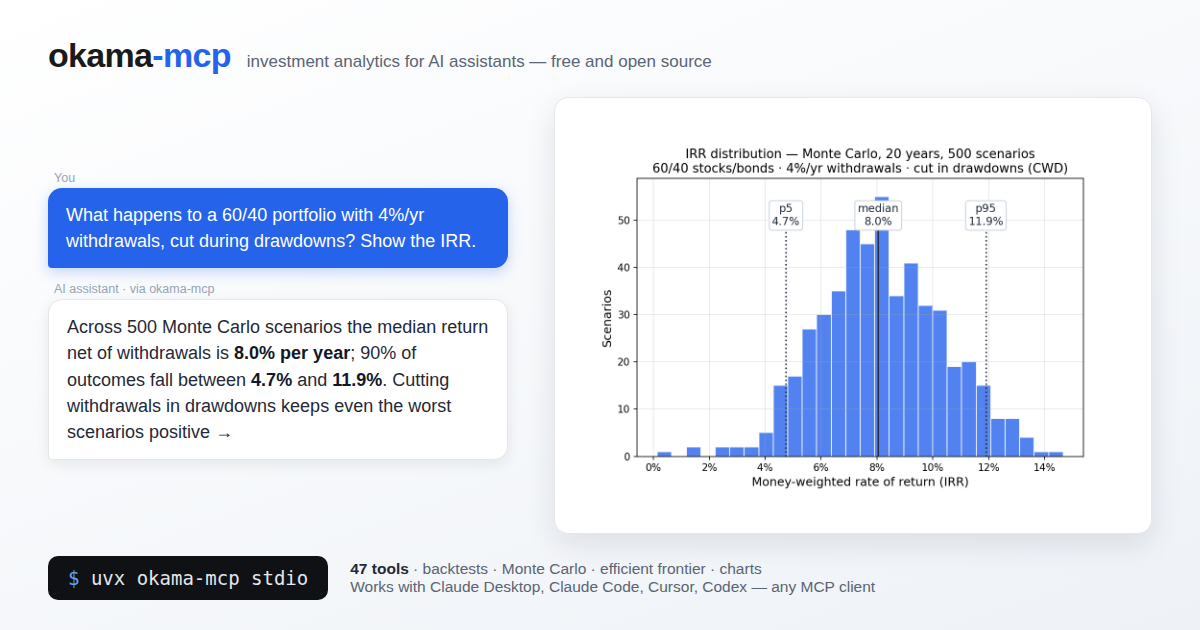
MCP (Model Context Protocol) server that exposes the okama investment portfolio toolkit to AI assistants — Claude Desktop, Claude Code, Cursor, and any other MCP-compatible client.
With okama-mcp installed, you can ask an AI things like:
"Backtest a portfolio of 30% gold and 70% real estate over the last 15 years."
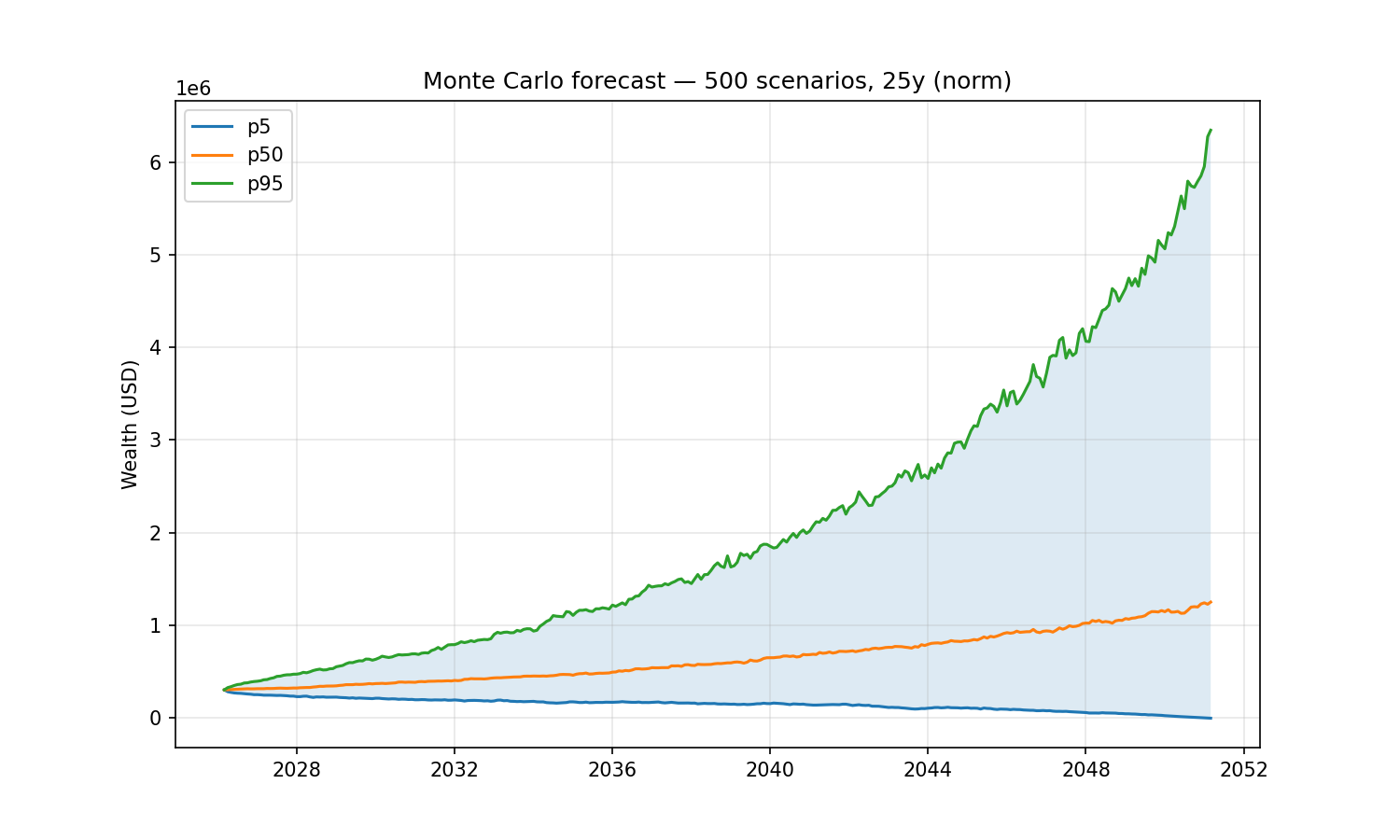
"Run a Monte Carlo retirement forecast on that portfolio, withdrawing $1,000/month indexed to inflation, over 25 years."
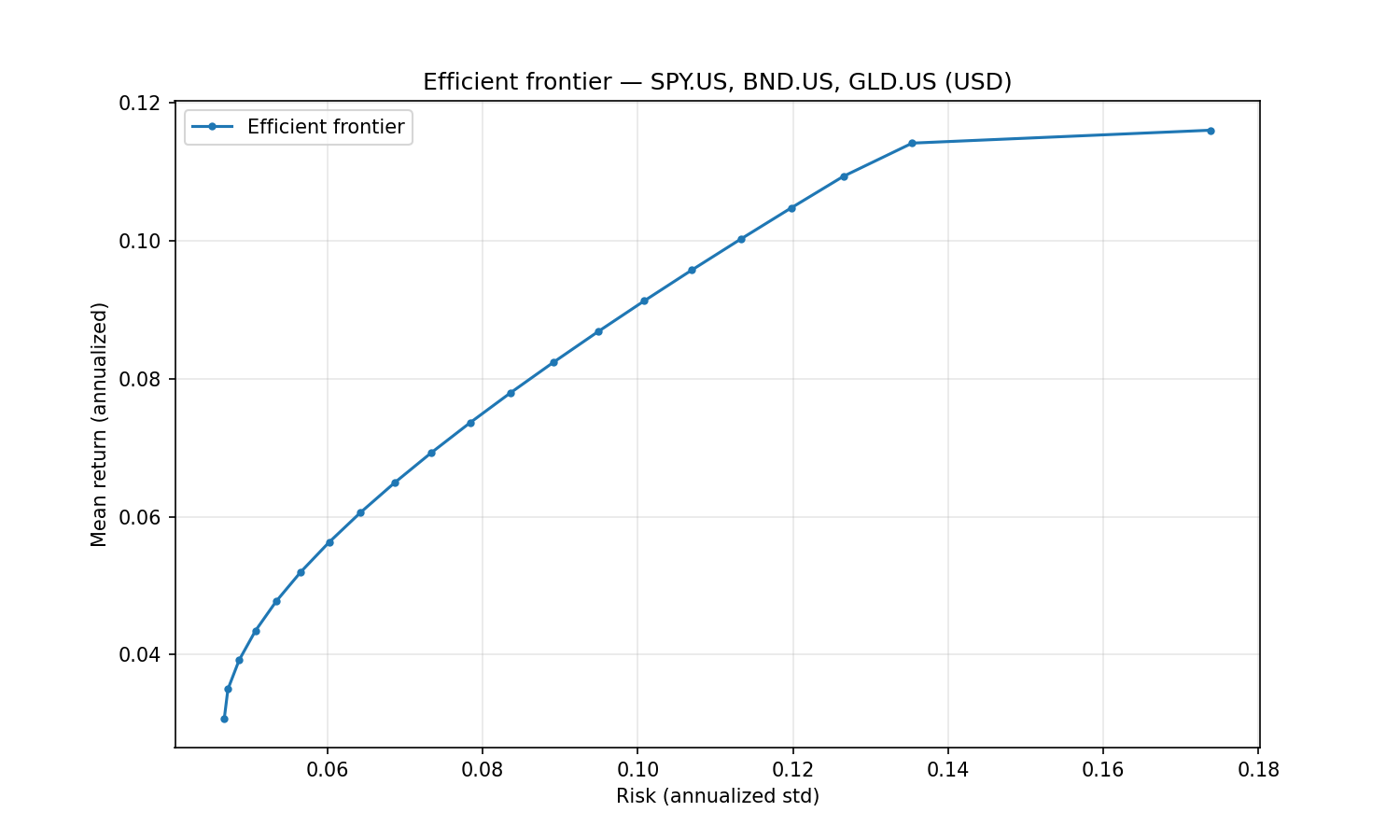
"What's the tangency portfolio of SPY, BND, and GLD with a 3% risk-free rate?"
…and the AI uses the MCP tools to call okama directly — no Python code needed.
Built on FastMCP. Single codebase, two transports:
stdio (for local clients) and streamable-http (for self-hosting).
okama-mcp is free and open source — no hosted service, no registration; you run it
yourself, locally or on your own server.
Install
Requires Python ≥ 3.11 (same floor as okama itself); okama ≥ 2.2.0 is installed automatically.
The easiest way — no clone, no venv — is uv or pipx:
uvx okama-mcp stdio          # run straight from PyPI
# or
pipx install okama-mcp
Plain pip works too:
pip install okama-mcp
[!WARNING] With pip, prefer a dedicated virtual environment: on most modern Linux distros the system Python is marked externally managed (PEP 668), so
pip installoutside a venv fails, and a shared environment risks dependency conflicts. In your MCP client config, pointcommandat the absolute path of theokama-mcpscript inside the venv — GUI clients don't see your shellPATH.uvxandpipxavoid all of this by isolating the install automatically.
To work on the code, install from source instead:
git clone https://github.com/mbk-dev/okama-mcp
cd okama-mcp
poetry install
Run
# stdio — for Claude Desktop, Claude Code, Cursor (local IPC)
okama-mcp stdio

# streamable HTTP — for self-hosting on your own server
okama-mcp http --host 127.0.0.1 --port 8765
When running from a source checkout, prefix each command with poetry run.
Connect a client
Claude Desktop
Edit ~/Library/Application Support/Claude/claude_desktop_config.json (macOS) or
%APPDATA%\Claude\claude_desktop_config.json (Windows):
{
  "mcpServers": {
    "okama": {
      "command": "uvx",
      "args": ["okama-mcp", "stdio"]
    }
  }
}
Restart Claude Desktop; the server appears in the tools menu.
Claude Code
To make the server available in every project (works from any directory):
claude mcp add --scope user okama -- uvx okama-mcp stdio
Developers running from a source checkout can use claude mcp add okama -- poetry run okama-mcp stdio from the project root instead.
Or commit a .mcp.json at the project root so the whole team picks it up:
{
  "mcpServers": {
    "okama": {
      "command": "uvx",
      "args": ["okama-mcp", "stdio"]
    }
  }
}
Cursor
Add the server to .cursor/mcp.json in your project (or ~/.cursor/mcp.json to make
it global):
{
  "mcpServers": {
    "okama": {
      "command": "uvx",
      "args": ["okama-mcp", "stdio"]
    }
  }
}
Codex (CLI & Desktop)
Add the server with one command:
codex mcp add okama -- uvx okama-mcp stdio
Or declare it in ~/.codex/config.toml (or a project-scoped .codex/config.toml
in trusted projects):
[mcp_servers.okama]
command = "uvx"
args = ["okama-mcp", "stdio"]
The Codex CLI, desktop app, and IDE extension share this configuration — set it up once and it works in all three.
Self-hosting (streamable HTTP)
Run okama-mcp on your own server and share it across your MCP clients:
okama-mcp http --host 127.0.0.1 --port 8765 --path /mcp
(From source: poetry run okama-mcp http ...)
Then point your MCP client at http://<your-server>:8765/mcp. For a production
setup put nginx + TLS in front; ready-made examples live in deploy/:
deploy/systemd/okama-mcp.service— systemd unit (hardened, runs as a dedicated user)deploy/nginx/self-hosted.conf— nginx vhost: TLS, SSE-friendly proxying of/mcp
The server is open by design — free to run, no registration. If your instance must not be public, restrict access at the nginx level (allow-list, VPN, or HTTP basic auth).
Tool catalog
A Monte Carlo retirement forecast (30% gold / 70% real estate, withdrawing $1,000/month indexed to inflation over 25 years) and the efficient frontier of SPY/BND/GLD — the exact examples from the top of this page:
All tools are stateless — pass the full portfolio specification with every call.
The server caches expensive okama objects (Portfolio, EfficientFrontier) by content
hash, so repeated calls on the same spec are fast.
Search & metadata
| Tool | Purpose |
|---|---|
search_assets(query, namespace?) |
Free-text search across all okama symbols by name / ticker / ISIN. |
list_namespaces(kind="all"|"assets"|"macro") |
Show the available okama namespaces. |
get_asset_info(symbol) |
Metadata for one symbol — name, country, currency, type, date range. |
Single asset & comparisons
| Tool | Purpose |
|---|---|
get_asset_history(symbol, kind, first_date?, last_date?) |
Time series for one asset. kind ∈ {close_monthly, close_daily, adj_close, ror, dividends}. |
compare_assets(symbols, ccy, first_date?, last_date?, inflation) |
Side-by-side statistics (describe() table: CAGR, risk, drawdowns by period). |
get_correlations(symbols, ccy, ...) |
Correlation matrix of monthly returns. |
get_rolling_risk(symbols, ccy, window_months=12) |
Rolling annualized risk per asset. |
get_dividend_info(symbols, ccy, ...) |
LTM dividend yield, 5y mean yield, paying/growing streaks per asset. |
Portfolio backtest
| Tool | Purpose |
|---|---|
analyze_portfolio(portfolio) |
Headline metrics + full describe() for a PortfolioSpec. |
get_portfolio_drawdowns(portfolio) |
Drawdown time series + max drawdown / recovery period. |
get_portfolio_var_cvar(portfolio, time_frame=12, level=1) |
Historical Value at Risk and CVaR. |
get_portfolio_wealth_index(portfolio, full=False) |
Wealth-index series (cumulative growth of 1000). |
get_rolling_cagr(portfolio, window_months=12, real=False) |
Rolling CAGR time series (optionally inflation-adjusted). |
get_cagr_probability(portfolio, years, cagr_target) |
Historical probability of CAGR below a target (e.g. of a loss) over N-year periods. |
Monte Carlo DCF
| Tool | Purpose |
|---|---|
monte_carlo_forecast(portfolio, mc, cashflow) |
Forward simulation with one of five cash-flow strategies (indexation, percentage, time_series, vanguard, cut_if_drawdown). Returns percentile wealth bands, terminal-wealth stats, survival metrics. Includes the money-weighted IRR distribution (percentiles + mean). |
get_portfolio_irr(portfolio, cashflow) |
Historical money-weighted return (IRR) for a contribution/withdrawal plan. |
Efficient Frontier
| Tool | Purpose |
|---|---|
build_efficient_frontier(frontier) |
Full EF point table (Risk / Mean return / CAGR + per-asset weights). |
get_tangency_portfolio(frontier, rf_return, rate_of_return) |
Max-Sharpe portfolio on the EF. |
get_min_variance_portfolio(frontier) |
Global Minimum Variance portfolio. |
Macro
| Tool | Purpose |
|---|---|
get_inflation(currency, first_date?, last_date?, include_cumulative?) |
Inflation series for a currency (USD, EUR, RUB, …). |
get_central_bank_rate(country, first_date?, last_date?) |
Central-bank policy rate (US, ECB, RUS, …). |
Charts
Each tool renders a PNG (default 1500×900) and returns it as MCP image content —
clients like Claude Desktop display it inline. Every chart tool also accepts
optional width / height (pixels, 300–4000) for custom sizes and aspect ratios,
and an optional save_path — the chart is then also written to that file and the
path reported back. Use save_path in clients that don't render MCP images in
their UI (e.g. Claude Code's terminal): ask for a chart "saved to /tmp/chart.png"
and open the file reference. Note: in self-hosted (streamable-http) deployments
save_path is written on the server's filesystem, not the client's machine.
| Tool | Chart |
|---|---|
plot_wealth_index(portfolio) |
Portfolio wealth index (+ inflation line). |
plot_drawdowns(portfolio) |
Drawdown depth over time. |
plot_monte_carlo(portfolio, mc, cashflow) |
Monte Carlo forecast fan (percentile bands). |
plot_irr_distribution(portfolio, mc, cashflow) |
Histogram of IRR across Monte Carlo scenarios (percentile markers). |
plot_efficient_frontier(frontier) |
EF curve with individual asset points. |
plot_assets(symbols, ccy, ...) |
Wealth-index comparison of individual assets. |
Spec shapes
The complex tools take typed dicts validated by pydantic. The full schemas live in
src/okama_mcp/schemas.py; here are the headline shapes:
// PortfolioSpec
{
  "assets":   ["GLD.US", "VNQ.US"],
  "weights":  [0.3, 0.7],            // optional, must sum to 1.0
  "ccy":      "USD",
  "first_date": "2010-01",
  "last_date":  "2024-12",
  "rebalancing_strategy": {            // mirrors okama.Rebalance
    "period": "year",                  // month | quarter | half-year | year | none
    "abs_deviation": 0.05,             // optional, |actual - target| threshold, 0 < x <= 1
    "rel_deviation": 0.1               // optional, |actual / target - 1| threshold, > 0
  },
  "inflation": true
}

// MCSpec
{
  "distribution":  "norm",            // norm | lognorm | t
  "period_years":  25,
  "scenarios":     500,                // ≤ 5000
  "percentiles":   [5, 50, 95],
  "random_seed":   42                  // optional, for reproducibility
}

// CashflowSpec — discriminated by `type`
{ "type": "indexation",       "initial_investment": 1000000, "frequency": "month", "amount": -1000, "indexation": "inflation" }
{ "type": "percentage",       "initial_investment": 1000000, "frequency": "year",  "percentage": -0.04 }
{ "type": "time_series",      "initial_investment": 100000,  "events":    { "2030-06": -50000 } }
{ "type": "vanguard",         "initial_investment": 1000000, "percentage": -0.04, "floor_ceiling": [-0.025, 0.05], "indexation": "inflation" }
{ "type": "cut_if_drawdown",  "initial_investment": 1000000, "frequency": "year",  "amount": -60000, "indexation": "inflation",
  "crash_threshold_reduction": [[0.2, 0.4], [0.5, 1.0]] }

// FrontierSpec
{
  "assets":   ["SPY.US", "BND.US", "GLD.US"],
  "ccy":      "USD",
  "bounds":   [[0.0, 0.7], [0.1, 1.0], [0.0, 0.3]],   // optional
  "n_points": 20,
  "rebalancing_strategy": { "period": "year" },
  "inflation": false
}
Development
The project follows TDD (see AGENTS.md). After every code change run:
poetry run pytest -q
poetry run ruff check .
To run the live-API integration test (hits api.okama.io):
poetry run pytest -m integration
Project layout
src/okama_mcp/
├── server.py          # FastMCP instance + registration entry point
├── transport.py       # CLI: `okama-mcp stdio | http`
├── schemas.py         # PortfolioSpec, MCSpec, CashflowSpec, FrontierSpec
├── cache.py           # TTL+LRU cache keyed by sha256 of canonical spec
├── serialization.py   # pandas → JSON-safe with smart truncation
├── errors.py          # Translate okama exceptions to actionable MCP errors
└── tools/
    ├── search.py, asset.py, asset_list.py
    ├── portfolio.py, monte_carlo.py
    ├── frontier.py, macro.py
    └── plots.py
License
MIT — same license as okama itself.
Project details
Verified details
These details have been verified by PyPIProject links
GitHub Statistics
Maintainers
Release history Release notifications | RSS feed


Download files
Download the file for your platform. If you're not sure which to choose, learn more about installing packages.
Source Distribution
Built Distribution
Filter files by name, interpreter, ABI, and platform.
If you're not sure about the file name format, learn more about wheel file names.
Copy a direct link to the current filters
File details
Details for the file okama_mcp-1.3.1.tar.gz.
File metadata
- Download URL: okama_mcp-1.3.1.tar.gz
- Upload date:
- Size: 33.1 kB
- Tags: Source
- Uploaded using Trusted Publishing? Yes
- Uploaded via: twine/6.1.0 CPython/3.13.12
File hashes
| Algorithm | Hash digest | |
|---|---|---|
| SHA256 |
4371ad76727043d3d165f4ab4c4637f2e0af6c281e04f8e146b0ac1b0c3819d4
|
|
| MD5 |
25577709ca7687d0d87b3a322c62ffa0
|
|
| BLAKE2b-256 |
c9b31b5ef139aa0630553ab08447e5b5cd0aaab7acc9e1efd6432713dab52582
|
Provenance
The following attestation bundles were made for okama_mcp-1.3.1.tar.gz:
Publisher:
release.yml on mbk-dev/okama-mcp
-
Statement:
-
Statement type:
https://in-toto.io/Statement/v1 -
Predicate type:
https://docs.pypi.org/attestations/publish/v1 -
Subject name:
okama_mcp-1.3.1.tar.gz -
Subject digest:
4371ad76727043d3d165f4ab4c4637f2e0af6c281e04f8e146b0ac1b0c3819d4 - Sigstore transparency entry: 1733039973
- Sigstore integration time:
-
Permalink:
mbk-dev/okama-mcp@fe8953dd6f0e9b43a167bdb70cf778fb54909983 -
Branch / Tag:
refs/tags/v1.3.1 - Owner: https://github.com/mbk-dev
-
Access:
public
-
Token Issuer:
https://token.actions.githubusercontent.com -
Runner Environment:
github-hosted -
Publication workflow:
release.yml@fe8953dd6f0e9b43a167bdb70cf778fb54909983 -
Trigger Event:
push
-
Statement type:
File details
Details for the file okama_mcp-1.3.1-py3-none-any.whl.
File metadata
- Download URL: okama_mcp-1.3.1-py3-none-any.whl
- Upload date:
- Size: 37.6 kB
- Tags: Python 3
- Uploaded using Trusted Publishing? Yes
- Uploaded via: twine/6.1.0 CPython/3.13.12
File hashes
| Algorithm | Hash digest | |
|---|---|---|
| SHA256 |
000cfbdbbfdf8b572e8ff088c3f7597997b1abb22364bcc747abb2457047d386
|
|
| MD5 |
9ce3bd49c0c7210581573b7bebe49c6e
|
|
| BLAKE2b-256 |
35516a35d547c7e0d97f56cd3a7d55fd7a943443791d9979beae01151c00c1a1
|
Provenance
The following attestation bundles were made for okama_mcp-1.3.1-py3-none-any.whl:
Publisher:
release.yml on mbk-dev/okama-mcp
-
Statement:
-
Statement type:
https://in-toto.io/Statement/v1 -
Predicate type:
https://docs.pypi.org/attestations/publish/v1 -
Subject name:
okama_mcp-1.3.1-py3-none-any.whl -
Subject digest:
000cfbdbbfdf8b572e8ff088c3f7597997b1abb22364bcc747abb2457047d386 - Sigstore transparency entry: 1733040008
- Sigstore integration time:
-
Permalink:
mbk-dev/okama-mcp@fe8953dd6f0e9b43a167bdb70cf778fb54909983 -
Branch / Tag:
refs/tags/v1.3.1 - Owner: https://github.com/mbk-dev
-
Access:
public
-
Token Issuer:
https://token.actions.githubusercontent.com -
Runner Environment:
github-hosted -
Publication workflow:
release.yml@fe8953dd6f0e9b43a167bdb70cf778fb54909983 -
Trigger Event:
push
-
Statement type:






