
okflify
Renders canonical OPF v1 product graphs and OKF bundles as HTML. One command, one self-contained file — no server, no build pipeline, no dependencies.
For OPF v1, product.json is semantic authority. OKFlify derives source,
canonical hierarchy, typed graph, journey/experience, decisions/authority,
timeline/calendar, evidence/proof, and unresolved-gap views without inferring
meaning from filenames or dates.
ORF (research) and EMF (memory) are additive OKF profiles. The same command renders them and labels their profile versions in the header.
See it live → · served from Eidos Hostkey and rebuilt from the same source CI verifies on every push.
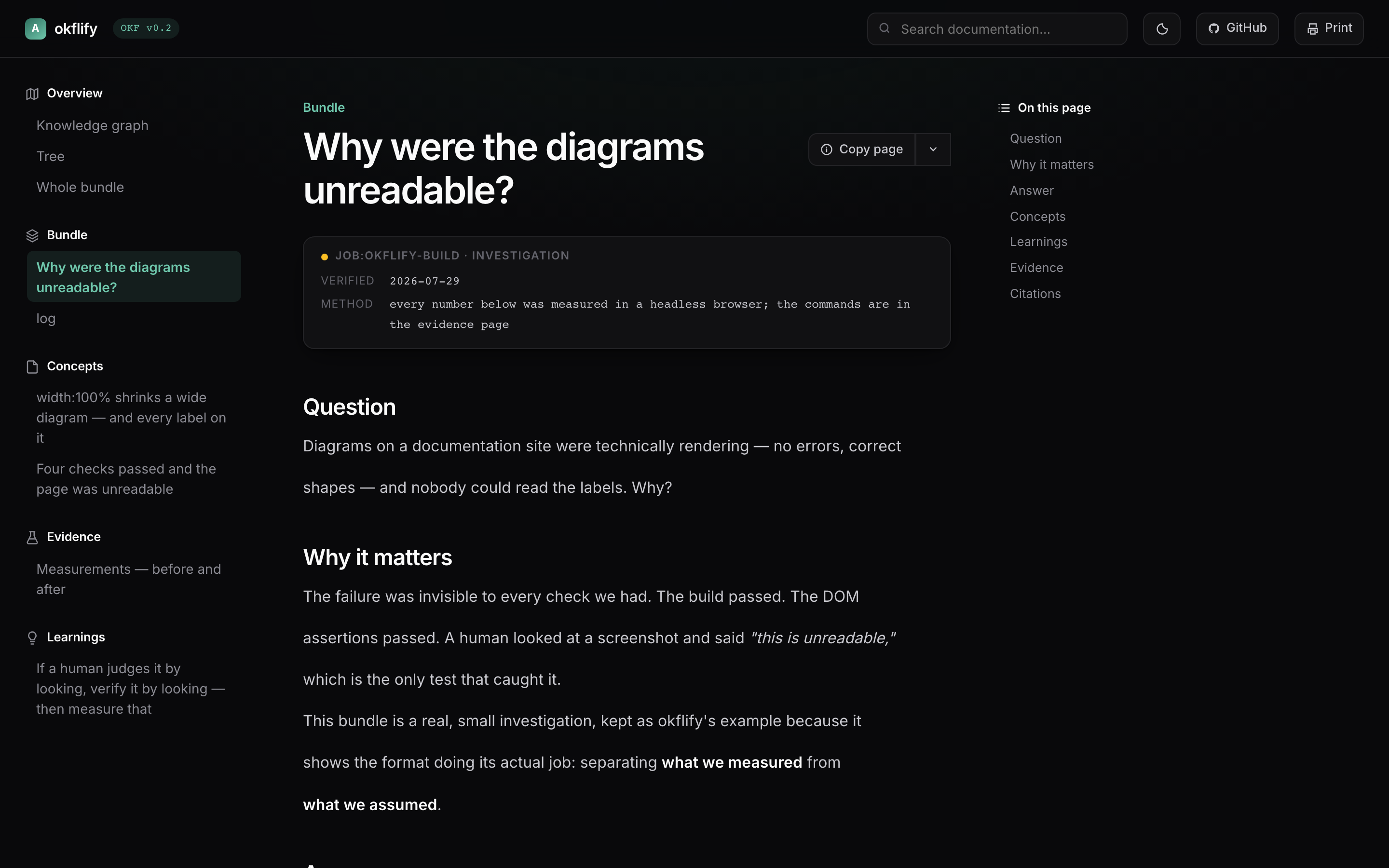
pip install -e .
okflify --example --open        # a real investigation, rendered
okflify ~/path/to/bundle        # or your own
okflify → bundle/okflify.html — 8 documents, 14 edges, 3 diagrams
Start with the manual
--example renders the detailed OKFlify manual as an OKF bundle. It explains the
OKF foundation, the renderer, ORF research packs, EMF memory packs, how the
profiles compose, and the compatibility proof. The public Hostkey site is built
from this same bundle: OKFlify documents itself by rendering its own source format.
Trust is the point
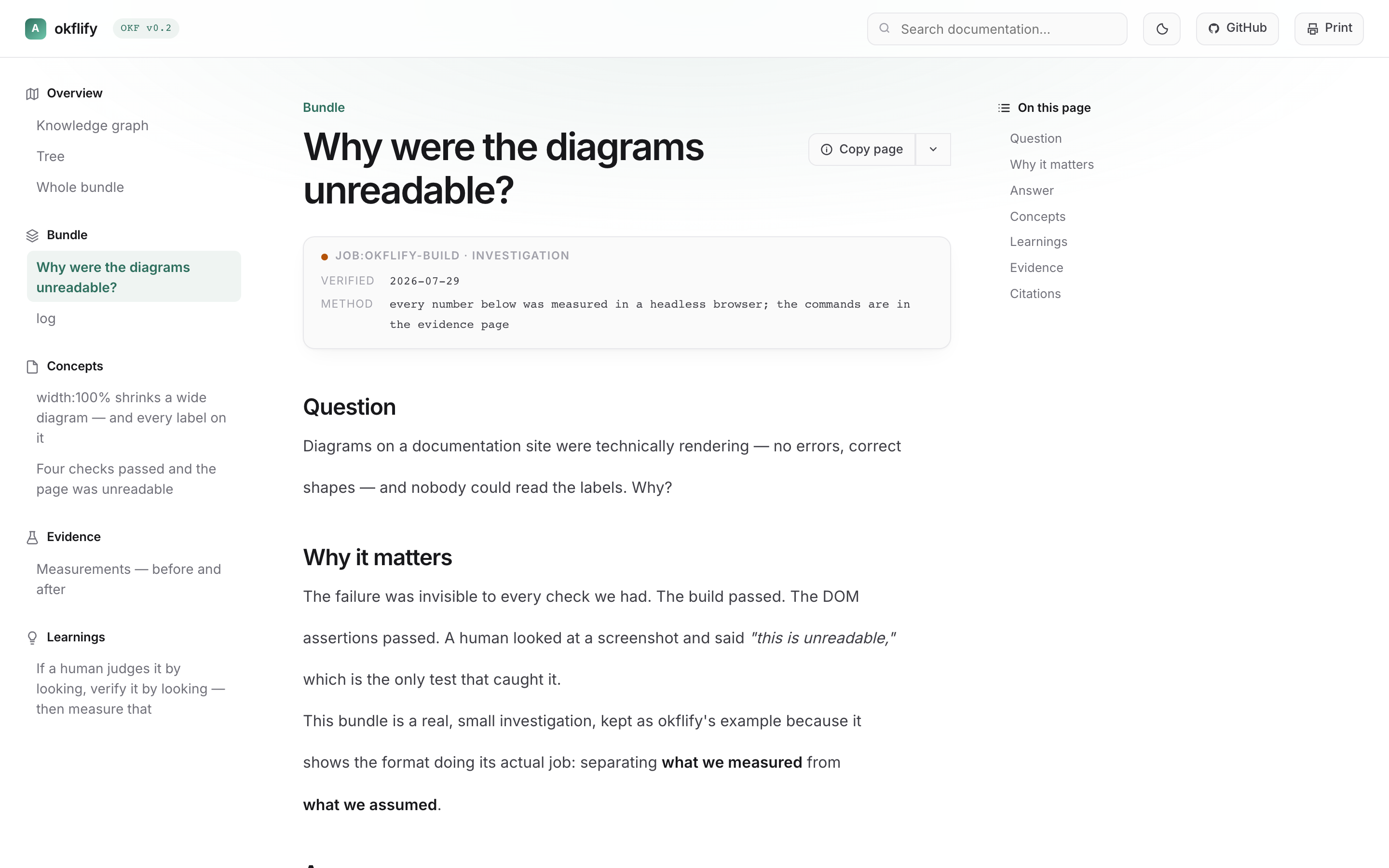
OKF v0.2 weights evidence human: > job: > agent:. okflify puts that at the top of every page, colours every graph node by it, and warns when a document is agent-verified only:
Agent-verified. Under OKF v0.2 weighting treat as unverified for gate-shaped decisions.
Knowledge bases fail in one specific way: everything in them looks equally true. A confident paragraph a model produced in four seconds renders exactly like a number a human checked against a bank statement. A renderer that shows those the same way isn't neutral — it's broken.
OKF is a graph, not a tree
Bundles live in folders, so every renderer reaches for a folder tree. That throws away the structure: concepts connect through ordinary markdown links, and the network is richer than any parent-child path.
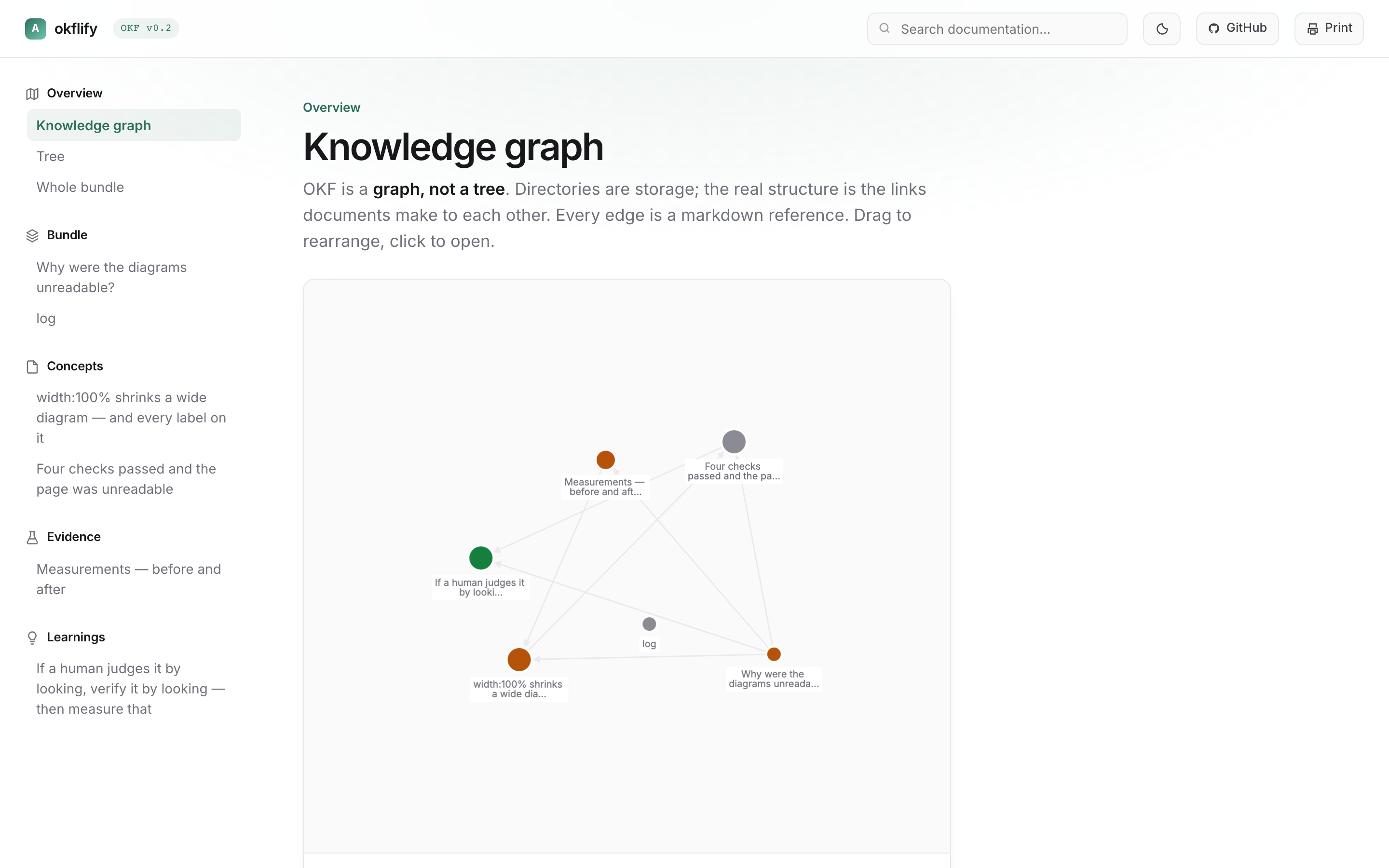
Cytoscape + fCoSE: directed edges, overlap-aware layout, hover to light the neighbourhood, click to open. Node size is inbound links; colour is trust tier.
If your bundle has no cross-links, you get a star — every edge leaving the index. okflify warns on stderr rather than flattering it. That is a content signal, not a bug report.
…but a tree when you have 100 documents
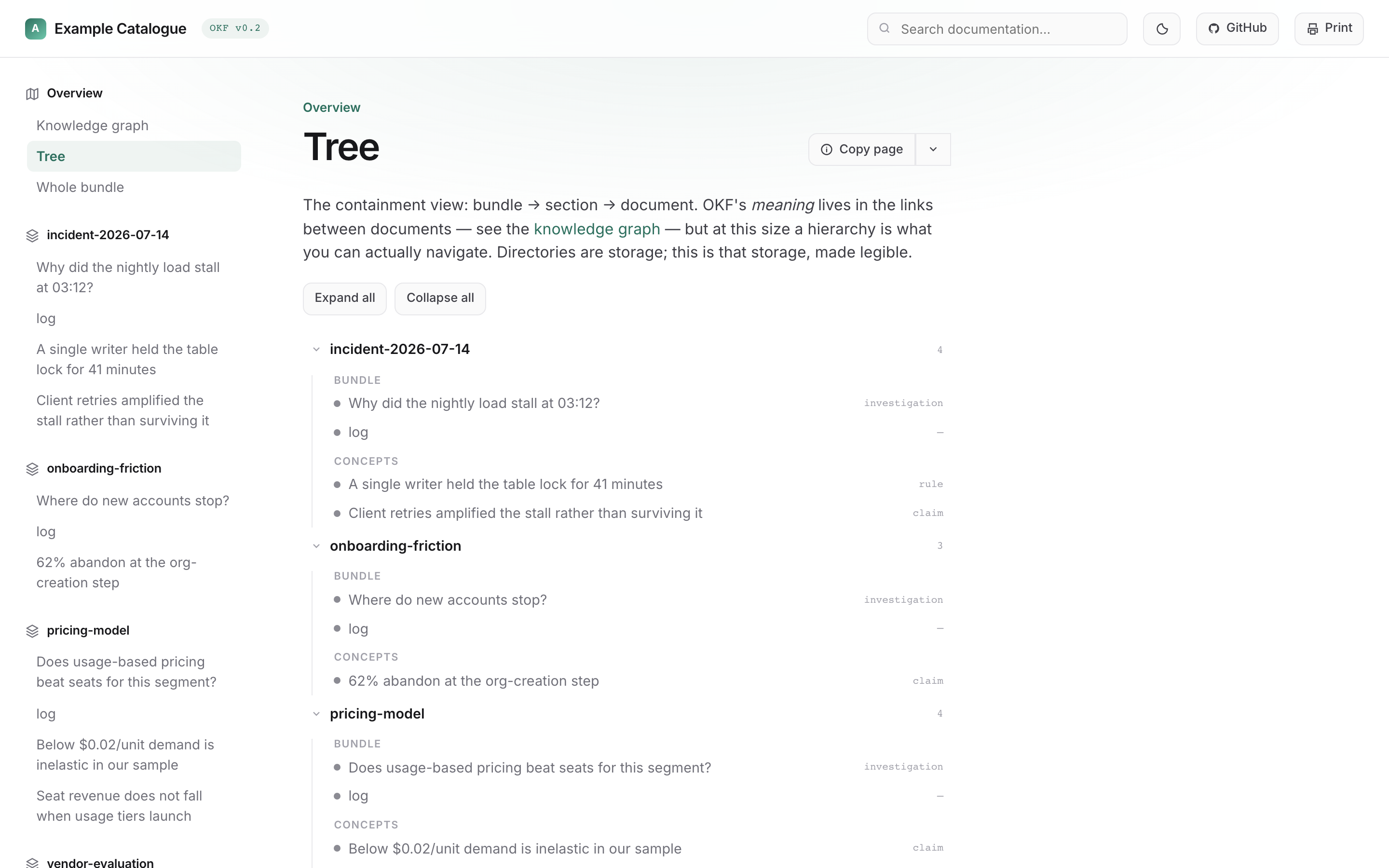
Bundle → section → document, collapsible, with the type and trust tier of every document at a glance — which the sidebar doesn't carry.
Above is a four-bundle catalogue. The largest it has been run against is 18 bundles / 102 documents / 88 edges, rendered into a single file.
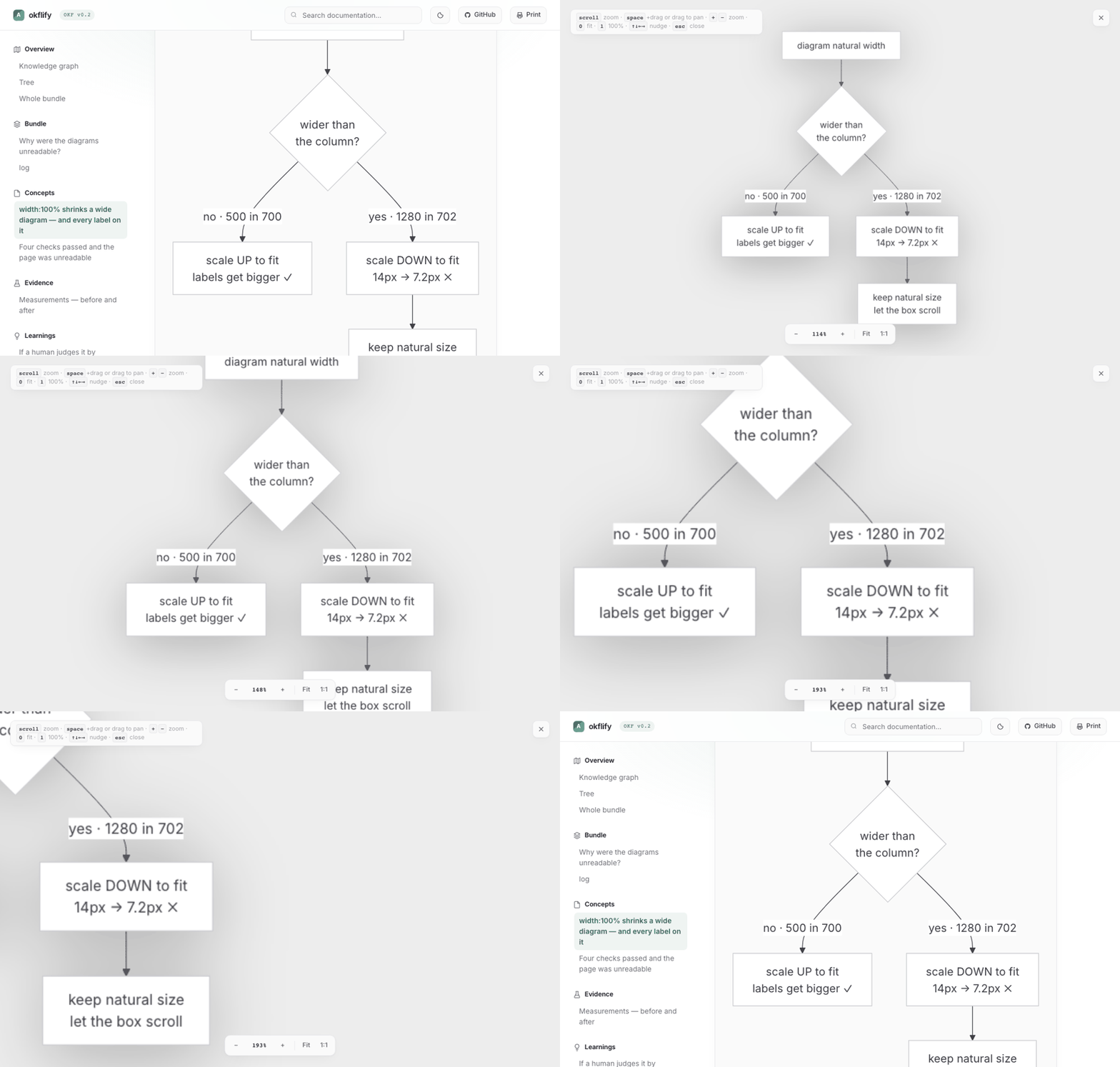
Diagram surfing
Click any diagram or image. Scroll zooms at the cursor, drag or space+drag pans, +/− zoom, 0 fit, 1 actual size, arrows nudge, esc closes.
Timeline and calendar
OPF temporal metadata (created_at, updated_at, and decision accepted_at) and dated log.md entries feed one activity stream. Timeline and the rendered log default to deterministic newest-first order; Calendar projects the same stream through navigable day, week, month, and year views. Explicit resolvable log links open their concepts, while missing references stay visible and are never guessed. These views never use filenames or sidebar position as dates.
Whole bundle, one page
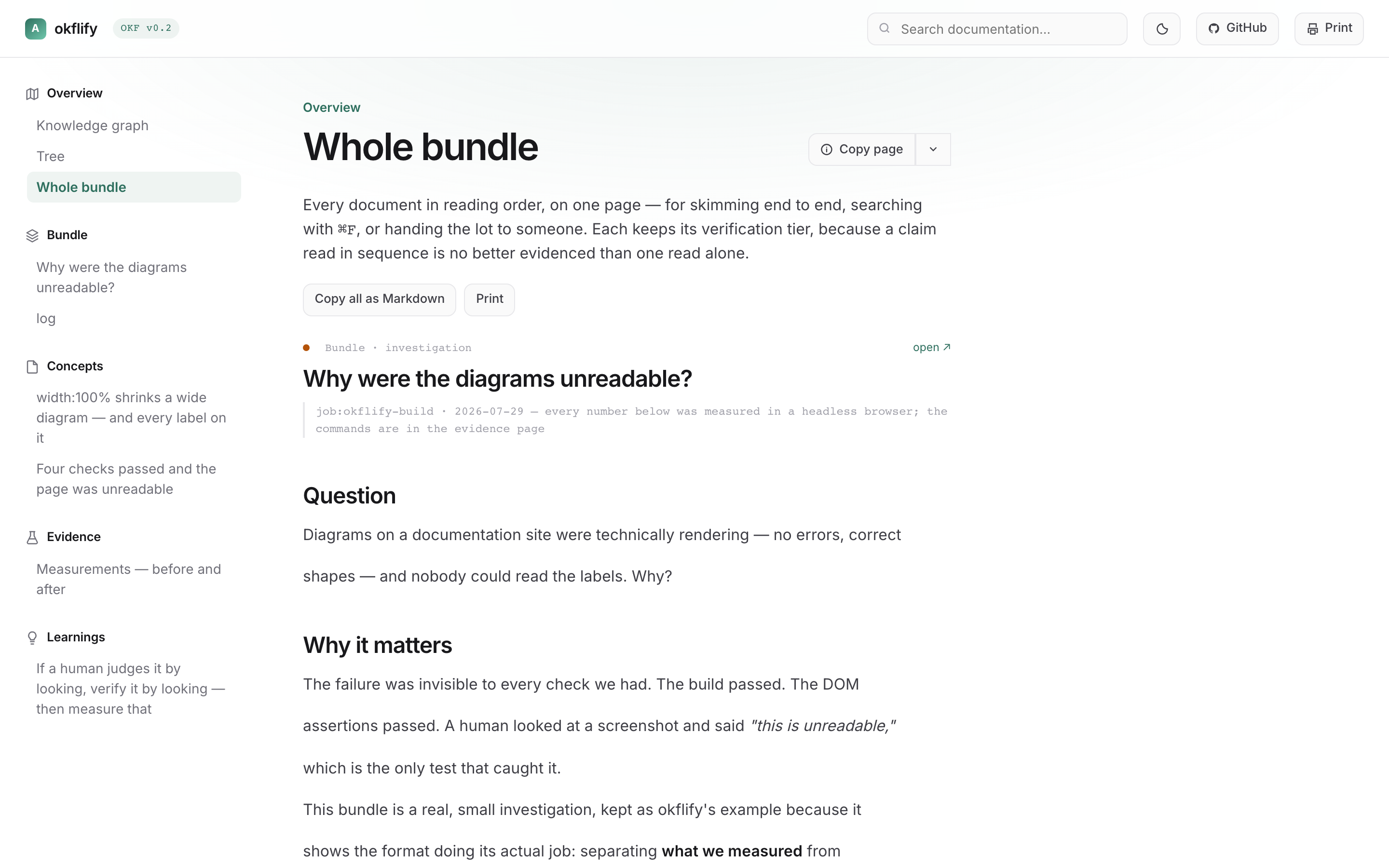
Every document in reading order — for skimming end to end, ⌘F, printing, or copying the lot as Markdown. Each keeps its tier.
Everything else
| ⌘K palette | documents and every h2/h3 |
| Copy page | Markdown for LLMs · open in Claude/ChatGPT with the page attached · copy whole bundle |
| Backlinks | "links to" / "linked from" cards |
| Light / dark | diagrams re-render to match |
| every document, page-broken | |
| Catalogues | a directory of bundles renders as one site with cross-bundle edges |
Bundle layout
bundle/
  index.md          # required — the root
  log.md            # append-only, no frontmatter by convention
  concepts/*.md     # claims, rules, questions
  evidence/*.md     # what was actually observed
  learnings/*.md    # promoted, re-verified
  docs.json         # optional theming
Only index.md is required. A catalogue is a directory of bundles — root/bundles/<slug>/ or root/<slug>/.
---
okf_version: "0.2"
type: claim          # claim | rule | learning | question | evidence-pointer | investigation
title: "One sentence someone could disagree with"
verified:
  by: human:daniel   # human: > job: > agent:
  at: 2026-07-29
  method: "how you checked — the field people skip"
  stale_after: 2026-10-01
---
method does the work. "Verified" without one is a feeling.
Theming
docs.json, Mintlify-shaped. Never edit the template to restyle.
{
  "name": "My Knowledge",
  "colors": { "primary": "#2E6F5E", "light": "#6FC7AC", "dark": "#1F5044" },
  "fonts": { "family": "Inter" },
  "appearance": { "default": "system" },
  "background": { "decoration": "gradient" },
  "home": { "href": "/boxes/", "label": "Boxes" },
  "github": false
}
Any Google Font name loads automatically. background.decoration: gradient, grid, none.
home — optional return link to the host app (not the pack index). The pack logo still jumps to the first document; the host control is a separate ← label in the header. When the HTML is opened full-page inside a product (e.g. Greenmark Boxes), set home.href to that product’s root. Runtime override: ?return=/path or ?home=/path (same-origin only), optional returnLabel.
github — header GitHub button. false / omit-with-home hides it (hosted packs must not advertise the okflify tool repo). Explicit URL or { "href", "label?", "title?" } for the pack’s own repo. Standalone packs (no home) still default to eidos-agi/okflify.
Notes from building it
Two things that cost real time:
Mermaid's built-in themes fight the page. neutral and dark render dark subgraph fills with dark labels. okflify uses theme: "base" with themeVariables bound to the CSS palette.
mermaid.run() is a no-op on an already-rendered block. It stamps data-processed and replaces the content, so the first theme rendered wins permanently — a light page keeps black diagrams forever. okflify caches each block's source and restores it before re-running.
Known gaps
Stated because overselling would contradict the whole premise:
- Graph edges have arrowheads but no bundle clustering in catalogue view
- Layout is re-seeded per visit rather than stable across reloads
- Search covers titles and headings, not document bodies
- Not an editor — okflify reads; something else writes
Development
pip install -e ".[dev]"
python -m pytest -q          # 19 tests
okflify --example --open
Releasing is bumping the version. Edit version in pyproject.toml, push to
master, and CI publishes to PyPI over OIDC and tags the commit. There is no
tag to remember, no token anywhere, and no upload step.
It asks PyPI whether that version exists rather than trusting git, so re-runs,
reverts and force-pushes are all safe. Touching okflify/ without bumping
fails the build — okflify once shipped eleven times as 0.1.0, and on PyPI
a version can never be reused.
Related
Sibling of mafia (Chromium for agents). Same house, same conventions.
MIT.
1 maintainer

Download files
Download the file for your platform. If you're not sure which to choose, learn more about installing packages.
Source Distribution
Built Distribution
Filter files by name, interpreter, ABI, and platform.
If you're not sure about the file name format, learn more about wheel file names.
Copy a direct link to the current filters
File details
Details for the file okflify-0.2.0.tar.gz.
File metadata
- Download URL: okflify-0.2.0.tar.gz
- Upload date:
- Size: 56.8 kB
- Tags: Source
- Uploaded using Trusted Publishing? Yes
- Uploaded via:
twine/7.0.0 CPython/3.13.14
File hashes
| Algorithm | Hash digest | |
|---|---|---|
| SHA256 |
daec3878e25fb0c8b49ecde1c0c1d090f44746587d4dc15359599c5b28987422
|
|
| MD5 |
d56c881f8017f3422c06cd5d38b4d7f6
|
|
| BLAKE2b-256 |
2d05f5cb2e8d4ab0829a4c0a13167cb0dea11c7810734cbb0d40dc03d25fe834
|
Provenance
The following attestation bundles were made for okflify-0.2.0.tar.gz:
Publisher:
release.yml on eidos-agi/okflify
-
Statement:
-
Statement type:
https://in-toto.io/Statement/v1 -
Predicate type:
https://docs.pypi.org/attestations/publish/v1 -
Subject name:
okflify-0.2.0.tar.gz -
Subject digest:
daec3878e25fb0c8b49ecde1c0c1d090f44746587d4dc15359599c5b28987422 - Sigstore transparency entry: 2387629286
- Sigstore integration time:
-
Permalink:
eidos-agi/okflify@fd52d3b130c13dcca3be9bcc11ddc4ea1ca2c8c1 -
Branch / Tag:
refs/heads/master - Owner: https://github.com/eidos-agi
-
Access:
public
-
Token Issuer:
https://token.actions.githubusercontent.com -
Runner Environment:
github-hosted -
Publication workflow:
release.yml@fd52d3b130c13dcca3be9bcc11ddc4ea1ca2c8c1 -
Trigger Event:
push
-
Statement type:
File details
Details for the file okflify-0.2.0-py3-none-any.whl.
File metadata
- Download URL: okflify-0.2.0-py3-none-any.whl
- Upload date:
- Size: 55.9 kB
- Tags: Python 3
- Uploaded using Trusted Publishing? Yes
- Uploaded via:
twine/7.0.0 CPython/3.13.14
File hashes
| Algorithm | Hash digest | |
|---|---|---|
| SHA256 |
14140f6215a4e75eb6a046130da6e4ffc5a58e8bd7f9977d23254dfb51a69ded
|
|
| MD5 |
9a3c534779a9a57565a4b462b69b1bc8
|
|
| BLAKE2b-256 |
36c1c899f365d8b5e5f2eb874f0790f7497e1aa348f67e9374072d14a9ed76e4
|
Provenance
The following attestation bundles were made for okflify-0.2.0-py3-none-any.whl:
Publisher:
release.yml on eidos-agi/okflify
-
Statement:
-
Statement type:
https://in-toto.io/Statement/v1 -
Predicate type:
https://docs.pypi.org/attestations/publish/v1 -
Subject name:
okflify-0.2.0-py3-none-any.whl -
Subject digest:
14140f6215a4e75eb6a046130da6e4ffc5a58e8bd7f9977d23254dfb51a69ded - Sigstore transparency entry: 2387629294
- Sigstore integration time:
-
Permalink:
eidos-agi/okflify@fd52d3b130c13dcca3be9bcc11ddc4ea1ca2c8c1 -
Branch / Tag:
refs/heads/master - Owner: https://github.com/eidos-agi
-
Access:
public
-
Token Issuer:
https://token.actions.githubusercontent.com -
Runner Environment:
github-hosted -
Publication workflow:
release.yml@fd52d3b130c13dcca3be9bcc11ddc4ea1ca2c8c1 -
Trigger Event:
push
-
Statement type:














