

okfsmith




Forge messy documents into OKF v0.2 knowledge bundles.
okfsmith is a Python CLI that ingests PDFs, markdown, wiki dumps, and Notion
exports and emits spec-conformant OKF v0.2 bundles: markdown files with YAML
frontmatter, plus reserved index.md and log.md. Every concept carries
provenance (sources[]), a trust tier, and lifecycle metadata, and every
bundle is checked by a built-in §11 validator. Serve it to your agents with
one MCP command.
60-second quickstart
pip install okfsmith

okfsmith init ./kb
okfsmith ingest ./kb notes/ report.pdf --no-llm   # offline first pass
okfsmith validate ./kb
okfsmith graph ./kb --format html   # writes ./kb/viz.html — open in a browser
Point any MCP-capable agent at the bundle:
pip install "okfsmith[mcp]"
okfsmith mcp ./kb
Tools exposed: index, list, search, get, neighbors — every answer
traces back to sources[] in the bundle.
⭐ If okfsmith helped you, a star means a lot — it helps other developers find the project.
Why okfsmith
Clean markdown already has good OKF tooling. The messy middle — 200-page PDFs with broken reading order, sprawling Notion exports, wiki dumps — is where knowledge usually lives, and that's what okfsmith ingests first:
parse → section → extract → link → emit → validate → serve
- Tiered parsing, free first. Tier 1 is local and keyless: LiteParse for
PDFs, stdlib parsing for markdown/text. Office formats (
.docx,.pptx,.xlsx) via the optionalokfsmith[office]extra; Docling OCR sidecar viaokfsmith[ocr]for scanned pages. PyMuPDF is deliberately avoided (AGPL). - Two extraction modes.
--no-llmwrites one draft concept per section — fast, offline, deterministic. With an LLM (Ollama by default, or an OpenAI-compatible API via env vars), a draft + critic flow extracts claims with[^source-id]citations feedingsources[]. - OKF v0.2 native. Only
typeis required in frontmatter. okfsmith also emitssources[]/provenance,generated/verifiedtrust metadata, and lifecycle fields. - §11 validator. The spec's hard conformance rules (E001–E004) plus advisory lints (dead links, orphans, stubs, legacy v0.1 fields). Broken links are warnings, never errors (spec §6).
- Graph visualization.
okfsmith graph --format htmlrenders a self-containedviz.html(works offline): nodes colored by type with a colorblind-safe palette, shaped by trust tier, with backlinks, search, and keyboard access. - One-command MCP server.
okfsmith mcp ./kbover stdio, SSE, or streamable HTTP. - Skill pack.
skills/okfsmith-build/SKILL.mdteaches agents the init → ingest → validate → serve loop.
CLI reference
| Command | What it does |
|---|---|
okfsmith init BUNDLE |
scaffold index.md + log.md |
okfsmith ingest BUNDLE SOURCE... |
parse, section, extract → draft concepts |
okfsmith sync BUNDLE SOURCE... |
incremental sync: only new/changed/renamed/deleted sources processed (flags: --watch/--interval, --dry-run, --format text|json) |
okfsmith validate BUNDLE |
check OKF §11 conformance (exit 0 = conformant) |
okfsmith list BUNDLE |
list concepts (filter by --tier, --type) |
okfsmith read BUNDLE ID |
print one concept |
okfsmith graph BUNDLE |
links: text / json / mermaid / html |
okfsmith search BUNDLE QUERY |
BM25 full-text search (flags: --limit/-n, --format text|json, --tier, --type) |
okfsmith eval BUNDLE |
golden-set evaluation: RAG Triad scores, retrieval-vs-generation diagnosis, --fail-under CI gate |
okfsmith mcp BUNDLE |
serve over MCP |
okfsmith chat BUNDLE |
interactive Q&A over the bundle (REPL) |
okfsmith doctor |
check dependencies, extras, Ollama |
The bundle is always the first positional argument. Expected failures print
error [CODE]: with a hint and never a traceback; usage errors exit 2.
Full reference with examples: docs/commands.md.
Interactive chat
okfsmith chat opens a Claude Code / Gemini CLI style REPL over your bundle:
ask questions in plain language, get answers with [concept-id] citations.
With local Ollama running (or OPENAI_API_KEY set) answers are synthesized
and grounded; otherwise the chat stays useful in extractive mode, showing the
keyword-matched concepts themselves. It never answers from thin air — no
relevant concepts, no invented answer.
$ okfsmith chat ./kb
 ███  █   █ █████  ████ █   █ █████ █████ █   █
█   █ █  █  █     █     ██ ██   █     █   █   █
█   █ ███   ████   ███  █ █ █   █     █   █████
█   █ █  █  █         █ █   █   █     █   █   █
 ███  █   █ █     ████  █   █ █████   █   █   █
okfsmith chat v0.3.0
Bundle: kb (24 concepts) · openai · qwen3:8b

Tips for getting started:
  1. Ask questions about your documents.
  2. Type /help for chat commands.
  3. Type /ingest <path> to add more documents.

kb › how do I authenticate?
✦
Use a Bearer token in the Authorization header [api/auth].

*Sources: [api/auth]*
kb › aur iska source kya hai
✦
The dashboard, under Settings › API Keys [api/auth].

*Sources: [api/auth]*
kb › /exit
Goodbye — your bundle is untouched.
(On a real terminal the logo renders as a yellow→orange→magenta gradient,
the prompt bundle name is colored, and answers carry a subtle ✦ marker.
Piped output stays plain ASCII — zero escape codes, always.)
Slash commands: /help /ingest /list /read /search /validate
/graph /doctor /model /clear /exit. Line history persists at
~/.okfsmith/history; Ctrl-C cancels input, Ctrl-D quits. Flags:
--model to pick the model, --no-llm to force extractive mode.
Web dashboard
Prefer a UI? okfsmith dashboard launches a local web app — the full
product in the browser: drag-and-drop ingest with live pipeline
progress, an interactive knowledge graph, grounded chat with clickable
citations, validation, temporal queries, MCP tools, eval, and settings.
okfsmith dashboard
It binds only to 127.0.0.1 (never exposed to the network), generates
a fresh login token on every launch, and loads zero third-party
resources — the entire UI is packaged with okfsmith and works fully
offline. Same bundles, same CLI underneath.
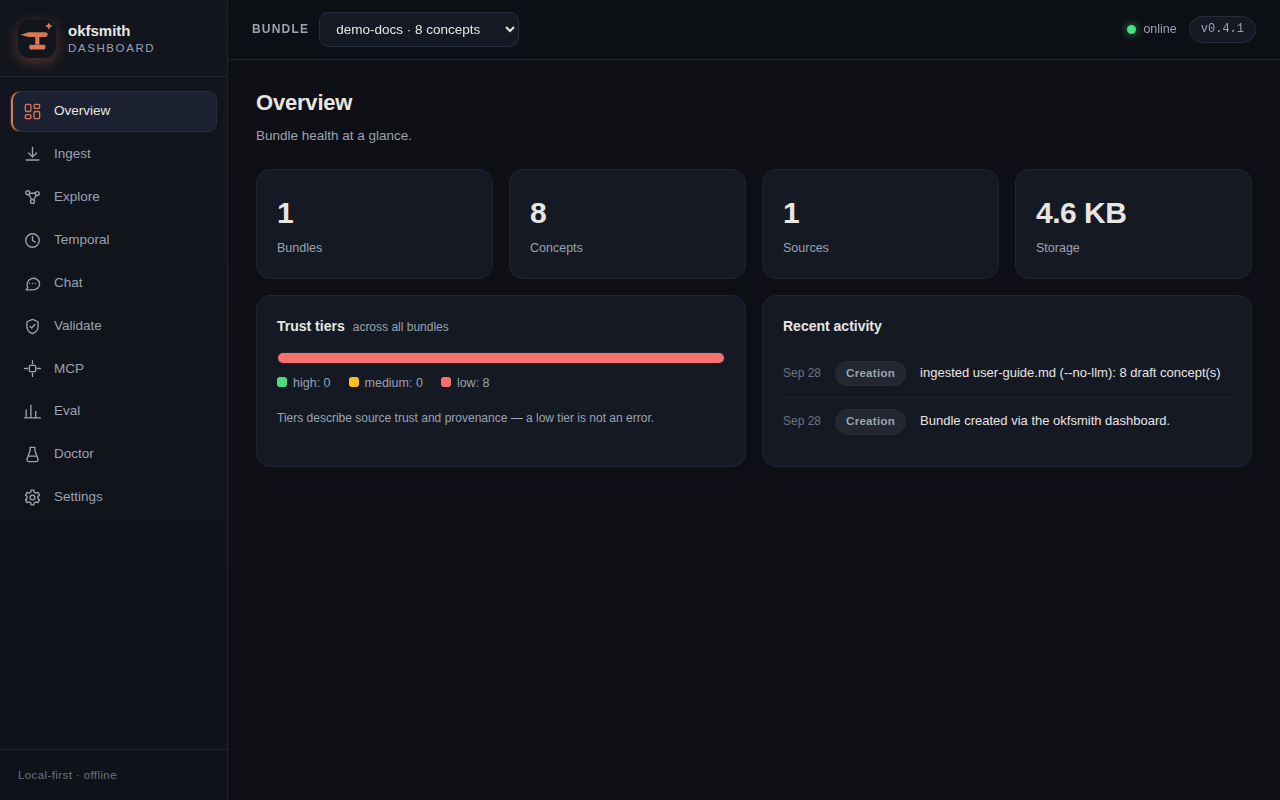
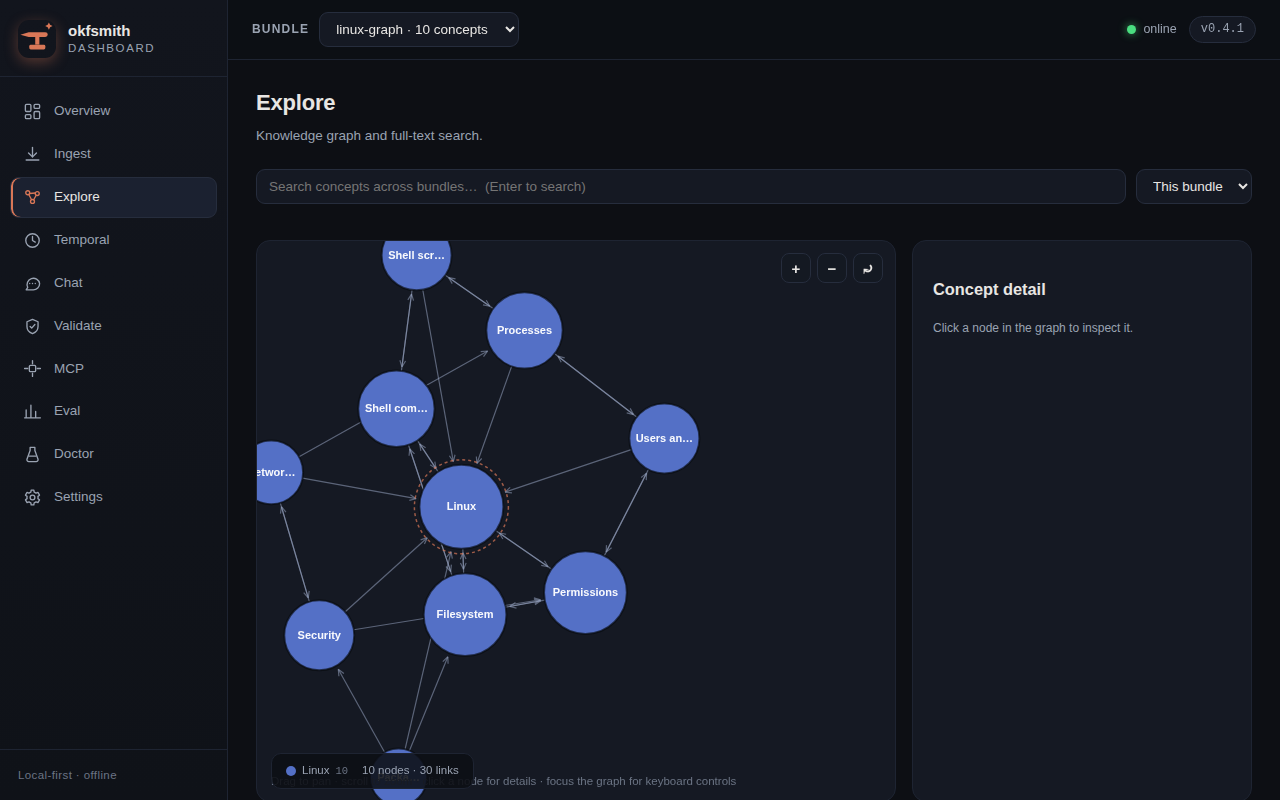
Full walkthrough with screenshots: Web dashboard guide.
Use any model (API key)
Ollama is the default, but any hosted model works — one key, any
provider. OpenRouter is the flagship: a single key routes to
hundreds of models (anthropic/claude-sonnet-4-style IDs included):
export OKFSMITH_API_KEY="sk-or-..."        # your OpenRouter key
okfsmith chat ./kb --provider openrouter --model anthropic/claude-sonnet-4
okfsmith ingest ./kb docs/ --provider openrouter --model openai/gpt-4o-mini
Anthropic's native API works directly too — no proxy needed:
export ANTHROPIC_API_KEY="sk-ant-..."      # your Anthropic key
okfsmith ingest ./kb docs/                # --provider anthropic is implied
okfsmith chat ./kb --provider anthropic --model claude-sonnet-4-5
Prefer env vars — the flags also work:
export OKFSMITH_API_KEY="..."              # Groq example
export OKFSMITH_PROVIDER=groq
okfsmith chat ./kb --model llama-3.3-70b-versatile

okfsmith chat ./kb --provider deepseek --model deepseek-chat
okfsmith chat ./kb --provider gemini --model gemini-2.0-flash

export AGENTROUTER_API_KEY="..."       # Agent Router gateway example
okfsmith chat ./kb --provider agentrouter --model gpt-4o-mini
Provider presets (16): openrouter · groq · mistral · deepseek ·
together · fireworks · deepinfra · anyscale · perplexity · xai ·
gemini · openai · agentrouter · lmstudio · ollama · anthropic
(native Messages API — the one preset that isn't OpenAI-compatible).
Literally anything else — Azure OpenAI, self-hosted vLLM, a llama.cpp
server, any compat proxy — works via --api-base:
okfsmith chat ./kb --api-base https://my-proxy/v1 --model my-model
Notes:
- Put the key in
OKFSMITH_API_KEY(AGENTROUTER_API_KEYis honored for theagentrouterpreset,ANTHROPIC_API_KEYfor theanthropicpreset).--api-keyalso works but lands in your shell history — okfsmith warns you once per session about that. - Keys are never logged, never shown (banners and
okfsmith doctoronly sayset (hidden)), and never written to disk. okfsmith doctorshows the resolved provider, base URL, model, and key status without probing the network.
Install options
pip install "okfsmith[office]"   # DOCX / PPTX / XLSX
pip install "okfsmith[mcp]"      # MCP server
pip install "okfsmith[ocr]"      # Docling OCR sidecar
pipx install "okfsmith[office,mcp]"
okfsmith doctor verifies your setup.
Docs
📚 Live documentation: https://bilal-junaid-jiwani.github.io/okfsmith/ · 🌐 Website: https://bilal-junaid-jiwani.github.io/okfsmith/site/
Quickstart · Ingesting · Validation · Temporal model · MCP · Troubleshooting · FAQ
License
Apache-2.0. See LICENSE.
1 maintainer

Metadata
1 maintainer
Release files for okfsmith 0.7.0
For a detailed explanation of source distributions (sdists) and built distributions (wheels), please see the package formats documentation.
Source distribution (sdist)
| File | Size | Uploaded | |
|---|---|---|---|
| okfsmith-0.7.0.tar.gz | 492.6 kB | Details |
Built distribution (wheel)
| File | Interpreter | ABI | Platform | Reset |
|---|---|---|---|---|
| okfsmith-0.7.0-py3-none-any.whl | Python 3 | none | any | Details |
Total release size: 768.7 kB
Release files / okfsmith-0.7.0.tar.gz
| Download URL | okfsmith-0.7.0.tar.gz |
|---|---|
| Size | 492.6 kB |
| Tags | Source |
|
SHA-256 checksum How to use checksums |
deaba477db830333c93a83eb7397ae745a014d4f0dda3bf3cb9c6b28d3cedd5d
|
|
BLAKE2b-256 checksum How to use checksums |
14644c0bca39d77222e6363382de1ea5f024215ea1039dc6e9905f198ed6c5b0
|
| Upload date | |
|
Uploaded using Trusted Publishing? What is trusted publishing? |
No |
| Uploaded via |
okfsmith-pypi-skill/1.0
|
Release files / okfsmith-0.7.0-py3-none-any.whl
| Download URL | okfsmith-0.7.0-py3-none-any.whl |
|---|---|
| Size | 276.1 kB |
| Tags | Python 3 |
|
SHA-256 checksum How to use checksums |
4772f691f56c909e417564d2d69aa7eef99d0dd04006363c21927046a9895a4d
|
|
BLAKE2b-256 checksum How to use checksums |
1a5e5275943aa622edd620bf8cbdefd9b925ae35f051cf226686638118f4cf62
|
| Upload date | |
|
Uploaded using Trusted Publishing? What is trusted publishing? |
No |
| Uploaded via |
okfsmith-pypi-skill/1.0
|














