
Olah
Self-hosted Lightweight Huggingface Mirror Service
Olah is a self-hosted lightweight huggingface mirror service. Olah means hello in Hilichurlian.
Olah implemented the mirroring feature for huggingface resources, rather than just a simple reverse proxy.
Olah does not immediately mirror the entire huggingface website but mirrors the resources at the file block level when users download them (or we can say cache them).
Other languages: 中文
Advantages of Olah
Olah has the capability to cache files in chunks while users download them. Upon subsequent downloads, the files can be directly retrieved from the cache, greatly enhancing download speeds and saving bandwidth. Additionally, Olah offers a range of cache control policies. Administrators can configure which repositories are accessible and which ones can be cached through a configuration file.
Features
- Huggingface Data Cache
- Models mirror
- Datasets mirror
- Spaces mirror
Install
Method 1: With pip
pip install olah
or:
pip install git+https://github.com/vtuber-plan/olah.git
Method 2: From source
- Clone this repository
git clone https://github.com/vtuber-plan/olah.git
cd olah
- Install the Package
pip install --upgrade pip
pip install -e .
Quick Start
Run the command in the console:
olah-cli
Then set the Environment Variable HF_ENDPOINT to the mirror site (Here is http://localhost:8090).
Linux:
export HF_ENDPOINT=http://localhost:8090
Windows Powershell:
$env:HF_ENDPOINT = "http://localhost:8090"
Starting from now on, all download operations in the HuggingFace library will be proxied through this mirror site.
pip install -U huggingface_hub
from huggingface_hub import snapshot_download

snapshot_download(repo_id='Qwen/Qwen-7B', repo_type='model',
                  local_dir='./model_dir', resume_download=True,
                  max_workers=8)
Or you can download models and datasets by using huggingface cli.
Download GPT2:
hf download openai-community/gpt2 --local-dir gpt2 --no-force-download
Download WikiText:
hf download --repo-type dataset Salesforce/wikitext --local-dir wikitext --no-force-download
You can check the path ./repos, in which olah stores all cached datasets and models.
Start the server
Run the command in the console:
olah-cli
Or you can specify the host address and listening port:
olah-cli --host localhost --port 8090
Note: Please change --mirror-netloc and --mirror-lfs-netloc to the actual URLs of the mirror sites when modifying the host and port.
olah-cli --host 192.168.1.100 --port 8090 --mirror-netloc 192.168.1.100:8090
The default mirror cache path is ./repos, you can change it by --repos-path parameter:
olah-cli --host localhost --port 8090 --repos-path ./hf_mirrors
Note that the cached data between different versions cannot be migrated. Please delete the cache folder before upgrading to the latest version of Olah.
In deployment scenarios, there may be high concurrent downloads, leading to Timeout errors for new connections.
You can set the WEB_CONCURRENCY variable for uvicorn to increase the number of workers, thereby enhancing concurrency in production environments.
For example, on Linux:
export WEB_CONCURRENCY=4
More Configurations
Additional configurations can be controlled through a configuration file by passing the configs.toml file as a command parameter:
olah-cli -c configs.toml
The complete content of the configuration file can be found at assets/full_configs.toml.
Configuration Details
The first section, basic, is used to set up basic configurations for the mirror site:
[basic]
host = "localhost"
port = 8090
ssl-key = ""
ssl-cert = ""
repos-path = "./repos"
cache-size-limit = ""
cache-clean-strategy = "LRU"
hf-scheme = "https"
hf-netloc = "huggingface.co"
hf-lfs-netloc = "cdn-lfs.huggingface.co"
mirror-scheme = "http"
mirror-netloc = "localhost:8090"
mirror-lfs-netloc = "localhost:8090"
mirrors-path = ["./mirrors_dir"]
host: Sets the host address that Olah listens to.port: Sets the port that Olah listens to.ssl-keyandssl-cert: When enabling HTTPS, specify the file paths for the key and certificate.repos-path: Specifies the directory for storing cached data.cache-size-limit: Specifies cache size limit (For example, 100G, 500GB, 2TB). Olah will scan the size of the cache folder every hour. If it exceeds the limit, olah will delete some cache files.cache-clean-strategy: Specifies cache cleaning strategy (Available strategies: LRU, FIFO, LARGE_FIRST).hf-scheme: Network protocol for the Hugging Face official site (usually no need to modify).hf-netloc: Network location of the Hugging Face official site (usually no need to modify).hf-lfs-netloc: Network location for Hugging Face official site's LFS files (usually no need to modify).mirror-scheme: Network protocol for the Olah mirror site (should match the above settings; change to HTTPS if providingssl-keyandssl-cert).mirror-netloc: Network location of the Olah mirror site (should matchhostandportsettings).mirror-lfs-netloc: Network location for Olah mirror site's LFS (should matchhostandportsettings).mirrors-path: Additional mirror file directories. If you have already cloned some Git repositories, you can place them in this directory for downloading. In this example, the directory is./mirrors_dir. To add a dataset likeSalesforce/wikitext, you can place the Git repository in the directory./mirrors_dir/datasets/Salesforce/wikitext. Similarly, models can be placed under./mirrors_dir/models/organization/repository.
The second section allows for accessibility restrictions:
[accessibility]
offline = false

[[accessibility.proxy]]
repo = "cais/mmlu"
allow = true

[[accessibility.proxy]]
repo = "adept/fuyu-8b"
allow = false

[[accessibility.proxy]]
repo = "mistralai/*"
allow = true

[[accessibility.proxy]]
repo = "mistralai/Mistral.*"
allow = false
use_re = true

[[accessibility.cache]]
repo = "cais/mmlu"
allow = true

[[accessibility.cache]]
repo = "adept/fuyu-8b"
allow = false
offline: Sets whether the Olah mirror site enters offline mode, no longer making requests to the Hugging Face official site for data updates. However, cached repositories can still be downloaded.proxy: Determines if the repository can be accessed through a proxy. By default, all repositories are allowed. Therepofield is used to match the repository name. Regular expressions and wildcards can be used by settinguse_reto control whether to use regular expressions (default is to use wildcards). Theallowfield controls whether the repository is allowed to be proxied.cache: Determines if the repository will be cached. By default, all repositories are allowed. Therepofield is used to match the repository name. Regular expressions and wildcards can be used by settinguse_reto control whether to use regular expressions (default is to use wildcards). Theallowfield controls whether the repository is allowed to be cached.
Future Work
- Administrator and user system
- OOS backend support
- Mirror Update Schedule Task
License
olah is released under the MIT License.
See also
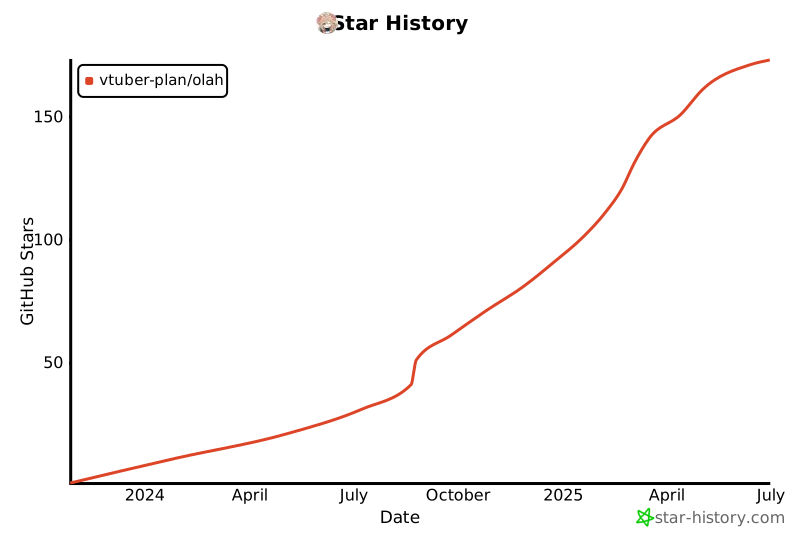
Star History
1 maintainer

Metadata
1 maintainer
Release files for olah 0.5.2
For a detailed explanation of source distributions (sdists) and built distributions (wheels), please see the package formats documentation.
Source distribution (sdist)
| File | Size | Uploaded | |
|---|---|---|---|
| olah-0.5.2.tar.gz | 125.3 kB | Details |
Built distribution (wheel)
| File | Interpreter | ABI | Platform | Reset |
|---|---|---|---|---|
| olah-0.5.2-py3-none-any.whl | Python 3 | none | any | Details |
Total release size: 212.4 kB
Release files / olah-0.5.2.tar.gz
| Download URL | olah-0.5.2.tar.gz |
|---|---|
| Size | 125.3 kB |
| Tags | Source |
|
SHA-256 checksum How to use checksums |
ac4d9300555a8e318ef1abccf5c007b0bb5d0e39d96c0cac5130ed7d0e7dced1
|
|
BLAKE2b-256 checksum How to use checksums |
26ea44a491cc489e04349a858f7c4a80daa0854889ff6b89423b3134b7c40c60
|
| Upload date | |
|
Uploaded using Trusted Publishing? What is trusted publishing? |
No |
| Uploaded via |
twine/7.0.0 CPython/3.13.14
|
Release files / olah-0.5.2-py3-none-any.whl
| Download URL | olah-0.5.2-py3-none-any.whl |
|---|---|
| Size | 87.1 kB |
| Tags | Python 3 |
|
SHA-256 checksum How to use checksums |
a931d62ec234b4dc34a73f520a5277656406a4357cdef3e3e2dd2baba8f55f30
|
|
BLAKE2b-256 checksum How to use checksums |
3c4daff4b2c5aa77416845c9bb4df379369b32b9a0e34683d5f11a8c0d307ef2
|
| Upload date | |
|
Uploaded using Trusted Publishing? What is trusted publishing? |
No |
| Uploaded via |
twine/7.0.0 CPython/3.13.14
|














