

Ollajev
Run Jev-style decision models on your machine. Pull a System One model from Hugging Face and call it through the same
/v1/systemoneAPI as TypeSafe's hosted Jev.
Product page · Install · Quick start · Models · API
A local server that runs System One decision models from Hugging Face behind TypeSafe's Jev / System One wire API.
Already calling TypeSafe or Jev? This is a drop-in replacement. Point
TYPESAFE_BASE_URLat this server and the stocktypesafe-sdkkeeps working: same routes, same request and response shapes, no API key (unless you setOLLAJEV_API_KEY). The answers come from a model on your machine instead of the hosted service.
- A decision model writes no text. You send one state and any number of typed questions.
- You get back a probability for each question:
noul(yes/no),choice(pick one option) orscore(expected level on an ordered rubric). - Pick a model with the request's
modelfield. Models load on first use and unload when idle. - One command line to manage models:
serve,setup,run,pull,list,ps,show,rm,stop,cp,service(see Commands).
Ollajev is an independent project. It is not affiliated with or endorsed by Ollama or TypeSafe.
Install
macOS and Linux:
curl -fsSL https://raw.githubusercontent.com/nvkudva/ollajev/main/install.sh | sh
Windows (PowerShell):
irm https://raw.githubusercontent.com/nvkudva/ollajev/main/install.ps1 | iex
- The script installs uv if it is missing, then installs
ollajevas a command in its own Python 3.12 environment (uv tool install). - Add
--service(… | sh -s -- --service) to also run the server in the background at every login: a launchd agent on macOS, a systemd user unit on Linux. - On Linux, llama.cpp is compiled during the install, so a C and C++ compiler must be present:
sudo apt install build-essentialon Debian and Ubuntu,sudo dnf install gcc gcc-c++on Fedora. The script checks and says so. Linux gets the CPU build of PyTorch; for an NVIDIA GPU, seepyproject.toml. - Already have uv?
uv tool install ollajevinstalls it from PyPI. On Linux, add--index https://download.pytorch.org/whl/cpu; without it PyPI's PyTorch brings the CUDA libraries, several GB. The script above takes the CPU build by itself. - To remove it, see Uninstall.
Uninstall
macOS and Linux:
curl -fsSL https://raw.githubusercontent.com/nvkudva/ollajev/main/install.sh | sh -s -- --uninstall
Windows (PowerShell):
irm https://raw.githubusercontent.com/nvkudva/ollajev/main/install.ps1 -OutFile install.ps1
.\install.ps1 -Uninstall
- This stops and removes the background service, if installed, and removes the
ollajevcommand. - Installed with uv directly? Run
ollajev service uninstall, thenuv tool uninstall ollajev. - Your config, logs and downloaded models are kept. To remove them too, delete these folders:
| Path | |
|---|---|
| Config and logs | ~/.ollajev |
| Models | ~/.cache/huggingface/hub/models--<user>--<repo> |
The models folder is the shared Hugging Face cache, which other tools use too. Delete only the
models--… folders of the models you pulled (ollajev list shows them), or run ollajev rm <model>
for each one before uninstalling.
Quick start
ollajev            # first run: opens the model manager; pick a model, press Enter, then s to serve
ollajev run        # in another terminal: ask the model questions
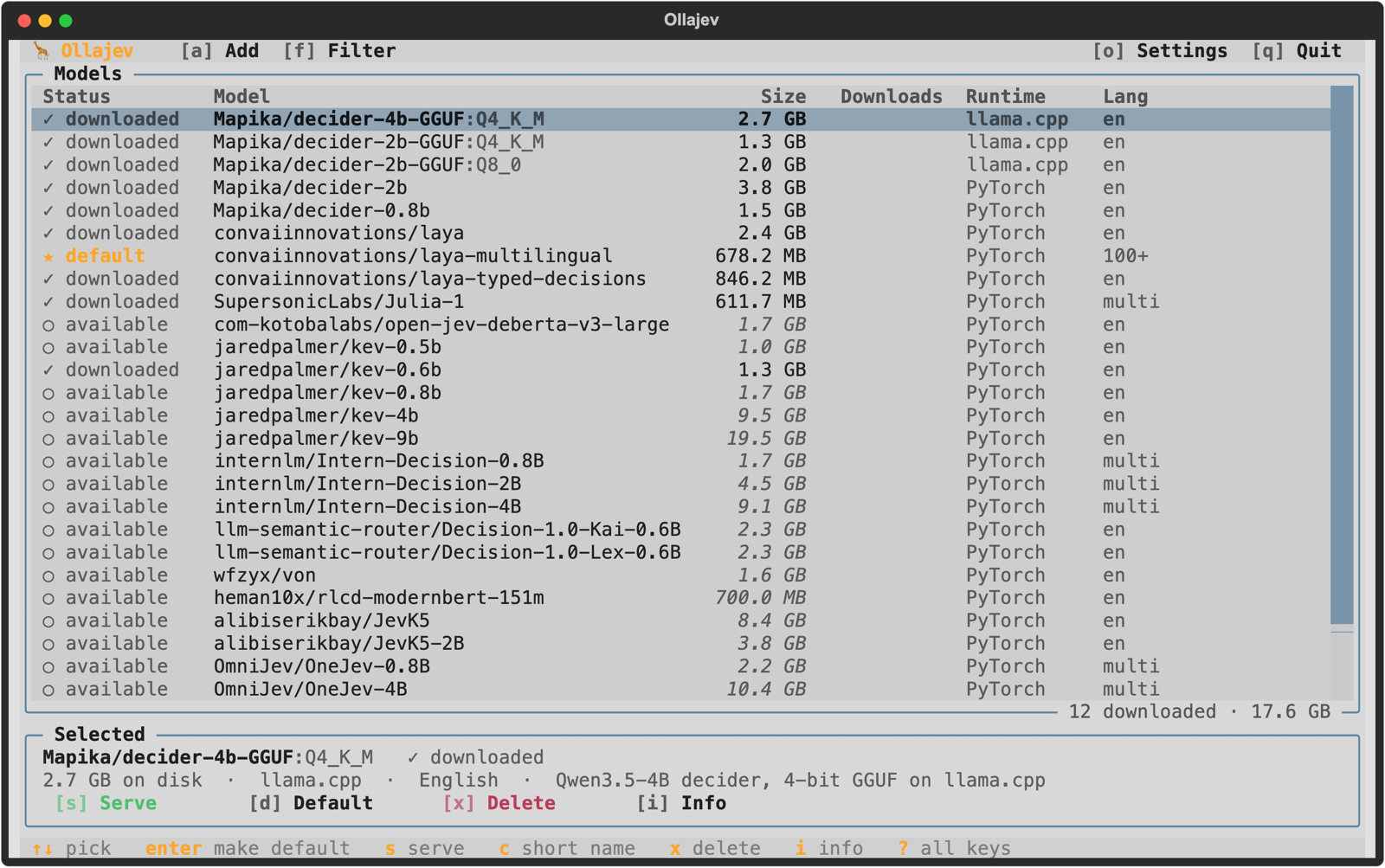
- The model manager lists the curated models, and
asearches Hugging Face for any other. Runollajev setup(orollajev tui) to open it again. - The playground opens at http://127.0.0.1:8000/playground. It lets you play with requests: pick
any downloaded model, load an example or write your own state and questions, send it, and compare
the answers across models in the log.
win the model manager opens it too.
Example
curl -s http://127.0.0.1:8000/v1/systemone -H 'content-type: application/json' -d '{
  "state": "I was charged twice for the same order and nobody answers my emails. I want my money back now.",
  "model": "Mapika/decider-4b-GGUF:Q4_K_M",
  "questions": {
    "area":    {"type":"choice","instructions":"Which product area is this about?","criteria":{"refund & dispute":"A billing dispute or refund request","card":"Anything about a card","other":null}},
    "urgency": {"type":"score","instructions":"How urgent is this message?","criteria":["Can wait","Needs attention this week","Needs attention today"]},
    "refund":  {"type":"noul","instructions":"The customer is asking for a refund."}
  }
}'
{
  "model": "Mapika/decider-4b-GGUF:Q4_K_M",
  "answers": {
    "area":    {"type":"choice","choice":"refund & dispute","confidence":0.9642,
                "probabilities":{"refund & dispute":0.9761,"card":0.0104,"other":0.0135}},
    "urgency": {"type":"score","score":1.712,"confidence":0.568,
                "legend":{"0":"Can wait","1":"Needs attention this week","2":"Needs attention today"},
                "probabilities":{"0":0.0099,"1":0.2682,"2":0.7219}},
    "refund":  {"type":"noul","noul":0.9433,"confidence":0.8866}
  },
  "usage": {"input_tokens": 198, "output_tokens": 0}
}
With the default model this request took about 0.4 s warm (0.7 s for the first one) on an Apple M3 Max laptop: three answers from one forward pass, no tokens generated.
Leave model out, or send jev-latest (typesafe-sdk's default), to use the default model.
Models
A model name is its Hugging Face repo id: <user>/<repo>. Repos with several quantized files take a
tag: <user>/<repo>:<quant> (case-insensitive) or <user>/<repo>:<file.gguf>. Without a tag,
Q4_K_M is used. An hf.co/ or huggingface.co/ prefix is accepted and ignored.
The model manager lists these:
| Model | Download | Runs on | Languages | Limits |
|---|---|---|---|---|
Mapika/decider-4b-GGUF:Q4_K_M (default) |
2.7 GB | llama.cpp (Metal) | English | 255 options, 10 levels, 32k tokens |
Mapika/decider-2b-GGUF:Q4_K_M |
1.2 GB | llama.cpp | English | same |
Mapika/decider-2b-GGUF:Q8_0 |
2.0 GB | llama.cpp | English | same |
Mapika/decider-2b |
3.8 GB | PyTorch | English | same |
Mapika/decider-0.8b |
1.5 GB | PyTorch | English | same |
convaiinnovations/laya |
0.85 GB | PyTorch | English | 512 tokens |
convaiinnovations/laya-multilingual |
0.68 GB | PyTorch | 100+ | 1024 tokens |
convaiinnovations/laya-typed-decisions |
0.85 GB | PyTorch | English | 1024 tokens |
SupersonicLabs/Julia-1 |
0.57 GB | PyTorch (CPU) | Multilingual | 2–20 options, 8k tokens |
com-kotobalabs/open-jev-deberta-v3-large |
1.7 GB | PyTorch | English | 512 tokens |
jaredpalmer/kev-0.5b, kev-0.6b, kev-0.8b |
1–1.7 GB with base | PyTorch | English | 255 options, 8k tokens |
jaredpalmer/kev-4b, kev-9b |
9.5 / 19.5 GB with base | PyTorch | English | same |
internlm/Intern-Decision-0.8B, -2B, -4B |
1.7 / 4.5 / 9.1 GB | PyTorch | Multilingual | 62 options, 16 questions |
llm-semantic-router/Decision-1.0-Kai-0.6B, -Lex-0.6B |
2.3 GB | PyTorch | English | 255 options, 1024 tokens |
wfzyx/von |
1.6 GB | PyTorch | English | 10 levels, 8k tokens |
heman10x/rlcd-modernbert-151m |
0.7 GB | PyTorch | English | 24 options, 512 tokens |
alibiserikbay/JevK5, JevK5-2B |
8.4 / 3.8 GB | PyTorch (llama.cpp for GGUF copies) | English | 255 options, 16 levels, 16k tokens |
OmniJev/OneJev-0.8B, -4B |
2.2 / 10.4 GB | PyTorch (llama.cpp for GGUF copies) | Multilingual | 255 options, 10 levels, 32k tokens |
Cloudflare/clef-flash, clef |
19.1 / 55 GB | PyTorch | Multilingual | 255 options, 16k tokens |
Any other repo works when it belongs to one of these families (decider, laya, julia, open-jev, kev,
intern-decision, decision1, von, rlcd, jevk5, onejev, clef), for example a fine-tune or a bigger size. Requests over a model's
limits get a 422 before the model runs. ollajev show <model> prints them.
Download, switch and remove models
ollajev list                                  # what is downloaded; * marks the default
ollajev pull SupersonicLabs/Julia-1           # download a model (any name from the table)
ollajev pull Mapika/decider-2b-GGUF:Q8_0      # download one quantized file
To use a different model:
| You want | Do this |
|---|---|
| Another model for one request | send "model": "<name>" in the /v1/systemone body; it loads on first use |
| Another default model | ollajev setup, move to a model, press Enter (it downloads if needed and becomes the default), then s to serve. A server that is already running picks up the saved default for requests that omit model |
| Serve a model once, without changing the default | ollajev serve <name> |
| Ask a model from the terminal | ollajev run <name> |
| A short name for a long one | ollajev cp <name> julia, then send "model": "julia" (aliases are saved in lower case and matched ignoring case) |
| Free memory now | ollajev stop <name> (idle models also unload after OLLAJEV_KEEP_ALIVE) |
| Free disk space | ollajev rm <name> |
A model must be downloaded before a request can use it; requests never download. Only
OLLAJEV_MAX_LOADED_MODELS models (default 1) stay in memory, so asking for a second model unloads the
first.
Repo code and trust
Julia, open-jev, Intern-Decision and Decision-1.0 run Python code shipped in the model repo, with
your user's privileges. The first pull of such a repo shows the commit and its code files and
asks you to trust that exact commit (--trust skips the question). Every repo is pinned to the
commit of its first download and never updates by itself.
kev's loader is vendored from GitHub at a pinned commit (ollajev/_vendor/kev), and its head.pt
is loaded with torch.load(weights_only=True), so the file cannot run code.
Trust is a CLI decision only: POST /api/pull never trusts a repo, so a network client cannot
make the server run new code. See SECURITY.md.
Network exposure
The server listens on 127.0.0.1 and accepts only localhost, 127.0.0.1 and [::1] as Host,
which blocks DNS-rebinding from a web page. To listen elsewhere, set a key; without one the server
refuses to start:
OLLAJEV_API_KEY=$(openssl rand -hex 24) OLLAJEV_HOST=0.0.0.0:8000 ollajev serve
export TYPESAFE_API_KEY=<the same key>
With a key set, /v1/* and /api/* need Authorization: Bearer <key>; the playground cannot
send one, so use it without a key. Put TLS in front (a reverse proxy) before exposing it beyond a LAN.
Commands
Run ollajev <command> --help for options and an example.
Model manager
ollajev setup opens one screen for the model commands. Move with the arrow keys or the mouse. The Selected panel under the list shows the model at the cursor and buttons for what applies to it: Download for a model not on disk yet, then Serve, Default, Unload and Delete, and Info. The status row at the bottom lists the keys for that model. The menu bar at the top (Add, Filter, Settings, Quit) can be clicked or used with its keys. Every button shows its key in brackets before its label. Serve starts the server right there: a Server panel shows its address and model, with Playground, Logs, Restart and Stop; quitting the manager stops it. Logs follows the server log in a new terminal tab. The buttons in every dialog can be clicked too. The keys:
| Key | Same as | What it does |
|---|---|---|
| Enter | pull + default |
download the model if needed (it asks first, with the size) and make it the default |
d |
make a downloaded model the default | |
p |
pull |
download only |
u |
stop |
unload it from memory |
x |
rm |
delete the download |
c |
cp |
give it a short name |
i |
show |
family, commit, limits, path |
a |
pull |
add any Hugging Face repo by name |
w |
open the playground of the running server | |
l |
follow the server logs in a new terminal tab | |
o |
settings: device, address, port, how long an idle model stays loaded, models in memory; saved in ~/.ollajev/config.json |
|
b |
service |
install or remove the background service |
s |
serve |
serve the selected model: it becomes the default, and the server starts or restarts with it |
R |
restart the server | |
S |
stop the server | |
f |
filter the list by name | |
| Ctrl+R | refresh the list | |
e |
the last error in full | |
| Esc | cancel a download | |
? |
list every key | |
q |
quit |
The Status column shows default, loaded, downloaded and available labels; a dimmed size is an estimate until the model
is downloaded. The colours are your terminal's own: its background and its colour palette, so the screen follows
whatever theme the terminal uses.
All commands
| Command | What it does |
|---|---|
ollajev |
start the server; the first run opens setup |
ollajev serve [model] |
start the server. Options: --host, --port, --no-browser, --log-file |
ollajev setup (tui) |
open the model manager (below) |
ollajev run [model] |
ask questions from the terminal |
ollajev pull <model>… [--trust] |
download models; --trust skips the repo-code question |
ollajev list (ls) |
downloaded models, family, size and date; * marks the default |
ollajev ps |
models loaded in memory, device and unload time |
ollajev show <model> |
family, pinned commit, file, limits and local path |
ollajev rm <model>… |
delete a download (one quant of a GGUF repo, or the whole repo) or an alias |
ollajev stop <model> |
unload a model from memory now |
ollajev cp <source> <name> |
give a model a short name |
ollajev service install |
run the server in the background at login (macOS launchd, Linux systemd) |
ollajev service uninstall |
stop and remove that service |
ollajev service status |
show whether the service is running |
ollajev service logs |
follow the server log |
ollajev --version |
print the version |
ps, stop and rm talk to the running server when there is one. list, show, pull and cp
work with no server running. Environment variables are listed under Configuration.
run uses the running server, or loads the model in its own process when none is running:
state> I was charged twice for order 8841 and want a refund.
q1> noul: The customer asks for a refund.
q2> choice: Which team? | billing, support, sales
q3>
  q1         noul    0.943
  q2         choice  billing   (billing 0.95  support 0.03  sales 0.02)
API
- Jev / System One:
GET /v1/models,POST /v1/systemone. Bearer headers are ignored unlessOLLAJEV_API_KEYis set. - Model management:
GET /api/tags,GET /api/ps,POST /api/pull({"model", "stream"}, NDJSON progress),POST /api/show,DELETE /api/delete,POST /api/copy,POST /api/stop. - Playground:
/playgroundlets you play with requests on different models. Pick any downloaded model, start from one of five ready-made examples or write your own state andnoul,choiceandscorequestions, edit them as a form or as JSON, and send. Each answer lands in a log with its probabilities, confidence and timing, so you can rerun the same request on another model and compare. It shows each model's limits and copies any request as acurlcommand./ui/presetsserves the examples; the old/demoaddress redirects here.
Every error is {"detail": [{"loc", "msg", "type"}]}: 404 model_not_found, 403
model_not_trusted, 422 for an invalid request or one over the model's limits.
Confidence uses TypeSafe's formulas for every model, so it means the same thing whichever model
answered: choice (n·p_max − 1)/(n − 1), score one minus the normalised expected distance from the
most likely level, noul the same as a two-option choice.
Configuration
The model manager's Settings (o) saves the device, address, port, keep-alive and models in memory to
~/.ollajev/config.json. An environment variable below overrides the saved value.
| Variable | Default | Meaning |
|---|---|---|
OLLAJEV_HOST |
127.0.0.1:8000 |
bind address for serve, and where the other commands look for it |
OLLAJEV_KEEP_ALIVE |
5m |
how long an idle model stays loaded (300, 5m, 1h, -1 = forever) |
OLLAJEV_MAX_LOADED_MODELS |
1 |
models in memory at once; the least recently used one unloads |
OLLAJEV_MODELS |
Hugging Face cache | where weights are stored |
OLLAJEV_DEVICE |
best available | force cpu, mps or cuda |
OLLAJEV_HOME |
~/.ollajev |
config (default model, pins, trusted commits, aliases) and logs/ |
OLLAJEV_MAX_BODY_BYTES |
8388608 |
largest request body the API accepts (413 above it) |
OLLAJEV_API_KEY |
none | bearer token every API call must send; required to listen on a non-loopback address |
The model serve preloads stays loaded until the server stops.
Config is ~/.ollajev/config.json, logs are ~/.ollajev/logs/server.log, and weights live in the
shared Hugging Face cache (~/.cache/huggingface/hub). A config left by 0.1 in the old OS folder
is read once and moved on the next save.
Known limits
- There is no size limit, but nothing checks free memory before a load: a model bigger than your RAM (or GPU memory) fails or swaps heavily.
- Requests to one model run one at a time. On Apple GPUs concurrent forwards crash the process.
- Julia-1 runs on CPU (its runtime does not move inputs to the Apple GPU); it is fast there.
- Decision-1.0 Kai returned near-uniform
scoredistributions in our tests; itschoiceandnoulanswers, and Lex's scores, look normal. The cause is not known yet.
Development
See CONTRIBUTING.md. In short:
uv sync
uv run ollajev --help
uv run pytest
How it compares to Ollama
Ollajev follows Ollama's workflow (pull, list, run, serve) for a different kind of model.
| Ollama | Ollajev | |
|---|---|---|
| Runs | chat and text-generation LLMs | System One decision models (Jev-style) |
| Answers with | generated text | probabilities for typed questions, one forward pass |
| Models from | ollama.com library, Hugging Face GGUF | Hugging Face (decider, laya, Julia, kev, …) |
| Model names | hf.co/user/repo:Q4_K_M |
user/repo:Q4_K_M, same tag rules |
| Commands | serve, run, pull, list, ps, show, rm, stop, cp |
the same |
| API | OpenAI-compatible /v1/chat/completions |
Jev-compatible /v1/systemone |
| Background | menu-bar app / systemd service | ollajev service install (launchd / systemd) |
License
Apache-2.0. kev's loader is vendored under its Apache-2.0 license; see NOTICE.
1 maintainer

Metadata
1 maintainer
Release files for ollajev 0.2.0
For a detailed explanation of source distributions (sdists) and built distributions (wheels), please see the package formats documentation.
Source distribution (sdist)
| File | Size | Uploaded | |
|---|---|---|---|
| ollajev-0.2.0.tar.gz | 1.9 MB | Details |
Built distribution (wheel)
| File | Interpreter | ABI | Platform | Reset |
|---|---|---|---|---|
| ollajev-0.2.0-py3-none-any.whl | Python 3 | none | any | Details |
Total release size: 2.1 MB
Release files / ollajev-0.2.0.tar.gz
| Download URL | ollajev-0.2.0.tar.gz |
|---|---|
| Size | 1.9 MB |
| Tags | Source |
|
SHA-256 checksum How to use checksums |
d587ed3f07ae84465610bdf96a7977d09cdfc060a7276ae5260899440222ca0b
|
|
BLAKE2b-256 checksum How to use checksums |
27632ccfc8448cdd294119674ce13745410499e7fe5a9704aa7f77672c787a06
|
| Upload date | |
|
Uploaded using Trusted Publishing? What is trusted publishing? |
Yes |
| Uploaded via |
twine/7.0.0 CPython/3.13.14
|
Provenance
Provenance describes where a file came from. On PyPI, provenance is shared via attestations, which provide a verifiable record of the build or publishing details. View details, limitations and caveats.


PyPI Publish Attestation
PyPI verified that this artifact, at this checksum, originated from the publisher listed below.
Signed by GitHub Actions, verified by PyPI on Oct 5, 2026.
Transparency logRelease files / ollajev-0.2.0-py3-none-any.whl
| Download URL | ollajev-0.2.0-py3-none-any.whl |
|---|---|
| Size | 172.0 kB |
| Tags | Python 3 |
|
SHA-256 checksum How to use checksums |
9e5769e4eb667fe18eb930547743681c369098a72a6242bbd6cfac882dc61ed6
|
|
BLAKE2b-256 checksum How to use checksums |
364ac61cf7e588e270561af24105fa748aa5bc15f59a45df63dc4ef1f5b3c0a9
|
| Upload date | |
|
Uploaded using Trusted Publishing? What is trusted publishing? |
Yes |
| Uploaded via |
twine/7.0.0 CPython/3.13.14
|
Provenance
Provenance describes where a file came from. On PyPI, provenance is shared via attestations, which provide a verifiable record of the build or publishing details. View details, limitations and caveats.
PyPI Publish Attestation
PyPI verified that this artifact, at this checksum, originated from the publisher listed below.
Signed by GitHub Actions, verified by PyPI on Oct 5, 2026.
Transparency log












