
A library and Hugging Face model downloader for Ollama.

Project description


Ollama (library and Hugging Face) model downloader
Rather evident from the name, this is a tool to help download models for Ollama including supported models from Hugging Face. However, doesn't Ollama already download models from its library using ollama pull <model:tag>?
Yes, but wait, not so fast...!
How did we get here?
While ollama pull <model:tag> certainly works, not always will you get lucky. This is a documented problem, see issue 941. The crux of the problem is that Ollama fails to pull a model from its library spitting out an error message as follows.
Error: digest mismatch, file must be downloaded again: want sha256:1a640cd4d69a5260bcc807a531f82ddb3890ebf49bc2a323e60a9290547135c1, got sha256:5eef5d8ec5ce977b74f91524c0002f9a7adeb61606cdbdad6460e25d58d0f454
People have been facing this for a variety of unrelated reasons and have found specific solutions that perhaps work for only when those specific reasons exist.
Comment 2989194688 in the issue thread proposes a manual way to download the models from the library. This solution is likely to work more than others.
Hence, this tool – an automation of that manual process!
Do note that, as of August 24, 2025, this Ollama downloader can also download supported models from Hugging Face!
Apart from ollama pull
Ollama's issues with the ollama pull command can also implicitly bite you when using ollama create.
As shown in the official example of customising a prompt using a Modelfile, if you omit the step ollama pull llama3.2, then Ollama will automatically pull that model when you run ollama create mario -f ./Modelfile. Thus, if Ollama had issues with pulling that model, then those issues will hinder the custom model creation.
Likewise, a more obvious command that will encounter the same issues as ollama pull is ollama run, which implicitly pulls the model if it does not exist.
Thus, the safer route is to pull the model, in advance, using this downloader so that Ollama does not try to pull it implicitly (and fail at it).
Yet another downloader?
Yes, and there exist others, possibly with different purposes.
Installation
The directory where you clone this repository will be referred to as the working directory or WD hereinafter.
Using pip
Although the rest of this README details the installation and usage of this downloader tool using the uv package manager, you can also use pip to install it from PyPI in a virtual environment of your choice by running pip install ollama-downloader. Thereafter, the scripts od and ollama-downloader will be available to you in that virtual environment.
Using uv (preferred)
Install uv. To install the project with its minimal dependencies in a virtual environment, run the following in the WD. To install all non-essential dependencies (which are required for developing and testing), replace the --no-dev with the --all-groups flag in the following command.
uv sync --no-dev
Configuration
There will exist, upon execution of the tool, a configuration file conf/settings.json in WD. It will be created upon the first run. However, you will need to modify it depending on your Ollama installation.
Let's explore the configuration in details. The default content is as follows.
{
    "ollama_server": {
        "url": "http://localhost:11434",
        "api_key": null,
        "remove_downloaded_on_error": true
    },
    "ollama_library": {
        "models_path": "~/.ollama/models",
        "models_tags_cache": "models_tags.json",
        "registry_base_url": "https://registry.ollama.ai/v2/library/",
        "library_base_url": "https://ollama.com/library",
        "verify_ssl": true,
        "timeout": 120.0,
        "user_group": null
    }
}
There are two main configuration groups: ollama_server and ollama_library. The former refers to the server for which you wish to download the model. The latter refers to the Ollama library where the model and related information ought to be downloaded from.
ollama_server
- The
urlpoints to the HTTP endpoint of your Ollama server. While the default is http://localhost:11434, note that your Ollama server may actually be running on a different machine, in which case, the URL will have to point to that endpoint correctly. - The
api_keyis only necessary if your Ollama server endpoint expects an API key to connect, which is typically not the case. - The
remove_downloaded_on_erroris a boolean flag, typically set totrue. This helps specify whether this downloader tool should remove downloaded files (including temporary files) if it fails to connect to the Ollama server or fails to find the downloaded model.
ollama_library
- The
models_pathpoints to the models directory of your Ollama installation. On Linux/UNIX systems, if it has been installed for your own user only then the path is the default~/.ollama/models. If it has been installed as a service, however, it could be, for example on Ubuntu 22.04,/usr/share/ollama/.ollama/models. Also note that the path could be a network share, if Ollama is on a different machine. - The
models_tags_cachepoints to the file that will contain the cache of models and their tags as available in the Ollama library, not your own Ollama installation. - The
registry_base_urlis the URL to the Ollama registry. Unless you have a custom Ollama registry, use the default value as shown above. - Likewise, the
library_base_urlis the URL to the Ollama library. Keep the default value unless you really need to point it to some mirror. - The
verify_sslis a flag that tells the downloader tool to verify the authenticity of the HTTPS connections it makes to the Ollama registry or the library. Turn this off only if you have a man-in-the-middle proxy with self-signed certificates. Even in that case, typically environment variablesSSL_CERT_FILEandSSL_CERT_DIRcan be correctly configured to validate such certificates. - The self-explanatory
timeoutspecifies the number of seconds to wait before any HTTPS connection to the Ollama registry or library should be allowed to fail. - The
user_groupis a specification of the user and the group (as a tuple, e.g.,"user_group": ["user", "group"]) that owns the path specified bymodels_path. If, for instance, your local Ollama is a service and its model path is/usr/share/ollama/.ollama/modelsthen, in order to write to that path, you must run this downloader as root. However, the ownership of file objects in that path must be assigned to the user ollama and group ollama. If your model path is on a writable network share then you most likely need not specify the user and group.
Usage
The preferred way to run this downloader is using the od script, such as uv run od --help, or od --help, if you installed the downloader using pip.
However, if you need to run it with superuser rights (i.e., using sudo) for model download then you should install the script in the uv created virtual environment by running uv pip install -e . and then you can invoke it as sudo .venv/bin/od --help.
The od script provides the following commands. All its commands can be listed by running uv run od --help.
 Usage: od [OPTIONS] COMMAND [ARGS]...

 A command-line interface for the Ollama downloader.


╭─ Options ───────────────────────────────────────────────────────────────────────╮
│ --help          Show this message and exit.                                     │
╰─────────────────────────────────────────────────────────────────────────────────╯
╭─ Commands ──────────────────────────────────────────────────────────────────────╮
│ show-config         Shows the application configuration as JSON.                │
│ list-models         Lists all available models in the Ollama library.           │
│ list-tags           Lists all tags for a specific model.                        │
│ model-download      Downloads a specific Ollama model with the given tag.       │
│ hf-model-download   Downloads a specified Hugging Face model.                   │
╰─────────────────────────────────────────────────────────────────────────────────╯
You can also use --help on each command to see command-specific help.
show-config
The show-config command simply displays the current configuration from conf/settings.json, if it exists. If it does not exist, it creates that file with the default settings and shows the content of that file.
Running uv run od show-config --help displays the following.
Usage: od show-config [OPTIONS]

 Shows the application configuration as JSON.


╭─ Options ────────────────────────────────────────────────────╮
│ --help          Show this message and exit.                  │
╰──────────────────────────────────────────────────────────────╯
list-models
The list-models command displays an up-to-date list of models that exist in the Ollama library.
Running uv run od list-models --help displays the following.
Usage: od list-models [OPTIONS]

 Lists all available models in the Ollama library.


╭─ Options ────────────────────────────────────────────────────╮
│ --help          Show this message and exit.                  │
╰──────────────────────────────────────────────────────────────╯
list-tags
The list-tags command shows the tags available for a specified model, or for all models if model is not specified. Note that this command will display cached information unless the --update flag is specified.
If you specify the --update flag, the cache is updated with newly fetched information from the Ollama library.
Running uv run od list-tags --help displays the following.
Usage: od list-tags [OPTIONS] [MODEL]

 Lists all tags for a specific model.


╭─ Arguments ──────────────────────────────────────────────────╮
│   model      [MODEL]  The name of the model to list tags     │
│                       for, e.g., llama3.1. If not provided,  │
│                       tags of all models will be listed.     │
│                       [default: None]                        │
╰──────────────────────────────────────────────────────────────╯
╭─ Options ────────────────────────────────────────────────────╮
│ --update    --no-update      Force update the model list and │
│                              its tags before listing.        │
│                              [default: no-update]            │
│ --help                       Show this message and exit.     │
╰──────────────────────────────────────────────────────────────╯
model-download
The model-download downloads the specified model and its tag from the Ollama library.
During the process of downloading, the following are performed.
- Validation of the manifest for the specified model and tag.
- Validation of the SHA256 hash of each downloaded BLOB.
- Post-download verification with the Ollama server specified by
ollama_server.urlin the configuration that the downloaded model is available.
As an example, run uv run od model-download all-minilm to download the all-minilm:latest embedding model. Note that if not specified, the tag is assumed to be latest. You want to specify a tag as <model>:<tag>. For instance, run uv run od model-download llama3.2:3b to download the llama3.2 model with the 3b tag.
Running uv run od model-download --help displays the following.
Usage: od model-download [OPTIONS] MODEL_TAG

 Downloads a specific Ollama model with the given tag.


╭─ Arguments ──────────────────────────────────────────────────╮
│ *    model_tag      TEXT  The name of the model and a        │
│                           specific to download, specified as │
│                           <model>:<tag>, e.g.,               │
│                           llama3.1:8b. If no tag is          │
│                           specified, 'latest' will be        │
│                           assumed.                           │
│                           [default: None]                    │
│                           [required]                         │
╰──────────────────────────────────────────────────────────────╯
╭─ Options ────────────────────────────────────────────────────╮
│ --help          Show this message and exit.                  │
╰──────────────────────────────────────────────────────────────╯
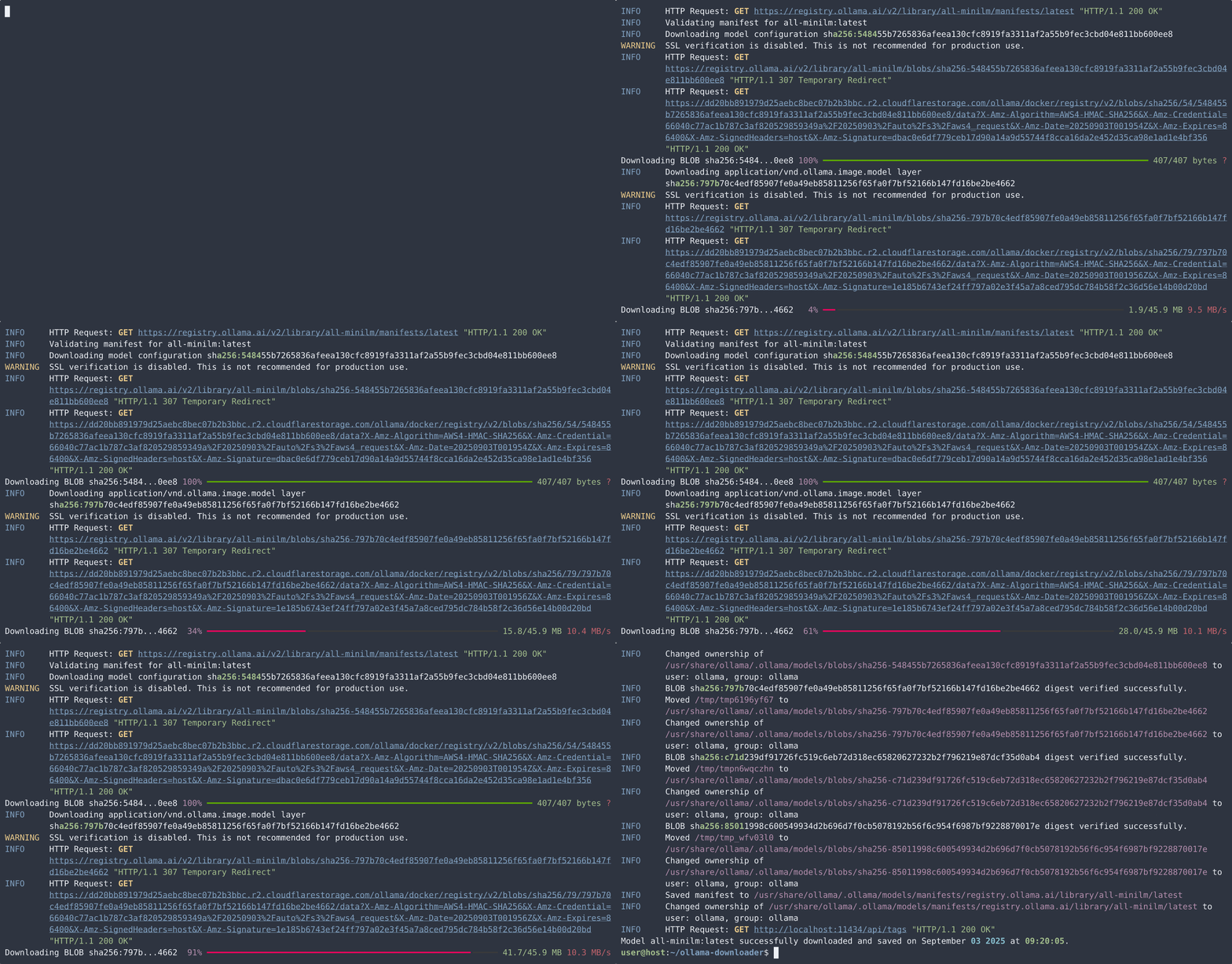
The following screencast shows the process of downloading the model all-minilm:latest on a machine running Ubuntu 22.04.5 LTS (GNU/Linux 6.8.0-60-generic x86_64) with Ollama installed as a service. Hence, the command sudo .venv/bin/od model-download all-minilm was used.
Notice that there are warnings that SSL verification has been disabled. This is intentional to illustrate the process of downloading through a HTTPS proxy (picked up from the HTTPS_PROXY environment variable) that has self-signed certificates.
hf-model-download
The hfmodel-download downloads the specified model from Hugging Face.
During the process of downloading, the following are performed.
- Validation of the manifest for the specified model for the specified repository and organisation. Note that not all Hugging Face models have the necessary files that can be downloaded into Ollama automatically.
- Validation of the SHA256 hash of each downloaded BLOB.
- Post-download verification with the Ollama server specified by
ollama_server.urlin the configuration that the downloaded model is available.
As an example, run uv run od model-download unsloth/gemma-3-270m-it-GGUF:Q4_K_M to download the gemma-3-270m-it-GGUF:Q4_K_M model from unsloth, the details of which can be found at https://huggingface.co/unsloth/gemma-3-270m-it-GGUF.
Running uv run od hf-model-download --help displays the following.
Usage: od hf-model-download [OPTIONS] USER_REPO_QUANT

 Downloads a specified Hugging Face model.


╭─ Arguments ───────────────────────────────────────────────────────────────────╮
│ *    user_repo_quant      TEXT  The name of the specific Hugging Face model   │
│                                 to download, specified as                     │
│                                 <username>/<repository>:<quantisation>, e.g., │
│                                 bartowski/Llama-3.2-1B-Instruct-GGUF:Q4_K_M.  │
│                                 [default: None]                               │
│                                 [required]                                    │
╰───────────────────────────────────────────────────────────────────────────────╯
╭─ Options ─────────────────────────────────────────────────────────────────────╮
│ --help          Show this message and exit.                                   │
╰───────────────────────────────────────────────────────────────────────────────╯
Testing and coverage
To run the provided set of tests using pytest, execute the following in WD. Append the flag --capture=tee-sys to the following command to see the console output during the tests. Note that the model download tests run as sub-processes. Their outputs will not be visible by using this flag.
uv run --group test pytest tests/
To get a report on coverage while invoking the tests, run the following two commands.
uv run --group test coverage run -m pytest tests/
uv run coverage report
Contributing
Install pre-commit for Git by using the --all-groups flag for uv sync.
Then enable pre-commit by running the following in the WD.
pre-commit install
Pull requests are welcome. For major changes, please open an issue first to discuss what you would like to change.
License
MIT.
Project details
Release history Release notifications | RSS feed


Download files
Download the file for your platform. If you're not sure which to choose, learn more about installing packages.
Source Distribution
Built Distribution
Filter files by name, interpreter, ABI, and platform.
If you're not sure about the file name format, learn more about wheel file names.
Copy a direct link to the current filters
File details
Details for the file ollama_downloader-0.1.0.tar.gz.
File metadata
- Download URL: ollama_downloader-0.1.0.tar.gz
- Upload date:
- Size: 1.3 MB
- Tags: Source
- Uploaded using Trusted Publishing? No
- Uploaded via: uv/0.8.13
File hashes
| Algorithm | Hash digest | |
|---|---|---|
| SHA256 |
9fcc0dcb04746e02894c50559abbfabf4cf070224dd3dab859fb31c89814a964
|
|
| MD5 |
59f3e000890a2c82b7007d8d51652ed9
|
|
| BLAKE2b-256 |
6db0c23ba25773309afbe62e08bd6a8b2df883e94cc67dd765f64e9de96b42b1
|
File details
Details for the file ollama_downloader-0.1.0-py3-none-any.whl.
File metadata
- Download URL: ollama_downloader-0.1.0-py3-none-any.whl
- Upload date:
- Size: 22.0 kB
- Tags: Python 3
- Uploaded using Trusted Publishing? No
- Uploaded via: uv/0.8.13
File hashes
| Algorithm | Hash digest | |
|---|---|---|
| SHA256 |
43c7aeef626e03c944ed2b1adfb566fb387349c57ae4e2c07ee05bb7bb7e4701
|
|
| MD5 |
eba214fd8aa4bdfc1b0053f0c48ffb2f
|
|
| BLAKE2b-256 |
a19102c3ed593a4fc507c6d3fdd1baab41aefb0d2ba12e1e6d6cb4283c7cfa61
|






