
🦙 Ollama Manager


CLI app to manage Ollama models.
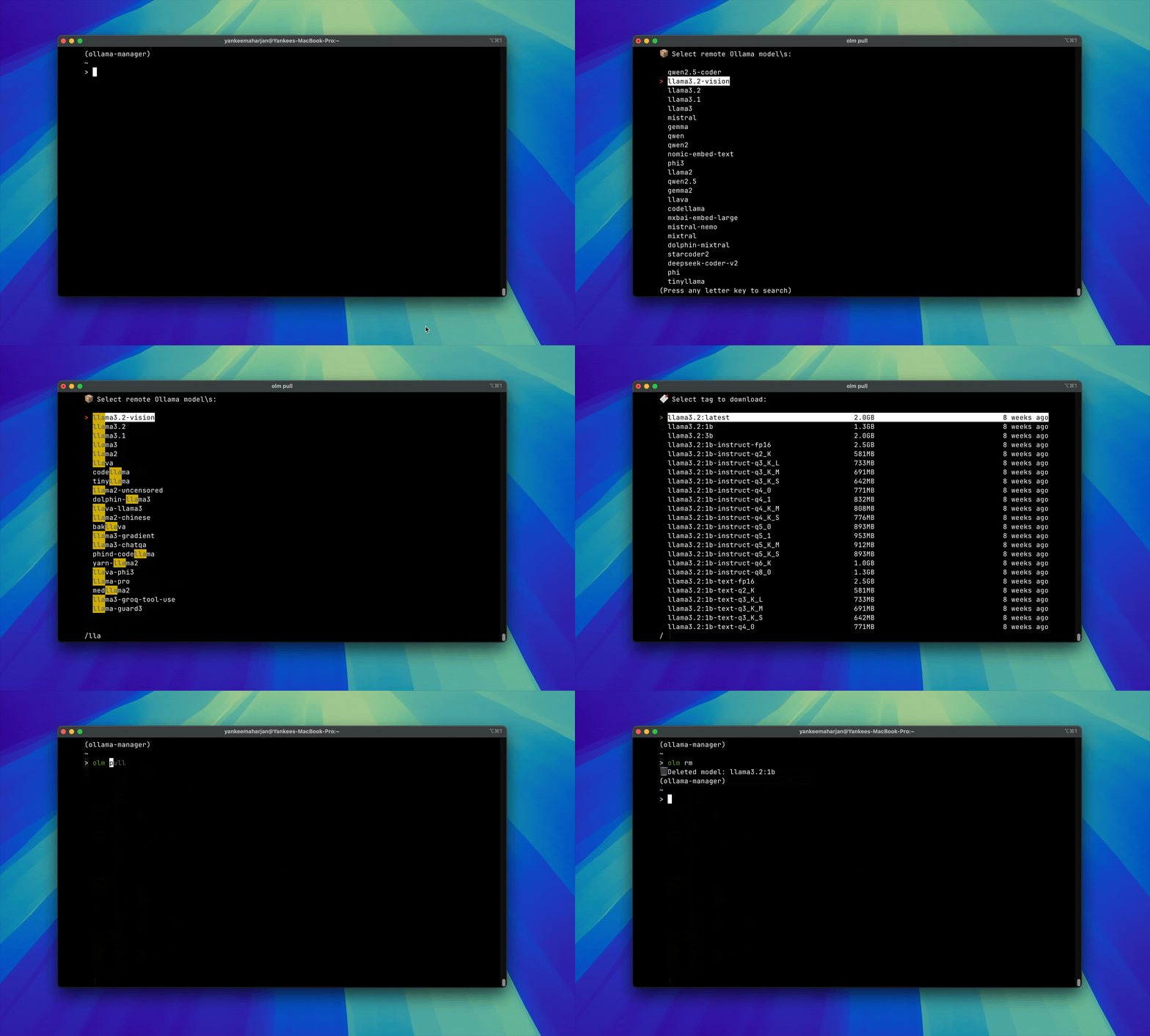
⚡️ Features
- List and Download Remote models from 🦙 Ollama library or 🤗 Hugging Face
- Delete existing Ollama models
- Launch models in Streamlit UI
- Fuzzy Search
🚀 Installation
pip install ollama-manager

# OR

pipx install ollama-manager
For development: installs app in editable mode
make setup
✨ Usage
Pull Remote Model
olm pull
Pull Hugging Face models:
olm pull -hf

# With query:

olm pull -hf -q llama3.2

# With limit:

olm pull -hf -q llama3.2 -l 10

# With multimodal capabilities:

olm pull -hf -q llama -mm
Delete Local Model/s
Delete a single model
olm rm
Delete multiple models
olm rm -m
Delete model without confirmation prompt:
olm rm -y
Run selected model
Run the selected model on Ollama terminal UI:
olm run
Run models in a Streamlit UI:
Ollama Manager UI
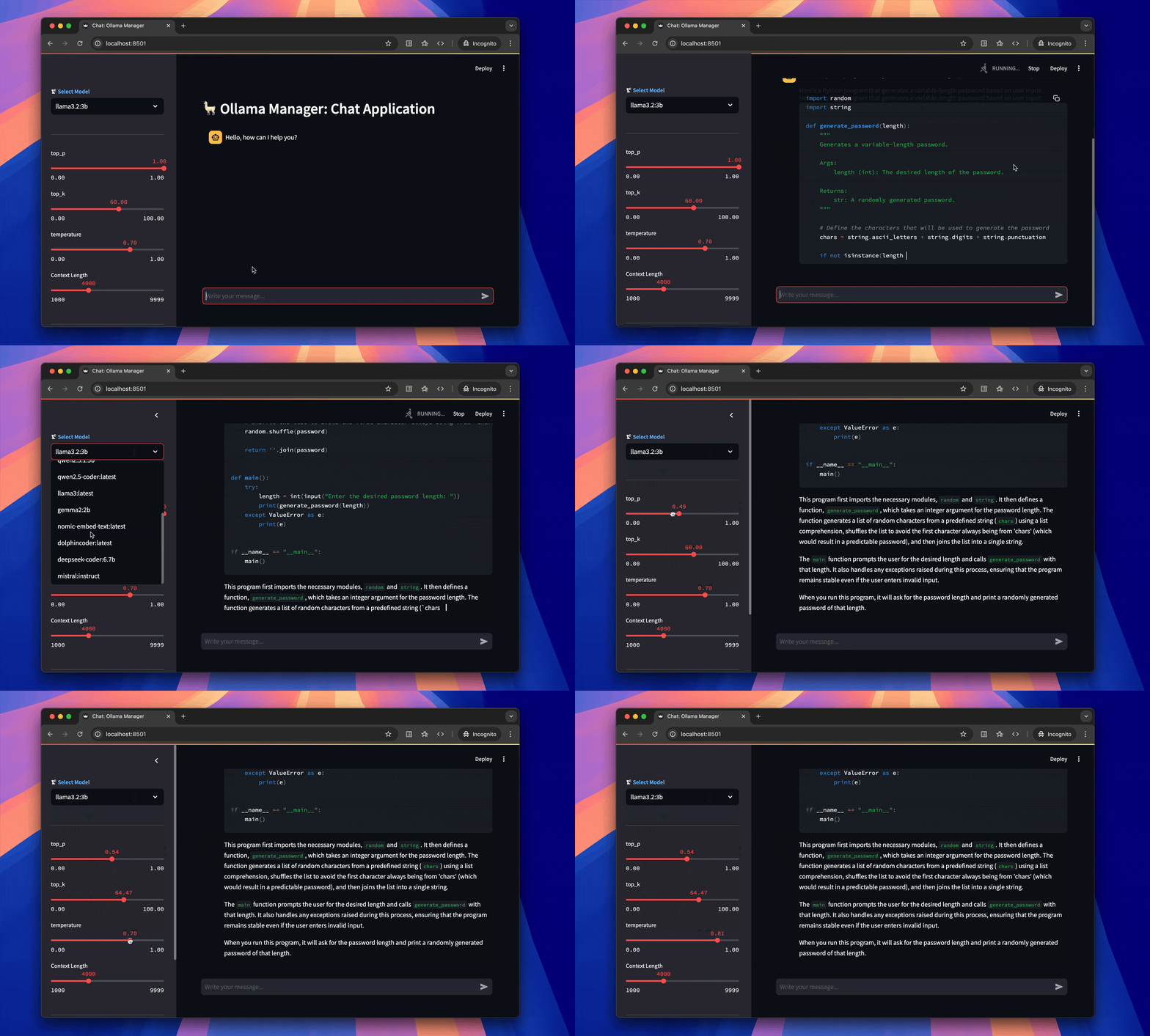
You need to install optional dependencies for this:
pip install ollama-manager[ui]
then use the following command to select the model:
# For Text Models
olm run -ui text

# For Vision Models

olm run -ui vision
List models
List your downloaded ollama models with a rich formatted table:
olm list
Sort models by name, date or size (default is name):
olm list --sort name  # Sort alphabetically by model name
olm list -s date      # Sort by modification date
olm list -s size      # Sort by model size
Control the sort order with --order or -o (default is asc):
olm list --sort size --order desc  # Largest models first
olm list -s date -o desc           # Most recently modified first
olm list -s name -o asc            # Alphabetical A-Z
Getting Help
olm --help

olm <sub-command> --help
1 maintainer

Metadata
1 maintainer
Release files for ollama-manager 0.1.7
For a detailed explanation of source distributions (sdists) and built distributions (wheels), please see the package formats documentation.
Source distribution (sdist)
| File | Size | Uploaded | |
|---|---|---|---|
| ollama_manager-0.1.7.tar.gz | 12.3 kB | Details |
Built distribution (wheel)
| File | Interpreter | ABI | Platform | Reset |
|---|---|---|---|---|
| ollama_manager-0.1.7-py3-none-any.whl | Python 3 | none | any | Details |
Total release size: 26.6 kB
Release files / ollama_manager-0.1.7.tar.gz
| Download URL | ollama_manager-0.1.7.tar.gz |
|---|---|
| Size | 12.3 kB |
| Tags | Source |
|
SHA-256 checksum How to use checksums |
aed708f687628a9686c3eae21b6d4553df907a9b324bec1d9502043a781b31c8
|
|
BLAKE2b-256 checksum How to use checksums |
9104aa635df6ada045dfa061b05ea2622f3c700f63f489257736cfd022127d42
|
| Upload date | |
|
Uploaded using Trusted Publishing? What is trusted publishing? |
Yes |
| Uploaded via |
twine/6.1.0 CPython/3.12.9
|
Provenance
Provenance describes where a file came from. On PyPI, provenance is shared via attestations, which provide a verifiable record of the build or publishing details. View details, limitations and caveats.


PyPI Publish Attestation
PyPI verified that this artifact, at this checksum, originated from the publisher listed below.
Signed by GitHub Actions, verified by PyPI on Jul 5, 2025.
Transparency logRelease files / ollama_manager-0.1.7-py3-none-any.whl
| Download URL | ollama_manager-0.1.7-py3-none-any.whl |
|---|---|
| Size | 14.3 kB |
| Tags | Python 3 |
|
SHA-256 checksum How to use checksums |
b4ac1de3928ba28951e0aa47bce1a0ca82e5ecbb56485c537f3c8bfd052a6118
|
|
BLAKE2b-256 checksum How to use checksums |
6355e91050e18e59b37516eb905d9f61bc10419cc688197af8199ace4f4d06b2
|
| Upload date | |
|
Uploaded using Trusted Publishing? What is trusted publishing? |
Yes |
| Uploaded via |
twine/6.1.0 CPython/3.12.9
|
Provenance
Provenance describes where a file came from. On PyPI, provenance is shared via attestations, which provide a verifiable record of the build or publishing details. View details, limitations and caveats.
PyPI Publish Attestation
PyPI verified that this artifact, at this checksum, originated from the publisher listed below.
Signed by GitHub Actions, verified by PyPI on Jul 5, 2025.
Transparency log













