




Ollama OCR
A powerful OCR (Optical Character Recognition) package that uses state-of-the-art vision language models through Ollama to extract text from images and PDF. Available both as a Python package and a Streamlit web application.
🌟 Features
Supports PDF and Images (New! 🆕)
-
Multiple Vision Models Support
- LLaVA 7B: Efficient vision-language model for real-time processing (LLaVa model can generate wrong output sometimes)
- Llama 3.2 Vision: Advanced model with high accuracy for complex documents
- Granite3.2-vision: A compact and efficient vision-language model, specifically designed for visual document understanding, enabling automated content extraction from tables, charts, infographics, plots, diagrams, and more.
- Moondream: Small vision language model designed to run efficiently on edge devices.
-
Multiple Output Formats
- Markdown: Preserves text formatting with headers and lists
- Plain Text: Clean, simple text extraction
- JSON: Structured data format
- Structured: Tables and organized data
- Key-Value Pairs: Extracts labeled information
- Table: Extract all tabular data.
-
Batch Processing
- Process multiple images in parallel
- Progress tracking for each image
- Image preprocessing (resize, normalize, etc.)
-
Custom Prompts
- Override default prompts with custom instructions for text extraction.
📦 Package Installation
pip install ollama-ocr
🚀 Quick Start
Prerequisites
- Install Ollama
- Pull the required model:
ollama pull llama3.2-vision:11b
ollama pull granite3.2-vision
ollama pull moondream
Using the Package
Single File Processing
from ollama_ocr import OCRProcessor

# Initialize OCR processor
ocr = OCRProcessor(model_name='llama3.2-vision:11b')  # You can use any vision model available on Ollama
# you can pass your custom ollama api

# Process an image
result = ocr.process_image(
    image_path="path/to/your/image.png", # path to your pdf files "path/to/your/file.pdf"
    format_type="markdown",  # Options: markdown, text, json, structured, key_value
    custom_prompt="Extract all text, focusing on dates and names.", # Optional custom prompt
    language="English" # Specify the language of the text (New! 🆕)
)
print(result)
Batch File
from ollama_ocr import OCRProcessor

# Initialize OCR processor
ocr = OCRProcessor(model_name='llama3.2-vision:11b', max_workers=4)  # max workers for parallel processing

# Process multiple images
# Process multiple images with progress tracking
batch_results = ocr.process_batch(
    input_path="path/to/images/folder",  # Directory or list of image paths
    format_type="markdown",
    recursive=True,  # Search subdirectories
    preprocess=True,  # Enable image preprocessing
    custom_prompt="Extract all text, focusing on dates and names.", # Optional custom prompt
    language="English" # Specify the language of the text (New! 🆕)
)
# Access results
for file_path, text in batch_results['results'].items():
    print(f"\nFile: {file_path}")
    print(f"Extracted Text: {text}")

# View statistics
print("\nProcessing Statistics:")
print(f"Total images: {batch_results['statistics']['total']}")
print(f"Successfully processed: {batch_results['statistics']['successful']}")
print(f"Failed: {batch_results['statistics']['failed']}")
📋 Output Format Details
- Markdown Format: The output is a markdown string containing the extracted text from the image.
- Text Format: The output is a plain text string containing the extracted text from the image.
- JSON Format: The output is a JSON object containing the extracted text from the image.
- Structured Format: The output is a structured object containing the extracted text from the image.
- Key-Value Format: The output is a dictionary containing the extracted text from the image.
🌐 Streamlit Web Application(supports batch processing)
- User-Friendly Interface
- Drag-and-drop file upload
- Real-time processing
- Download extracted text
- Image preview with details
- Responsive design
- Language Selection: Specify the language for better OCR accuracy. (New! 🆕)
- Clone the repository:
git clone https://github.com/imanoop7/Ollama-OCR.git
cd Ollama-OCR
- Install dependencies:
pip install -r requirements.txt
- Go to the directory where app.py is located:
cd src/ollama_ocr
- Run the Streamlit app:
streamlit run app.py
Examples Output
Input Image

Sample Output


📄 License
This project is licensed under the MIT License - see the LICENSE file for details.
🙏 Acknowledgments
Built with Ollama Powered by Vision Models
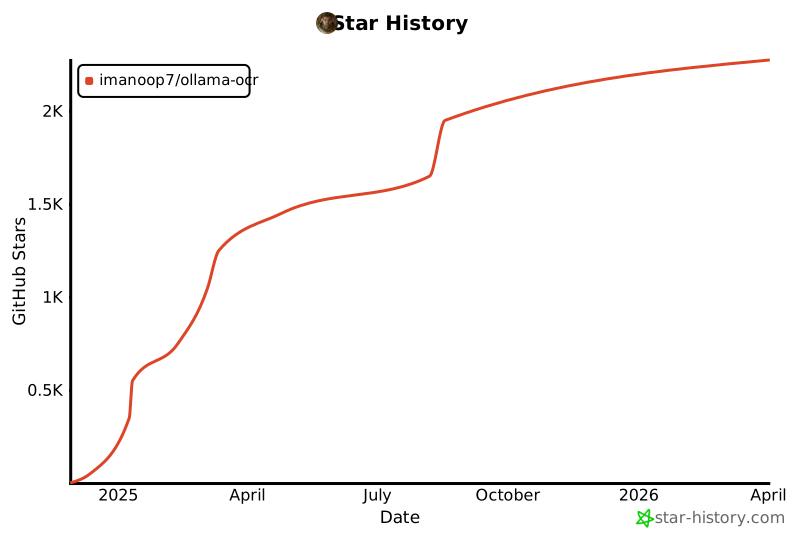
Star History
1 maintainer

Metadata
1 maintainer
Release files for ollama-ocr 0.1.6
For a detailed explanation of source distributions (sdists) and built distributions (wheels), please see the package formats documentation.
Source distribution (sdist)
| File | Size | Uploaded | |
|---|---|---|---|
| ollama_ocr-0.1.6.tar.gz | 13.6 kB | Details |
Built distribution (wheel)
| File | Interpreter | ABI | Platform | Reset |
|---|---|---|---|---|
| ollama_ocr-0.1.6-py3-none-any.whl | Python 3 | none | any | Details |
Total release size: 25.9 kB
Release files / ollama_ocr-0.1.6.tar.gz
| Download URL | ollama_ocr-0.1.6.tar.gz |
|---|---|
| Size | 13.6 kB |
| Tags | Source |
|
SHA-256 checksum How to use checksums |
aaacc1626c62f7da90332f19968d2e846f95ca8005d8b5f4a8e6cfc3673b4913
|
|
BLAKE2b-256 checksum How to use checksums |
1cd03b5effc572b473c2487997e9c16d4e2eb2f577b854e3cf0f4cb219f06e35
|
| Upload date | |
|
Uploaded using Trusted Publishing? What is trusted publishing? |
No |
| Uploaded via |
twine/6.1.0 CPython/3.11.0
|
Release files / ollama_ocr-0.1.6-py3-none-any.whl
| Download URL | ollama_ocr-0.1.6-py3-none-any.whl |
|---|---|
| Size | 12.3 kB |
| Tags | Python 3 |
|
SHA-256 checksum How to use checksums |
03a13741b1b52dddfe2490c06a2dcfd98264dad2847f1b32032517261705623e
|
|
BLAKE2b-256 checksum How to use checksums |
f67e1454188304e97900ac83d47f27b7de726c69708dfc5afbe7573e9c62796e
|
| Upload date | |
|
Uploaded using Trusted Publishing? What is trusted publishing? |
No |
| Uploaded via |
twine/6.1.0 CPython/3.11.0
|














