
Minimal package for loading and initializing OlmoEarth models

Project description
OlmoEarth Pretrain Minimal
A minimal package for loading and initializing OlmoEarth models. This package contains only the code necessary to load models from Hugging Face or initialize them with random weights, without training or evaluation dependencies.
Installation
Option 1: Install from PyPI
pip install olmoearth-pretrain-minimal
Option 2: Install from source with uv
Install uv if you haven't already:
curl -LsSf https://astral.sh/uv/install.sh | sh
To install dependencies:
git clone git@github.com:allenai/olmoearth_pretrain_minimal.git
cd olmoearth_pretrain_minimal
uv sync
uv installs everything into a venv, so to keep using python commands you can activate uv's venv: source .venv/bin/activate. Otherwise, swap to uv run python.
Note: You must specify either --extra torch-cpu or --extra torch-cu128 to install PyTorch. This allows you to explicitly choose the CPU or GPU version regardless of your platform, which is especially useful for CI environments that need CPU-only builds on Linux.
Model Summary
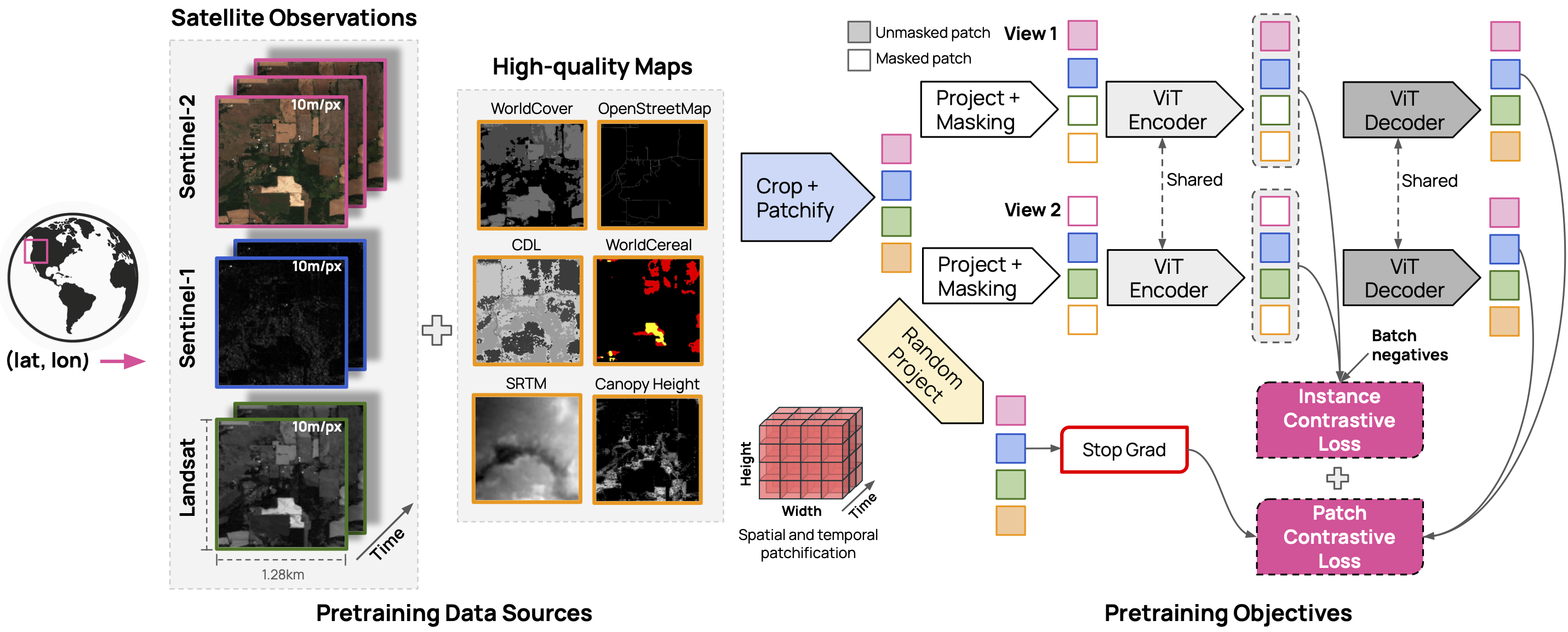
The OlmoEarth models are trained on three satellite modalities (Sentinel 2, Sentinel 1 and Landsat) and six derived maps (OpenStreetMap, WorldCover, USDA Cropland Data Layer, SRTM DEM, WRI Canopy Height Map, and WorldCereal).
Note: The model weights are released under the OlmoEarth Artifact License
| Model Size | Weights | Encoder Params | Decoder Params |
|---|---|---|---|
| Nano | link | 1.4M | 800K |
| Tiny | link | 6.2M | 1.9M |
| Base | link | 89M | 30M |
| Large | link | 308M | 53M |
Usage
Loading Models from Hugging Face
The recommended way to load models is using the model loader, which downloads the model configuration from Hugging Face:
from olmoearth_pretrain_minimal import ModelID, load_model_from_id

# Load a model from Hugging Face with pre-trained weights
# - ModelID.OLMOEARTH_V1_NANO - 1.4M encoder params, 800K decoder params
# - ModelID.OLMOEARTH_V1_TINY - 6.2M encoder params, 1.9M decoder params
# - ModelID.OLMOEARTH_V1_BASE - 89M encoder params, 30M decoder params
# - ModelID.OLMOEARTH_V1_LARGE - 308M encoder params, 53M decoder params
model = load_model_from_id(ModelID.OLMOEARTH_V1_BASE, load_weights=True)

# Load with randomly initialized weights
model_with_weights = load_model_from_id(ModelID.OLMOEARTH_V1_NANO, load_weights=False)
Direct Model Initialization (Custom Configuration)
For custom configurations (e.g., custom modalities), you can directly instantiate the model class:
from olmoearth_pretrain_minimal import OlmoEarthPretrain_v1

# Initialize with custom modalities and settings
model = OlmoEarthPretrain_v1(
    model_size="nano",
    supported_modality_names=["sentinel2_l2a", "sentinel1", "landsat"],
    max_patch_size=8,
    max_sequence_length=12,
    drop_path=0.1,
)
Manual Weight Loading
If you have pre-trained weights in a separate file, you can load them manually:
from olmoearth_pretrain_minimal import ModelID, load_model_from_id
import torch

# Load model without weights
model = load_model_from_id(ModelID.OLMOEARTH_V1_NANO, load_weights=False)

# Load pre-trained weights from a separate file
weights = torch.load("path/to/weights.pth")
model.load_state_dict(weights)
Data Normalization
The model expects normalized input data. Use the Normalizer class to normalize your data before passing it to the model.
Note: Data must be provided with bands in the specific order expected by each modality. See the band order section below.
Sample Code
import torch
import numpy as np

from olmoearth_pretrain_minimal import load_model_from_id, ModelID, Normalizer
from olmoearth_pretrain_minimal.olmoearth_pretrain_v1.utils.constants import Modality
from olmoearth_pretrain_minimal.olmoearth_pretrain_v1.utils.datatypes import MaskedOlmoEarthSample

# Initialize normalizer
normalizer = Normalizer(std_multiplier=2.0)

# Prepare Sentinel-2 L2A data: (batch, height, width, time, bands)
# Bands must match Modality.SENTINEL2_L2A.band_order (12 bands)
sentinel2_data = np.random.rand(1, 128, 128, 12, 12).astype(np.float32)

# Normalize the data
normalized_sentinel2 = normalizer.normalize(Modality.SENTINEL2_L2A, sentinel2_data)

model = load_model_from_id(ModelID.OLMOEARTH_V1_BASE, load_weights=True)
model.eval()

# Create minimal sample (timestamps required, month must be long for embedding)
timestamps = torch.zeros(1, 12, 3, dtype=torch.long)
timestamps[:, :, 1] = torch.arange(12, dtype=torch.long)  # months 0-11

sample = MaskedOlmoEarthSample(
    timestamps=timestamps,
    sentinel2_l2a=torch.from_numpy(normalized_sentinel2).float(),
    sentinel2_l2a_mask=torch.zeros(1, 128, 128, 12, dtype=torch.long),
)

with torch.no_grad():
    output = model.encoder(sample, patch_size=8, input_res=10, fast_pass=True)
Expected Band Orders
The model expects data with bands in a specific order for each modality. Use Modality.<MODALITY_NAME>.band_order to get the correct order:
from olmoearth_pretrain_minimal.olmoearth_pretrain_v1.utils.constants import Modality

# Sentinel-2 L2A band order (12 bands)
print(Modality.SENTINEL2_L2A.band_order)
# ['B02', 'B03', 'B04', 'B08', 'B05', 'B06', 'B07', 'B8A', 'B11', 'B12', 'B01', 'B09']

# Sentinel-1 band order (2 bands)
print(Modality.SENTINEL1.band_order)
# ['vv', 'vh']

# Landsat band order (11 bands)
print(Modality.LANDSAT.band_order)
# ['B8', 'B1', 'B2', 'B3', 'B4', 'B5', 'B6', 'B7', 'B9', 'B10', 'B11']

# WorldCover band order (1 band)
print(Modality.WORLDCOVER.band_order)
# ['B1']

# SRTM band order (1 band)
print(Modality.SRTM.band_order)
# ['srtm']
Key points:
- The last dimension of your data array must match the band order exactly
- For multitemporal modalities (Sentinel-2, Sentinel-1, Landsat), data shape is
(batch, height, width, time, bands) - For single-temporal modalities (WorldCover, SRTM, etc.), data shape is
(batch, height, width, bands)
Note
For the full package with training and evaluation capabilities, see the main olmoearth_pretrain package.


Download files
Download the file for your platform. If you're not sure which to choose, learn more about installing packages.
Source Distribution
Built Distribution
Filter files by name, interpreter, ABI, and platform.
If you're not sure about the file name format, learn more about wheel file names.
Copy a direct link to the current filters
File details
Details for the file olmoearth_pretrain_minimal-0.0.3.tar.gz.
File metadata
- Download URL: olmoearth_pretrain_minimal-0.0.3.tar.gz
- Upload date:
- Size: 62.0 kB
- Tags: Source
- Uploaded using Trusted Publishing? Yes
- Uploaded via: twine/6.1.0 CPython/3.13.12
File hashes
| Algorithm | Hash digest | |
|---|---|---|
| SHA256 |
f2d514939cb56e0602d31ff7bec8eada78721ff0b1664700660f11066e78417d
|
|
| MD5 |
96b36155c76a32b5b128b5a20eab3f4c
|
|
| BLAKE2b-256 |
fd8e0a9604ef6fafafb9739dc6547a7f9009b9a90c9a75afb61062ff3ece8ad0
|
Provenance
The following attestation bundles were made for olmoearth_pretrain_minimal-0.0.3.tar.gz:
Publisher:
publish.yml on allenai/olmoearth_pretrain_minimal
-
Statement:
-
Statement type:
https://in-toto.io/Statement/v1 -
Predicate type:
https://docs.pypi.org/attestations/publish/v1 -
Subject name:
olmoearth_pretrain_minimal-0.0.3.tar.gz -
Subject digest:
f2d514939cb56e0602d31ff7bec8eada78721ff0b1664700660f11066e78417d - Sigstore transparency entry: 1397082589
- Sigstore integration time:
-
Permalink:
allenai/olmoearth_pretrain_minimal@32e9f7472cced57f1ffb4963cc31d8035048ea60 -
Branch / Tag:
refs/heads/main - Owner: https://github.com/allenai
-
Access:
public
-
Token Issuer:
https://token.actions.githubusercontent.com -
Runner Environment:
github-hosted -
Publication workflow:
publish.yml@32e9f7472cced57f1ffb4963cc31d8035048ea60 -
Trigger Event:
workflow_dispatch
-
Statement type:
File details
Details for the file olmoearth_pretrain_minimal-0.0.3-py3-none-any.whl.
File metadata
- Download URL: olmoearth_pretrain_minimal-0.0.3-py3-none-any.whl
- Upload date:
- Size: 66.5 kB
- Tags: Python 3
- Uploaded using Trusted Publishing? Yes
- Uploaded via: twine/6.1.0 CPython/3.13.12
File hashes
| Algorithm | Hash digest | |
|---|---|---|
| SHA256 |
e78d26dcd84002d7dc5a716b5c345fffd9af1b44c1915ee7b576a1a0dd90b8e0
|
|
| MD5 |
4b204c8fc9c40bea653f0622a024dbb2
|
|
| BLAKE2b-256 |
04baaa5b79b1cd6c998be8a1616924ba1dd7ebc7ea9fe8e68b624187c127e2d0
|
Provenance
The following attestation bundles were made for olmoearth_pretrain_minimal-0.0.3-py3-none-any.whl:
Publisher:
publish.yml on allenai/olmoearth_pretrain_minimal
-
Statement:
-
Statement type:
https://in-toto.io/Statement/v1 -
Predicate type:
https://docs.pypi.org/attestations/publish/v1 -
Subject name:
olmoearth_pretrain_minimal-0.0.3-py3-none-any.whl -
Subject digest:
e78d26dcd84002d7dc5a716b5c345fffd9af1b44c1915ee7b576a1a0dd90b8e0 - Sigstore transparency entry: 1397082608
- Sigstore integration time:
-
Permalink:
allenai/olmoearth_pretrain_minimal@32e9f7472cced57f1ffb4963cc31d8035048ea60 -
Branch / Tag:
refs/heads/main - Owner: https://github.com/allenai
-
Access:
public
-
Token Issuer:
https://token.actions.githubusercontent.com -
Runner Environment:
github-hosted -
Publication workflow:
publish.yml@32e9f7472cced57f1ffb4963cc31d8035048ea60 -
Trigger Event:
workflow_dispatch
-
Statement type:






