
Unified message provider interface for Discord, Slack, Jira, and custom platforms with distributed relay support

Project description
Omni Message Provider
A unified Python interface for building chatbots and automated systems across multiple messaging platforms (Discord, Slack, Jira) with optional distributed relay support for scalable deployments.
Features
- Unified Interface: Single
MessageProviderinterface for all platforms - Multiple Platforms: Discord, Slack, Jira, FastAPI (custom), and polling clients
- Distributed Architecture: Optional WebSocket relay for microservices deployments
- High Performance: MessagePack serialization, WebSocket transport
- Production Ready: Kubernetes-ready, auto-reconnection, error handling
Installation
Basic Installation
pip install omni-message-provider
With Platform Support
# Discord only
pip install omni-message-provider[discord]

# Slack only
pip install omni-message-provider[slack]

# Jira only
pip install omni-message-provider[jira]

# All platforms
pip install omni-message-provider[all]
Quick Start
Discord Bot
import os
import discord
from message_provider import DiscordMessageProvider

# Configure Discord
intents = discord.Intents.default()
intents.message_content = True

# Create provider
provider = DiscordMessageProvider(
    bot_token=os.getenv("DISCORD_BOT_TOKEN"),
    client_id="discord:my-bot",
    intents=intents,
    trigger_mode="mention",
    command_prefixes=["!support", "!cq"]
)

# Handle messages
def message_handler(message):
    print(f"Received: {message['text']}")

    channel = message['channel']
    message_id = message['message_id']

    # Reply (threads the response)
    provider.send_message(
        message="Hello!",
        user_id=message['user_id'],
        channel=channel,
        previous_message_id=message_id
    )

    # React to the original message
    provider.send_reaction(message_id, "👋", channel=channel)

provider.register_message_listener(message_handler)
provider.start()
Slack Bot
import os
from message_provider import SlackMessageProvider

provider = SlackMessageProvider(
    bot_token=os.getenv("SLACK_BOT_TOKEN"),
    app_token=os.getenv("SLACK_APP_TOKEN"),
    use_socket_mode=True,
    trigger_mode="mention",
    allowed_channels=["#support", "C12345678"]
)

def message_handler(message):
    channel = message['channel']
    message_id = message['message_id']

    # Reply in thread (previous_message_id is used as thread_ts)
    provider.send_message(
        message="Got it!",
        user_id=message['user_id'],
        channel=channel,
        previous_message_id=message_id
    )

    # React to the original message
    provider.send_reaction(message_id, "eyes", channel=channel)

provider.register_message_listener(message_handler)
provider.start()
Jira Issue Monitor
import os
from message_provider import JiraMessageProvider

provider = JiraMessageProvider(
    server="https://company.atlassian.net",
    email=os.getenv("JIRA_EMAIL"),
    api_token=os.getenv("JIRA_API_TOKEN"),
    project_keys=["SUPPORT", "BUG"],
    client_id="jira:main",
    watch_labels=["bot-watching"],
    trigger_phrases=["@bot"]
)

def message_handler(message):
    if message['type'] == 'new_issue':
        # Add comment to ticket
        provider.send_message(
            message="We're on it!",
            channel=message['channel']  # Issue key
        )
        # Add label
        provider.send_reaction(message['channel'], "bot-acknowledged")
        # Change status
        provider.update_message(message['channel'], "In Progress")

provider.register_message_listener(message_handler)
provider.start()
Distributed Architecture
For scalable, Kubernetes-ready deployments:
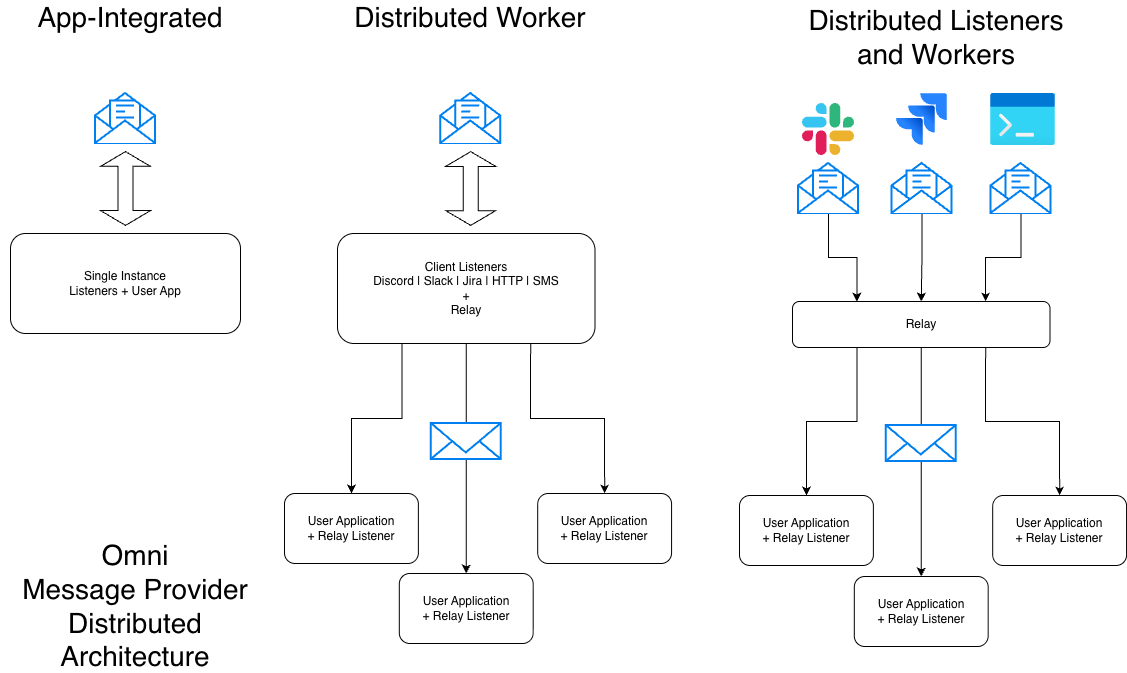
# Message Provider Pod (Discord/Slack/Jira)
from message_provider import DiscordMessageProvider, RelayClient

discord_provider = DiscordMessageProvider(...)
relay_client = RelayClient(
    local_provider=discord_provider,
    relay_hub_url="ws://relay-hub:8765",
    client_id="discord:guild-123"
)
relay_client.start_blocking()

# RelayHub Pod (Central Router)
from message_provider import RelayHub, FastAPIMessageProvider

mp_provider = FastAPIMessageProvider(...)
hub = RelayHub(local_provider=mp_provider, port=8765)
await hub.start()

# Orchestrator Pods (Multiple instances)
from message_provider import RelayMessageProvider

provider = RelayMessageProvider(websocket_url="ws://relay-hub:8765")
provider.register_message_listener(my_handler)
provider.start()
Unified Interface
All providers implement the same interface:
class MessageProvider:
    def send_message(message: str, user_id: str, channel: str = None, previous_message_id: str = None) -> dict:
        """Send a message. Use previous_message_id to reply in a thread."""

    def send_reaction(message_id: str, reaction: str, channel: str = None) -> dict:
        """Add a reaction/label. channel is required for Discord and Slack."""

    def update_message(message_id: str, new_text: str, channel: str = None) -> dict:
        """Update a message/status. channel is required for Discord and Slack."""

    def register_message_listener(callback: Callable) -> None:
        """Register callback for incoming messages"""

    def start() -> None:
        """Start the provider (blocking)"""
Providers are stateless -- they do not cache message or channel metadata internally. The application is responsible for tracking conversation state (e.g., which channel and thread a message belongs to) using the data provided in incoming messages.
Platform-Specific Mappings
Discord
send_message()→ Send Discord message (usesprevious_message_idas reply reference)send_reaction(channel=...)→ Add emoji reaction (channel required)update_message(channel=...)→ Edit message (channel required)channel= Discord channel ID
Slack
send_message()→ Post Slack message (usesprevious_message_idasthread_ts)send_reaction(channel=...)→ Add reaction emoji (channel required)update_message(channel=...)→ Update message (channel required)channel= Slack channel ID
Jira
send_message()→ Add comment to ticketsend_reaction()→ Add label to ticketupdate_message()→ Change ticket statuschannel= Jira issue key (e.g., "SUPPORT-123")
Message Format
All providers return messages in standardized format:
{
    "type": "new_issue" | "new_comment" | "new_message",
    "message_id": "unique-id",
    "text": "message content",
    "user_id": "user-identifier",
    "channel": "channel-identifier",
    "metadata": {
        "client_id": "platform:instance",
        # Platform-specific fields
    }
}
Provider-Specific Fields
Provider-specific data is included under metadata. Use it only when needed.
{
    "type": "new_message",
    "message_id": "unique-id",
    "text": "message content",
    "user_id": "user-identifier",
    "channel": "channel-identifier",
    "metadata": {
        "client_id": "platform:instance",
        "provider": "slack",  # comment: "slack", "discord", "jira", "fastapi", "relay"
        "provider_data": {    # comment: provider-specific details (see below)
            # comment: Slack example
            "thread_ts": "1700000000.123456",
            "channel_type": "channel",
            "event_type": "app_mention"
        }
    }
}
Slack provider_data (examples):
{
    "thread_ts": "1700000000.123456",  # comment: parent thread timestamp
    "channel_type": "channel",         # comment: channel, group, im, mpim
    "event_type": "app_mention",       # comment: app_mention or message
    "user_email": "user@example.com"   # comment: user's email from Slack profile
}
Discord provider_data (examples):
{
    "author_name": "User#1234",        # comment: display name
    "author_discriminator": "1234",    # comment: discriminator (if available)
    "guild_id": "1234567890",          # comment: server ID
    "guild_name": "My Server",         # comment: server name
    "channel_name": "support",         # comment: channel name
    "is_thread": False,                # comment: thread flag
    "thread_id": None,                 # comment: thread ID if applicable
    "reference_message_id": None,      # comment: replied-to message ID
    "is_mention": False                # comment: whether the bot was mentioned
}
Jira provider_data (examples):
{
    "issue_key": "SUPPORT-123",        # comment: issue key
    "project": "SUPPORT",              # comment: project key
    "project_name": "Support",         # comment: project name
    "issue_type": "Bug",               # comment: issue type
    "priority": "High",                # comment: priority
    "status": "In Progress",           # comment: current status
    "labels": ["bot-watching"],        # comment: issue labels
    "reporter_name": "Jane Doe",       # comment: reporter display name
    "reporter_email": "jane@acme.com",  # comment: reporter email if available
    "created": "2024-01-01T00:00:00Z",  # comment: created timestamp
    "url": "https://.../browse/KEY"     # comment: issue URL
}
Configuration
All providers accept explicit parameters (no environment variables in library):
# User controls their own env var names
provider = DiscordMessageProvider(
    bot_token=os.getenv("MY_DISCORD_TOKEN"),  # Your choice
    client_id=os.getenv("MY_CLIENT_ID"),
    trigger_mode="both",  # "mention", "chat", "command", "both"
    command_prefixes=["!support", "!cq"]
)
Examples
See the src/message_provider/examples/ directory for complete working examples:
discord_example.py- Discord bot with reactionsslack_example.py- Slack bot with Socket Modejira_example.py- Jira issue monitorrelay_example.py- Distributed relay setuppolling_client_example.py- FastAPI polling client
Development
# Clone repository
git clone https://github.com/AgentSanchez/omni-message-provider
cd omni-message-provider

# Install with dev dependencies
pip install -e ".[dev,all]"

# Run tests
pytest

# Format code
black src/message_provider/
ruff check src/message_provider/
Requirements
- Python 3.9+
- Core:
fastapi,uvicorn,websockets,msgpack - Optional:
discord.py,slack-bolt,jira
License
MIT License - see LICENSE file
Support
Release history Release notifications | RSS feed


Download files
Download the file for your platform. If you're not sure which to choose, learn more about installing packages.
Source Distribution
Built Distribution
Filter files by name, interpreter, ABI, and platform.
If you're not sure about the file name format, learn more about wheel file names.
Copy a direct link to the current filters
File details
Details for the file omni_message_provider-0.2.3.tar.gz.
File metadata
- Download URL: omni_message_provider-0.2.3.tar.gz
- Upload date:
- Size: 47.5 kB
- Tags: Source
- Uploaded using Trusted Publishing? No
- Uploaded via: twine/6.2.0 CPython/3.11.14
File hashes
| Algorithm | Hash digest | |
|---|---|---|
| SHA256 |
4a88375e90b54e56855cacace3cc6d492d78e5764f8bba505749db9b3dd381f7
|
|
| MD5 |
1a51f93f533376c278655535be14b86f
|
|
| BLAKE2b-256 |
d76e1128d98a601d1c6debadceb6283560e5fbe4c39ff1561da2d0693fbbe1e4
|
File details
Details for the file omni_message_provider-0.2.3-py3-none-any.whl.
File metadata
- Download URL: omni_message_provider-0.2.3-py3-none-any.whl
- Upload date:
- Size: 57.1 kB
- Tags: Python 3
- Uploaded using Trusted Publishing? No
- Uploaded via: twine/6.2.0 CPython/3.11.14
File hashes
| Algorithm | Hash digest | |
|---|---|---|
| SHA256 |
c5056324417c3d14104c6abd7a00e3bfff7459e36fc402f35d7be6c8ddec507e
|
|
| MD5 |
9b7fb36d08d96577ee802404ba6e90e2
|
|
| BLAKE2b-256 |
996b45f378a8c9c4a9bb7ba60cbfbc10b49497d421ba63a966073977f92baae3
|






