
Universal Event-Driven Runtime Engine for AI Agents

Project description
🌐 OmniDaemon
Universal Event-Driven Runtime Engine for AI Agents



Run any AI agent. Any framework. One event-driven control plane.
Created by Abiola Adeshina • From the team behind OmniCore Agent
🌊 Why OmniDaemon Exists: The Challenges with Scaling Intelligent Agents
This is the foundational reason OmniDaemon was built. Understanding this will help you see why event-driven architecture is not just a technical choice, but a necessity for building scalable AI agent systems.
Perspectives in this section draw on Sean Falconer's analysis in "The Future of AI Agents is Event-Driven". [source]
The Core Challenge
Scaling agents — whether a single agent or a collaborative system — hinges on their ability to access and share data effortlessly. Agents need to gather information from multiple sources, including other agents, tools, and external systems, to make decisions and take action.
Single agent dependencies
Connecting agents to the tools and data they need is fundamentally a distributed systems problem. This complexity mirrors the challenges faced in designing microservices, where components must communicate efficiently without creating bottlenecks or rigid dependencies.
Like microservices, agents must communicate efficiently and ensure their outputs are useful across the broader system. And like any service, their outputs shouldn't just loop back into the AI application — they should flow into other critical systems like data warehouses, CRMs, CDPs, and customer success platforms.
Sure, you could connect agents and tools through RPC and APIs, but that's a recipe for tightly coupled systems. Tight coupling makes it harder to scale, adapt, or support multiple consumers of the same data. Agents need flexibility. Their outputs must seamlessly feed into other agents, services, and platforms without locking everything into rigid dependencies.
What's the Solution?
Loose coupling through an event-driven architecture. It's the backbone that allows agents to share information, act in real time, and integrate with the broader ecosystem — without the headaches of tight coupling.
📚 Event-Driven Architectures: A Primer
In the early days, software systems were monoliths. Everything lived in a single, tightly integrated codebase. While simple to build, monoliths became a nightmare as they grew.
Scaling was a blunt instrument: you had to scale the entire application, even if only one part needed it. This inefficiency led to bloated systems and brittle architectures that couldn't handle growth.
Microservices changed this.
By breaking applications into smaller, independently deployable components, teams could scale and update specific parts without touching the whole system. But this created a new challenge: how do all these smaller services communicate effectively?
If we connect services through direct RPC or API calls, we create a giant mess of interdependencies. If one service goes down, it impacts all nodes along the connected path.
EDA solved the problem.
Instead of tightly coupled, synchronous communication, EDA enables components to communicate asynchronously through events. Services don't wait on each other — they react to what's happening in real-time.
This approach made systems more resilient and adaptable, allowing them to handle the complexity of modern workflows. It wasn't just a technical breakthrough; it was a survival strategy for systems under pressure.
⚠️ The Rise and Fall of Early Social Giants
The rise and fall of early social networks like Friendster underscore the importance of scalable architecture. Friendster captured massive user bases early on, but their systems couldn't handle the demand. Performance issues drove users away, and the platform ultimately failed.
On the flip side, Facebook thrived not just because of its features but because it invested in scalable infrastructure. It didn't crumble under the weight of success — it rose to dominate.
Today, we risk seeing a similar story play out with AI agents.
Like early social networks, agents will experience rapid growth and adoption. Building agents isn't enough. The real question is whether your architecture can handle the complexity of distributed data, tool integrations, and multi-agent collaboration. Without the right foundation, your agent stack could fall apart just like the early casualties of social media.
🚀 The Future is Event-Driven Agents
The future of AI isn't just about building smarter agents — it's about creating systems that can evolve and scale as the technology advances. With the AI stack and underlying models changing rapidly, rigid designs quickly become barriers to innovation. To keep pace, we need architectures that prioritize flexibility, adaptability, and seamless integration. EDA is the foundation for this future, enabling agents to thrive in dynamic environments while remaining resilient and scalable.
🤝 Agents as Microservices with Informational Dependencies
Agents are similar to microservices: they're autonomous, decoupled, and capable of handling tasks independently. But agents go further.
While microservices typically process discrete operations, agents rely on shared, context-rich information to reason, make decisions, and collaborate. This creates unique demands for managing dependencies and ensuring real-time data flows.
For instance, an agent might pull customer data from a CRM, analyze live analytics, and use external tools — all while sharing updates with other agents. These interactions require a system where agents can work independently but still exchange critical information fluidly.
EDA solves this challenge by acting as a "central nervous system" for data. It allows agents to broadcast events asynchronously, ensuring that information flows dynamically without creating rigid dependencies. This decoupling lets agents operate autonomously while integrating seamlessly into broader workflows and systems.
🔓 Decoupling While Keeping Context Intact
Building flexible systems doesn't mean sacrificing context. Traditional, tightly coupled designs often bind workflows to specific pipelines or technologies, forcing teams to navigate bottlenecks and dependencies. Changes in one part of the stack ripple through the system, slowing innovation and scaling efforts.
EDA eliminates these constraints. By decoupling workflows and enabling asynchronous communication, EDA allows different parts of the stack — agents, data sources, tools, and application layers — to function independently.
Take today's AI stack, for example. MLOps teams manage pipelines like RAG, data scientists select models, and application developers build the interface and backend. A tightly coupled design forces all these teams into unnecessary interdependencies, slowing delivery and making it harder to adapt as new tools and techniques emerge.
In contrast, an event-driven system ensures that workflows stay loosely coupled, allowing each team to innovate independently.
Application layers don't need to understand the AI's internals — they simply consume results when needed. This decoupling also ensures AI insights don't remain siloed. Outputs from agents can seamlessly integrate into CRMs, CDPs, analytics tools, and more, creating a unified, adaptable ecosystem.
⚡ Scaling Agents with Event-Driven Architecture
EDA is the backbone of this transition to agentic systems.
Its ability to decouple workflows while enabling real-time communication ensures that agents can operate efficiently at scale. Platforms like Kafka exemplify the advantages of EDA in an agent-driven system:
- Horizontal Scalability: Distributed design supports the addition of new agents or consumers without bottlenecks, ensuring the system grows effortlessly.
- Low Latency: Real-time event processing enables agents to respond instantly to changes, ensuring fast and reliable workflows.
- Loose Coupling: By communicating through topics rather than direct dependencies, agents remain independent and scalable.
- Event Persistence: Durable message storage guarantees that no data is lost in transit, which is critical for high-reliability workflows.
Data streaming enables the continuous flow of data throughout a business. A central nervous system acts as the unified backbone for real-time data flow, seamlessly connecting disparate systems, applications, and data sources to enable efficient agent communication and decision-making.
This architecture is a natural fit for frameworks like Anthropic's Model Context Protocol (MCP).
MCP provides a universal standard for integrating AI systems with external tools, data sources, and applications, ensuring secure and seamless access to up-to-date information. By simplifying these connections, MCP reduces development effort while enabling context-aware decision-making.
EDA addresses many of the challenges MCP aims to solve. MCP requires seamless access to diverse data sources, real-time responsiveness, and scalability to support complex multi-agent workflows. By decoupling systems and enabling asynchronous communication, EDA simplifies integration and ensures agents can consume and produce events without rigid dependencies.
🎯 Event-Driven Agents Will Define the Future of AI
The AI landscape is evolving rapidly, and architectures must evolve with it.
And businesses are ready. A Forum Ventures survey found that 48% of senior IT leaders are prepared to integrate AI agents into operations, with 33% saying they're very prepared. This shows a clear demand for systems that can scale and handle complexity.
EDA is the key to building agent systems that are flexible, resilient, and scalable. It decouples components, enables real-time workflows, and ensures agents can integrate seamlessly into broader ecosystems.
Those who adopt EDA won't just survive — they'll gain a competitive edge in this new wave of AI innovation. The rest? They risk being left behind, casualties of their own inability to scale.
🎯 What is OmniDaemon?
"Kubernetes for AI Agents" - A universal runtime that makes AI agents autonomous, observable, and scalable.
In 5 seconds:
- 🤖 Run AI agents in the background (not chatbots, not APIs)
- 📨 Event-driven (agents react to events, not HTTP requests)
- 🔌 Use any AI framework (OmniCoreAgent, Google ADK, LangChain, or custom)
- 🚀 Production-ready (retries, DLQ, metrics, scaling built-in)
💡 The Vision: OmniDaemon transforms AI from static reasoning engines into event-driven, self-operating entities that integrate seamlessly across clouds, data streams, and enterprise environments. This is how we move AI from experiments to living, autonomous infrastructure.
Why OmniDaemon?
Traditional AI (Request-Driven):
User asks → AI responds → Done ❌
OmniDaemon (Event-Driven):
Event happens → AI agent reacts → Result stored ✅
              → Multiple agents listen
              → Automatic retries
              → DLQ for failures
What you get:
| Feature | What It Means |
|---|---|
| 🤖 Run Any AI Agent | OmniCoreAgent, Google ADK, LangChain, CrewAI, and many more. |
| 📨 Event-Driven | Agents listen to topics, not HTTP endpoints |
| 🔄 Auto Retries | Failed tasks retry automatically |
| 💀 Dead Letter Queue | Failed messages go to DLQ for analysis |
| 📊 Real-time Metrics | Tasks received, processed, failed, timing |
| 🎛️ Full Control | Beautiful CLI + HTTP API |
| ⚖️ Horizontal Scaling | Run multiple agent instances for load balancing |
| 🔌 Pluggable | Swap Redis/Kafka/RabbitMQ via env vars |
When to Use OmniDaemon
✅ Perfect For:
- Background AI Agents - Autonomous agents that react to events
- Event-Driven Workflows - Multi-step AI processing pipelines
- Multi-Agent Systems - Multiple agents collaborating on tasks
- Async AI Processing - Long-running AI tasks (not real-time chat)
- Enterprise AI Ops - Scalable, observable, production AI systems
❌ Not Recommended For:
- Simple HTTP APIs - Use FastAPI/Flask directly (simpler)
- Real-Time Chat - Use WebSockets/SSE (lower latency)
- Synchronous Request-Response - Use REST APIs (simpler architecture)
- Single-Shot Scripts - Use Python scripts directly (no runtime needed)
🆚 Compared to Alternatives:
| Tool | Use Case | vs OmniDaemon |
|---|---|---|
| Celery | Task queues | ❌ Not AI-first, complex setup, no agent abstraction |
| AWS Lambda | Serverless functions | ❌ Cold starts, time limits, vendor lock-in |
| Temporal | Workflow engine | ❌ Heavy, complex, not AI-optimized |
| Airflow | DAG orchestration | ❌ Batch-oriented, not real-time events |
| OmniDaemon | AI Agent Runtime | ✅ AI-first, event-driven, any framework, production-ready |
🚀 Quick Start
Get OmniDaemon running in 5 minutes with zero prior knowledge. Follow each step carefully.
Step 1: Install Event Bus & Storage Backend
For this Quick Start, we'll use Redis (current production-ready backend for both event bus and storage).
💡 OmniDaemon is pluggable! Redis Streams is our first event bus implementation. Coming soon: Kafka, RabbitMQ, NATS. For storage, we support JSON (dev) and Redis (production), with PostgreSQL, MongoDB, and S3 planned.
macOS
brew install redis
brew services start redis
Ubuntu/Debian
sudo apt update
sudo apt install redis-server
sudo systemctl start redis-server
sudo systemctl enable redis-server
Windows
# Option 1: Using WSL (recommended)
wsl --install
# Then follow Ubuntu steps above

# Option 2: Download installer from https://redis.io/download
Docker (All Platforms - Easiest!)
docker run -d -p 6379:6379 --name redis redis:latest
✅ Verify Event Bus is running (Redis Streams for this Quick Start):
redis-cli ping
Expected output: PONG
❌ If you see "command not found" or connection error, the event bus backend isn't running. Try the Docker method above.
Step 2: Install OmniDaemon
⚡ Recommended: Using uv (Modern & Fast)
uv is a blazing-fast Python package installer (10-100x faster than pip!):
# Install uv (if not already installed)
curl -LsSf https://astral.sh/uv/install.sh | sh
# Or: pip install uv

# Create a new project
mkdir my-omnidaemon-project
cd my-omnidaemon-project

# Initialize project
uv init

# Create virtual environment
uv venv

# Activate environment
source .venv/bin/activate  # On Windows: .venv\Scripts\activate

# Install OmniDaemon
uv add omnidaemon

# Verify installation
python -c "import omnidaemon; print('✅ OmniDaemon installed!')"
If installing from source with uv:
git clone https://github.com/omnirexflora-labs/OmniDaemon
cd OmniDaemon
uv sync  # Installs all dependencies
python -c "import omnidaemon; print('✅ OmniDaemon installed from source!')"
Traditional Method: Using pip
If you prefer the traditional approach:
# Create a new project folder
mkdir my-omnidaemon-project
cd my-omnidaemon-project

# Create virtual environment
python3 -m venv venv
source venv/bin/activate  # On Windows: venv\Scripts\activate

# Install OmniDaemon
pip install omnidaemon

# Verify installation
python -c "import omnidaemon; print('✅ OmniDaemon installed!')"
From source with pip:
git clone https://github.com/omnirexflora-labs/OmniDaemon
cd OmniDaemon
pip install -e .
python -c "import omnidaemon; print('✅ OmniDaemon installed from source!')"
Step 3: Create Your First Agent
Create a file called agent_runner.py (this is your agent runner that registers and starts agents):
📝 Simple Version (Minimal - Most Common)
# agent_runner.py - SIMPLE VERSION
import asyncio
from omnidaemon import OmniDaemonSDK, AgentConfig

sdk = OmniDaemonSDK()

# CALLBACK = Where your AI agent runs!
# This function is called when a message arrives
async def greeter(message: dict):
    """
    This is YOUR callback - where your logic/AI agent executes.

    For this simple example, we just return a greeting.
    In real apps, this is where you'd call your AI agent.

    See real examples:
    - examples/omnicoreagent/agent_runner.py (OmniCore)
    - examples/google_adk/agent_runner.py (Google ADK)
    """
    content = message.get("content", {})
    name = content.get("name", "stranger")
    return {"reply": f"Hello, {name}! 👋"}

async def main():
    # Register agent - only topic and callback are required!
    await sdk.register_agent(
        agent_config=AgentConfig(
            topic="greet.user",      # REQUIRED: Where to listen
            callback=greeter,         # REQUIRED: Your function (where AI agent runs)
        )
    )

    await sdk.start()
    print("🎧 Agent running. Press Ctrl+C to stop.")

    try:
        while True:
            await asyncio.sleep(1)
    except KeyboardInterrupt:
        pass
    finally:
        await sdk.shutdown()

if __name__ == "__main__":
    asyncio.run(main())
🤖 Understanding the Callback:
The callback is WHERE YOUR AI AGENT RUNS. When a message arrives:
- OmniDaemon calls your callback function
- Your callback processes the message (with your AI agent or logic)
- Your callback returns the result
- OmniDaemon stores the result automatically
What goes in the callback?
- ✅ OmniCore Agent - See OmniCore Example
- ✅ Google ADK Agent - See Google ADK Example
- ✅ LangChain Agent - Any LangChain chain
- ✅ Custom AI Agent - Your own agent implementation
- ✅ Plain Python - Simple logic (but this is designed for AI agents!)
💡 Pro Tip: Start with simple logic (like above), then add your AI agent later!
Only 2 things are required:
- ✅
topic- Where your agent listens - ✅
callback- Your function (where AI agent runs)
Everything else has smart defaults:
name→ Auto-generated (e.g.,agent-abc123)tools→ Empty list[]description→ Empty string""config→ Consumer count: 1, retries: 3, reclaim: 60s
⚙️ Full Version (All Options - Production Ready)
# agent_runner.py - FULL VERSION with all options
import asyncio
from omnidaemon import OmniDaemonSDK, AgentConfig, SubscriptionConfig

sdk = OmniDaemonSDK()

async def greeter(message: dict):
    content = message.get("content", {})
    name = content.get("name", "stranger")
    print(f"📨 Processing request for: {name}")
    return {"reply": f"Hello, {name}! Welcome to OmniDaemon. 🎉"}

async def main():
    try:
        # Register with ALL optional parameters
        await sdk.register_agent(
            agent_config=AgentConfig(
                name="GREETER_AGENT",              # Optional: Custom name
                topic="greet.user",                # REQUIRED
                callback=greeter,                   # REQUIRED
                description="Friendly greeting agent",  # Optional
                tools=["greeting", "chat"],         # Optional: Tool names
                config=SubscriptionConfig(          # Optional: Advanced settings
                    reclaim_idle_ms=60000,          # Optional: 60s (default varies)
                    dlq_retry_limit=3,              # Optional: 3 retries (default)
                    consumer_count=2,               # Optional: 2 parallel consumers
                ),
            )
        )

        print("✅ Agent registered!")
        await sdk.start()
        print("🎧 Listening for events...")

        while True:
            await asyncio.sleep(1)

    except KeyboardInterrupt:
        print("\n👋 Shutting down...")
    finally:
        await sdk.shutdown()

if __name__ == "__main__":
    asyncio.run(main())
Use full version when:
- ✅ Need custom agent names for monitoring
- ✅ Need more than 1 parallel consumer (scaling)
- ✅ Need custom retry/reclaim settings
- ✅ Want descriptive metadata for docs
💡 Quick Comparison:
| Parameter | Required? | Simple Version | Full Version | Default if Not Set |
|---|---|---|---|---|
topic |
✅ YES | ✅ | ✅ | - |
callback |
✅ YES | ✅ | ✅ | - |
name |
No | ❌ | ✅ | agent-<uuid> |
description |
No | ❌ | ✅ | "" |
tools |
No | ❌ | ✅ | [] |
config |
No | ❌ | ✅ | See below |
Default Config Values:
consumer_count: 1 (single consumer)dlq_retry_limit: 3 attemptsreclaim_idle_ms: Varies by event bus
👉 Start with Simple Version, add options later as needed!
🤖 Real AI Agent Callbacks (How Pros Do It)
Here's how the callback looks with ACTUAL AI agents:
Example 1: With OmniCore Agent
from omnicoreagent import OmniAgent

# Initialize your AI agent
agent = OmniAgent(
    name="my_agent",
    system_instruction="Help users with tasks",
    model_config={"provider": "openai", "model": "gpt-4o"},
)

# Callback = where you run your AI agent
async def my_callback(message: dict):
    content = message.get("content", "")

    # THIS is where your AI agent runs!
    result = await agent.run(content)

    return {"status": "success", "data": result}
Example 2: With Google ADK Agent
from google.adk.agents import LlmAgent
from google.adk.runners import Runner

# Initialize your AI agent
agent = LlmAgent(
    model="gemini-2.0-flash",
    name="my_agent",
    instruction="Help users with tasks",
)
runner = Runner(agent=agent, app_name="my_app", session_service=session_service)

# Callback = where you run your AI agent
async def my_callback(message: dict):
    query = message.get("content", "")

    # THIS is where your AI agent runs!
    async for event in runner.run_async(user_id="user", session_id="session", new_message=query):
        if event.is_final_response():
            return event.content.parts[0].text
Example 3: Plain Python (Simple Logic)
# Callback = any Python logic
async def my_callback(message: dict):
    # No AI agent - just process data
    data = message.get("content", {})
    result = process_data(data)  # Your custom logic
    return {"processed": result}
💡 The Pattern:
- Initialize your AI agent outside the callback (once)
- In callback: Extract message content
- In callback: Run your AI agent with that content
- In callback: Return the result
- OmniDaemon handles the rest (storage, retries, DLQ, etc.)
📦 What's Inside the Message?
IMPORTANT: The message parameter contains the FULL EventEnvelope, not just content!
async def my_callback(message: dict):
    """
    The 'message' parameter contains EVERYTHING from the publisher:
    - content (your data)
    - correlation_id (track requests)
    - tenant_id (multi-tenancy)
    - source (event origin)
    - causation_id (event chain)
    - webhook (callback URL)
    - reply_to (response topic)
    - created_at (timestamp)
    - etc.
    """

    # Access any field from the EventEnvelope
    content = message.get("content", {})           # Your data
    correlation_id = message.get("correlation_id")  # Request tracking
    tenant_id = message.get("tenant_id")           # Which tenant?
    source = message.get("source")                 # Where from?
    causation_id = message.get("causation_id")     # What caused this?
    reply_to = message.get("reply_to")             # Response topic
    webhook = message.get("webhook")               # Callback URL

    # Use metadata to make smart decisions!
    # ... (see examples below)
Why This Matters: You can use this metadata to:
- ✅ Filter by tenant (multi-tenancy)
- ✅ Route by source (different logic per channel)
- ✅ Make decisions based on correlation chain
- ✅ Check if response needed (reply_to exists?)
- ✅ Conditional processing based on causation
- ✅ Custom logic per event metadata
🎯 Smart Callback Patterns
Pattern 1: Multi-Tenant Filtering
async def my_callback(message: dict):
    tenant_id = message.get("tenant_id")

    # Only process if specific tenant
    if tenant_id not in ["tenant-123", "tenant-456"]:
        return {"status": "skipped", "reason": "unauthorized tenant"}

    # Load tenant-specific config
    tenant_config = get_tenant_config(tenant_id)
    content = message.get("content", {})

    # Process with your AI agent (adapt to your agent's API)
    result = await process_with_agent(content, config=tenant_config)
    return {"status": "success", "data": result, "tenant": tenant_id}
Pattern 2: Source-Based Routing
async def my_callback(message: dict):
    source = message.get("source")
    content = message.get("content", {})

    # Different logic based on source
    if source == "web-app":
        # Web users get full processing
        result = await process_with_agent(content)
    elif source == "mobile-app":
        # Mobile gets optimized processing
        result = await process_with_agent(content, optimized=True)
    elif source == "api":
        # API gets raw data
        result = await process_with_agent(content, raw=True)
    else:
        # Default behavior
        result = await process_with_agent(content)

    return {"status": "success", "data": result, "processed_by": source}
Pattern 3: Correlation-Based Decisions
async def my_callback(message: dict):
    correlation_id = message.get("correlation_id")
    content = message.get("content", {})

    # Check if this is part of ongoing conversation
    if correlation_id:
        # Load conversation context from your DB
        context = await load_conversation_context(correlation_id)
        result = await process_with_agent(content, context=context)

        # Save updated context
        await save_conversation_context(correlation_id, result)
    else:
        # New conversation
        result = await process_with_agent(content)

    return {"status": "success", "data": result, "correlation_id": correlation_id}
Pattern 4: Causation Chain Processing
async def my_callback(message: dict):
    causation_id = message.get("causation_id")
    content = message.get("content", {})

    # Check what caused this event
    if causation_id:
        # Load parent event
        parent_event = await get_event(causation_id)

        # Process differently based on parent
        if parent_event.get("type") == "user_action":
            priority = "high"
        elif parent_event.get("type") == "scheduled_task":
            priority = "normal"
        else:
            priority = "low"

        result = await process_with_agent(content, priority=priority)
    else:
        # No parent event
        result = await process_with_agent(content)

    return {"status": "success", "data": result}
💡 Note:
process_with_agent()is a placeholder. Replace with your actual AI agent's API. See real examples:examples/omnicoreagent/agent_runner.pyorexamples/google_adk/agent_runner.py
Pattern 5: Conditional Response Routing
async def my_callback(message: dict):
    content = message.get("content", {})
    reply_to = message.get("reply_to")
    webhook = message.get("webhook")

    # Process the task with your AI agent
    result = await process_with_agent(content)

    # Smart response handling
    response = {"status": "success", "data": result}

    if reply_to:
        # Response will auto-publish to reply_to topic
        # Another agent can pick it up there
        response["note"] = f"Will be published to {reply_to}"

    if webhook:
        # Response will be POSTed to webhook
        # Your API will receive it
        response["note"] = f"Will be sent to {webhook}"

    # You can also add custom routing logic
    if result.get("needs_review"):
        # Publish to review queue
        await sdk.publish_task(
            EventEnvelope(
                topic="review.queue",
                payload=PayloadBase(content=result)
            )
        )
        response["routed_to_review"] = True

    return response
Pattern 6: Complete Smart Callback
async def my_callback(message: dict):
    """
    Production-grade callback that uses all metadata
    to make intelligent routing decisions.
    """
    # Extract all metadata
    content = message.get("content", {})
    tenant_id = message.get("tenant_id")
    source = message.get("source")
    correlation_id = message.get("correlation_id")

    # 1. Tenant validation
    if tenant_id and not await is_tenant_authorized(tenant_id):
        return {
            "status": "error",
            "error": "Unauthorized tenant",
            "tenant_id": tenant_id
        }

    # 2. Load tenant-specific config
    config = await get_tenant_config(tenant_id) if tenant_id else {}

    # 3. Check rate limits by source
    if source and await is_rate_limited(source, tenant_id):
        return {
            "status": "rate_limited",
            "retry_after": 60,
            "source": source
        }

    # 4. Load conversation context if correlated
    context = None
    if correlation_id:
        context = await load_context(correlation_id)

    # 5. Process with your AI agent (adapt to your agent's API)
    result = await process_with_agent(
        content,
        config=config,
        context=context,
        metadata={"tenant_id": tenant_id, "source": source}
    )

    # 6. Save context for next message
    if correlation_id:
        await save_context(correlation_id, result)

    # 7. Return enriched response
    return {
        "status": "success",
        "data": result,
        "metadata": {
            "tenant_id": tenant_id,
            "source": source,
            "correlation_id": correlation_id,
            "processed_at": time.time()
        }
    }
💡 Note: All examples use
process_with_agent()as a placeholder. Replace with actual agent API: Seeexamples/omnicoreagent/agent_runner.pyorexamples/google_adk/agent_runner.py
🎓 Key Insights:
- Message = Full Event - Not just content, ALL metadata included
- Use Metadata Smartly - Filter, route, prioritize based on metadata
- Multi-Tenancy - Use
tenant_idto isolate and configure - Source Routing - Different logic for web vs mobile vs API
- Conversation Context - Use
correlation_idto maintain context - Event Chains - Use
causation_idto understand event history - Response Routing - Check
reply_toandwebhookfor smart routing
💡 Pro Tip: Start simple (just use content), then add metadata-based logic as your system grows!
See full working examples:
- OmniCore Agent Example - Complete code
- Google ADK Agent Example - Complete code
Step 4: Run Your Agent
python agent_runner.py
✅ You should see output like this:
✅ Agent registered successfully!
[Runner abc-123] Registered agent 'GREETER_AGENT' on topic 'greet.user'
🎧 Agent is now listening for events. Press Ctrl+C to stop.
✅ Success indicators:
- "Agent registered successfully!" message
- Shows "[Runner ...] Registered agent" with your agent name
- Shows "listening for events" message
- Process doesn't exit (stays running, waiting for messages)
❌ Common errors and fixes:
| Error | Cause | Fix |
|---|---|---|
Connection refused [Errno 111] |
Event bus not running | Go back to Step 1, start event bus backend |
ModuleNotFoundError: No module named 'omnidaemon' |
Not installed | Go back to Step 2 |
ImportError: cannot import name 'OmniDaemonSDK' |
Wrong import | Try from omnidaemon import OmniDaemonSDK |
Keep this terminal running - your agent is now alive and listening!
Step 5: Test Your Agent
Open a NEW terminal (keep agent running in first terminal).
📝 Simple Version (Minimal - Quickest)
# Create publisher.py
cat > publisher.py << 'EOF'
import asyncio
from omnidaemon import OmniDaemonSDK
from omnidaemon import EventEnvelope, PayloadBase

sdk = OmniDaemonSDK()

async def main():
    # SIMPLE: Only topic and content required!
    event = EventEnvelope(
        topic="greet.user",              # REQUIRED
        payload=PayloadBase(
            content={"name": "Alice"}     # REQUIRED
        ),
    )

    task_id = await sdk.publish_task(event_envelope=event)
    print(f"📨 Task ID: {task_id}")

    # Wait and get result
    await asyncio.sleep(2)
    result = await sdk.get_result(task_id)
    print(f"✅ Result: {result}")

asyncio.run(main())
EOF

python publisher.py
That's it! Only 2 things required:
- ✅
topic- Where to send the message - ✅
content- Your data (can be dict, string, or JSON)
Everything else is auto-generated:
id→ UUID (e.g.,abc-123-def)created_at→ Current timestampwebhook→Nonereply_to→None
⚙️ Full Version (All Options - Production)
# Create publisher_full.py
cat > publisher_full.py << 'EOF'
import asyncio
from omnidaemon import OmniDaemonSDK
from omnidaemon import EventEnvelope, PayloadBase

sdk = OmniDaemonSDK()

async def main():
    # FULL: All optional parameters
    event = EventEnvelope(
        topic="greet.user",                # REQUIRED: Agent's listening topic

        payload=PayloadBase(
            content={"name": "Alice", "lang": "en"},    # REQUIRED: Your data

            webhook="https://myapp.com/callback",       # Optional: HTTP callback
            # When task completes, OmniDaemon sends POST request to this URL
            # with the result. Great for async notifications to your API!

            reply_to="greet.response",                  # Optional: Chain agents
            # Result is published to this topic. Another agent can listen here
            # and process the result. Perfect for agent chaining/workflows!
        ),

        # Optional: Multi-tenancy isolation
        tenant_id="tenant-123",
        # Isolate data by tenant in multi-tenant systems

        # Optional: Request tracking across services
        correlation_id="req-456",
        # Track this request across multiple services/agents
        # Same ID flows through entire request chain

        # Optional: Causation tracking (what caused what)
        causation_id="cause-789",
        # Track what caused this event (previous event ID)
        # Build causality chains: Event A → Event B → Event C

        # Optional: Event source identification
        source="web-app",
        # Where did this event originate? (web-app, mobile-app, cron-job, etc.)
    )

    task_id = await sdk.publish_task(event_envelope=event)
    print(f"📨 Published: {task_id}")
    print(f"   Webhook: Will POST result to https://myapp.com/callback")
    print(f"   Reply to: Result will be published to '{event.payload.reply_to}' topic")
    print(f"   Correlation: {event.correlation_id}")

    await asyncio.sleep(2)
    result = await sdk.get_result(task_id)
    print(f"✅ Result: {result}")
    print(f"\n💡 Note: Results stored for 24 hours, then auto-deleted for storage efficiency")

asyncio.run(main())
EOF

python publisher_full.py
📖 Understanding Each Parameter
🔗 webhook - HTTP Callback (Async Notification)
webhook="https://myapp.com/callback"
What happens:
- Agent processes your task
- OmniDaemon sends HTTP POST to your webhook URL
- Request body contains the task result
- Your API receives notification without polling!
Example webhook handler (FastAPI):
@app.post("/callback")
async def handle_result(result: dict):
    task_id = result.get("task_id")
    data = result.get("data")
    print(f"Task {task_id} completed: {data}")
    # Process result in your system
Use when: You want async notifications to your API (no polling needed!)
🔄 reply_to - Agent Chaining (Publish Result to Another Topic)
reply_to="greet.response"
What happens:
- Agent processes your task
- Result is published to
reply_totopic - Another agent listening on that topic receives it
- Perfect for multi-agent workflows!
Example agent chain:
# Agent 1: Process user input
await sdk.register_agent(
    agent_config=AgentConfig(
        topic="process.user.input",
        callback=process_input,
    )
)

# Agent 2: Handle processed result
await sdk.register_agent(
    agent_config=AgentConfig(
        topic="process.result",  # ← Listening here!
        callback=handle_result,
    )
)

# Publish with reply_to
event = EventEnvelope(
    topic="process.user.input",
    payload=PayloadBase(
        content={"text": "Hello"},
        reply_to="process.result",  # ← Result goes here!
    ),
)
Use when: Building agent workflows (Agent A → Agent B → Agent C)
⏱️ Result Storage (24-Hour TTL)
Results are automatically stored for 24 hours, then deleted.
Why 24 hours?
- ✅ Enough time to retrieve results
- ✅ Prevents storage from growing unbounded
- ✅ Automatic cleanup (no manual management)
- ✅ Efficient storage management
What this means:
- ✅ Call
get_result(task_id)within 24 hours - works fine - ❌ Call
get_result(task_id)after 24 hours - result is gone
If you need longer:
- Store results in your own database after retrieval
- Use webhooks to get notified immediately
- Use
reply_toto chain to a storage agent
🔍 correlation_id - Request Tracking
correlation_id="req-456"
What it does:
- Tracks a request across multiple services/agents
- Same ID flows through entire request chain
- Perfect for distributed tracing
Example flow:
User Request → API (correlation_id: req-456)
            → Agent 1 (correlation_id: req-456)
            → Agent 2 (correlation_id: req-456)
            → Database (correlation_id: req-456)
Use when:
- Debugging distributed systems
- Tracing requests across services
- Building observability dashboards
🔗 causation_id - Causality Tracking
causation_id="cause-789"
What it does:
- Tracks what caused this event
- Build causality chains
Example chain:
Event A (id: cause-789)
  ↓ causes
Event B (causation_id: cause-789, id: effect-123)
  ↓ causes
Event C (causation_id: effect-123, id: final-456)
Use when:
- Event sourcing patterns
- Audit trails
- Understanding event dependencies
📍 source - Event Origin
source="web-app"
What it does:
- Identifies where event came from
- Useful for filtering/routing
Examples:
source="web-app"- From web frontendsource="mobile-app"- From mobile appsource="cron-job"- From scheduled tasksource="webhook"- From external webhook
Use when:
- Multi-channel systems
- Analytics/metrics by source
- Different processing per source
🏢 tenant_id - Multi-Tenancy
tenant_id="tenant-123"
What it does:
- Isolates data by tenant
- Each tenant's data stays separate
Use when:
- SaaS products with multiple customers
- Each customer needs data isolation
- Compliance/security requirements
💡 Pro Tips:
- Start Simple - Only use
topicandcontentinitially - Add Webhook - When you need async notifications
- Add reply_to - When building agent chains
- Add correlation_id - When debugging distributed issues
- Add tenant_id - When building multi-tenant SaaS
Most common pattern (80% of use cases):
event = EventEnvelope(
    topic="my.topic",
    payload=PayloadBase(content={"data": "..."})
)
Production pattern with webhooks:
event = EventEnvelope(
    topic="my.topic",
    payload=PayloadBase(
        content={"data": "..."},
        webhook="https://myapi.com/callback",  # Get notified!
    ),
    correlation_id=request_id,  # Track it!
)
📊 Quick Reference Table:
| Parameter | Required? | Simple | Full | Default | What It Does |
|---|---|---|---|---|---|
| EventEnvelope: | |||||
topic |
✅ YES | ✅ | ✅ | - | Where to send message |
payload |
✅ YES | ✅ | ✅ | - | Your data + options |
id |
No | ❌ | ❌ | Auto-UUID | Unique message ID |
created_at |
No | ❌ | ❌ | time.time() |
Message timestamp |
tenant_id |
No | ❌ | ✅ | None |
Multi-tenancy isolation |
correlation_id |
No | ❌ | ✅ | None |
Track requests across services |
causation_id |
No | ❌ | ✅ | None |
Track event causality chain |
source |
No | ❌ | ✅ | None |
Event origin (web, mobile, etc.) |
| PayloadBase: | |||||
content |
✅ YES | ✅ | ✅ | - | Your task data |
webhook |
No | ❌ | ✅ | None |
HTTP POST callback URL |
reply_to |
No | ❌ | ✅ | None |
Publish result to topic (chaining) |
⏱️ Result Storage:
- Results stored for 24 hours (TTL)
- Automatic cleanup for storage efficiency
- Use
webhookorreply_toif you need longer retention
Option C: Using CLI (If Available)
# Simple
omnidaemon task publish --topic greet.user --payload '{"name":"Alice"}'

# With webhook
omnidaemon task publish --topic greet.user --payload '{"name":"Alice"}' --webhook https://myapp.com/callback
✅ Expected output:
📨 Published task: msg-1234567890-0
✅ Result: {'reply': 'Hello, Alice! Welcome to OmniDaemon. 🎉'}
In your agent terminal (first terminal), you'll see:
📨 Received greeting request for: Alice
🎉 Congratulations! Your agent just processed its first event!
Step 6: Verify Everything Works
Let's check system health:
# Create health_check.py
cat > health_check.py << 'EOF'
import asyncio
from omnidaemon import OmniDaemonSDK

async def main():
    sdk = OmniDaemonSDK()
    health = await sdk.health()

    print("\n🏥 System Health Check")
    print("=" * 50)
    print(f"Status: {health['status']}")
    print(f"Registered Agents: {health['registered_agents_count']}")
    print(f"Subscribed Topics: {health['subscribed_topics']}")
    print(f"Event Bus: {health['event_bus_type']}")
    print(f"Storage Healthy: {health['storage_healthy']}")
    print("=" * 50)

    if health['status'] == 'running':
        print("✅ All systems operational!")
    else:
        print(f"⚠️  System status: {health['status']}")

asyncio.run(main())
EOF

python health_check.py
✅ Expected output:
🏥 System Health Check
==================================================
Status: running
Registered Agents: 1
Subscribed Topics: ['greet.user']
Event Bus: RedisStreamEventBus (Pluggable - using Redis Streams)
Storage: Healthy (Pluggable - using Redis)
==================================================
✅ All systems operational!
🎉 Success! What Just Happened?
You now have a fully functional event-driven AI agent runtime:
- ✅ Event Bus - Running and handling message distribution (using Redis Streams)
- ✅ Storage Backend - Persisting agents, results, and metrics (using Redis)
- ✅ OmniDaemon - Installed and operational
- ✅ Agent - Registered and listening for events
- ✅ Event Flow - Published task → Agent processed → Result stored
- ✅ Health Check - All systems verified
The Event Flow:
Publisher (you)
   │
   ├─► Publishes to topic "greet.user"
   │
   ▼
Event Bus (Redis Streams)
   │   (Pluggable: Kafka, RabbitMQ, NATS coming soon)
   │
   ├─► Notifies all subscribers
   │
   ▼
Your Agent (greeter)
   │
   ├─► Processes message
   ├─► Generates response
   │
   ▼
Storage Backend (Redis)
   │   (Pluggable: PostgreSQL, MongoDB, S3 coming soon)
   │
   └─► Stores result for retrieval
⚙️ Configuration (Optional)
The Quick Start uses smart defaults - you don't need to configure anything!
Defaults:
- Storage Backend: JSON files in
.omnidaemon_data/(pluggable) - Event Bus: Redis Streams at
localhost:6379(pluggable) - API: Disabled (use SDK/CLI only)
To customize, create a .env file:
# .env
# Storage Backend (pluggable: json, redis, postgresql*, mongodb*, s3*)
STORAGE_BACKEND=redis              # Production: Use Redis for distributed storage
REDIS_URL=redis://localhost:6379   # Connection string for Redis backend

# Event Bus (pluggable: redis_stream, kafka*, rabbitmq*, nats*)
EVENT_BUS_TYPE=redis_stream        # Production-ready option (more coming soon)
REDIS_URL=redis://localhost:6379   # Connection string for Redis Streams

# API Server
OMNIDAEMON_API_ENABLED=true        # Enable HTTP API server
OMNIDAEMON_API_PORT=8765           # API port

# Logging
LOG_LEVEL=INFO                     # DEBUG for troubleshooting

# * = Coming soon
When to change defaults:
| Setting | Change When... |
|---|---|
STORAGE_BACKEND=redis |
Production deployment, need distributed storage |
REDIS_URL=... |
Event bus or storage on different host/port |
OMNIDAEMON_API_ENABLED=true |
Want HTTP API access |
LOG_LEVEL=DEBUG |
Troubleshooting issues |
For Quick Start: Stick with defaults! 👍
🐛 Quick Troubleshooting
Problem: "Event Bus connection keeps failing"
# For Redis Streams backend (default):
# Check if Redis is running
redis-cli ping

# Check Redis is on default port
redis-cli -p 6379 ping

# If using custom port, set it
export REDIS_URL=redis://localhost:6380
python agent_runner.py

# For other event bus backends (when available):
# Check EVENT_BUS_TYPE in your .env matches your running backend
Problem: "Agent runs but doesn't process tasks"
# Verify agent registered
python -c "
import asyncio
from omnidaemon import OmniDaemonSDK
agents = asyncio.run(OmniDaemonSDK().list_agents())
print(f'Registered agents: {agents}')
"

# Check event bus streams (if using Redis Streams)
redis-cli XLEN omni-stream:greet.user
Problem: "No output when running agent"
This is normal! Agent runs in background. Look for:
- ✅ "Registered agent" message
- ✅ "Listening for topics" message
- ✅ No error messages
Problem: "Can't import OmniDaemonSDK"
# Try alternative import
from omnidaemon import OmniDaemonSDK

# Or check if installed
pip list | grep omnidaemon
Still stuck? See full Troubleshooting Guide below.
🚀 What's Next?
🎓 Learning Path:
| Step | What to Do | Why |
|---|---|---|
| 1️⃣ | Complete Examples | Copy-paste real agents (OmniCore, Google ADK) |
| 2️⃣ | Common Patterns | Learn production-ready recipes |
| 3️⃣ | Configuration Guide | Set up dev/prod environments |
| 4️⃣ | CLI Reference | Master the command-line tools |
| 5️⃣ | Advanced Topics | Scale, monitor, optimize |
💡 Quick Jumps:
- 🚀 Go to Production? → Configuration Guide
- 🐛 Having Issues? → Troubleshooting
- 🏗️ Understanding Architecture? → Architecture
- 📚 Deep Dive? → Core Concepts
🧠 Core Concepts
🔁 Event-Driven, Not Request-Driven
Traditional (Request-Driven):
User → HTTP Request → Agent → Response → Done
OmniDaemon (Event-Driven):
Event Published → Event Bus → Agent Consumes → Process → Store Result
                  (Redis Streams)    ↓
                               Multiple Agents Listen
                               Asynchronous Execution
                               Automatic Retries
                               DLQ for Failures
Key Differences:
- Agents subscribe to topics, not HTTP endpoints
- Tasks are published as events, not API calls
- Execution is asynchronous and decoupled
- Built-in durability and fault tolerance
🧩 Framework Agnostic
Your agent can be anything:
- 🤖 OmniCore Agent - Complete AI agent framework with MCP tools
- 🔧 Google ADK - Google's Agent Development Kit
- 🦜 LangChain - Popular LLM orchestration framework
- 🤝 AutoGen - Multi-agent collaboration framework
- 🦙 LlamaIndex - Data-augmented LLM apps
- 👥 CrewAI - Agent collaboration framework
- 🐍 Plain Python - Any callable that accepts a
Dict
OmniDaemon only requires:
async def your_agent(payload: dict) -> dict:
    # Your logic here
    return {"result": "..."}
⚙️ Pluggable Architecture
How Pluggability Works
The Simple Truth: You provide the URL/connection string, OmniDaemon handles ALL the implementation!
from omnidaemon import OmniDaemonSDK

# Your code stays the SAME regardless of backend!
sdk = OmniDaemonSDK()  # Auto-configured via environment variables
await sdk.register_agent(...)
await sdk.publish_task(...)
Example: Switching Event Bus Backends
# Using Redis Streams (default)
EVENT_BUS_TYPE=redis_stream
REDIS_URL=redis://localhost:6379

# Switch to RabbitMQ (when available) - SAME CODE!
EVENT_BUS_TYPE=rabbitmq
RABBITMQ_URL=amqp://localhost:5672

# Switch to Kafka (when available) - SAME CODE!
EVENT_BUS_TYPE=kafka
KAFKA_SERVERS=localhost:9092
Example: Switching Storage Backends
# Local JSON files (development)
STORAGE_BACKEND=json
JSON_STORAGE_DIR=.omnidaemon_data

# Switch to Redis (production) - SAME CODE!
STORAGE_BACKEND=redis
REDIS_URL=redis://localhost:6379

# Switch to PostgreSQL (when available) - SAME CODE!
STORAGE_BACKEND=postgresql
POSTGRES_URL=postgresql://localhost:5432/omnidaemon

# Switch to MongoDB (when available) - SAME CODE!
STORAGE_BACKEND=mongodb
MONGODB_URI=mongodb://localhost:27017/omnidaemon
🔥 Key Point: Your agent code NEVER changes. Just update environment variables, and OmniDaemon handles the rest - connection pooling, retries, serialization, health checks, everything!
Dependency Injection Pattern
OmniDaemon uses Dependency Injection - the event bus and storage are pre-configured and injected automatically:
from omnidaemon import OmniDaemonSDK

# No manual instantiation needed!
# Event bus and storage are configured via environment variables
# and injected automatically when you create the SDK
sdk = OmniDaemonSDK()

# Behind the scenes, OmniDaemon:
# 1. Reads EVENT_BUS_TYPE and STORAGE_BACKEND from environment
# 2. Loads the appropriate backend class
# 3. Connects using the provided URL/connection string
# 4. Injects it into the SDK
#
# You just use the SDK - simple! 🎉
Supported Backends
Event Bus (Messaging):
| Backend | Status | Configuration |
|---|---|---|
| Redis Streams | ✅ Production-ready | EVENT_BUS_TYPE=redis_stream + REDIS_URL=... |
| Kafka | 🚧 Coming soon | EVENT_BUS_TYPE=kafka + KAFKA_SERVERS=... |
| RabbitMQ | 🚧 Coming soon | EVENT_BUS_TYPE=rabbitmq + RABBITMQ_URL=... |
| NATS JetStream | 🚧 Coming soon | EVENT_BUS_TYPE=nats + NATS_URL=... |
Storage (Persistence):
| Backend | Status | Configuration |
|---|---|---|
| JSON | ✅ Development | STORAGE_BACKEND=json + JSON_STORAGE_DIR=... |
| Redis | ✅ Production-ready | STORAGE_BACKEND=redis + REDIS_URL=... |
| PostgreSQL | 🚧 Coming soon | STORAGE_BACKEND=postgresql + POSTGRES_URL=... |
| MongoDB | 🚧 Coming soon | STORAGE_BACKEND=mongodb + MONGODB_URI=... |
💡 That's it! No code changes. No imports. No complex configuration. Just set env vars and go!
🏗️ Architecture
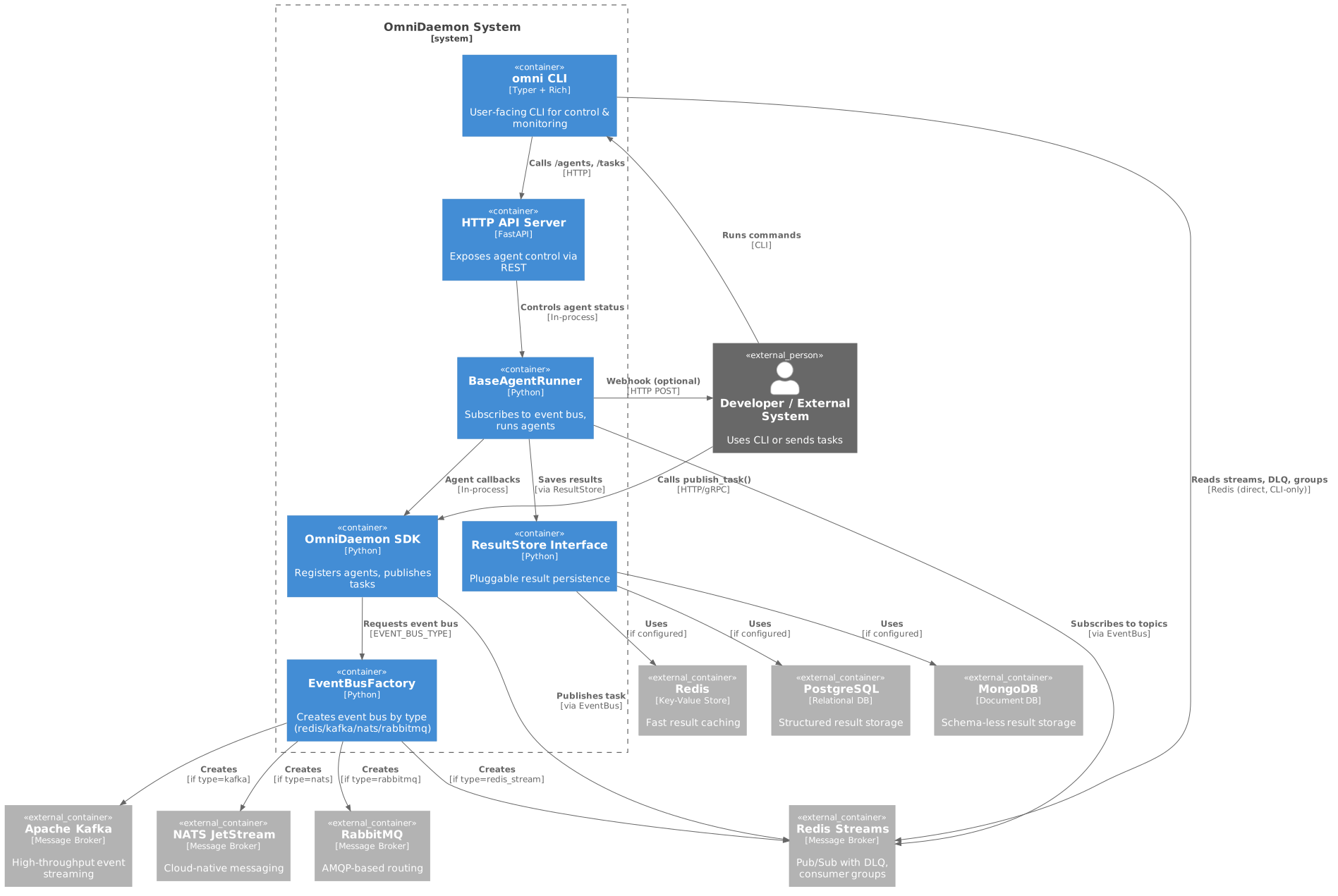
C4 Model Architecture Diagram - System context and container-level view of OmniDaemon's architecture
┌─────────────────────────────────────────────────────────────────┐
│                         OmniDaemon                              │
│                   Universal Runtime Engine                       │
└─────────────────────────────────────────────────────────────────┘
                              │
                              │
        ┌─────────────────────┼─────────────────────┐
        │                     │                     │
        ▼                     ▼                     ▼
┌──────────────┐    ┌──────────────┐    ┌──────────────┐
│  Event Bus   │    │   Storage    │    │ Agent Runner │
│ (Pluggable!) │    │ (Pluggable!) │    │  (Your Code) │
├──────────────┤    ├──────────────┤    ├──────────────┤
│ • Streams    │    │ • Agents     │    │ • Register   │
│ • Pub/Sub    │    │ • Results    │    │ • Subscribe  │
│ • DLQ        │    │ • Metrics    │    │ • Process    │
│ • Groups     │    │ • Config     │    │ • Respond    │
│              │    │              │    │              │
│ Redis ✅     │    │ Redis ✅     │    │              │
│ Kafka 🚧     │    │ JSON ✅      │    │              │
│ RabbitMQ 🚧  │    │ Postgres 🚧  │    │              │
│ NATS 🚧      │    │ MongoDB 🚧   │    │              │
└──────────────┘    └──────────────┘    └──────────────┘
        │                     │                     │
        │                     │                     │
        └─────────────────────┴─────────────────────┘
                              │
                              │
        ┌─────────────────────┼─────────────────────┐
        │                     │                     │
        ▼                     ▼                     ▼
┌──────────────┐    ┌──────────────┐    ┌──────────────┐
│     CLI      │    │     API      │    │     SDK      │
│   (Typer)    │    │  (FastAPI)   │    │  (Python)    │
├──────────────┤    ├──────────────┤    ├──────────────┤
│ • Commands   │    │ • REST       │    │ • Register   │
│ • Rich UI    │    │ • Endpoints  │    │ • Publish    │
│ • Monitoring │    │ • Webhooks   │    │ • Query      │
└──────────────┘    └──────────────┘    └──────────────┘
Key Components
- Event Bus (Pluggable) - Message broker for event distribution. Currently: Redis Streams. Coming: Kafka, RabbitMQ, NATS.
- Storage (Pluggable) - Persistent layer for agents, results, metrics. Currently: Redis, JSON. Coming: PostgreSQL, MongoDB, S3.
- Agent Runner - Orchestrates agent execution and lifecycle
- CLI - Beautiful command-line interface (powered by Rich)
- API - RESTful HTTP API (powered by FastAPI)
- SDK - Python SDK for agent integration
💡 Swap backends anytime via environment variables - no code changes needed!
📦 Complete Examples
1. OmniCore Agent Example
OmniCore is a custom agent framework with support for MCP (Model Context Protocol) tools like filesystem access.
File: examples/omnicoreagent/agent_runner.py
from omnicoreagent import OmniAgent, ToolRegistry, MemoryRouter, EventRouter
from omnidaemon import OmniDaemonSDK
from omnidaemon import start_api_server
from omnidaemon import AgentConfig, SubscriptionConfig
from decouple import config
import asyncio
import logging

sdk = OmniDaemonSDK()
logger = logging.getLogger(__name__)

# MCP Tools Configuration
MCP_TOOLS = [
    {
        "name": "filesystem",
        "command": "npx",
        "args": [
            "-y",
            "@modelcontextprotocol/server-filesystem",
            "/path/to/your/folder",
        ],
    },
]

class OmniAgentRunner:
    """Wrapper for OmniCore Agent with lazy initialization."""

    def __init__(self):
        self.agent = None
        self.memory_router = None
        self.event_router = None
        self.connected = False
        self.session_id = None

    async def initialize(self):
        """Initialize agent components."""
        if self.connected:
            return

        # Initialize routers
        self.memory_router = MemoryRouter("in_memory")
        self.event_router = EventRouter("in_memory")

        # Initialize agent
        self.agent = OmniAgent(
            name="filesystem_assistant_agent",
            system_instruction="Help the user manage their files.",
            model_config={
                "provider": "openai",
                "model": "gpt-4o",
                "temperature": 0,
                "max_context_length": 1000,
            },
            mcp_tools=MCP_TOOLS,
            agent_config={
                "agent_name": "OmniAgent",
                "max_steps": 15,
                "tool_call_timeout": 20,
                "memory_config": {"mode": "sliding_window", "value": 100},
            },
            memory_router=self.memory_router,
            event_router=self.event_router,
            debug=False,
        )

        await self.agent.connect_mcp_servers()
        self.connected = True
        logger.info("✅ OmniAgent initialized successfully")

    async def handle_chat(self, message: str):
        """Handle chat messages."""
        if not self.agent:
            return "Agent not initialized"

        if not self.session_id:
            from datetime import datetime
            self.session_id = f"session_{datetime.now().strftime('%Y%m%d_%H%M%S')}"

        try:
            result = await self.agent.run(message)
            return result.get("response", "No response")
        except Exception as e:
            logger.error(f"Error: {e}")
            return f"Error: {str(e)}"

    async def shutdown(self):
        """Cleanup agent resources."""
        if self.agent and hasattr(self.agent, 'cleanup'):
            await self.agent.cleanup()

# Create agent runner instance
filesystem_agent_runner = OmniAgentRunner()

async def call_file_system_agent(message: dict):
    """OmniDaemon callback for filesystem agent."""
    await filesystem_agent_runner.initialize()
    result = await filesystem_agent_runner.handle_chat(
        message=message.get("content")
    )
    return {"status": "success", "data": result}

async def main():
    try:
        # Register agent with OmniDaemon
        logger.info("Registering agents...")
        await sdk.register_agent(
            agent_config=AgentConfig(
                name="OMNICOREAGENT_FILESYSTEM",
                topic="file_system.tasks",
                callback=call_file_system_agent,
                description="Filesystem management agent",
                tools=["filesystem"],
                config=SubscriptionConfig(
                    reclaim_idle_ms=6000,
                    dlq_retry_limit=3,
                    consumer_count=3
                ),
            )
        )

        # Start OmniDaemon agent runner
        logger.info("Starting OmniDaemon...")
        await sdk.start()
        logger.info("✅ OmniDaemon started")

        # Start API server if enabled
        if config("OMNIDAEMON_API_ENABLED", default=False, cast=bool):
            api_port = config("OMNIDAEMON_API_PORT", default=8765, cast=int)
            asyncio.create_task(start_api_server(sdk, port=api_port))
            logger.info(f"🌐 API running on http://127.0.0.1:{api_port}")

        # Keep running
        logger.info("🎧 Agent runner processing events. Press Ctrl+C to stop.")
        try:
            while True:
                await asyncio.sleep(1)
        except (KeyboardInterrupt, asyncio.CancelledError):
            logger.info("Received shutdown signal...")

    except Exception as e:
        logger.error(f"Error: {e}", exc_info=True)
        raise

    finally:
        logger.info("Shutting down...")
        try:
            await sdk.shutdown()
            await filesystem_agent_runner.shutdown()
            logger.info("✅ Shutdown complete")
        except Exception as e:
            logger.error(f"Shutdown error: {e}")

if __name__ == "__main__":
    asyncio.run(main())
Run it:
# Set environment variables
export STORAGE_BACKEND=redis
export EVENT_BUS_TYPE=redis_stream
export REDIS_URL=redis://localhost:6379
export OMNIDAEMON_API_ENABLED=true
export OMNIDAEMON_API_PORT=8765

# Run the agent
python examples/omnicoreagent/agent_runner.py
2. Google ADK Agent Example
Google ADK (Agent Development Kit) is Google's framework for building AI agents.
File: examples/google_adk/agent_runner.py
from google.adk.agents import LlmAgent
from google.adk.tools.mcp_tool.mcp_toolset import McpToolset
from google.adk.tools.mcp_tool.mcp_session_manager import StdioConnectionParams
from mcp import StdioServerParameters
from google.adk.sessions import InMemorySessionService
from google.adk.runners import Runner
from google.adk.models.lite_llm import LiteLlm
from google.genai import types
from omnidaemon import OmniDaemonSDK
from omnidaemon import start_api_server
from omnidaemon import AgentConfig, SubscriptionConfig
from decouple import config
from dotenv import load_dotenv
import asyncio
import logging
import os

load_dotenv()

sdk = OmniDaemonSDK()
logger = logging.getLogger(__name__)

# Target folder for filesystem operations
TARGET_FOLDER_PATH = "/path/to/your/folder"

# Initialize Google ADK agent with MCP filesystem tool
filesystem_agent = LlmAgent(
    model=LiteLlm(model="openai/gpt-4o"),
    name="filesystem_assistant_agent",
    instruction="Help the user manage their files.",
    tools=[
        McpToolset(
            connection_params=StdioConnectionParams(
                server_params=StdioServerParameters(
                    command="npx",
                    args=[
                        "-y",
                        "@modelcontextprotocol/server-filesystem",
                        os.path.abspath(TARGET_FOLDER_PATH),
                    ],
                ),
                timeout=60,
            ),
        )
    ],
)

# Session management
session_service = InMemorySessionService()
APP_NAME = "filesystem_agent"
USER_ID = "user_1"
SESSION_ID = "session_001"

async def create_session():
    await session_service.create_session(
        app_name=APP_NAME,
        user_id=USER_ID,
        session_id=SESSION_ID
    )

# Runner orchestrates agent execution
runner = Runner(
    agent=filesystem_agent,
    app_name=APP_NAME,
    session_service=session_service
)

async def call_file_system_agent(message: dict):
    """OmniDaemon callback for Google ADK agent."""
    await create_session()

    query = message.get("content")
    if not query:
        return "No content in message payload"

    logger.info(f">>> User Query: {query}")

    content = types.Content(
        role="user",
        parts=[types.Part(text=query)]
    )

    final_response = "No response"

    async for event in runner.run_async(
        user_id=USER_ID,
        session_id=SESSION_ID,
        new_message=content
    ):
        if event.is_final_response():
            if event.content and event.content.parts:
                final_response = event.content.parts[0].text
            elif event.actions and event.actions.escalate:
                final_response = f"Agent escalated: {event.error_message}"
            break

    logger.info(f"<<< Agent Response: {final_response}")
    return final_response

async def main():
    try:
        # Register agent
        logger.info("Registering Google ADK agents...")
        await sdk.register_agent(
            agent_config=AgentConfig(
                name="GOOGLE_ADK_FILESYSTEM",
                topic="file_system.tasks",
                callback=call_file_system_agent,
                description="Filesystem management agent using Google ADK",
                tools=["filesystem"],
                config=SubscriptionConfig(
                    reclaim_idle_ms=6000,
                    dlq_retry_limit=3,
                    consumer_count=3
                ),
            )
        )

        # Start OmniDaemon
        logger.info("Starting OmniDaemon...")
    await sdk.start()
        logger.info("✅ OmniDaemon started")

        # Start API if enabled
    if config("OMNIDAEMON_API_ENABLED", default=False, cast=bool):
            api_port = config("OMNIDAEMON_API_PORT", default=8765, cast=int)
            asyncio.create_task(start_api_server(sdk, port=api_port))
            logger.info(f"🌐 API running on http://127.0.0.1:{api_port}")

    # Keep running
        logger.info("🎧 Agent runner processing events. Press Ctrl+C to stop.")
    try:
        while True:
            await asyncio.sleep(1)
        except (KeyboardInterrupt, asyncio.CancelledError):
            logger.info("Received shutdown signal...")

    except Exception as e:
        logger.error(f"Error: {e}", exc_info=True)
        raise

    finally:
        logger.info("Shutting down...")
        await sdk.shutdown()
        logger.info("✅ Shutdown complete")

if __name__ == "__main__":
    asyncio.run(main())
Run it:
# Set environment variables
export OPENAI_API_KEY=your_key_here
export STORAGE_BACKEND=redis
export EVENT_BUS_TYPE=redis_stream
export REDIS_URL=redis://localhost:6379
export OMNIDAEMON_API_ENABLED=true

# Run the agent
python examples/google_adk/agent_runner.py
3. Content Moderation Pipeline (OmniCore Agent + SQLite)
Goal: Automate moderation of filesystem content, flag policy violations, and persist outcomes for BI dashboards.
- Agents:
examples/content_moderation/agent_runner.pyCONTENT_MODERATION_AGENT– OmniCore agent with filesystem MCP tool + rich moderation toolkitCONTENT_MODERATION_REVIEW_AGENT– Stores moderation results in SQLite
- Publisher:
examples/content_moderation/publisher.py - Topics:
- Input:
content_moderation.tasks - Review:
content_moderation.review
- Input:
- Data store:
~/.omniagent/moderation.db(auto-created)
# Terminal 1 – start the OmniCore agents (moderation + review archiver)
uv run python examples/content_moderation/agent_runner.py

# Option A – continuous watch over selected directories (polling)
uv run python examples/content_moderation/publisher.py --directories ~/Projects ~/Docs --watch --interval 5

# Option B – native filesystem events (requires watchdog)
uv pip install watchdog prometheus-client
uv run python examples/content_moderation/publisher.py --directories ~/Projects --watch --watchdog

# Option C – manual cycle or targeted file scans
uv run python examples/content_moderation/publisher.py                          # default directories
uv run python examples/content_moderation/publisher.py --directories ~/Projects # one-off diff
uv run python examples/content_moderation/publisher.py --task single_file --file ~/Docs/post.txt

# Programmatic ingestion (copy + publish single file)
uv run python examples/content_moderation/ingest.py ~/Docs/post.txt --metadata '{"tenant":"acme"}'

# Inspect moderation output
omnidaemon task list --topic content_moderation.review
sqlite3 ~/.omniagent/moderation.db 'SELECT * FROM moderation_reviews ORDER BY created_at DESC LIMIT 5;'
Highlights:
- OmniCore agents leverage custom Python tooling (spam/profanity detection, PII checks, hate-speech heuristics, SQLite logging, quarantine handling) and automatically gain access to the ingest workspace.
publisher.pysupports a continuous watcher (polling or watchdog). New or modified files are copied into~/.omniagent/moderation_ingest/before schema-validated events are published to the moderation topic.ingest.pyexposes a simple API-friendly entry point for services that want to push individual files into the moderation flow.- All events/decisions are validated via
ModerationEvent/ModerationDecision(Pydantic) before reaching the agents. - Prometheus metrics (
content_moderation_events_total,...decisions_total, etc.) are available whenprometheus-clientis installed andCONTENT_MODERATION_METRICS_PORTis set. reply_toautomatically routes agent responses to the review topic, where the second OmniCore agent archives results via therecord_moderation_resulttool.- Extend with dashboards (Superset, Metabase) or escalation workflows using the SQLite tables.
🎯 Common Patterns
Production-ready patterns you can copy and use immediately.
Pattern 1: Multi-Tenant Agent
Process requests for different tenants with isolated configs:
async def multi_tenant_agent(message: dict):
    tenant_id = message.get("tenant_id")
    content = message.get("content", {})

    # Load tenant-specific config
    config = await get_tenant_config(tenant_id)

    # Process with your AI agent
    # (Replace with your actual agent's run method)
    result = await process_with_agent(content, config)

    return {
        "status": "success",
        "data": result,
        "tenant_id": tenant_id
    }
See real implementation: examples/omnicoreagent/agent_runner.py
Pattern 2: Agent Chain (Workflow)
Chain multiple agents for multi-step processing:
# Agent 1: Extract text from document
await sdk.register_agent(
    agent_config=AgentConfig(
        topic="document.process",
        callback=extract_text,
    )
)

# Agent 2: Summarize extracted text
await sdk.register_agent(
    agent_config=AgentConfig(
        topic="text.summarize",
        callback=summarize_text,
    )
)

# Publish with reply_to for chaining
event = EventEnvelope(
    topic="document.process",
    payload=PayloadBase(
        content={"doc_url": "https://..."},
        reply_to="text.summarize",  # Result → next agent
    ),
)
Pattern 3: Fan-Out Processing
Multiple agents process the same event in parallel:
# Agent A: Image processing
await sdk.register_agent(
    agent_config=AgentConfig(
        topic="media.uploaded",
        name="image-processor",
        callback=process_image,
    )
)

# Agent B: Metadata extraction
await sdk.register_agent(
    agent_config=AgentConfig(
        topic="media.uploaded",
        name="metadata-extractor",
        callback=extract_metadata,
    )
)

# Agent C: Thumbnail generation
await sdk.register_agent(
    agent_config=AgentConfig(
        topic="media.uploaded",
        name="thumbnail-generator",
        callback=generate_thumbnail,
    )
)

# One event → All three agents process it!
Pattern 4: Priority Routing
Route by source for different processing logic:
async def priority_agent(message: dict):
    source = message.get("source")
    content = message.get("content", {})

    # Different logic per source
    if source == "premium-user":
        # Premium users get faster processing
        priority = "high"
        timeout = 30
    elif source == "trial-user":
        priority = "normal"
        timeout = 60
    else:
        priority = "low"
        timeout = 120

    # Process with your AI agent (adapt to your agent's API)
    # See examples/omnicoreagent/agent_runner.py for real implementation
    result = await process_with_agent(content, priority=priority, timeout=timeout)

    return {"status": "success", "data": result, "source": source}
See real implementation: examples/omnicoreagent/agent_runner.py
Pattern 5: Long-Running with Webhook
Notify your API when long task completes:
# Your agent runner (long-running AI task)
async def analyze_video(message: dict):
    video_url = message.get("content", {}).get("url")

    # Long-running AI processing (30 seconds+)
    analysis = await ai_agent.analyze_video(video_url)

    return {"analysis": analysis}

# Publisher (with webhook)
event = EventEnvelope(
    topic="video.analyze",
    payload=PayloadBase(
        content={"url": "https://..."},
        webhook="https://myapi.com/video-complete",  # Get notified!
    ),
)

# Your API receives POST when done:
@app.post("/video-complete")
async def handle_video_result(result: dict):
    # Process result in your system
    print(f"Video analysis complete: {result}")
Pattern 6: Conversation Context
Maintain context across multiple messages:
async def conversational_agent(message: dict):
    correlation_id = message.get("correlation_id")
    content = message.get("content", {})

    # Load conversation history
    if correlation_id:
        context = await db.get_conversation(correlation_id)
    else:
        context = []

    # Add user message
    user_text = content.get("text")
    context.append({"role": "user", "content": user_text})

    # Process with your AI agent (adapt to your agent's API)
    # For OmniCore: await agent.run(user_text)
    # For Google ADK: runner.run_async(user_id, session_id, new_message)
    response = await process_with_agent(user_text, context=context)

    # Save updated context
    context.append({"role": "assistant", "content": response})
    await db.save_conversation(correlation_id, context)

    return {"reply": response, "correlation_id": correlation_id}
See real implementation: examples/google_adk/agent_runner.py (uses session_service)
Pattern 7: Retry with Custom Logic
Handle retries intelligently:
async def smart_retry_agent(message: dict):
    content = message.get("content", {})
    retry_count = content.get("_retry_count", 0)

    try:
        # Process with your AI agent
        result = await process_with_agent(content)
        return {"status": "success", "data": result}
    except TemporaryError as e:
        # Retriable error (network, rate limits, etc.)
        if retry_count < 3:
            content["_retry_count"] = retry_count + 1
            # OmniDaemon will auto-retry
            raise
        else:
            # Max retries → goes to DLQ
            return {"status": "failed", "error": str(e)}
    except PermanentError as e:
        # Non-retriable error (invalid input, etc.)
        return {"status": "error", "error": str(e)}
Note: OmniDaemon automatically retries failed tasks (default: 3 retries). This pattern shows how to add custom retry logic on top.
⚙️ Configuration Guide
Environment Variables
Configure OmniDaemon via environment variables (use .env file or export):
Core Configuration
# ─────────────────────────────────────────────────────────
# Storage Backend (Pluggable!)
# ─────────────────────────────────────────────────────────
STORAGE_BACKEND=redis          # Options: json, redis
                               # Coming: postgresql, mongodb, s3
                               # Default: json

# Storage Connection URLs (choose based on STORAGE_BACKEND):
JSON_STORAGE_DIR=.omnidaemon_data                    # For json backend (default)
REDIS_URL=redis://localhost:6379                     # For redis backend
REDIS_KEY_PREFIX=omni                                # Redis key prefix (default: omni)
# POSTGRES_URL=postgresql://user:pass@localhost:5432/omni  # For postgresql (coming soon)
# MONGODB_URI=mongodb://localhost:27017/omnidaemon         # For mongodb (coming soon)

# ─────────────────────────────────────────────────────────
# Event Bus (Pluggable!)
# ─────────────────────────────────────────────────────────
EVENT_BUS_TYPE=redis_stream    # Options: redis_stream
                               # Coming: kafka, rabbitmq, nats
                               # Default: redis_stream

# Event Bus Connection URLs (choose based on EVENT_BUS_TYPE):
REDIS_URL=redis://localhost:6379                # For redis_stream backend
# RABBITMQ_URL=amqp://localhost:5672            # For rabbitmq backend (coming soon)
# KAFKA_SERVERS=localhost:9092                  # For kafka backend (coming soon)
# NATS_URL=nats://localhost:4222                # For nats backend (coming soon)

# ─────────────────────────────────────────────────────────
# API Server (Optional)
# ─────────────────────────────────────────────────────────
OMNIDAEMON_API_ENABLED=true    # Enable HTTP API (default: false)
OMNIDAEMON_API_PORT=8765       # API port (default: 8765)
OMNIDAEMON_API_HOST=0.0.0.0    # API host (default: 127.0.0.1)

# ─────────────────────────────────────────────────────────
# Logging
# ─────────────────────────────────────────────────────────
LOG_LEVEL=INFO                 # Logging level (default: INFO)
💡 Why Pluggable? OmniDaemon's architecture allows you to swap backends via environment variables. Currently production-ready: Redis Streams (event bus) and Redis/JSON (storage). More backends coming soon!
Example .env File
# .env
STORAGE_BACKEND=redis
REDIS_URL=redis://localhost:6379
REDIS_KEY_PREFIX=omni
EVENT_BUS_TYPE=redis_stream
OMNIDAEMON_API_ENABLED=true
OMNIDAEMON_API_PORT=8765
LOG_LEVEL=INFO
Environment-Specific Configs
Development (Local, fast iteration):
STORAGE_BACKEND=json
JSON_STORAGE_DIR=.dev_data
EVENT_BUS_TYPE=redis_stream
REDIS_URL=redis://localhost:6379
OMNIDAEMON_API_ENABLED=true
OMNIDAEMON_API_PORT=8765
Production (Redis for everything):
STORAGE_BACKEND=redis               # Distributed, persistent
REDIS_URL=redis://prod-redis.example.com:6379
REDIS_KEY_PREFIX=prod_omni
EVENT_BUS_TYPE=redis_stream
OMNIDAEMON_API_ENABLED=true
OMNIDAEMON_API_PORT=8765
OMNIDAEMON_API_HOST=0.0.0.0        # Allow external connections
LOG_LEVEL=WARNING                   # Only warnings/errors in production
Best Practices
1. Resource Management
DLQ Management:
# Check DLQ regularly
omnidaemon bus dlq --topic your.topic

# Don't let DLQ grow unbounded - investigate recurring failures
Metrics & Results:
# Clear old metrics periodically
omnidaemon storage clear-metrics

# Results auto-expire after 24h (TTL), or clear manually
omnidaemon storage clear-results
2. Error Handling
Robust callback implementation:
async def my_agent(payload: dict):
    try:
        result = await process(payload)
        return {"status": "success", "data": result}
    except TemporaryError as e:
        logger.warning(f"Temporary failure: {e}")
        raise  # Will retry automatically
    except PermanentError as e:
        logger.error(f"Permanent failure: {e}")
        return {"status": "error", "error": str(e)}
    except Exception as e:
        logger.error(f"Unexpected error: {e}", exc_info=True)
        raise  # Will go to DLQ after max retries
3. Graceful Shutdown
try:
    while True:
        await asyncio.sleep(1)
except (KeyboardInterrupt, asyncio.CancelledError):
    logger.info("Shutdown signal received")
finally:
    await sdk.shutdown()  # Cleans up resources
4. Multi-Runner Coordination
Load Balancing (same consumer group):
# Both runners process same topic, messages distributed
# Runner 1 & 2 use same agent name → load sharing
await sdk.register_agent(
    agent_config=AgentConfig(
        topic="tasks.process",
        name="worker-agent",  # Same name!
    )
)
Parallel Processing (different consumer groups):
# Both runners process ALL messages independently
# Use different agent names
Monitor with: omnidaemon bus groups --stream tasks.process
5. Performance Tips
- High-Throughput: Increase
consumer_countinSubscriptionConfig - Low-Latency: Deploy runners close to Redis (same region/AZ)
- Reliability: Monitor DLQ, set appropriate
max_retries
🎮 CLI Reference
OmniDaemon includes a beautiful CLI powered by Rich with colors, tables, panels, and progress indicators.
Installation Verification
omnidaemon --help
Agent Management
# List all registered agents
omnidaemon agent list

# List agents in tree view (default)
omnidaemon agent list --format tree

# List agents in table format
omnidaemon agent list --format table

# Get details about a specific agent
omnidaemon agent get --topic file_system.tasks --name FILESYSTEM_AGENT

# Pause agent (stops processing, keeps consumer group)
omnidaemon agent unsubscribe --topic file_system.tasks --name FILESYSTEM_AGENT

# Delete agent permanently
omnidaemon agent delete --topic file_system.tasks --name FILESYSTEM_AGENT

# Delete agent with full cleanup (consumer group + DLQ)
omnidaemon agent delete --topic file_system.tasks --name FILESYSTEM_AGENT --delete-dlq

# Delete without confirmation
omnidaemon agent delete --topic file_system.tasks --name FILESYSTEM_AGENT -y

# Delete all agents for a topic
omnidaemon agent delete-topic --topic file_system.tasks
Task Management
# Publish a task
omnidaemon task publish --topic file_system.tasks \
  --payload '{"content":"List files in /tmp"}'

# Publish with webhook callback
omnidaemon task publish --topic file_system.tasks \
  --payload '{"content":"Process data","webhook":"https://example.com/callback"}'

# Get task result
omnidaemon task result <task_id>

# List all task results
omnidaemon task list

# List results for a specific topic
omnidaemon task list --topic file_system.tasks

# Delete a task result
omnidaemon task delete <task_id>
System Health & Metrics
# Check system health (runner, event bus, storage)
omnidaemon health

# View agent metrics (tasks received, processed, failed)
omnidaemon metrics

# View metrics for a specific topic
omnidaemon metrics --topic file_system.tasks

# Limit detailed metrics shown
omnidaemon metrics --limit 50
Bus Monitoring
💡 Note: Bus monitoring commands currently work with Redis Streams event bus. Support for other event buses (Kafka, RabbitMQ, NATS) will be added as they're implemented.
# List all event bus streams
omnidaemon bus list

# Inspect messages in a stream
omnidaemon bus inspect --stream file_system.tasks --limit 10

# Show consumer groups for a stream
omnidaemon bus groups --stream file_system.tasks

# Inspect dead-letter queue for a topic
omnidaemon bus dlq --topic file_system.tasks --limit 10

# Get comprehensive bus statistics
omnidaemon bus stats

# Export stats as JSON
omnidaemon bus stats --json
Storage Management
# Check storage health
omnidaemon storage health

# Clear all agents
omnidaemon storage clear-agents

# Clear all results
omnidaemon storage clear-results

# Clear all metrics
omnidaemon storage clear-metrics

# Nuclear option: clear EVERYTHING
omnidaemon storage clear-all
Configuration Management
# Set a configuration value
omnidaemon config set my_key my_value

# Set JSON value
omnidaemon config set api_config '{"host":"0.0.0.0","port":8080}'

# Get a configuration value
omnidaemon config get my_key

# List all configuration
omnidaemon config list
Info & Help
# Show OmniDaemon information
omnidaemon info

# Show help for any command
omnidaemon agent --help
omnidaemon task publish --help
omnidaemon bus dlq --help
🌐 API Reference
OmniDaemon provides a RESTful HTTP API powered by FastAPI.
Starting the API Server
Method 1: Via environment variable
export OMNIDAEMON_API_ENABLED=true
export OMNIDAEMON_API_PORT=8765
python your_agent_runner.py
Method 2: Programmatically
from omnidaemon import start_api_server
import asyncio

# In your main function
asyncio.create_task(start_api_server(sdk, port=8765))
Base URL: http://localhost:8765
Agent Endpoints
List All Agents
GET /agents

curl http://localhost:8765/agents
Response:
[
  {
    "name": "FILESYSTEM_AGENT",
    "topic": "file_system.tasks",
    "description": "Filesystem management agent",
    "tools": ["filesystem"],
    "config": {...}
  }
]
Get Agent Details
GET /agents/{topic}/{name}

curl http://localhost:8765/agents/file_system.tasks/FILESYSTEM_AGENT
Unsubscribe Agent (Pause)
POST /agents/{topic}/{name}/unsubscribe

curl -X POST http://localhost:8765/agents/file_system.tasks/FILESYSTEM_AGENT/unsubscribe
Response:
{
  "status": "unsubscribed",
  "topic": "file_system.tasks",
  "agent": "FILESYSTEM_AGENT",
  "message": "Agent paused. Restart runner to resume."
}
Delete Agent
DELETE /agents/{topic}/{name}?delete_group=true&delete_dlq=false

curl -X DELETE "http://localhost:8765/agents/file_system.tasks/FILESYSTEM_AGENT?delete_group=true&delete_dlq=true"
Query Parameters:
delete_group(bool, default: true) - Delete consumer groupdelete_dlq(bool, default: false) - Delete dead-letter queue
Response:
{
  "status": "deleted",
  "topic": "file_system.tasks",
  "agent": "FILESYSTEM_AGENT",
  "cleanup": {
    "storage_deleted": true,
    "consumer_group_deleted": true,
    "dlq_deleted": true
  }
}
Delete All Agents for Topic
DELETE /agents/topic/{topic}

curl -X DELETE http://localhost:8765/agents/topic/file_system.tasks
Task Endpoints
Publish Task
POST /tasks

curl -X POST http://localhost:8765/tasks \
  -H "Content-Type: application/json" \
  -d '{
    "topic": "file_system.tasks",
    "payload": {
      "content": "List files in /tmp",
      "webhook": "https://example.com/callback"
    }
  }'
Response:
{
  "task_id": "msg-1234567890-0",
  "topic": "file_system.tasks"
}
Get Task Result
GET /tasks/{task_id}

curl http://localhost:8765/tasks/msg-1234567890-0
Response:
{
  "task_id": "msg-1234567890-0",
  "result": {
    "status": "success",
    "data": "..."
  },
  "timestamp": 1234567890.0
}
List All Results
GET /tasks?topic=file_system.tasks&limit=100

curl "http://localhost:8765/tasks?topic=file_system.tasks&limit=50"
Delete Task Result
DELETE /tasks/{task_id}

curl -X DELETE http://localhost:8765/tasks/msg-1234567890-0
System Endpoints
Health Check
GET /health

curl http://localhost:8765/health
Response:
{
  "runner_id": "runner-abc123",
  "status": "running",
  "event_bus_type": "RedisStreamEventBus",
  "event_bus_connected": true,
  "storage_healthy": true,
  "subscribed_topics": ["file_system.tasks"],
  "registered_agents_count": 2,
  "uptime_seconds": 3600.5
}
Metrics
GET /metrics?topic=file_system.tasks&limit=100

curl "http://localhost:8765/metrics?topic=file_system.tasks"
Response:
{
  "file_system.tasks": {
    "FILESYSTEM_AGENT": {
      "tasks_received": 100,
      "tasks_processed": 95,
      "tasks_failed": 5,
      "avg_processing_time_sec": 2.3
    }
  }
}
Bus Monitoring Endpoints
List Streams
GET /bus/streams

curl http://localhost:8765/bus/streams
Inspect Stream
GET /bus/inspect/{stream}?limit=10

curl "http://localhost:8765/bus/inspect/file_system.tasks?limit=10"
List Consumer Groups
GET /bus/groups/{stream}

curl http://localhost:8765/bus/groups/file_system.tasks
Inspect DLQ
GET /bus/dlq/{topic}?limit=10

curl "http://localhost:8765/bus/dlq/file_system.tasks?limit=10"
Bus Statistics
GET /bus/stats

curl http://localhost:8765/bus/stats
Storage Endpoints
Storage Health
GET /storage/health

curl http://localhost:8765/storage/health
Clear Operations
# Clear all agents
DELETE /storage/agents

# Clear all results
DELETE /storage/results

# Clear all metrics
DELETE /storage/metrics

# Clear everything
DELETE /storage/all

curl -X DELETE http://localhost:8765/storage/agents
Configuration
# Set config
POST /config/{key}
curl -X POST http://localhost:8765/config/my_key \
  -H "Content-Type: application/json" \
  -d '{"value": "my_value"}'

# Get config
GET /config/{key}
curl http://localhost:8765/config/my_key
🚀 Advanced Topics
Multi-Runner Setup
OmniDaemon supports horizontal scaling via multiple runner instances. Each runner is an independent consumer in the event bus consumer group.
Why?
- Load distribution - Event bus distributes messages across all active consumers
- High availability - If one runner crashes, others continue processing
- Zero downtime - Start/stop runners without message loss
Setup:
Terminal 1:
python examples/omnicoreagent/agent_runner.py
Terminal 2:
python examples/google_adk/agent_runner.py
Both runners:
- Subscribe to the same topics
- Join the same consumer groups
- Share message processing load
- Maintain independent state
Key Points:
- Event bus handles load balancing automatically (Redis Streams, Kafka, etc.)
- Messages are delivered to exactly one consumer in a group
- Consumer groups persist even when all consumers stop (message durability)
- Use
omnidaemon healthto check active consumers
💡 Note: Load balancing behavior is provided by the event bus backend (currently Redis Streams). Other event buses (Kafka, RabbitMQ) will have similar capabilities.
Agent Lifecycle Management
OmniDaemon provides two-tier agent lifecycle control:
1. Pause Agent (Unsubscribe)
Use Case: Temporary maintenance, debugging, or traffic control
What Happens:
- ✅ Stops processing new messages
- ✅ Keeps consumer group (messages queue)
- ✅ Keeps DLQ (failed messages preserved)
- ✅ Keeps agent data in storage
- ✅ Can resume by restarting runner
CLI:
omnidaemon agent unsubscribe --topic my.topic --name MyAgent
API:
curl -X POST http://localhost:8765/agents/my.topic/MyAgent/unsubscribe
To Resume: Just restart your agent runner!
2. Delete Agent (Permanent Removal)
Use Case: Agent no longer needed, complete cleanup
What Happens:
- ✅ Stops processing
- ✅ Deletes consumer group (optional, default: yes)
- ✅ Deletes DLQ (optional, default: no)
- ✅ Removes agent data from storage
- ❌ Cannot resume
CLI:
# Default: cleanup consumer group
omnidaemon agent delete --topic my.topic --name MyAgent

# Full cleanup (consumer group + DLQ)
omnidaemon agent delete --topic my.topic --name MyAgent --delete-dlq

# Keep consumer group
omnidaemon agent delete --topic my.topic --name MyAgent --no-cleanup

# Skip confirmation
omnidaemon agent delete --topic my.topic --name MyAgent -y
API:
# Full cleanup
curl -X DELETE "http://localhost:8765/agents/my.topic/MyAgent?delete_group=true&delete_dlq=true"

# Keep consumer group
curl -X DELETE "http://localhost:8765/agents/my.topic/MyAgent?delete_group=false"
Dead Letter Queue (DLQ)
When agents fail to process messages after multiple retries, OmniDaemon moves them to a Dead Letter Queue for manual inspection.
Configuration:
config=SubscriptionConfig(
    reclaim_idle_ms=60000,      # 60 seconds before reclaiming
    dlq_retry_limit=3,          # 3 attempts before DLQ
    consumer_count=2            # 2 concurrent consumers
)
Inspect DLQ:
# CLI
omnidaemon bus dlq --topic file_system.tasks --limit 10

# API
curl "http://localhost:8765/bus/dlq/file_system.tasks?limit=10"
Handling Failed Messages:
- Inspect - Check why the message failed
- Fix - Update agent logic or payload format
- Replay - Republish message manually (coming soon: automatic replay)
- Delete - If message is invalid
Metrics & Observability
OmniDaemon tracks comprehensive metrics per agent and topic:
Metrics Tracked:
tasks_received- Total tasks received by agenttasks_processed- Successfully completed taskstasks_failed- Tasks that raised exceptionsavg_processing_time_sec- Average processing time
View Metrics:
# CLI
omnidaemon metrics

# CLI with filters
omnidaemon metrics --topic file_system.tasks --limit 50

# API
curl "http://localhost:8765/metrics?topic=file_system.tasks"
Sample Output:
┌────────────────────┬──────────────────┬──────────┬───────────┬────────┬──────────┐
│ Agent              │ Topic            │ Received │ Processed │ Failed │ Avg Time │
├────────────────────┼──────────────────┼──────────┼───────────┼────────┼──────────┤
│ FILESYSTEM_AGENT   │ file_system.tasks│   1,234  │   1,200   │   34   │   2.3s   │
│ ANOTHER_AGENT      │ other.tasks      │     567  │     560   │    7   │   1.1s   │
└────────────────────┴──────────────────┴──────────┴───────────┴────────┴──────────┘
Metrics Persistence:
- Stored in configured storage backend (JSON or Redis)
- Survives runner restarts
- Can be exported for external monitoring (Prometheus support coming soon)
Bus Monitoring
Monitor event bus infrastructure directly:
💡 Note: These commands currently work with Redis Streams. Support for other event buses will be added as they're implemented.
List All Streams
omnidaemon bus list
Shows all active streams and their message counts.
Inspect Stream Messages
omnidaemon bus inspect --stream file_system.tasks --limit 10
Shows recent messages in a stream (useful for debugging).
View Consumer Groups
omnidaemon bus groups --stream file_system.tasks
Shows all consumer groups, pending messages, and last delivered ID.
DLQ Inspection
omnidaemon bus dlq --topic file_system.tasks --limit 10
Inspect failed messages in the dead-letter queue.
Comprehensive Stats
omnidaemon bus stats

# JSON output for automation
omnidaemon bus stats --json
Shows:
- Stream lengths
- Consumer group details
- DLQ counts
- Event bus memory usage (for Redis Streams backend)
🐛 Troubleshooting
⚡ Quick Fixes (Start Here!)
Problem: Nothing works?
# 1. Is event bus backend running? (for Redis Streams)
redis-cli ping  # Should return PONG

# 2. Is OmniDaemon installed?
python -c "import omnidaemon; print('✅ Installed')"

# 3. Check health
omnidaemon health
Problem: Agent not processing messages?
# Check registration
omnidaemon agent list

# Check metrics
omnidaemon metrics --topic your.topic

# Check DLQ
omnidaemon bus dlq --topic your.topic
Problem: Can't see results?
# Results expire after 24h
# Check task status
omnidaemon task result --task-id YOUR_TASK_ID

# List recent results
omnidaemon task list
Common Issues (Detailed)
1. "Connection refused" Error
Problem: Can't connect to event bus backend
Solution (for Redis Streams backend):
# Check if Redis is running
redis-cli ping

# If not, start Redis
redis-server

# Or via Docker
docker run -d -p 6379:6379 redis:latest
For other event bus backends: Check that the backend service (Kafka, RabbitMQ, etc.) is running and accessible at the configured URL.
2. Health Check Shows "stopped" but Agent is Running
Problem: Stale data from previous run
Solution: Start time is cleared when runner stops properly. If not:
# Check health
omnidaemon health

# If shows stale state, restart your runner
# The start time will update when agents register
3. Messages Not Being Processed
Problem: Agent subscribed but not consuming
Checklist:
# 1. Check agent is registered
omnidaemon agent list

# 2. Check consumer groups exist
omnidaemon bus groups --stream your.topic

# 3. Check if messages are in stream
omnidaemon bus inspect --stream your.topic

# 4. Check metrics for errors
omnidaemon metrics --topic your.topic

# 5. Check DLQ for failed messages
omnidaemon bus dlq --topic your.topic
4. High Memory Usage
Problem: Too many messages in streams/DLQ
Solutions:
# Check bus stats
omnidaemon bus stats

# Clear old results
omnidaemon storage clear-results

# Clear metrics (if too many)
omnidaemon storage clear-metrics

# For event bus (Redis Streams), configure maxlen:
# Messages are auto-trimmed when stream exceeds maxlen (default: 10,000)
# Other event buses have similar retention policies
5. Agent Fails Silently
Problem: No error messages, agent just doesn't work
Debug Steps:
# 1. Enable debug logging
export LOG_LEVEL=DEBUG

# 2. Check metrics for failures
omnidaemon metrics --topic your.topic

# 3. Inspect DLQ
omnidaemon bus dlq --topic your.topic

# 4. Check agent registration
omnidaemon agent get --topic your.topic --name YourAgent
6. "Agent not found" in Health Check
Problem: Health check doesn't see agents
Explanation: CLI creates a new SDK instance. Health check queries storage directly.
Verify:
# Check agents in storage
omnidaemon agent list

# If empty, your runner hasn't registered yet
# Start your runner and check again
🗺️ Roadmap & Community
What's Coming
-
Message Bus
- Kafka integration
- RabbitMQ integration
- NATS JetStream integration
-
Storage
- PostgreSQL backend
- MongoDB backend
- S3 for large results
-
Observability
-
Prometheus metrics exporter
- OpenTelemetry tracing
- Grafana dashboards
-
Developer Experience
-
Web UI dashboard
- VS Code extension
- Agent templates/scaffolding
-
Enterprise Features
- Authentication & authorization
- Multi-tenancy
- Kubernetes operator
- Helm charts
Community & Support
📖 Documentation:
- This README - Complete getting started guide
- Official Docs - Full documentation
- Examples/ - Working code examples (
examples/omnicoreagent/,examples/google_adk/)
💬 Get Help:
- GitHub Issues - Report bugs or request features
- Discussions - Ask questions, share ideas
- Discord - Coming soon!
🤝 Contributing:
- We welcome contributions! Open an issue or submit a PR
- Check good first issues
- Review the examples to understand the architecture
📝 License
MIT License - see LICENSE file for details.
👨💻 Author & Credits
Created by Abiola Adeshina
OmniDaemon is built by the OmniDaemon Team - the same team behind OmniCore Agent, a powerful AI agent framework with MCP (Model Context Protocol) tool support.
🌟 From the Same Creator:
- OmniCore Agent - AI agent framework with filesystem tools, memory routing, and event streaming (see
examples/omnicoreagent/) - OmniDaemon - Universal event-driven runtime engine for AI agents (this project)
💡 OmniDaemon and OmniCore Agent are designed to work seamlessly together, but OmniDaemon supports any AI framework!
Connect with the creator:
- GitHub: @Abiorh001
- X (Twitter): @abiorhmangana
- Website: mintify.com
- Docs: abiorh001.github.io/OmniDaemon
🙏 Acknowledgments
OmniDaemon is built on the shoulders of giants:
- FastAPI - Modern Python web framework
- Typer - CLI framework
- Rich - Beautiful terminal output
- Redis - In-memory data store and message broker
- Pydantic - Data validation
And all the amazing AI agent frameworks that OmniDaemon supports!
Created by Abiola Adeshina and the OmniDaemon Team
From the creators of OmniCore Agent — building the future of event-driven AI systems
⭐ Star us on GitHub | 🐛 Report Bug | 💡 Request Feature | 📖 Documentation
Release history Release notifications | RSS feed


Download files
Download the file for your platform. If you're not sure which to choose, learn more about installing packages.
Source Distribution
Built Distribution
Filter files by name, interpreter, ABI, and platform.
If you're not sure about the file name format, learn more about wheel file names.
Copy a direct link to the current filters
File details
Details for the file omnidaemon-0.1.0.tar.gz.
File metadata
- Download URL: omnidaemon-0.1.0.tar.gz
- Upload date:
- Size: 111.6 kB
- Tags: Source
- Uploaded using Trusted Publishing? No
- Uploaded via: twine/6.2.0 CPython/3.13.3
File hashes
| Algorithm | Hash digest | |
|---|---|---|
| SHA256 |
2a36f521c14c2e16dd8c11983c943c9508761fae1afc6d7554fe93dbcab833e2
|
|
| MD5 |
6068f9af35e3e49ede4b77246d8c71f9
|
|
| BLAKE2b-256 |
eba8aa6770b2c98db144bd2f6714885826aebf436a7a84507e484cf9f75aa512
|
File details
Details for the file omnidaemon-0.1.0-py3-none-any.whl.
File metadata
- Download URL: omnidaemon-0.1.0-py3-none-any.whl
- Upload date:
- Size: 88.6 kB
- Tags: Python 3
- Uploaded using Trusted Publishing? No
- Uploaded via: twine/6.2.0 CPython/3.13.3
File hashes
| Algorithm | Hash digest | |
|---|---|---|
| SHA256 |
d41a3d7dee9f416917bc530adb5450182b96873a0c0c1d33ea499163f772066a
|
|
| MD5 |
e74ace0120b1835ca92e0ea958738eb4
|
|
| BLAKE2b-256 |
1cf1ec1ea07423de01c8916e12167c1fee4931fd3c151963b0ea7161cd0e9557
|






