
OmniDoc: the world-leading AI office suite. Any-format conversion, layout-preserving translation, structured extraction, and a native AI MCP for every document
One app. One API. Your layout stays exactly where it was.
Stop re-typing translated PDFs. OmniDoc translates PDF, Word, PowerPoint, LaTeX and 18 more formats into more than 200 languages and puts every table, formula and footnote back in place. Then it goes further: four free offline editors, interactive documents that publish as web pages, and a built-in MCP server with 40+ tools so Claude, Cursor and other AI assistants create and edit your files for you.
- AI office. One sentence and AI writes the Word report, builds the Excel workbook with formulas that are recalculated and checked, or lays out the PowerPoint deck, then checks its own work.
- Any-format conversion. PDF to editable Word, PDF to HTML with selectable text, PDF to images, UniDoc to Word, PDF and lossless HTML; merge, split and compress PDFs. Offline and free on your own computer.
- World-leading PDF layout reconstruction. Keep every page 1:1, or rebuild paragraphs, headings, lists and reading order into a Word file you can edit right away.
- Layout-preserving translation. Tables, formulas, footnotes, scans and LaTeX papers stay in place; bilingual side-by-side output is ready to hand in.
- Structured content extraction. Headings, paragraphs, lists, tables, formulas, headers, footers, footnotes and reading order, read out of PDFs, Word files and scans.
- Native AI MCP for every document. Word, Excel, PowerPoint, PDF, interactive UniDoc pages and Zotero: Claude, Cursor and any MCP app work on your real files, with no API key to paste.
200+ languages · 22 file formats · 40+ MCP tools · Offline editing · Windows · macOS · Linux · Web
pip install omnidoc
from omnidoc import OmniDocClient

# one call: upload, translate with the layout kept, download side-by-side bilingual files
OmniDocClient().translate_file("contract.pdf", "en", output_dir="out", output_mode="bilingual")
- Website: https://omnidoc.top/
- Download the free desktop app: https://download.omnidoc.top/
- API documentation: https://docs.omnidoc.top/
This package is the OmniDoc Python SDK. It calls the OmniDoc API, so it needs an OmniDoc account and an API key (see Quick start).
OmniDoc 让文档成为生产力
OmniDoc,是把高质量翻译、文档结构化提取、动态内容文档和 AI 办公整合在一起的新一代文档生产力平台。
- 免费翻译,让知识不再被语言阻挡。
- 冲击最强翻译效果,让专业内容真正被读懂。
- 打造最强的文档结构化提取能力,让文件变成可用的数据。
- 世界首款动态内容文档,让文档从静态页面变成可探索的知识空间。
- 学生完全免费,让真正需要工具的人先拥有工具。
- 做中国新生的金山软件,做面向全球的下一代办公力量。
OmniDoc 是面向 AI 时代的新一代文档生产力平台,把高质量翻译、文档结构化提取、动态内容文档和办公文件处理连接在一起。
论文、合同、表格、报告与演示材料,可以从阅读开始,一路走向理解、整理、分析和交付。专业翻译关注上下文与术语,结构化提取让内容成为可用数据,动态文档让知识通过交互被理解,MCP 则让这些能力成为 AI 可以调用的工具。
免费翻译,让语言障碍更小;学生完全免费,让好工具更接近学习者。OmniDoc 希望以“世界首款动态内容文档”的开创精神,追求最强翻译效果和最强结构化提取能力,做中国新生的金山软件,打造面向全球的下一代办公力量。
OmniDoc,让文档成为生产力。让知识自由流动,让工作更快完成。 访问 omnidoc.top,开启你的下一代文档体验。
注:“最强”“世界首款”“领先世界”及免费权益等表达为品牌方宣传口径,不作为独立第三方评测结论。
Why OmniDoc
The world's most powerful AI document engine, all in one app.
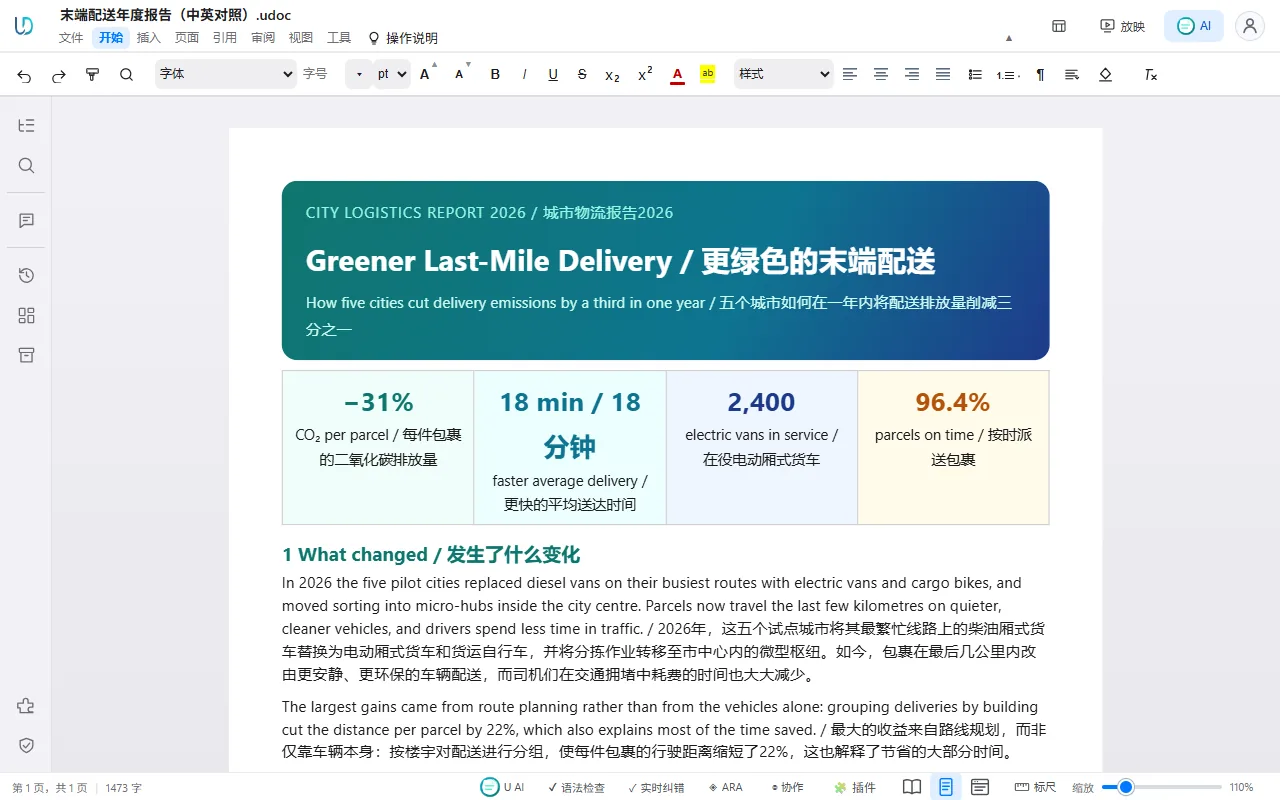
The first product to put PDF layout reconstruction, interactive dynamic documents and AI-native office work into one app: translated PDFs keep their layout, documents become web pages, and AI builds your Word, Excel and PowerPoint files. The desktop app is free.
- Papers and contracts translated, layout intact. Tables, formulas and footnotes stay in place, scans and LaTeX papers work too, and bilingual output is ready to hand in.
- The world's most powerful PDF layout reconstruction. Keep every page 1:1 as it looks, or rebuild paragraphs, headings, lists and reading order into a Word file you can edit right away. Offline on your computer.
- Documents that move, shared as web pages. Put charts, animations and flowcharts in the document and readers can interact with them; export to Word or PDF whenever you need.
- One sentence, and AI makes the Word, Excel or PPT. Connect Claude, Cursor or another AI assistant to write documents, build spreadsheets and decks, and convert PDFs on your own computer, at no cost.
Three core technologies behind every OmniDoc product
Structure extraction that keeps the layout, documents that are interactive web pages, and an office suite that AI assistants operate directly.
Production-grade structure extraction that keeps the layout. OmniDoc reads PDFs, Word files and scans into their real structure: headings, paragraphs, lists, tables, formulas, headers, footers, footnotes and reading order. Translation and conversion put every element back where it was, so a translated paper keeps its equations and a converted PDF keeps its pages. PDF to a web page with selectable text in about one second on your own computer; scanned and complex pages go through visual structure extraction.
From a fixed PDF layout to a flowing document. A PDF only records where each piece of text sits on the page; it has no paragraphs or headings. OmniDoc rebuilds paragraphs, headings, lists, tables and reading order from those scattered blocks and writes an editable, flowing document, or keeps the original layout page by page when you need it.
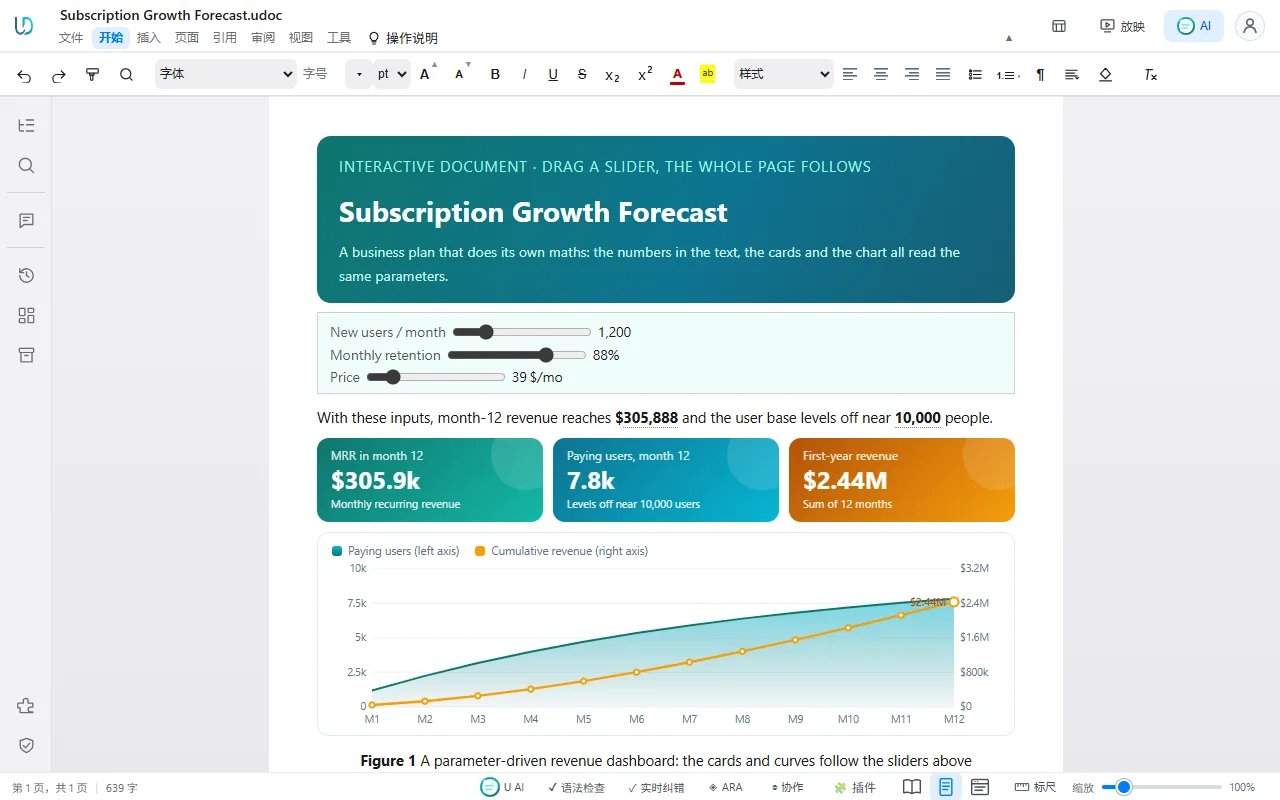
UniDoc: documents that are interactive web pages. A UniDoc document can hold interactive charts, animations, flowcharts, tabs, cards and numbered equations that readers click, drag and play. Publish it and it stays interactive at a public web address; when you need a static copy, export the same file to Word, PDF or lossless HTML. AI assistants can write a whole interactive document in one go. Native .udoc format, about 9 ms from keystroke to layout, and the same editor in the desktop app and the browser.
An AI-native office suite: your assistant does the work. OmniDoc Desktop ships with an MCP server of more than 40 tools. Claude, Cursor and other MCP apps use it to create and edit Word, Excel and PowerPoint files, convert PDFs, translate, publish and manage Zotero papers, and to check their own work: every edit returns layout problems, recalculated formulas or slide previews. Runs on your computer: editing and conversion are offline and free; cloud services such as translation use credits.
Ask your AI assistant, get a finished file
Install OmniDoc Desktop and add it to Claude Desktop or Cursor in one click, or to any app that supports MCP. Your assistant then works on real files on your computer.
- Word documents. Write reports, papers and résumés from templates, import an existing .docx, and save Word, PDF and lossless HTML in one call. Figures, tables and equations are numbered, and layout problems are reported back.
- Excel workbooks. Build or change .xlsx files with formulas that are recalculated and checked, native Excel charts, pivot tables, conditional formatting, filters and sparklines.
- PowerPoint decks. Create decks from your own template or a blank 16:9 deck, fill layouts with text, tables, charts and pictures, add animations and transitions, and catch overflowing text on every slide.
- PDF conversion. Convert PDFs offline to Word with the page layout kept or as editable paragraphs, to HTML with selectable text, or to images; merge, split and compress PDFs.
- Read, translate and publish. Read Word and PDF files in reading order, translate files with the same engines as omnidoc.top, and turn any document into a public web link.
- Papers and Zotero. Search your Zotero library, add papers with their PDFs, notes and tags, and fetch a paper's full text from open-access sources or your own institutional sign-in.
Editing and conversion run offline at no cost. Translation and other cloud services use credits, and your assistant acts as the account signed in to OmniDoc, so there is no API key to paste.
APIs for developers
- Document API. REST endpoints to upload files, run translation jobs, track them and download results, plus file tools, glossaries, instant text translation and audio and video jobs.
- OpenAI-compatible AI API. Point any OpenAI SDK at https://omnidoc.top/v1 and call Claude Haiku 5.5, with streaming. Each call is charged its actual model cost: 1 yuan of cost is 1,000 credits.
- MCP server. The local MCP server in OmniDoc Desktop gives AI agents more than 40 document tools that work offline, with no API key.
Pricing
Translation is charged for what is actually delivered, roughly 4 credits per page. The smallest pack is 3,000 credits for ¥9.9 (about 750 pages), and bought credits never expire. The editors and offline conversion are free.
HTML dynamic documents
Every Office file, rendered as HTML: Word, Excel, PowerPoint, PDF and Markdown open, edit and present in a web engine, export lossless HTML and publish as a link in one click. A UniDoc .udoc document is also a web page: interactive charts, animations, flowcharts, tabs and equations sit in the document, it stays interactive after publishing, and it exports to Word, PDF or lossless HTML. More: https://omnidoc.top/guides/html-dynamic-documents/en/
Not to be confused with
This package is the official Python SDK of OmniDoc (至译) at omnidoc.top and omnidoc.cn; the official Rust client is omnidoc on crates.io. Similar names that are not related to OmniDoc:
- OmniDocBench (opendatalab/OmniDocBench, PyPI
omnidocbench): a benchmark for document parsing models (CVPR 2025). - OmniDocs (adithya-s-k/OmniDocs, PyPI
omnidocs): a Python toolkit for visual document processing. omnidoc-pro,omnidoc-sdk,omnidoc-ragandomnidoc-excel-extractoron PyPI: packages by other developers.- Omnidoc (omnidoc.fr): a French medical tele-expertise platform.
Full table with sources: https://omnidoc.top/guides/what-is-omnidoc/en/
Python SDK
Install
pip install omnidoc
Requires Python 3.9 or newer. The only dependency is requests.
Quick start
Create an API key (it starts with sk_) in the API center at https://omnidoc.top/app/api-keys and put it in the environment:
export OMNIDOC_API_KEY="sk_your_key"
from omnidoc import OmniDocClient

client = OmniDocClient()  # reads OMNIDOC_API_KEY
files = client.translate_file("report.docx", "en", output_dir="out")
print(files)
translate_file uploads the file (presign, direct upload, finalize), creates a translation job, polls until it ends and downloads every artifact. A failed job raises JobFailedError; quota_exceeded is true when the balance was too low to start, in which case nothing is charged.
Step by step
doc_id = client.upload("report.docx")
job = client.create_job(doc_id, "en", output_mode="bilingual")
job = client.wait_job(job["id"], poll_interval=3, timeout=1800)
for artifact in client.list_artifacts(job["id"]):
    client.download_artifact(artifact["id"], "out")
Each create_job call generates a new Idempotency-Key; internal retries reuse it, so a job is never created or charged twice. To retry the same submission yourself, pass the same idempotency_key.
Account and other endpoints
client.get_job(job_id)           # job status (free)
client.cancel_job(job_id)        # cancel a job
client.credit_balance()          # credit balance (free)
client.credit_operations()       # credit history
client.usage_summary()           # usage summary

# Endpoints not wrapped yet: call them by the path shown on docs.omnidoc.top
client.get_json("<path>", params={...})
client.post_json("<path>", json={...})
Errors and retries
- API errors raise
OmniDocErrorwithstatus_code,code,messageandrequest_id(theX-Request-Idresponse header). - 429 and 5xx responses are retried using
Retry-Afteror exponential backoff, up tomax_retriestimes (default 4). AUTH_API_KEY_QUOTA_EXCEEDEDis not retried: the key's budget is used up and has to be raised first.
Webhook signatures
from omnidoc import parse_webhook

event = parse_webhook(raw_body, request.headers["X-Webhook-Signature"], secret)
Verify with the raw request body bytes. A bad signature or an old timestamp raises ValueError. De-duplicate events by data.job_id and data.status.
Security
- Keep the key on your server or in a controlled environment, never in source code, logs or a public repository.
- The key is sent only to the API address, never to the direct-upload
upload_url.
Development
pip install -e ".[test]"
pytest
The tests use a fake HTTP session: no API key and no network.
1 maintainer

Metadata
1 maintainer
Release files for omnidoc 0.1.9
For a detailed explanation of source distributions (sdists) and built distributions (wheels), please see the package formats documentation.
Source distribution (sdist)
| File | Size | Uploaded | Provenance | Actions |
|---|---|---|---|---|
| omnidoc-0.1.9.tar.gz | 21.9 kB | Without provenance | Details for omnidoc-0.1.9.tar.gz |
Built distribution (wheel)
| File | Interpreter | ABI | Platform | Actions Reset |
|---|---|---|---|---|
| omnidoc-0.1.9-py3-none-any.whl | Python 3 | none | any | Details for omnidoc-0.1.9-py3-none-any.whl |
Total release size: 35.9 kB
Release files / omnidoc-0.1.9.tar.gz
| Download URL | omnidoc-0.1.9.tar.gz |
|---|---|
| Size | 21.9 kB |
| Tags | Source |
|
SHA-256 checksum How to use checksums |
878fcae8d403a8b3886ddaf4c6b2baf5af3f422ffd3c6e627e5a0103235dc3c7
|
|
BLAKE2b-256 checksum How to use checksums |
a18e2b691f2711a349f9d614eb16408804fb55da63c1479806f03c319c6cb7c7
|
| Upload date | |
|
Uploaded using Trusted Publishing? What is trusted publishing? |
No |
| Uploaded via |
twine/7.0.0 CPython/3.13.11
|
Release files / omnidoc-0.1.9-py3-none-any.whl
| Download URL | omnidoc-0.1.9-py3-none-any.whl |
|---|---|
| Size | 14.0 kB |
| Tags | Python 3 |
|
SHA-256 checksum How to use checksums |
6a5265cb91478c5957390d24c39430e6308c88bc370f8e24f3ea2534278ca850
|
|
BLAKE2b-256 checksum How to use checksums |
5c7a1a3345ddde72a7e4e03ce44885eb41537144ceb4fb1972e10230cd3dc89b
|
| Upload date | |
|
Uploaded using Trusted Publishing? What is trusted publishing? |
No |
| Uploaded via |
twine/7.0.0 CPython/3.13.11
|
Security for omnidoc 0.1.9
Provenance
Provenance describes where a file came from. On PyPI, provenance is shared via attestations, which provide a verifiable record of the build or publishing details. View details, limitations and caveats.
No provenance found
None of the files in this release were uploaded with provenance metadata.
A note on package security
PyPI is a repository for distributing packages, not a service for auditing them. While third-party security researchers and our staff do their best to detect and remove malicious packages, PyPI cannot guarantee the quality, security or suitability of any given package.
To learn more about protecting yourself from malicious actors, visit our package security documentation.














