
OmniScout
Local-first browser automation, semantic search & research for AI agents.
No cloud APIs. No hosted sessions. No lock-in. Just a fast, local HTTP daemon in your terminal.








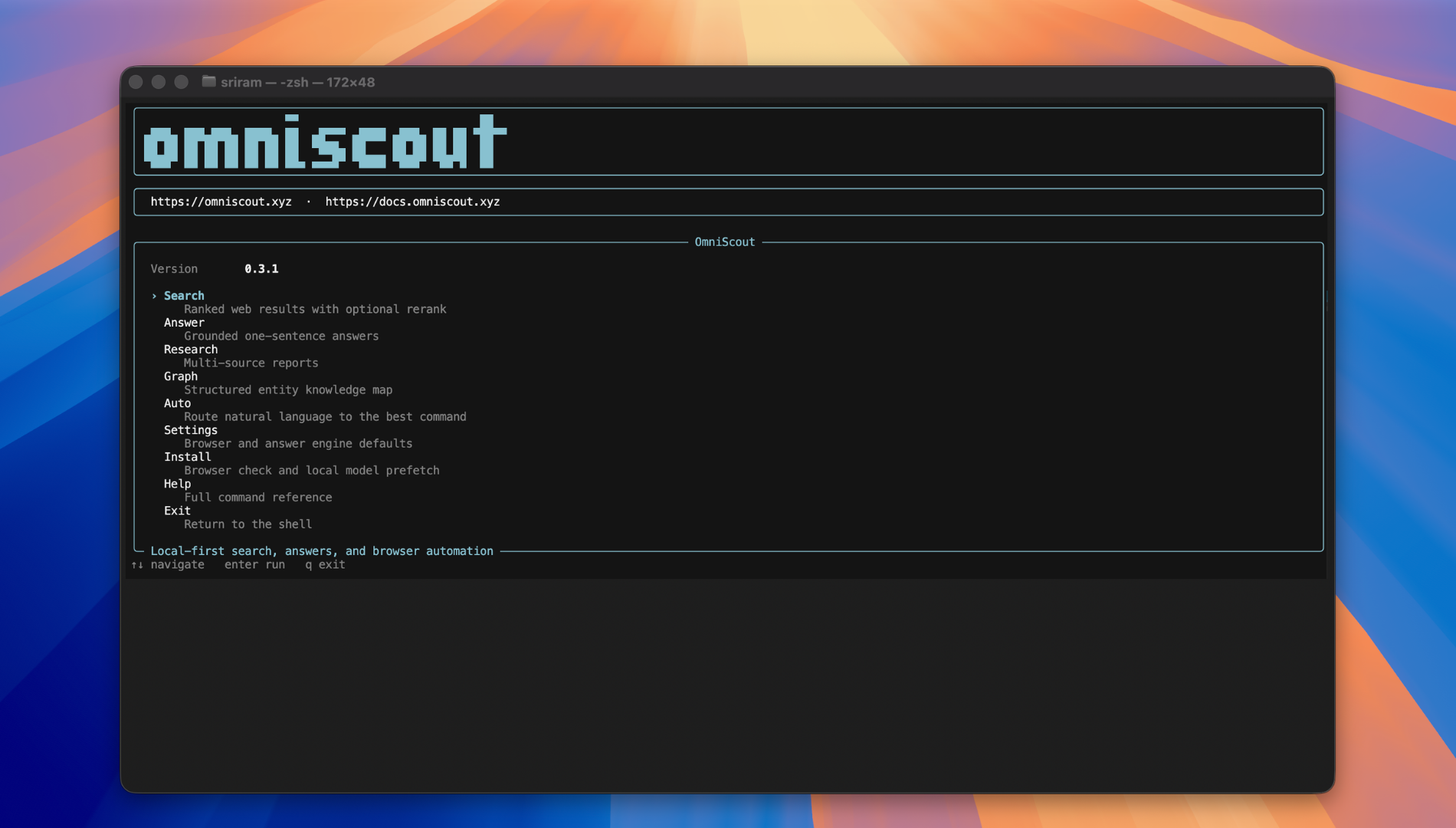
pip install omniscout
Requirements: Python 3.11 or newer and a Chromium-based browser such as Chrome, Brave, Edge, Vivaldi, Opera, Arc, or Chromium. OmniScout stores browser profiles, indexes, caches, and downloaded models locally. The first search or answer may download and warm an embedding model.
Verify the installation and inspect available commands:
omniscout --version
omniscout --help
omniscout computer doctor       # diagnose desktop automation (macOS)
Quick Start
Warm the local models, search, open a result in the managed browser, and inspect the page for accessibility references:
omniscout warmup
omniscout answer "latest AI news"
omniscout open
omniscout snapshot --refs-only
omniscout browser click '@e3'
For a direct URL, use the browser command group:
omniscout daemon start
omniscout browser navigate https://news.ycombinator.com
omniscout browser snapshot --refs-only
omniscout browser click '@e3'
omniscout browser close
Configure default browser:
omniscout settings set browser brave
Install agent skill files so Claude Code, Cursor, and Codex auto-discover OmniScout:
omniscout install --skill
The installer currently writes skill files for Claude Code, Cursor, Codex CLI,
and Gemini CLI. Other agents can use the bundled SKILL.md manually.
For deterministic agent integration, use --json or set OMNISCOUT_JSON=1:
omniscout --json answer "What is local-first software?"
export OMNISCOUT_JSON=1
When you need to discover a command or option, use the built-in help:
omniscout --help
omniscout computer --help
omniscout computer ui --help
Documentation Overview
The full documentation lives at docs.omniscout.xyz and is organized as follows:
CLI
| Page | What it covers |
|---|---|
| Overview | What OmniScout is, what you get (daemon, backends, @eN refs, search/extract/research/graph engines, Probe Zero), design principles, installation, hello world, data layout, and configuration |
| Agents | Drop-in prompts and skill files for Claude Code, Cursor, Codex, and Kimi; multi-step agent loops; JSON contract; trace / replay / watch; error kinds; skill template |
| Examples | Copy-paste recipes: knowledge graphs, research, form fill, login + profile reuse, CAPTCHA, network capture, multi-step workflows, screenshots, PDFs, sessions, tabs, search → extract → answer, and Python/shell integration |
| Commands | Full CLI reference — every command, flag, and JSON shape: daemon lifecycle, browser action vocabulary, tab/network/console management, search/extract/research/graph options, profiles, settings, workflow commands, response envelope, and environment variables |
| Architecture | Daemon, backends (Patchright vs Extension), @eN snapshot refs, action queue, snapshot generations, action history & replay, session restore, event stream, and all core layers (commands, engines, daemon, storage, config, models) with data-flow diagrams |
| Roadmap | Planned features — multi-provider search, smart extraction, page summaries, and MCP server |
| Troubleshooting | Every common failure mode and fix: @eN refs, login, CAPTCHA, extension backend, installation, runtime, search, extraction, research, browser automation, profiles, daemon, performance, cache, JSON output, and configuration issues |
| Probe Zero | OmniScout's local answer engine — what it does, how to enable it, Classic vs Probe Zero, and gold-benchmark metrics |
SDK
| Page | What it covers |
|---|---|
| SDK Overview | What the SDK is, key features, installation, quick example, and common use cases |
| Python API Reference | Complete Python API docs — Search, Extraction, Crawler, Research, Browser, Daemon Client, Configuration, Models, Logging, async support, testing, performance tips, and troubleshooting |
What It Is
OmniScout is a self-contained terminal-native interface for the web. Think of it as a local browser brain for AI agents — enabling them to search, browse, extract structured data, and remember everything without ever leaving your laptop.
A long-lived daemon at 127.0.0.1:7720 provides sub-second browser actions, a warm embedding model, and a local vector store. It communicates over HTTP/JSON and works with your existing Chromium browser (Chrome, Brave, Edge, Vivaldi, etc.). Local state and processing stay on your machine, while search, crawling, extraction, and browser automation still access the external websites or providers you request.
Why OmniScout?
| Feature | Status |
|---|---|
| Local First | No hosted browser sessions; state and processing are local by default |
| Semantic Search | Searches the web and re-ranks results using local sentence-transformers embeddings |
| Long-lived Daemon | Sub-second per-action latency with persistent sessions |
| Real Browser | Drives your real Chrome/Brave; keeps cookies, logins, and extensions |
| Semantic Memory | Remember and search your browsing history with vector embeddings |
| Rich Extraction | Pull structured data from any URL with zero LLM calls |
| Agent-Ready | Every command speaks JSON — hook it up to any AI framework |
Core Commands
The following is the complete beginner-oriented command map. Run any command with
--help for its flags and subcommands.
| Command | Purpose |
|---|---|
search |
Search the web, optionally with local semantic reranking. |
answer |
Retrieve web results and synthesize an answer; preferred when you need an answer rather than a URL list. |
map |
Crawl a site and produce a URL map. |
warmup |
Preload embedding and answer models in the daemon. |
remember, memory |
Store and semantically search remembered visits and notes. |
extract |
Return readable or structured data from a URL or query. |
open, snapshot, context, reset |
Open pages, inspect @eN refs, view workflow state, and reset continuity. |
auto |
Route a one-line request to the best command. |
research, graph |
Run full research pipelines or build entity knowledge graphs. |
settings, install |
Configure OmniScout and install agent skills or browser support. |
browser |
Direct Chromium automation for complex web workflows. |
computer |
Native desktop automation for apps, files, clipboard, and windows. |
daemon, session, profile |
Manage the service, persistent sessions, and browser profiles. |
index, extract-jobs, crawl, monitor |
Manage indexes, background jobs, crawls, and URL change monitoring. |
record, macro, replay, workflow |
Record, reuse, replay, and export workflows. |
benchmark |
Benchmark answer modes. |
Search
1. Search & Research
# Semantic web search
omniscout search "state of local AI agents 2026"

# Summarized one-sentence answer (no LLM)
omniscout answer "Who is the president?" --depth balanced

# Full research pipeline (search → crawl → extract → rerank → summarize)
omniscout research "emerging quantum computing startups 2026"

# Open the local OmniScout Search UI (bundled SearXNG at 127.0.0.1:8888)
omniscout search ui
Browser
2. Browser Automation
# Navigate and identify elements with accessibility tree refs
omniscout browser navigate https://news.ycombinator.com
omniscout browser snapshot --refs-only
omniscout browser click '@e3'

# Screenshots (full page, delayed, or centered)
omniscout browser screenshot --full-length --out state.png
omniscout browser screenshot --delay 2 --out after-load.png

# Capture network and console logs
omniscout browser network list
omniscout browser console tail
Computer
3. Desktop Automation
# macOS MVP: open apps/files/URLs and type into the focused window
omniscout computer navigate /Applications/Notes.app
omniscout computer wait 300
omniscout computer type "Meeting notes"
omniscout computer key cmd+s

# Clipboard, screenshots, and window management
omniscout computer clipboard set "Hello from Scout"
omniscout computer screenshot --out /tmp/desktop.png
omniscout computer window list
Desktop automation currently supports macOS via native open, AppleScript,
screencapture, and clipboard tools. Commands use the same daemon JSON envelope
and --session model as browser automation.
Extract
4. Content Extraction
# Clean Markdown or structured JSON from any page
omniscout extract https://example.com
omniscout extract -q "SpaceX founder" --format structured --fields founder

# Exa-style schema-driven extraction (no LLM)
omniscout extract https://stripe.com/pricing \
  --schema-inline '{"type":"object","properties":{"pricing":{"type":"string"}}}'
5. Knowledge Graphs
# Map a company or person into a structured Unicode tree
omniscout graph "Cursor"              # search web and extract
omniscout graph "Cursor" -w cursor.com --data  # crawl site directly
omniscout graph "Cursor" --llm        # optional LLM overlay on evidence
6. Browser Memory
# Remember and semantically search your browsing history
omniscout remember https://example.com/blog/post
omniscout memory "neural networks in production"
Desktop automation reference
computer supports navigate, type, key, screenshot, wait, doctor,
clipboard, window, ui, and backend. The computer ui group supports
snapshot, click, drag, and is; use its @eN references for element-level
actions. Desktop automation currently supports macOS through native OS tools.
Reusable workflow example
omniscout record start --name my_macro
omniscout browser navigate https://example.com
omniscout browser snapshot --refs-only
omniscout record stop my_macro
omniscout macro run my_macro
Development
cd cli
python -m venv .venv
source .venv/bin/activate
pip install -e ".[dev]"
pytest
ruff check .
Tests live in cli/tests/. Integration tests are marked with integration and
may start subprocesses or bind local ports. Keep browser profiles and generated
model/cache data outside the repository.
Architecture
flowchart LR
    A["AI agent (Claude / Cursor / Codex / Kimi)"] --> B["OmniScout CLI<br/>(typer + rich)"]
    B -->|"HTTP POST"| C["Daemon<br/>(127.0.0.1:7720)"]
    C --> D["Patchright Backend"]
    C --> E["Extension Backend<br/>(opt-in)"]
    C --> F["Embed Service<br/>(warm model)"]
    B --> G["Search / Extract / Research / Graph"]
    G --> H["Local Qdrant"]
    G --> I["SearXNG / Crawler"]
    D --> J["Chrome / Brave / Edge / Vivaldi"]
For contributors:
cli/omniscout/
  app.py              # Typer root
  commands/           # CLI subcommands
  daemon/             # HTTP server, backends, replay
  engines/            # browser, search, research, extractor, crawler
  store/              # SQLite cache, sessions, workflow, memory
  models.py           # Pydantic JSON contracts
JSON & Agent Integration
Every command speaks JSON. Set OMNISCOUT_JSON=1 and stdout becomes a structured payload.
export OMNISCOUT_JSON=1
omniscout search "robotics simulators"
Or talk to the daemon directly:
curl -X POST http://127.0.0.1:7720/command \
  -H 'Content-Type: application/json' \
  -d '{"action":"navigate","args":{"url":"https://example.com"},"session":"demo"}'
Configuration
Create a config.toml in your config directory (e.g. ~/.config/omniscout/config.toml on Linux, ~/Library/Application Support/omniscout/config.toml on macOS):
default_source = "searxng"   # searxng | ddg | wikipedia | web
search_limit = 10
research_results = 8
request_throttle_seconds = 1.0
embedding_model = "sentence-transformers/all-MiniLM-L6-v2"
browser = "chrome"                    # chrome | edge | brave | vivaldi | opera | arc | chromium | custom
# browser_executable = "/path/to/browser"  # only needed for 'custom'
Or configure via CLI:
omniscout settings browsers
omniscout settings set browser brave
omniscout settings show
Environment Variables
| Variable | Purpose |
|---|---|
OMNISCOUT_JSON=1 |
Force JSON output on every command |
OMNISCOUT_DAEMON_AUTO_START=0 |
Don't auto-start the daemon |
OMNISCOUT_DAEMON_PORT |
Daemon port (default: 7720) |
OMNISCOUT_DATA_DIR |
Override the default data directory |
OMNISCOUT_BROWSER |
Browser ID (overrides config) |
OMNISCOUT_EMBED_LOCAL_ONLY=0 |
Allow runtime Hugging Face fetches |
TWOCAPTCHA_API_KEY |
CAPTCHA solver API key |
Legacy HARNESS_* equivalents accepted.
On-disk State
| Path | Purpose |
|---|---|
profiles/ |
Persistent Chrome user-data-dirs |
qdrant/ |
Embedded vector index |
models/sentence-transformers/ |
Prefetched embedding model |
memory.sqlite |
Browser memory (visits + notes) |
sessions.sqlite |
Long-lived browser session registry |
cache/pages/ |
Content-hashed HTML cache |
daemon/ |
PID, port, logs, action history, session restore |
Supported By
OmniScout works with any AI agent that can run shell commands. Skill files are auto-installed with omniscout install --skill wherever a well-known directory exists.
Agents with verified skill directories:
- Claude Code —
~/.claude/skills/ - OpenAI Codex CLI —
~/.codex/skills/ - Cursor —
~/.cursor/skills-cursor/ - Gemini CLI / Antigravity —
~/.gemini/config/skills/ - Pi — paste
SKILL.mdinto the system prompt - OpenCode — paste
SKILL.mdinto the system prompt - Windsurf — paste
SKILL.mdinto the system prompt - Cline — paste
SKILL.mdinto the system prompt - Roo Code — paste
SKILL.mdinto the system prompt - Amp — paste
SKILL.mdinto the system prompt - Replit Agent — paste
SKILL.mdinto the system prompt - AiderDesk — paste
SKILL.mdinto the system prompt - AstrBot — paste
SKILL.mdinto the system prompt - Droid (Factory) — paste
SKILL.mdinto the system prompt - Goose — paste
SKILL.mdinto the system prompt - Factory — paste
SKILL.mdinto the system prompt
Also works with: GitHub Copilot (Agent Mode), any custom agent with shell access, or any coding assistant that can invoke the omniscout / scout CLI binary.
The CLI is the interface. If your agent runs bash, it runs OmniScout.
License
Modified MIT — see LICENSE. Products built on OmniScout must prominently display Powered by OmniScout on the user interface.
1 maintainer

Download files
Download the file for your platform. If you're not sure which to choose, learn more about installing packages.
Source Distribution
Built Distribution
Filter files by name, interpreter, ABI, and platform.
If you're not sure about the file name format, learn more about wheel file names.
Copy a direct link to the current filters
File details
Details for the file omniscout-0.4.6.2.tar.gz.
File metadata
- Download URL: omniscout-0.4.6.2.tar.gz
- Upload date:
- Size: 5.9 MB
- Tags: Source
- Uploaded using Trusted Publishing? Yes
- Uploaded via: twine/7.0.0 CPython/3.13.14
File hashes
| Algorithm | Hash digest | |
|---|---|---|
| SHA256 |
d4b5d2061a69e74b6073883094d00f36072a1233e21665fcf20a628691730bc8
|
|
| MD5 |
48694466814050fd4b52dd41c5085c51
|
|
| BLAKE2b-256 |
87aca7954a3fa6071c82123f4a4b850f324ff3b4c6adec59a3267ac150ed4ed2
|
Provenance
The following attestation bundles were made for omniscout-0.4.6.2.tar.gz:
Publisher:
pypi-publish.yml on sriramramnath/omniscout
-
Statement:
-
Statement type:
https://in-toto.io/Statement/v1 -
Predicate type:
https://docs.pypi.org/attestations/publish/v1 -
Subject name:
omniscout-0.4.6.2.tar.gz -
Subject digest:
d4b5d2061a69e74b6073883094d00f36072a1233e21665fcf20a628691730bc8 - Sigstore transparency entry: 2420031315
- Sigstore integration time:
-
Permalink:
sriramramnath/omniscout@4bef8b6cbe63898bc5d09549b4696e865793b315 -
Branch / Tag:
refs/heads/main - Owner: https://github.com/sriramramnath
-
Access:
private
-
Token Issuer:
https://token.actions.githubusercontent.com -
Runner Environment:
github-hosted -
Publication workflow:
pypi-publish.yml@4bef8b6cbe63898bc5d09549b4696e865793b315 -
Trigger Event:
workflow_dispatch
-
Statement type:
File details
Details for the file omniscout-0.4.6.2-py3-none-any.whl.
File metadata
- Download URL: omniscout-0.4.6.2-py3-none-any.whl
- Upload date:
- Size: 5.1 MB
- Tags: Python 3
- Uploaded using Trusted Publishing? Yes
- Uploaded via: twine/7.0.0 CPython/3.13.14
File hashes
| Algorithm | Hash digest | |
|---|---|---|
| SHA256 |
3f27f81d3707093d4cacf05abc03ea32229817ffbdc0504f1f15f980d8b07e2a
|
|
| MD5 |
f1881e0e07beaf4e28737d5f33f7da3f
|
|
| BLAKE2b-256 |
27422b922ab30682ad8c2375bb9ef5178189ab928b85a752249b0048fd758f40
|
Provenance
The following attestation bundles were made for omniscout-0.4.6.2-py3-none-any.whl:
Publisher:
pypi-publish.yml on sriramramnath/omniscout
-
Statement:
-
Statement type:
https://in-toto.io/Statement/v1 -
Predicate type:
https://docs.pypi.org/attestations/publish/v1 -
Subject name:
omniscout-0.4.6.2-py3-none-any.whl -
Subject digest:
3f27f81d3707093d4cacf05abc03ea32229817ffbdc0504f1f15f980d8b07e2a - Sigstore transparency entry: 2420031375
- Sigstore integration time:
-
Permalink:
sriramramnath/omniscout@4bef8b6cbe63898bc5d09549b4696e865793b315 -
Branch / Tag:
refs/heads/main - Owner: https://github.com/sriramramnath
-
Access:
private
-
Token Issuer:
https://token.actions.githubusercontent.com -
Runner Environment:
github-hosted -
Publication workflow:
pypi-publish.yml@4bef8b6cbe63898bc5d09549b4696e865793b315 -
Trigger Event:
workflow_dispatch
-
Statement type:







