
No project description provided

Project description
Omoospace
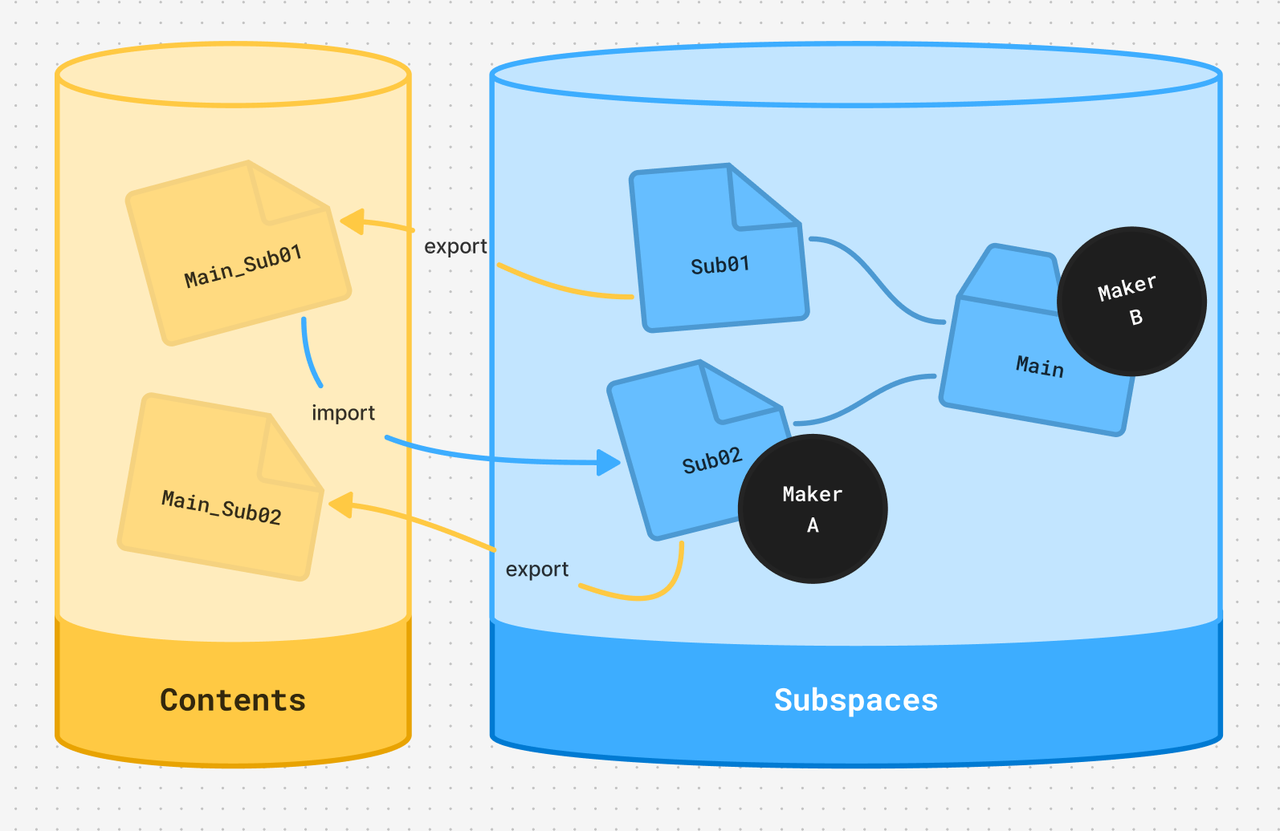
Omoospace is a universal folder structure guideline for creative projects. Its goals are universality, flexibility, and semantic clarity. It works for complex projects and team collaboration, as well as simple projects and individual work. Why Omoospace?
Getting Started
New Project
- Create a new folder as the project root.
- Create
Omoospace.ymlin the root. - Create
Contents/in the root and put your resource files in it. - (Optional) Create
Subspaces/in the root and put your source files in it. - (Optional) Add other folders as needed and place the corresponding file types in them.
Existing Project
-
Create
Omoospace.ymlin the project root. -
Edit
Omoospace.ymland add:contents_dir: <resource_folder_name>
Example:
contents_dir: Assets
-
(Optional) Edit
Omoospace.ymland add:subspaces_dir: <source_folder_name>
Example:
subspaces_dir: ProjectFiles
Command Line Tool
Install uv and tool
https://docs.astral.sh/uv/getting-started/installation/
uv tool install omoospace[cli]
New Project
omoos create <Name>
Existing Project
cd <project folder>
omoos init
Release history Release notifications | RSS feed


Download files
Download the file for your platform. If you're not sure which to choose, learn more about installing packages.
Source Distribution
Built Distribution
Filter files by name, interpreter, ABI, and platform.
If you're not sure about the file name format, learn more about wheel file names.
Copy a direct link to the current filters
File details
Details for the file omoospace-0.2.7.tar.gz.
File metadata
- Download URL: omoospace-0.2.7.tar.gz
- Upload date:
- Size: 27.6 kB
- Tags: Source
- Uploaded using Trusted Publishing? Yes
- Uploaded via: uv/0.11.16 {"installer":{"name":"uv","version":"0.11.16","subcommand":["publish"]},"python":null,"implementation":{"name":null,"version":null},"distro":{"name":"Ubuntu","version":"24.04","id":"noble","libc":null},"system":{"name":null,"release":null},"cpu":null,"openssl_version":null,"setuptools_version":null,"rustc_version":null,"ci":true}
File hashes
| Algorithm | Hash digest | |
|---|---|---|
| SHA256 |
17ecf6755ceccfca925912243121bc98657ed0e8f9a0f94f059555930b4aacba
|
|
| MD5 |
ab7d16af65478274bcae6ac310a71540
|
|
| BLAKE2b-256 |
36c2d64b5847d3a92b959de1783c2cd51dd585cfc18ab6c0599f2c8252844a54
|
File details
Details for the file omoospace-0.2.7-py3-none-any.whl.
File metadata
- Download URL: omoospace-0.2.7-py3-none-any.whl
- Upload date:
- Size: 31.8 kB
- Tags: Python 3
- Uploaded using Trusted Publishing? Yes
- Uploaded via: uv/0.11.16 {"installer":{"name":"uv","version":"0.11.16","subcommand":["publish"]},"python":null,"implementation":{"name":null,"version":null},"distro":{"name":"Ubuntu","version":"24.04","id":"noble","libc":null},"system":{"name":null,"release":null},"cpu":null,"openssl_version":null,"setuptools_version":null,"rustc_version":null,"ci":true}
File hashes
| Algorithm | Hash digest | |
|---|---|---|
| SHA256 |
46179917fb4ad819b654704a5c623e4b5937aa4a6321d8cd7aa2ecd7f098ba6b
|
|
| MD5 |
8ecd4f893b2d50801e49e6b7f8ae36f2
|
|
| BLAKE2b-256 |
7b4c9af0e7792521aa0c86267ef79d7341a5ead4b0798e290df246912d3d0d58
|






