
OMRKit v2.2
Zero-calibration Optical Mark Recognition engine with 3-of-4 occluded ArUco recovery, erased-smudge resilience, photocopy drift micro-alignment, QR auto-template detection, blank-form auto-grid finder, live browser camera scanner, printable Unicode ArUco sheet generator, Classical Test Theory psychometrics, FastAPI REST API, and 6-language Web Studio.






Live Demo · PyPI · Deployment Guide · Examples · Contributing
Live Web Studio: Open omrkit-studio.onrender.com directly in your browser (supports EN · TR · ZH · DE · RU · ES) — click Sample Cohort in the top bar to scan & grade 5 optical sheets, triage flagged bubbles with keyboard shortcuts (
A–E,Backspace,↑↓), test Live Camera, or generate printable ArUco + QR sheets. (Hosted on Render's free tier; cold start takes ~20–30s.)
Why OMRKit?
Traditional open-source OMR scripts require manual pixel-editing in brittle JSON files, break on rotated photos, fail when a thumb covers a corner fiducial or an eraser leaves a faint smudge, and output unverified CSV dumps. OMRKit v2.2 handles the full optical grading pipeline in one MIT-licensed toolkit:
| Capability | Legacy OMR Scripts | OMRKit v2.2 |
|---|---|---|
| Printable PDF Generator + Exact Template | Manual JSON pixels | 1-Click Unicode Vector PDF (ArUco + QR) + Exact template.json |
| Occluded Corner & Photocopy Drift | Fails if 1 corner hidden or shifted | 3-of-4 ArUco 12-Point Recovery + ±6px Block Micro-Alignment |
| Erased Pencil Smudges vs. Double Marks | False multi-mark flags | Darkness-Dominance Filter (Rejects Smudges, Catches Double Marks) |
| Zero-Template QR Auto-Scanning | Must pass template manually | omrkit scan sheet.jpg auto-detects template from QR |
| Auto-Detect Grids on Blank Forms | Measure pixels by hand | Auto-Deskew (±12°) omrkit detect-layout + Interactive Canvas |
| Live Webcam / Mobile Browser Scanner | Static files only | Real-Time getUserMedia Viewfinder with Auto-Lock |
| Multi-Page PDF & EXIF Orientation | Single images only | Native pypdfium2 + EXIF Auto-Orient |
| Checkmarks (✓), Crosses (✗) & Shadows | Global intensity only | Illumination Normalization + Hybrid Fill/Ring/Ink Classifier |
| Confidence & Keyboard HITL Review | Silent errors in CSV | Calibrated 0–1 Confidence + Zoomed Bubble Crops + A–E Triage |
| Exam Psychometrics & Scorecards | Basic score sum | CTT Difficulty ($p$), Discrimination ($D$), KR-20, Excel & Unicode PDF Cards |
Legacy OMRChecker v1 Migration |
Manual rewrite | omrkit migrate-template old.json -o new.json |
Real-World Detection & Generated Sheets
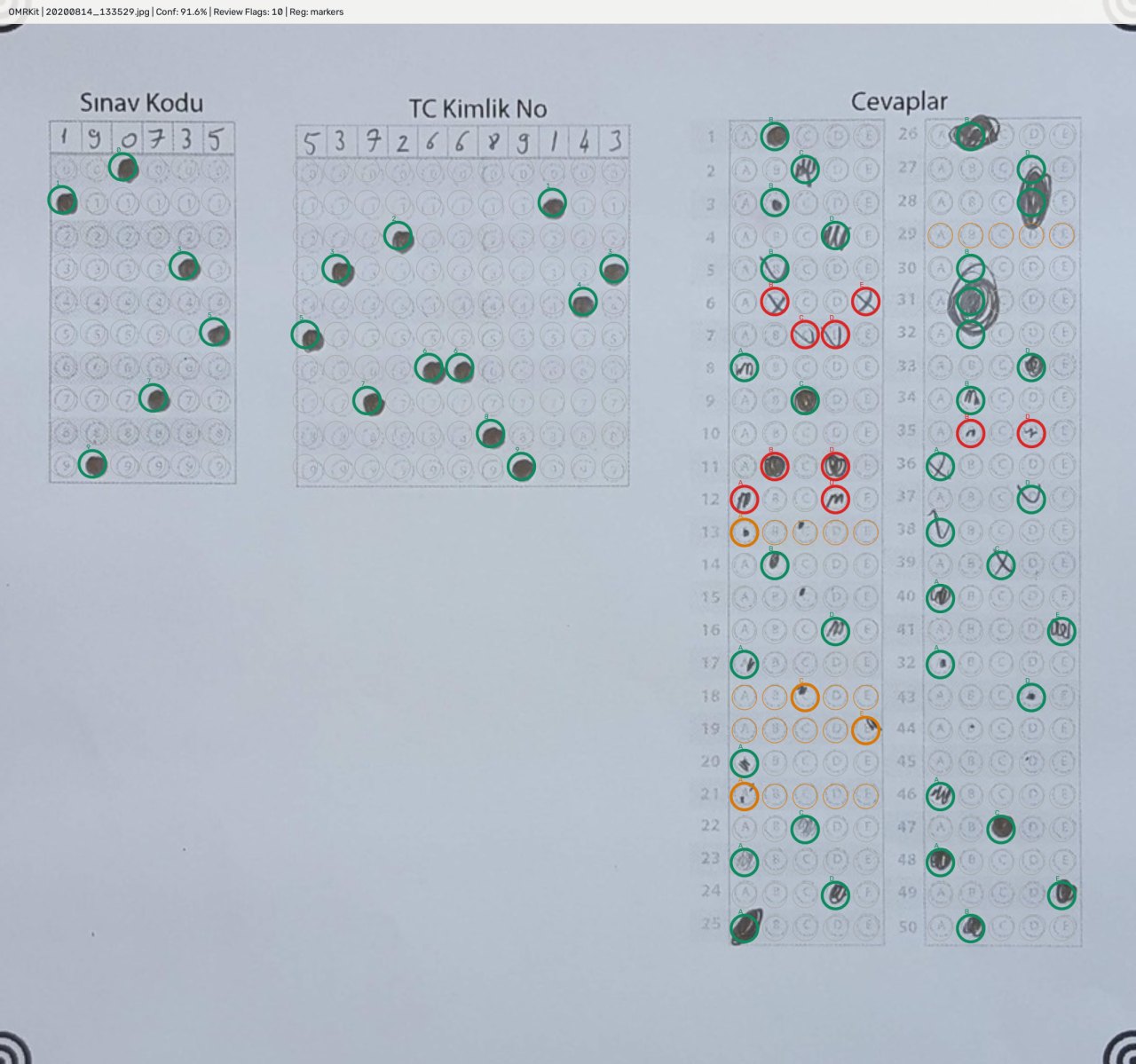
Real mobile photo scan: Emerald = confident (including ✓ & ✗ marks), Crimson = multi-marked, Amber = faint marks queued for zoomed HITL keyboard review. |
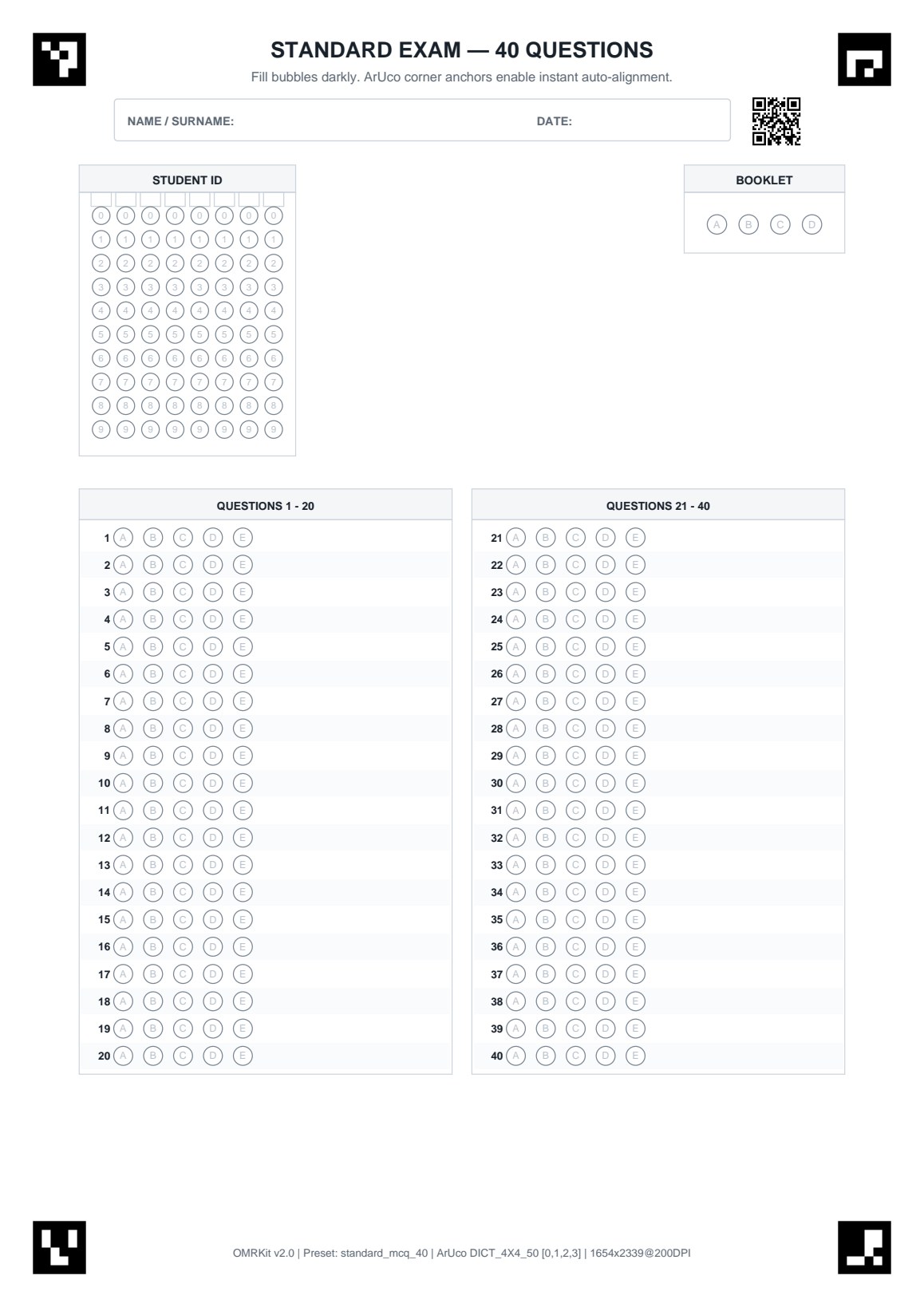
Zero-calibration generated PDF: Vector A4/Letter layout with native Unicode typography, ArUco corners [0,1,2,3], QR badge, and companion template.json.
|
Quickstart (60 Seconds)
1. Install from PyPI, Run via Docker, or Try Online
# Option A: Install from PyPI (recommended)
pip install omrkit              # Core CV engine + PDF + ArUco/QR + Sheet Generator + CLI
pip install "omrkit[all]"       # Full platform: adds 6-language Web Studio, FastAPI REST API & Excel

# Option B: Prebuilt official Docker image (zero build)
docker run -p 8000:8000 ghcr.io/duhanguler/omr:latest
- Live Public Demo: https://omrkit-studio.onrender.com/ (OpenAPI docs at
/docs) - Self-Host (1-Click Render Blueprint):
· See docs/DEPLOYMENT.md for GHCR & cloud deployment details.
2. Generate a Print-Ready ArUco + QR Sheet
omrkit generate --preset standard_mcq_40 -o my_exam
# Writes: standard_mcq_40_sheet.pdf, template.json, answer_key.json
Built-in presets (omrkit generate --list):
quick_quiz_20— 20 questions (A–D), 6-digit Student IDstandard_mcq_40— 40 questions (A–E), 8-digit Student ID, Booklet (A–D)turkish_exam_50— 50 questions (A–E), native Turkish Unicode headings, 6-digit Sınav Kodu, 11-digit TC Kimlik No (checksum validated), Bookletturkish_yks_120— 120-question YKS / TYT layout (4 columns × 30 rows)
3. Scan Images or Multi-Page PDFs (Explicit or Zero-Template QR Auto-Scan)
# Zero-template QR auto-detection on generated sheets:
omrkit scan examples/standard_mcq_40q/scans -o outputs/auto_demo

# Explicit template + YKS/TYT negative marking + Excel & PDF scorecards:
omrkit scan examples/standard_mcq_40q/scans \
  -t examples/standard_mcq_40q/template.json \
  -k examples/standard_mcq_40q/answer_key.json \
  --policy yks_tyt \
  --format csv,json,xlsx,scorecards \
  -o outputs/demo

# Auto-detect bubble grids from ANY blank form (with automatic ±12° deskew):
omrkit detect-layout examples/turkish_exam_50q/blank_form.jpg -o auto_template.json

# Migrate a legacy OMRChecker v1 template.json in one command:
omrkit migrate-template old_template.json -o template_v2.json
Try the real-world hand-marked Turkish 50-question mobile scans:
omrkit scan examples/turkish_exam_50q/scans \
  -t examples/turkish_exam_50q/template.json \
  -o outputs/turkish_demo
4. Launch Visual Web Studio & REST API
omrkit studio
# Web Studio:    http://127.0.0.1:8000
# OpenAPI Docs:  http://127.0.0.1:8000/docs
Python SDK
Integrate optical scanning, grading, and psychometrics in 10 lines of typed Python:
from omrkit import AnswerKey, ExamGrader, GradingPolicy, OMRScanner, Template

template = Template.from_file("examples/standard_mcq_40q/template.json")
scanner = OMRScanner(template)

batch = scanner.scan_batch("examples/standard_mcq_40q/scans", workers=4)

key = AnswerKey.from_file("examples/standard_mcq_40q/answer_key.json")
report = ExamGrader(key, GradingPolicy.preset("yks_tyt")).grade_batch(batch.sheets)

print(f"Graded {report.analytics.student_count} sheets | Mean: {report.analytics.mean_score}")
print(f"KR-20 Reliability: {report.analytics.kr20_reliability}")
Architecture
flowchart LR
    A["Images / Multi-Page PDF"] --> B["EXIF Auto-Orient + PDFium Loader"]
    B --> C["5-Mode Registration: ArUco (4pt / 3pt Recovery) / Markers / Quad / ORB / Direct"]
    C --> D["Shadow Normalization + Block Micro-Alignment (±6px)"]
    D --> E["Hybrid Bubble Detector (Fill + Ring + Ink + Smudge Filter)"]
    E --> F{"Confidence & Validator Check"}
    F -- "High Confidence" --> G["ExamGrader + CTT Psychometrics"]
    F -- "Low Conf / Multi-Mark / Bad Checksum" --> H["HITL Review Queue (Zoomed Crops + Keyboard Triage)"]
    H --> G
    G --> I["CSV / JSON / Multi-Sheet Excel / Unicode PDF Scorecards / Overlays"]
Key Technical Features
- Resilient 5-Mode Registration:
arucowith 0°/90°/180°/270° recovery plus 3-of-4 occluded corner 12-point homography (aruco_3pt),markers(multi-scale concentric markers),page_quad(borderless contour with polar corner ordering),homography(ORB + RANSAC), andnone(flatbed). - Photocopy Micro-Alignment & Smudge-Safe Detector: Per-block Sobel rim correlation snaps misaligned photocopies (
±6px) back onto exact bubble centers. Hybrid inner fill + 75th-percentile ring contrast + ink stroke scoring + darkness-dominance smudge rejection reads checkmarks (✓), crosses (✗), and light pencil marks cleanly while flagging true double marks. - Built-in Field Validators: Algorithmic Turkish TC Kimlik No (11-digit mod-10/11), Luhn,
digits, andnon_emptyvalidators flag misread IDs automatically. - Classical Test Theory (CTT) Psychometrics: Mean, median, standard deviation, percentiles, item difficulty ($p$), upper/lower 27% discrimination index ($D$), distractor distribution, and KR-20 reliability.
- Grading Policies & Native Unicode PDFs: Standard, YKS/TYT & KPSS (4 wrong = -1 correct), LGS (3 wrong = -1 correct), multi-booklet (
A/B/C/D), bonus/cancelled items, weighted sections, and automatic TrueType Unicode font discovery (LiberationSans/DejaVuSans) for generated sheets and student scorecards. - Privacy Utility:
omrkit strip-exif <dir> -o <clean_dir>bakes EXIF orientation into pixels and strips GPS/device metadata.
Reproducible Benchmarks
Run omrkit benchmark --samples 5 on your own machine to reproduce:
Scenario (standard_mcq_40, 245 fields/scenario) |
Accuracy | Avg Confidence | False HITL Flags | Single-Thread Throughput |
|---|---|---|---|---|
| Clean Flatbed Scan (Solid Fill) | 100.00% | 99.2% | 0 | ~530 OMR/min |
| Mobile Perspective + Uneven Shadow | 100.00% | 99.2% | 0 | ~310 OMR/min |
| Rotated 90° / 180° / 270° + Perspective | 100.00% | 99.2% | 0 | ~415 OMR/min |
Pen Checkmarks (✓) + Shadow |
100.00% | 99.1% | 0 | ~440 OMR/min |
v2.2 Erased Smudge (tone=170) + Dark Fill (tone=45) |
100.00% | 98.4% | 0 | ~490 OMR/min |
| v2.2 1-of-4 Occluded ArUco + 90° Rotation + Skew | 100.00% | 99.1% | 0 | ~360 OMR/min |
(Multi-process batch mode via --workers N scales linearly across CPU cores.)
Web Studio & REST API
OMRKit Studio ships pre-bundled inside the Python package in 6 languages (EN · TR · ZH · DE · RU · ES) and launches via omrkit studio or docker run:
- Scan & Review (HITL): Drop JPG/PNG/PDF batches with explicit template or QR Auto-Detect, inspect zoomed color-coded verification overlays with live bounding-box reticles, view magnified bubble-strip crops inside each flagged card, and resolve flags rapidly with keyboard shortcuts (
A–E,Backspace,↑↓). - Live Camera: Browser webcam / smartphone viewfinder (
getUserMedia) with Auto-Lock corner capture, live resolution readout, audio confirmation, and QR recognition. - Template Designer: Upload any blank optical form image or PDF, run Auto-Detect Grids (auto-deskewing up to ±12°), migrate legacy
OMRCheckerv1 JSONs, click-drag blocks directly on canvas, micro-nudge with arrow keys (1px/Shift 10px), and undo/redo cleanly (Ctrl+Z/Ctrl+Shift+Z). - Sheet Generator: Configure title, questions (5–120), option labels, booklet selector, and ID grids; inspect live print-spec telemetry, print directly (Print PDF), or download the ZIP bundle (
PDF + template.json + answer_key.json). - Grading & Analytics: Multi-booklet inline answer-key editor, scoring policy selector, hover-interactive score histogram, sortable student scoreboard with Unicode PDF Scorecards, and filterable CTT psychometrics with inline option-distribution micro-bars.
REST API Endpoints
GET /api/health·GET /api/presetsPOST /api/generate·POST /api/generate/bundlePOST /api/templates/validate·POST /api/templates/auto-detect·POST /api/templates/migrate·POST /api/preview-imagePOST /api/scan(supportstemplate_json="auto", returnsoverlays,review_crops,sheet_dimensions) ·POST /api/demo/cohort·POST /api/gradePOST /api/export/csv·POST /api/export/xlsx·POST /api/export/scorecard
Development
uv venv .venv
uv pip install --python .venv/bin/python -e ".[all,dev]"

# Python QA
.venv/bin/ruff check src tests
.venv/bin/mypy src/omrkit
.venv/bin/pytest -v --cov=omrkit

# Frontend Studio development
cd studio && npm ci && npm run dev
License
Released under the MIT License. Copyright © 2026 Duhan Güler & Contributors.
1 maintainer

Metadata
1 maintainer
Release files for omrkit 2.2.0
For a detailed explanation of source distributions (sdists) and built distributions (wheels), please see the package formats documentation.
Source distribution (sdist)
| File | Size | Uploaded | Provenance | Actions |
|---|---|---|---|---|
| omrkit-2.2.0.tar.gz | 180.5 kB | With provenance | Details for omrkit-2.2.0.tar.gz |
Built distribution (wheel)
| File | Interpreter | ABI | Platform | Actions Reset |
|---|---|---|---|---|
| omrkit-2.2.0-py3-none-any.whl | Python 3 | none | any | Details for omrkit-2.2.0-py3-none-any.whl |
Total release size: 378.0 kB
Release files / omrkit-2.2.0.tar.gz
| Download URL | omrkit-2.2.0.tar.gz |
|---|---|
| Size | 180.5 kB |
| Tags | Source |
|
SHA-256 checksum How to use checksums |
e8425d18438dc7a060ba19cf67db8da7ff513097939bd514bd16e538b20dffdf
|
|
BLAKE2b-256 checksum How to use checksums |
3b0bfe5823efb2d5e48c0eccd8160985f9783cdee41e0d1e0909ea55c154a276
|
| Upload date | |
|
Uploaded using Trusted Publishing? What is trusted publishing? |
Yes |
| Uploaded via |
twine/7.0.0 CPython/3.13.16
|
Provenance
Provenance describes where a file came from. On PyPI, provenance is shared via attestations, which provide a verifiable record of the build or publishing details. View details, limitations and caveats.


PyPI Publish Attestation
PyPI verified that this artifact, at this checksum, originated from the publisher listed below.
Signed by GitHub Actions, verified by PyPI on Nov 21, 2026.
Transparency logRelease files / omrkit-2.2.0-py3-none-any.whl
| Download URL | omrkit-2.2.0-py3-none-any.whl |
|---|---|
| Size | 197.4 kB |
| Tags | Python 3 |
|
SHA-256 checksum How to use checksums |
13c5e93b52c9c0b902a99f8226d35763fa6b56cee411f74c6077852495768038
|
|
BLAKE2b-256 checksum How to use checksums |
8ad53a600be67de20f01ff39cda1d560c0be51aed4c02fa7304a3553bf9c713c
|
| Upload date | |
|
Uploaded using Trusted Publishing? What is trusted publishing? |
Yes |
| Uploaded via |
twine/7.0.0 CPython/3.13.16
|
Provenance
Provenance describes where a file came from. On PyPI, provenance is shared via attestations, which provide a verifiable record of the build or publishing details. View details, limitations and caveats.
PyPI Publish Attestation
PyPI verified that this artifact, at this checksum, originated from the publisher listed below.
Signed by GitHub Actions, verified by PyPI on Nov 21, 2026.
Transparency logSecurity for omrkit 2.2.0
Provenance
Provenance describes where a file came from. On PyPI, provenance is shared via attestations, which provide a verifiable record of the build or publishing details. View details, limitations and caveats.
Full provenance
Both files in this release have been uploaded with provenance metadata.
Attestation for omrkit-2.2.0.tar.gz
PyPI Publish Attestation
PyPI verified that this artifact, at this checksum, originated from the publisher listed below.
Signed by GitHub Actions, verified by PyPI on Nov 21, 2026.
Transparency logA note on package security
PyPI is a repository for distributing packages, not a service for auditing them. While third-party security researchers and our staff do their best to detect and remove malicious packages, PyPI cannot guarantee the quality, security or suitability of any given package.
To learn more about protecting yourself from malicious actors, visit our package security documentation.














