

Ondine
Batch-process your DataFrames with LLMs, without the boilerplate.
Agents reason row-by-row. Ondine computes columns — 100,000 rows for $0.48 (projected), crash-safe, on any of 100+ providers.




ondine.dev · Docs · PyPI
The pain
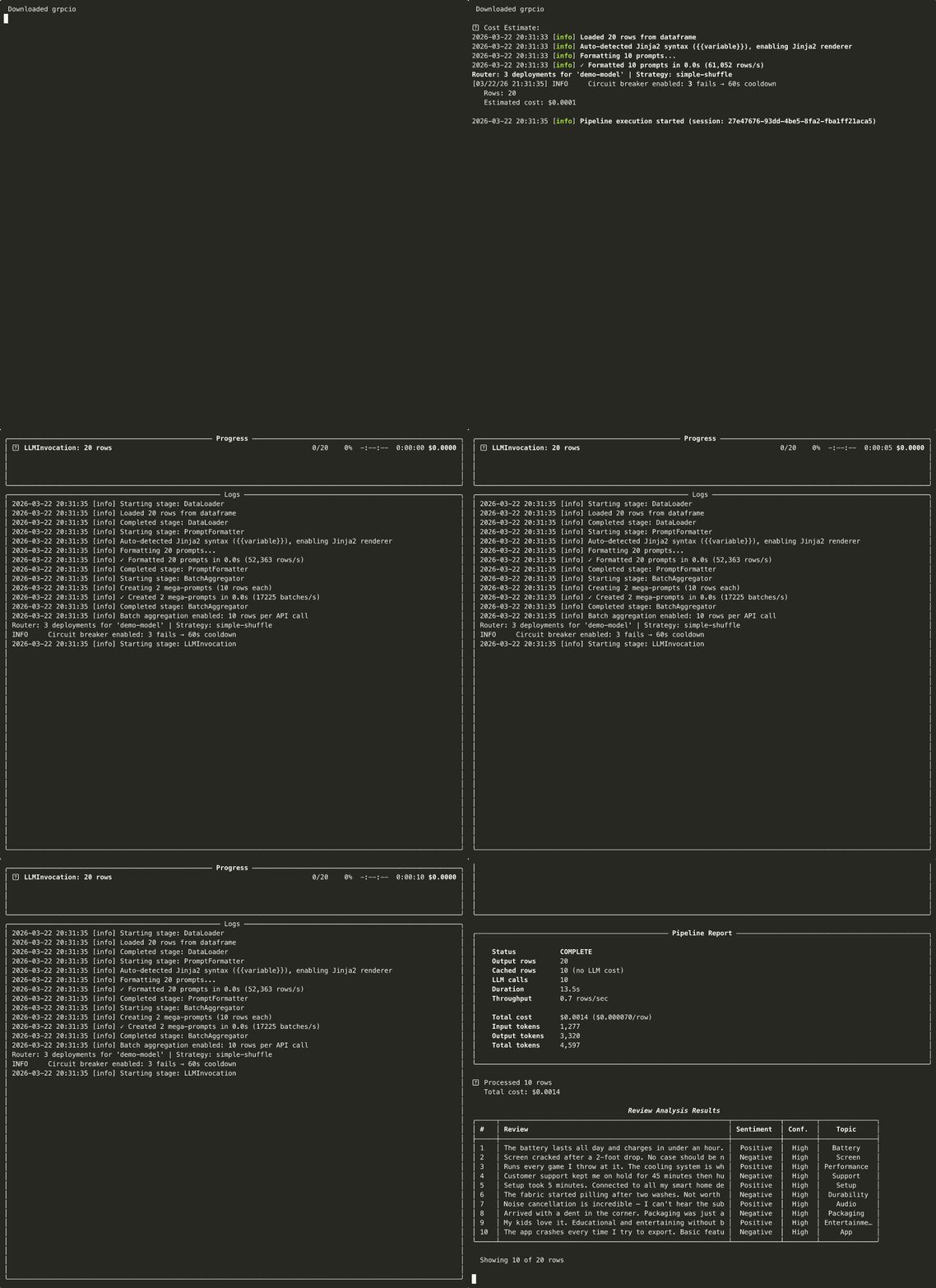
Running an LLM over 10,000 rows should be one call. In practice it becomes a script: loop over rows, parse JSON by hand, retry on 429, recompute what already ran after a crash, and add up the bill in a spreadsheet. Every team writes that script, and rewrites it again for the next dataset.
Ondine replaces that script with one function. You describe the column you want in natural language; Ondine computes it across the whole table — with schema validation, budget caps, crash-safe checkpoints, and cost tracking turned on by default.
from ondine import enrich

df = enrich(
    "reviews.csv",
    "Classify the tone of: {review}",
    output_columns=["sentiment"],
    model="gpt-4o-mini",
    budget=5.0,
)
That's the whole interface. The LLM stops being a service you call in a loop. It becomes a column function inside your DataFrame.
Install
pip install ondine
Python 3.10+. Works with any LLM through LiteLLM: OpenAI, Anthropic, Groq, Mistral, Cerebras, Ollama, MLX, vLLM, SGLang, 100+ others.
Quickstart
Two ways in. enrich() for the common case (one prompt, one table, get a table back). PipelineBuilder when you need to chain options.

from ondine import enrich, PipelineBuilder

# 1. enrich() — the one-liner front door
df = enrich(
    "reviews.csv",
    "Classify sentiment and extract the topic from: {review}",
    output_columns=["sentiment", "topic"],
    model="gpt-4o-mini",
    budget=5.00,
)

# 2. PipelineBuilder — same engine, explicit control
result = (
    PipelineBuilder.create()
    .from_csv("reviews.csv",
              input_columns=["review"],
              output_columns=["sentiment", "topic"])
    .with_prompt("Classify sentiment and extract the key topic from: {review}")
    .with_llm(provider="openai", model="gpt-4o-mini")
    .with_batch_size(50)
    .with_max_budget(5.00)
    .build()
    .execute()
)
print(f"Processed {result.metrics.processed_rows} rows · ${result.costs.total_cost:.2f}")
One builder chain: input columns, prompt, model, budget cap. Multi-column outputs get a JSON parser; schema enforcement, checkpointing, and cost tracking are on by default.
When to use Ondine vs an agent
Ondine is not an agent framework. Agents and Ondine sit at different layers and compose rather than compete.
| If your task is... | Use |
|---|---|
| Turn one table into a richer table (classify, extract, score, translate N rows) | Ondine |
| Run the same prompt over a whole column with a budget cap and crash recovery | Ondine |
| Produce eval labels / synthetic data / bulk structured fields at scale | Ondine |
| Reason, branch, call tools, and decide the next action per request | An agent framework |
| Hand off the deterministic batch layer your agent's outputs feed into | Ondine (the batch layer of an agentic stack) |
Rule of thumb: if you know the prompt ahead of time and the data is a table, that's Ondine. If the prompt depends on what the model just decided, that's an agent — and Ondine is the substrate it pushes bulk work onto.
Use cases
Same engine every time. The use case lives in the prompt.
1. Bulk enrichment
Add a column the LLM computes from existing ones. Sentiment, category, PII redaction, language detection — any per-row transform.
from ondine import enrich

df = enrich(
    "support_tickets.csv",
    "Detect the language of: {message}",
    output_columns=["language"],
    model="gpt-4o-mini",
)
2. Structured extraction
Pull typed fields out of free text and validate them against a Pydantic schema. Malformed JSON auto-retries.
from ondine import enrich
from pydantic import BaseModel

class Invoice(BaseModel):
    vendor: str
    total: float
    currency: str
    due_date: str

df = enrich(
    "invoices.csv",
    "Extract the vendor, total, currency, and due date from: {raw_text}",
    output_columns=["vendor", "total", "currency", "due_date"],
    model="gpt-4o-mini",
    schema=Invoice,
    budget=25.00,
)
3. Agent evaluation
Generate labels, rubric scores, or pass/fail verdicts for eval harnesses — the batch workload that agent frameworks don't ship.
from ondine import PipelineBuilder

result = (
    PipelineBuilder.create()
    .from_csv("agent_traces.csv",
              input_columns=["trace", "criteria"],
              output_columns=["score", "reasoning"])
    .with_prompt("Score this agent trace against the rubric (1-10). "
                 "Return the score and a one-line justification.\n\n"
                 "Trace:\n{trace}\n\nRubric:\n{criteria}")
    .with_llm(provider="openai", model="gpt-4o-mini")
    .with_max_budget(10.00)
    .with_checkpoint_interval(100)
    .build()
    .execute()
)
4. Synthetic data
Generate test fixtures, paraphrases, or contrastive examples at scale, then checkpoint so a crash mid-run doesn't lose the work.
from ondine import enrich

df = enrich(
    "seed_prompts.csv",
    "Write a paraphrase of this prompt in a different tone: {prompt}",
    output_columns=["paraphrase"],
    model="gpt-4o-mini",
    batch_size=50,
    budget=5.00,
)
One abstraction. Any transform.
What you get for free
The plumbing that df.apply() and a hand-rolled loop don't give you — on by default, no config required.
- Hard budget caps — pre-run cost estimate, live tracking, halts at your USD limit.
- Checkpointing to Parquet + a durable SQLite response cache, so a crash resumes from the last batch instead of restarting.
- Adaptive concurrency (Netflix Gradient2): shrinks on 429, grows on saturation, with
Retry-Afterparsing across provider header shapes. - Multi-row batching: pack N rows per call. 200 calls instead of 10,000 at
batch_size=50, with prefix caching for the shared system prompt. - Structured output: Pydantic schema enforcement with auto-retry on malformed JSON.
- Cost tracking in
Decimalprecision — no floating-point surprises on the invoice. - Any backend — 100+ providers via LiteLLM, plus local inference (Ollama, MLX, vLLM, SGLang). Swap with a string.
Advanced surfaces — Knowledge Base / RAG, OCR, grounding verification (Rust + SQLite + FTS5), the latency Router, distributed Redis rate limiting, Azure Managed Identity, and observability sinks (Langfuse, OpenTelemetry, Prometheus) — are documented at docs.ondine.dev.
Benchmark: Ondine vs naive loop vs agent-per-row
Three ways to classify the sentiment of 100K product reviews with an LLM.
Measured on a real API (DeepSeek deepseek-chat) over a 30-row sample per arm,
then extrapolated to 100K from the measured per-row rate. Full methodology,
raw numbers, and reproducibility commands in benchmarks/RESULTS.md.
| Approach | API calls (100K) | Wall-time (projected) | Cost (projected) | Rows lost on crash at 60% |
|---|---|---|---|---|
| Ondine (batched) | 6,666 | 3.8h | $0.48 | 0 |
| Naive loop (1 call/row) | 100,000 | 21.0h | $0.74 | 60,000 |
| Agent-per-row (plan→classify→reflect) | 300,000 | 3.0d | $2.46 | 60,000 |
- 15× fewer API calls than the naive loop; 45× fewer than agent-per-row.
- Crash-safety is binary: a
kill -9at 60% progress loses 100% of the naive/agent arms' completed work (60,000 rows of API spend gone, restart from row 0). Ondine's per-batch SQLite response cache recovered all 100,000 rows on resume with zero re-invocations. - On the measured sample, the agent arm was also less accurate (93.3% vs 100%) — three reasoning calls per review added cost without helping a single-label task.
The projection multiplies the measured per-row rate by 100,000. Ondine's real 100K wall-time is likely lower than shown (concurrency scales with batch count); the naive/agent projections are sequential and therefore tight. These are real measurements, not invented claims — rerun them yourself with
python benchmarks/repositioning.py.
Local inference
No API keys. No telemetry. Fully offline.
from ondine import QuickPipeline

# Ollama
pipeline = QuickPipeline.create(
    data="reviews.csv",
    prompt="Classify sentiment: {review}",
    output_columns=["sentiment"],
    model="ollama/qwen3.5",
)

# MLX (Apple Silicon, native; no server process)
pipeline = QuickPipeline.create(
    data="reviews.csv",
    prompt="Classify sentiment: {review}",
    output_columns=["sentiment"],
    model="mlx/mlx-community/Llama-4-Scout-Instruct-4bit",
)
Compared to alternatives
| Tool | What it does | Why pick Ondine |
|---|---|---|
| Instructor | f(prompt) → Pydantic (one call) |
Ondine applies that pattern to N rows, with budget caps, checkpoints, and adaptive concurrency |
| Pandas-AI | df.chat("question") |
Different job (query vs. compute) |
| LangChain batch | chain.batch([...]) |
No budget cap, no grounding, no crash-safe resume, no observability defaults |
| OpenAI/Anthropic Batch API | Provider-specific batch | No multi-provider, no grounding, 24-hour turnaround |
| Airflow/Prefect/Dagster | Workflow orchestrators | Heavy setup, no LLM-specific features. Ondine ships integrations for them. |
| Agent frameworks | Decide-the-next-action loop | Different layer. Ondine is the batch substrate agents push bulk work onto. |
Documentation
- ondine.dev — landing page + examples
- docs.ondine.dev — full reference:
enrich()/ Builder API, Context Store internals, grounding, Airflow/Prefect integrations, observability - examples/ — runnable scripts covering every major use case
- CHANGELOG.md — release notes
Contributing
PRs welcome. See CONTRIBUTING.md. Code style: Black + Ruff. Tests required for new features.
License
MIT. See LICENSE.
Acknowledgments
- LiteLLM — provider routing layer
- Instructor — the single-call pattern Ondine applies at DataFrame scale
- The Pydantic team — validation backbone
Who's behind this
Ondine is built and maintained by ptimizeroracle. It's the batch layer of an agentic stack — designed so the LLM work that doesn't need to branch can run as a column function instead of a script.
- Issues: https://github.com/ptimizeroracle/ondine/issues
- Discussions: https://github.com/ptimizeroracle/ondine/discussions
- Website: https://ondine.dev
1 maintainer

Download files
Download the file for your platform. If you're not sure which to choose, learn more about installing packages.
Source Distribution
Built Distributions
Filter files by name, interpreter, ABI, and platform.
If you're not sure about the file name format, learn more about wheel file names.
Copy a direct link to the current filters
File details
Details for the file ondine-1.11.3.tar.gz.
File metadata
- Download URL: ondine-1.11.3.tar.gz
- Upload date:
- Size: 302.8 kB
- Tags: Source
- Uploaded using Trusted Publishing? No
- Uploaded via:
twine/7.0.0 CPython/3.13.14
File hashes
| Algorithm | Hash digest | |
|---|---|---|
| SHA256 |
5c43342cf9de421b9ac3ee4ecf551fc245452e9ee878498cba5d26e6f81e7bb5
|
|
| MD5 |
71c7e34b96cd2a40246d6703d3dbc083
|
|
| BLAKE2b-256 |
8a40834dad473acddf824e7b0d762cc6f7d52c9459d12773c20729a1235e4e5f
|
File details
Details for the file ondine-1.11.3-cp313-cp313-win_amd64.whl.
File metadata
- Download URL: ondine-1.11.3-cp313-cp313-win_amd64.whl
- Upload date:
- Size: 1.6 MB
- Tags: CPython 3.13, Windows x86-64
- Uploaded using Trusted Publishing? No
- Uploaded via:
twine/7.0.0 CPython/3.13.14
File hashes
| Algorithm | Hash digest | |
|---|---|---|
| SHA256 |
9d0011d49df7974f51953446fc119ac6b806bf73415f05be3073854110dec37f
|
|
| MD5 |
e7bee6feaf451c753fb23d925bc66848
|
|
| BLAKE2b-256 |
733a47009390a5c83aa4a30982f2096d0a708b1e2777668de3ef4114bdf045aa
|
File details
Details for the file ondine-1.11.3-cp313-cp313-manylinux_2_17_x86_64.manylinux2014_x86_64.whl.
File metadata
- Download URL: ondine-1.11.3-cp313-cp313-manylinux_2_17_x86_64.manylinux2014_x86_64.whl
- Upload date:
- Size: 1.8 MB
- Tags: CPython 3.13, manylinux: glibc 2.17+ x86-64
- Uploaded using Trusted Publishing? No
- Uploaded via:
twine/7.0.0 CPython/3.13.14
File hashes
| Algorithm | Hash digest | |
|---|---|---|
| SHA256 |
20fbae8ded914bf221306d10e3968d2affdc34dd317522f203775b7f0d9e90d2
|
|
| MD5 |
9e469ed3b5c6e889d125f4221a4438a7
|
|
| BLAKE2b-256 |
cef169afddd707901152b7f011a5f528929916172da50e424dfd33929ff50ceb
|
File details
Details for the file ondine-1.11.3-cp313-cp313-manylinux_2_17_aarch64.manylinux2014_aarch64.whl.
File metadata
- Download URL: ondine-1.11.3-cp313-cp313-manylinux_2_17_aarch64.manylinux2014_aarch64.whl
- Upload date:
- Size: 1.8 MB
- Tags: CPython 3.13, manylinux: glibc 2.17+ ARM64
- Uploaded using Trusted Publishing? No
- Uploaded via:
twine/7.0.0 CPython/3.13.14
File hashes
| Algorithm | Hash digest | |
|---|---|---|
| SHA256 |
5fb9257a91f6b63d7bbc82a16b471264ccaa298bc9b7f375551420e56e96f317
|
|
| MD5 |
81f1eb92ef6cb0c54d0c30c8d08cae14
|
|
| BLAKE2b-256 |
fcacf950b7126612d59829b823b6c8acddfac5acb865347b9b38e2f981e4206f
|
File details
Details for the file ondine-1.11.3-cp313-cp313-macosx_10_12_x86_64.macosx_11_0_arm64.macosx_10_12_universal2.whl.
File metadata
- Download URL: ondine-1.11.3-cp313-cp313-macosx_10_12_x86_64.macosx_11_0_arm64.macosx_10_12_universal2.whl
- Upload date:
- Size: 3.1 MB
- Tags: CPython 3.13, macOS 10.12+ universal2 (ARM64, x86-64), macOS 10.12+ x86-64, macOS 11.0+ ARM64
- Uploaded using Trusted Publishing? No
- Uploaded via:
twine/7.0.0 CPython/3.13.14
File hashes
| Algorithm | Hash digest | |
|---|---|---|
| SHA256 |
54557974ea432c4fdc290859d6eef61f8a65dabe0c638ac2a6df85eeca9838be
|
|
| MD5 |
8efff04e6f1ab1e0cad4881aaac1aff5
|
|
| BLAKE2b-256 |
11edc86242f72bfd6a2604f10fcdd550bb3f7a725a7e97946b6c6fcfa7938d98
|
File details
Details for the file ondine-1.11.3-cp312-cp312-win_amd64.whl.
File metadata
- Download URL: ondine-1.11.3-cp312-cp312-win_amd64.whl
- Upload date:
- Size: 1.6 MB
- Tags: CPython 3.12, Windows x86-64
- Uploaded using Trusted Publishing? No
- Uploaded via:
twine/7.0.0 CPython/3.13.14
File hashes
| Algorithm | Hash digest | |
|---|---|---|
| SHA256 |
d16e40151c20281eeb5771782382cd102ca42cb97939501d1dfe39403041dd9c
|
|
| MD5 |
792eb5dfb19adedc176f6bfc85497f23
|
|
| BLAKE2b-256 |
682207686eccbfa0671ff8ed3a6a5b609ffdc4f3abcac16e990aad8908f05f8e
|
File details
Details for the file ondine-1.11.3-cp312-cp312-manylinux_2_17_x86_64.manylinux2014_x86_64.whl.
File metadata
- Download URL: ondine-1.11.3-cp312-cp312-manylinux_2_17_x86_64.manylinux2014_x86_64.whl
- Upload date:
- Size: 1.8 MB
- Tags: CPython 3.12, manylinux: glibc 2.17+ x86-64
- Uploaded using Trusted Publishing? No
- Uploaded via:
twine/7.0.0 CPython/3.13.14
File hashes
| Algorithm | Hash digest | |
|---|---|---|
| SHA256 |
355a2cd7a2c1828688cba42389736944bb03027378db3883a2a8ed8ba471410a
|
|
| MD5 |
1aa9027c390e0f45e54a4eeb42d239df
|
|
| BLAKE2b-256 |
f296dfe995351f3595a04d56150b740b192e03940afcff31dd690361774d4e05
|
File details
Details for the file ondine-1.11.3-cp312-cp312-manylinux_2_17_aarch64.manylinux2014_aarch64.whl.
File metadata
- Download URL: ondine-1.11.3-cp312-cp312-manylinux_2_17_aarch64.manylinux2014_aarch64.whl
- Upload date:
- Size: 1.8 MB
- Tags: CPython 3.12, manylinux: glibc 2.17+ ARM64
- Uploaded using Trusted Publishing? No
- Uploaded via:
twine/7.0.0 CPython/3.13.14
File hashes
| Algorithm | Hash digest | |
|---|---|---|
| SHA256 |
3330be5b9442756e8d7b045352d114c1396544eae70495c44ef970b7f81e35b3
|
|
| MD5 |
33dccf4abbd14d431a4e0bc52c8771b9
|
|
| BLAKE2b-256 |
9200e1b055e88407be920bb5208c35ade91d7f954166d1151d86d569f29a9feb
|
File details
Details for the file ondine-1.11.3-cp312-cp312-macosx_10_12_x86_64.macosx_11_0_arm64.macosx_10_12_universal2.whl.
File metadata
- Download URL: ondine-1.11.3-cp312-cp312-macosx_10_12_x86_64.macosx_11_0_arm64.macosx_10_12_universal2.whl
- Upload date:
- Size: 3.1 MB
- Tags: CPython 3.12, macOS 10.12+ universal2 (ARM64, x86-64), macOS 10.12+ x86-64, macOS 11.0+ ARM64
- Uploaded using Trusted Publishing? No
- Uploaded via:
twine/7.0.0 CPython/3.13.14
File hashes
| Algorithm | Hash digest | |
|---|---|---|
| SHA256 |
128c3105e3af29c521f7581419ae85d6f47d86a2cc107239c7548fb05be27ed9
|
|
| MD5 |
70928715797eda755d212c3aaa94e2a7
|
|
| BLAKE2b-256 |
0240f381671996b682a1de5267b6820cffc5ac5307c92b366a9ec7c07fa10d87
|
File details
Details for the file ondine-1.11.3-cp311-cp311-win_amd64.whl.
File metadata
- Download URL: ondine-1.11.3-cp311-cp311-win_amd64.whl
- Upload date:
- Size: 1.6 MB
- Tags: CPython 3.11, Windows x86-64
- Uploaded using Trusted Publishing? No
- Uploaded via:
twine/7.0.0 CPython/3.13.14
File hashes
| Algorithm | Hash digest | |
|---|---|---|
| SHA256 |
45c5f0592ce0e4c996ee235ec848bade23c5255d77881f1755de869ac24690e3
|
|
| MD5 |
bd9964233fa30953b37941f80a05dd68
|
|
| BLAKE2b-256 |
260fc7ee9c8500af1657789d682b97b7144df7ee3462e494be76e9280ad44ae2
|
File details
Details for the file ondine-1.11.3-cp311-cp311-manylinux_2_17_x86_64.manylinux2014_x86_64.whl.
File metadata
- Download URL: ondine-1.11.3-cp311-cp311-manylinux_2_17_x86_64.manylinux2014_x86_64.whl
- Upload date:
- Size: 1.8 MB
- Tags: CPython 3.11, manylinux: glibc 2.17+ x86-64
- Uploaded using Trusted Publishing? No
- Uploaded via:
twine/7.0.0 CPython/3.13.14
File hashes
| Algorithm | Hash digest | |
|---|---|---|
| SHA256 |
a1520a91725d1753feddf63e45ea48058a7edcaf0ca239a05a2114dd5ed99e3b
|
|
| MD5 |
65b4db9c4eb7f7aa587c8117dcdf265d
|
|
| BLAKE2b-256 |
5889c4b8a8cb24c5fd871d51078a4cf00ea62e6ca0f0d1200e3b97d3d7b32bbf
|
File details
Details for the file ondine-1.11.3-cp311-cp311-manylinux_2_17_aarch64.manylinux2014_aarch64.whl.
File metadata
- Download URL: ondine-1.11.3-cp311-cp311-manylinux_2_17_aarch64.manylinux2014_aarch64.whl
- Upload date:
- Size: 1.8 MB
- Tags: CPython 3.11, manylinux: glibc 2.17+ ARM64
- Uploaded using Trusted Publishing? No
- Uploaded via:
twine/7.0.0 CPython/3.13.14
File hashes
| Algorithm | Hash digest | |
|---|---|---|
| SHA256 |
bdb184c3e312886d9d32b69d00aee027eef7aad0d75609c0f7e5a7d82b543b84
|
|
| MD5 |
eb6d6486ffa9ee55b316f1e2e508e75d
|
|
| BLAKE2b-256 |
f25375d4b1d8dcebeef788172b0adce04816ce931a27054306dac66e0155dfc7
|
File details
Details for the file ondine-1.11.3-cp311-cp311-macosx_10_12_x86_64.macosx_11_0_arm64.macosx_10_12_universal2.whl.
File metadata
- Download URL: ondine-1.11.3-cp311-cp311-macosx_10_12_x86_64.macosx_11_0_arm64.macosx_10_12_universal2.whl
- Upload date:
- Size: 3.1 MB
- Tags: CPython 3.11, macOS 10.12+ universal2 (ARM64, x86-64), macOS 10.12+ x86-64, macOS 11.0+ ARM64
- Uploaded using Trusted Publishing? No
- Uploaded via:
twine/7.0.0 CPython/3.13.14
File hashes
| Algorithm | Hash digest | |
|---|---|---|
| SHA256 |
d290f93b0f05e2d80beec6909ed9566e05d564eff81d8b8ad679bd5a24762a39
|
|
| MD5 |
8d67a79cecc96c7ac93e3c85547fcc94
|
|
| BLAKE2b-256 |
8eabe7ae9b1628b56807d0fe8f8585a2a08019dc8a091f1468aeb38f7d840e96
|
File details
Details for the file ondine-1.11.3-cp310-cp310-win_amd64.whl.
File metadata
- Download URL: ondine-1.11.3-cp310-cp310-win_amd64.whl
- Upload date:
- Size: 1.6 MB
- Tags: CPython 3.10, Windows x86-64
- Uploaded using Trusted Publishing? No
- Uploaded via:
twine/7.0.0 CPython/3.13.14
File hashes
| Algorithm | Hash digest | |
|---|---|---|
| SHA256 |
cf43ca4f635ffd184d8922dc62ae4abdc0eafaf25f21e2da4e97223177d84b6b
|
|
| MD5 |
7d9274fd2f304794ae8a10c74058daf0
|
|
| BLAKE2b-256 |
68e91171d1e99718217a4601019c2ae62a9791a4672adff2d8f361138e0b2d39
|
File details
Details for the file ondine-1.11.3-cp310-cp310-manylinux_2_17_x86_64.manylinux2014_x86_64.whl.
File metadata
- Download URL: ondine-1.11.3-cp310-cp310-manylinux_2_17_x86_64.manylinux2014_x86_64.whl
- Upload date:
- Size: 1.8 MB
- Tags: CPython 3.10, manylinux: glibc 2.17+ x86-64
- Uploaded using Trusted Publishing? No
- Uploaded via:
twine/7.0.0 CPython/3.13.14
File hashes
| Algorithm | Hash digest | |
|---|---|---|
| SHA256 |
0a842aaf38eb0a3276c9982e1e103bd1956654323c4f23f0b284d897ff3acdd2
|
|
| MD5 |
defee3c57ea7e51aed35d18ddca12dad
|
|
| BLAKE2b-256 |
12cbe9a7645cc235e18eae5e62c3ca1795a3e60c8e57750ccc8df6894c1aabfd
|
File details
Details for the file ondine-1.11.3-cp310-cp310-manylinux_2_17_aarch64.manylinux2014_aarch64.whl.
File metadata
- Download URL: ondine-1.11.3-cp310-cp310-manylinux_2_17_aarch64.manylinux2014_aarch64.whl
- Upload date:
- Size: 1.8 MB
- Tags: CPython 3.10, manylinux: glibc 2.17+ ARM64
- Uploaded using Trusted Publishing? No
- Uploaded via:
twine/7.0.0 CPython/3.13.14
File hashes
| Algorithm | Hash digest | |
|---|---|---|
| SHA256 |
563bd63e898f5fbf9e791572bc8ad436817fa5dc01b98fed832d9eb0ff9f4927
|
|
| MD5 |
7ca89a50c6531c5638bd7cac27754f81
|
|
| BLAKE2b-256 |
5552c9e27fbdfeee8a74b5f8a480d586074d2d8ee38d3329d1349c9b66869a4e
|
File details
Details for the file ondine-1.11.3-cp310-cp310-macosx_10_12_x86_64.macosx_11_0_arm64.macosx_10_12_universal2.whl.
File metadata
- Download URL: ondine-1.11.3-cp310-cp310-macosx_10_12_x86_64.macosx_11_0_arm64.macosx_10_12_universal2.whl
- Upload date:
- Size: 3.1 MB
- Tags: CPython 3.10, macOS 10.12+ universal2 (ARM64, x86-64), macOS 10.12+ x86-64, macOS 11.0+ ARM64
- Uploaded using Trusted Publishing? No
- Uploaded via:
twine/7.0.0 CPython/3.13.14
File hashes
| Algorithm | Hash digest | |
|---|---|---|
| SHA256 |
8af4529ef15428fc59f5c5a215a7280f6fb6e24aba8a6fbdc979ed3216643aa8
|
|
| MD5 |
49d92232df53a7be17822c2259f2d93a
|
|
| BLAKE2b-256 |
391f8d0d682a566f1b7eef7a470875a4597ffa66827538ad58abc84fb0827f71
|














