










OneCode, your gateway to Python application deployment on the Cloud! Pssst, if you're not into rolling out your App but simply using them, check out the OneCode Cloud user doc.
- OneCode in One Minute
- Deploy on OneCode Cloud
- Getting Started with the OneCode API
- Upgrading from 0.x
- Work in Progress
- Getting Help
:snake: OneCode in One Minute
Install OneCode
pip install onecode
Create your first OneCode project
onecode-create

# then follow the prompts
? Enter the path where to create OneCode project: ~/
? Enter your OneCode project name: HelloWorld

⠋ Creating new OneCode project
✅ Created HelloWorld OneCode project
Add your first OneCode Element
Edit the file HelloWorld/flows/helloworld.py such as
from onecode import Logger, text_input


def run():
    Logger.info(f"Hello {text_input('your name', 'OneCoder')}!")
Running your OneCode project
cd HelloWorld
python main.py

# You should see the following printed
[INFO] helloworld - |OneCode|.helloworld.py:5 - Hello OneCoder!
By default, the OneCode text input is OneCoder but now can take any other values without having to change the code.
:tada: Congratulations, you now are a OneCoder! :tada:
:volcano: Deploy on OneCode Cloud
The following steps will show you how to get setup for the 1st time:
-
Ensure you install at least
onecode >= 1.0.0and have a GitHub account- If you have an app with a previous
onecodeversion, upgrade from 0.x. - Create your OneCode App (or use an existing one) and push it to your GitHub account.
- If you have an app with a previous
-
Request a beta-tester access here.
-
Once you received your confirmation email, login on onecode.rocks.
-
Register your first app
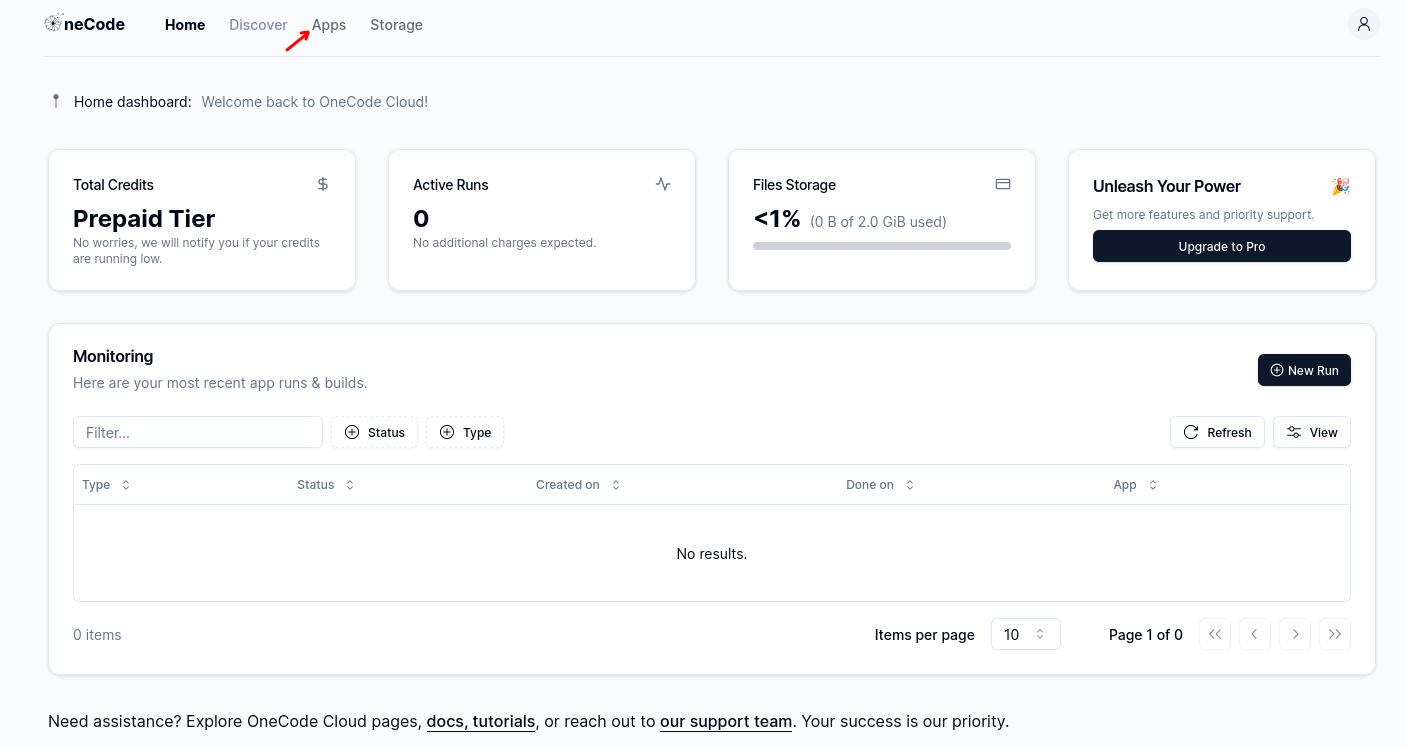
- From the dashboard, navigate to Apps in the top menubar.
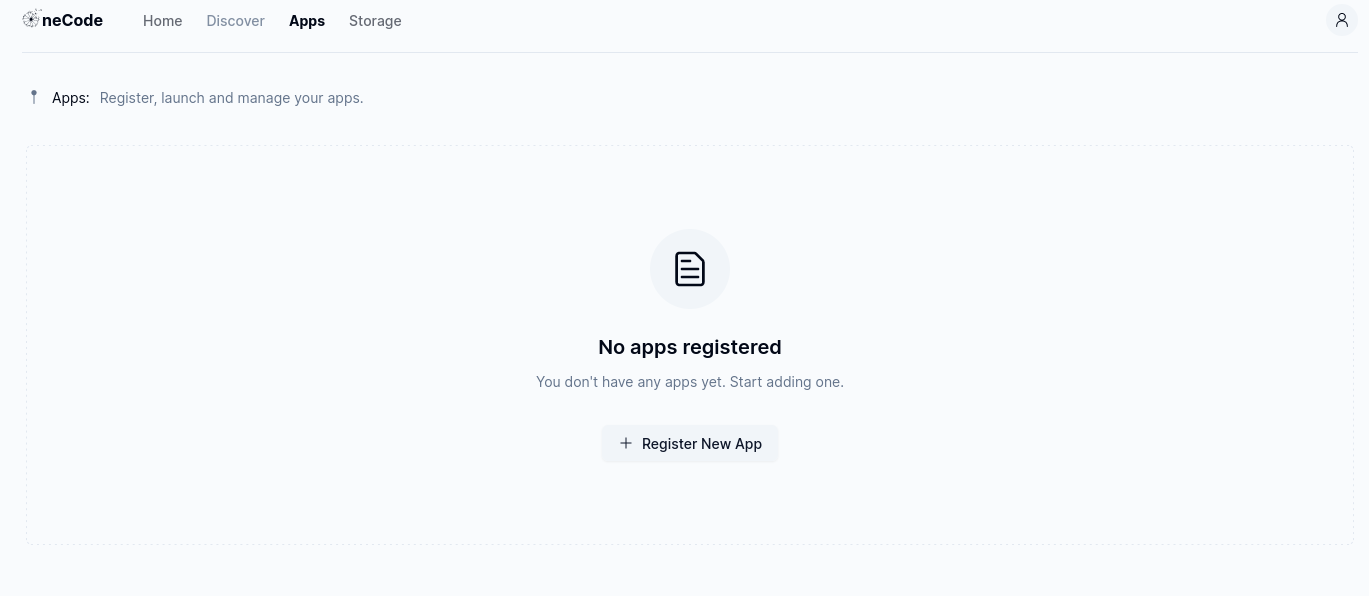
- Click on Register New App.
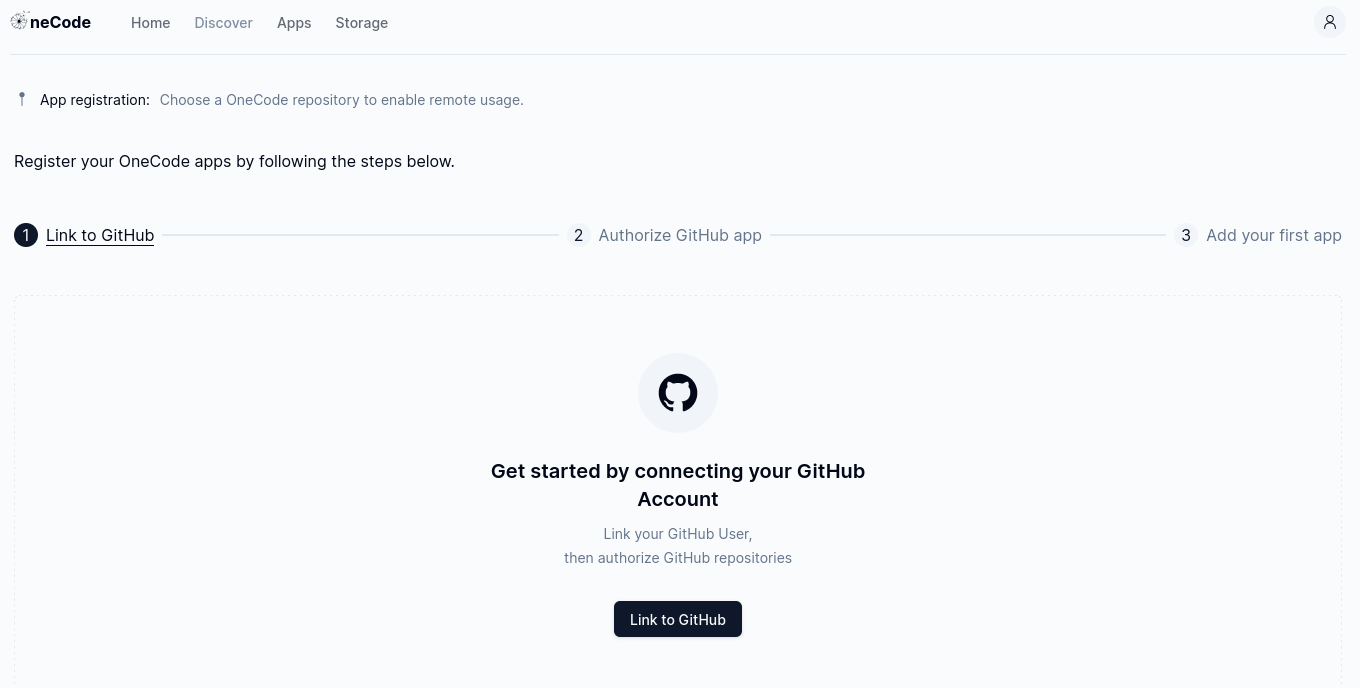
- On your first visit, you'll need to Link GitHub Account to your OneCode account.
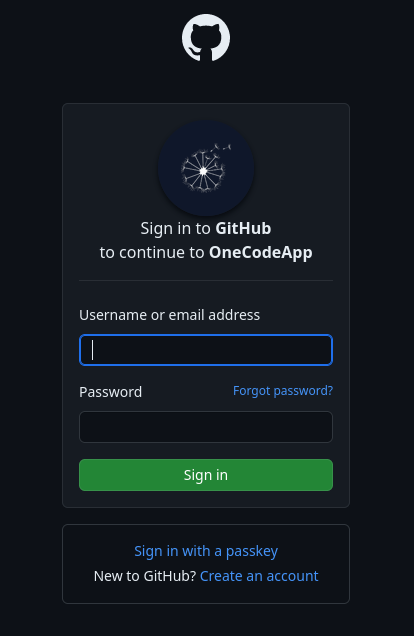
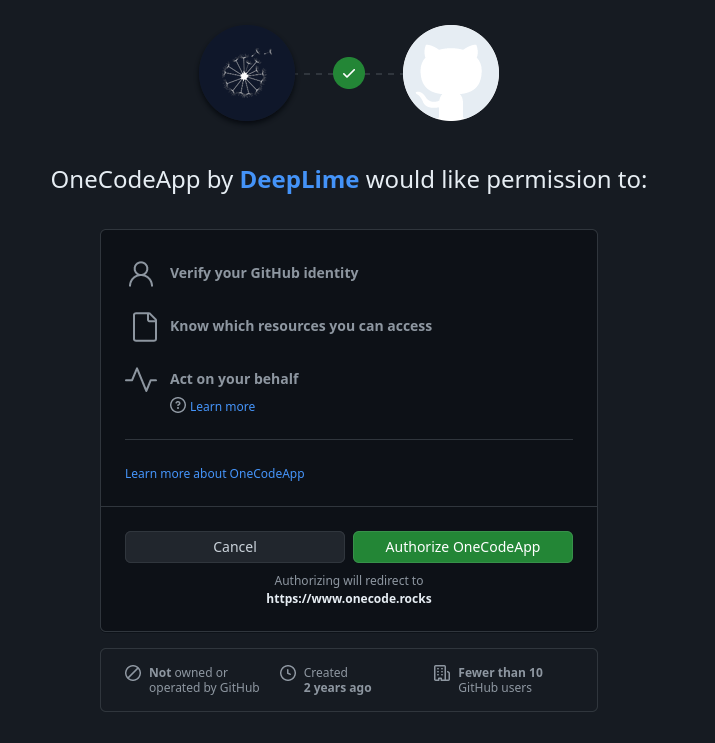
- As you are redirected to GitHub, login to your GitHub account.
- Authorize OneCode.
-
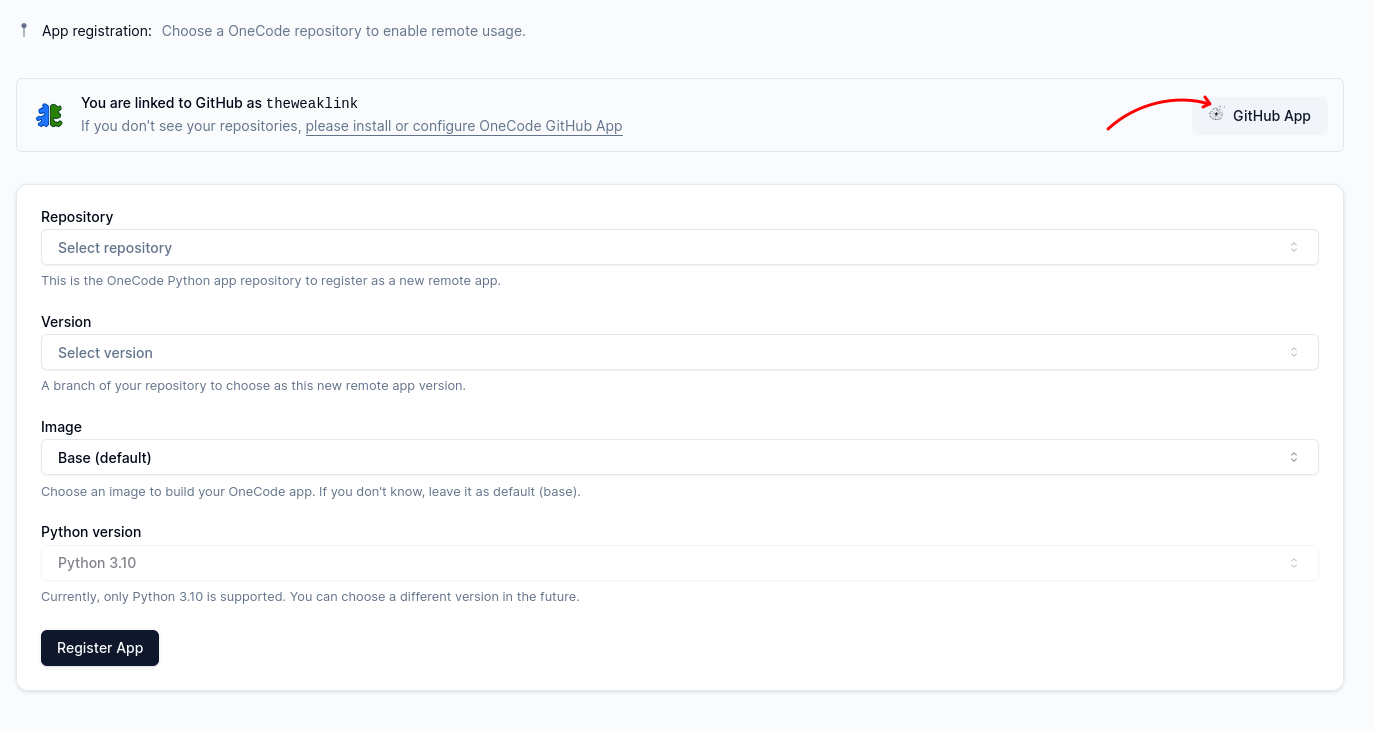
Upon authorization, you will be redirected back to OneCode with your GitHub identity. You now need to decide which repositories OneCode may access in order to build your app by clicking on GitHub App.
-
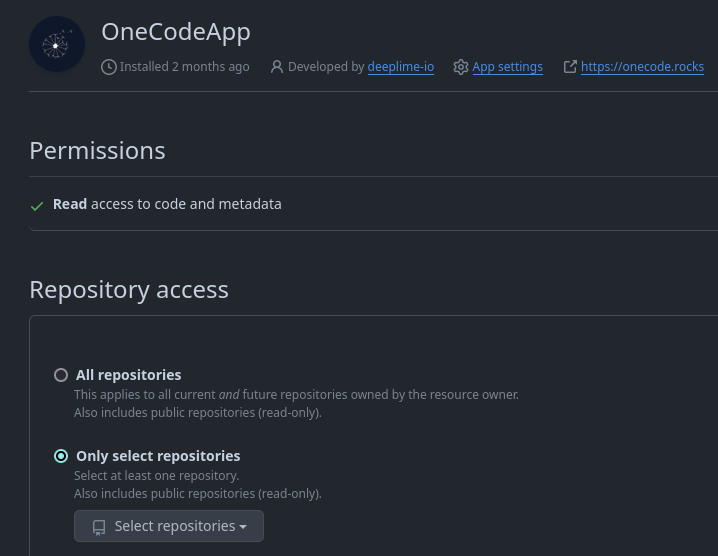
Choose which repositories should be accessible by OneCode. Note that you can change these permissions at anytime.
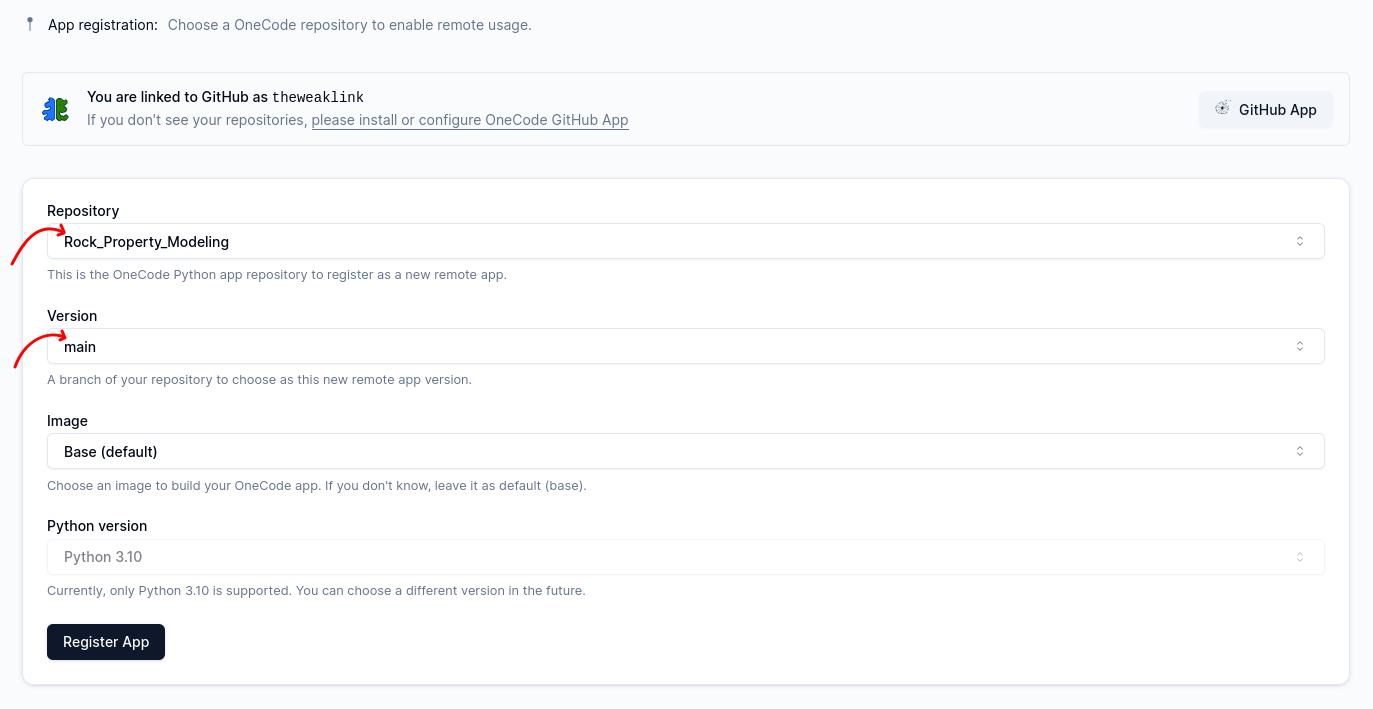
- Select the repository and the branch corresponding to the OneCode App you want to deploy. Choose if needed a different image and Python version than the default one.
-
The App will then appear in your personal Apps Workspace and be automatically built. Each new commit that you push to the registered branch will automatically trigger a new build
:tada: :tada: :tada: Congratulations, you now are an Cloud OneCoder! :tada: :tada: :tada:
:rocket: Getting Started with the OneCode API
OneCode relies on the following principles:
-
no-disruption: OneCode doesn't force you to change the way you code. No matter what your code structure and Python files hierarchy, OneCode can seamlessly be integrated with it.
-
controllable input parameters: simply replace your hard-coded parameters with OneCode functions (called Elements) so that their value can change without having to change the code. One Code, many ways to run!
-
automated interface: OneCode push on the cloud, the interface will automatically be generated from the OneCode Elements
-
easy deployment: no need to change the code between your local machine and the cloud. Simply push your code as-is on your synchronized GitHub account and your App (environment and UI!) will build automatically!
The most important part of the API are Input and Output Elements. They can be inlined within your code or not, that's up to you (no-disruption!), see examples below:
- use Input Elements whenever you need to expose a parameter with a specific widget. For example:
# instead of: df = pd.read_csv('test.csv')
df = csv_reader('your df', 'test.csv')

# instead of: for i in range(5):
for i in range(slider('N', 5, min=0, max=10)):  # inlined
    # do stuff

# instead of: choice = 'cat'
choice = dropdown('your choice', 'cat', options=['dog', 'cat', 'fish']) # not inlined
Logger.info(f'Your choice is {choice}')
- use Output Elements whenever an output should be returned. For example:
# instead of: plt.savefig('stuff.png')
plt.savefig(file_output('stuff', 'stuff.png'))  # inlined

# instead of: filepath = 'test.txt'
filepath = file_output('test', 'test.txt')  # not inlined
with open(filepath, 'w') as f:
    # do stuff
Check out the full API documentation here!
:arrow_up: Upgrading from 0.x
-
Ensure there is
requirements.txtfile at the root of your App and that it contains at leastonecode>=1,<2. -
Change all Output Elements (e.g.
image_output(),text_output(), etc.) to simplyfile_output(). -
Remove any
section_header()element. -
Check out the work in progress section in case you were using advanced features.
:construction: Work in Progress
As onecode is still transitioning to OneCode Cloud, early versions of the OneCode Cloud don't yet
support completely the following features:
-
Multi-steps: adding more than one flow to your App will eventually be supported. In the meantime, either split your app (one app per step) or merge all steps under a single one (you may directly update the
.onecode.jsonfile or create a new app and move the code to it). -
Folder Inputs: as the cloud doesn't really have directory structures, it needs some special work. In the meantime, replace with multiple selection
file_inputinstead. -
Custom Elements (in custom plugin or
onecode_ext): extra security precautions must be taken to allow custom UI on the Cloud. It has therefore been disabled for now. Replace them with regular elements until the Cloud is ready for them. -
Dynamic
options: dynamic expressions inoptionsof thedropdownelement) is not fully supported yet. You can still use it, in that case, the elements will ask user to fill out values as regular text input (e.g. CSV column names, etc.). -
Dynamic
optional:optionalasTrue/False(static) works as expected, however dynamnic expressions will be ignored for now. As a consequence,hide_when_disabledattribute is obsolete until dynamicoptionalare supported again. -
Attribute
count: we go back-and-forth with this one on bringing this one to the Cloud. In the meantime, switch back to non-dynamic elements, e.g. multiple dropdown, text input collecting list of values, etc. -
Running
onecode-start: getting a local UI is in the works, it's a pretty big feature, thanks for your patience on that one.
:wave: Getting Help
If you are a OneCode customer, you may directly email our support team. Feel free as well to browse the GitHub Issues and reach out to the community by posting bug reports, questions and suggestions.
1 maintainer

Download files
Download the file for your platform. If you're not sure which to choose, learn more about installing packages.
Source Distribution
Built Distribution
Filter files by name, interpreter, ABI, and platform.
If you're not sure about the file name format, learn more about wheel file names.
Copy a direct link to the current filters
File details
Details for the file onecode-1.2.2.tar.gz.
File metadata
- Download URL: onecode-1.2.2.tar.gz
- Upload date:
- Size: 43.0 kB
- Tags: Source
- Uploaded using Trusted Publishing? No
- Uploaded via:
uv/0.10.4 {"installer":{"name":"uv","version":"0.10.4","subcommand":["publish"]},"python":null,"implementation":{"name":null,"version":null},"distro":{"name":"Pop!_OS","version":"22.04","id":"jammy","libc":null},"system":{"name":null,"release":null},"cpu":null,"openssl_version":null,"setuptools_version":null,"rustc_version":null,"ci":null}
File hashes
| Algorithm | Hash digest | |
|---|---|---|
| SHA256 |
188a21f8b22c39221db43944d7e199ccbb652e228dba8aa9e291d7f9b0d08b05
|
|
| MD5 |
ff7811f3b5f5b484e501b83533ddae45
|
|
| BLAKE2b-256 |
2fd5ff8470f398812de0ac7ac9b5d2506620098b34b21401a379ebf06b897b31
|
File details
Details for the file onecode-1.2.2-py3-none-any.whl.
File metadata
- Download URL: onecode-1.2.2-py3-none-any.whl
- Upload date:
- Size: 72.4 kB
- Tags: Python 3
- Uploaded using Trusted Publishing? No
- Uploaded via:
uv/0.10.4 {"installer":{"name":"uv","version":"0.10.4","subcommand":["publish"]},"python":null,"implementation":{"name":null,"version":null},"distro":{"name":"Pop!_OS","version":"22.04","id":"jammy","libc":null},"system":{"name":null,"release":null},"cpu":null,"openssl_version":null,"setuptools_version":null,"rustc_version":null,"ci":null}
File hashes
| Algorithm | Hash digest | |
|---|---|---|
| SHA256 |
fc8e82a78729e7f46b6d122e47f5efc1e2776f9695898f9b21815bb6cd944267
|
|
| MD5 |
a089495e7e1c2e2371955a36e266e84b
|
|
| BLAKE2b-256 |
9dc8ea283ea17ee9d5928ea4c9f68533d2f8f1db53fdea62660bbb663ce67314
|














