
Unofficial TUI and client library for Microsoft Fabric OneLake
Verified details
These details have been verified by PyPIProject links
GitHub Statistics
Maintainers

Project description
OneLake TUI (Unofficial)
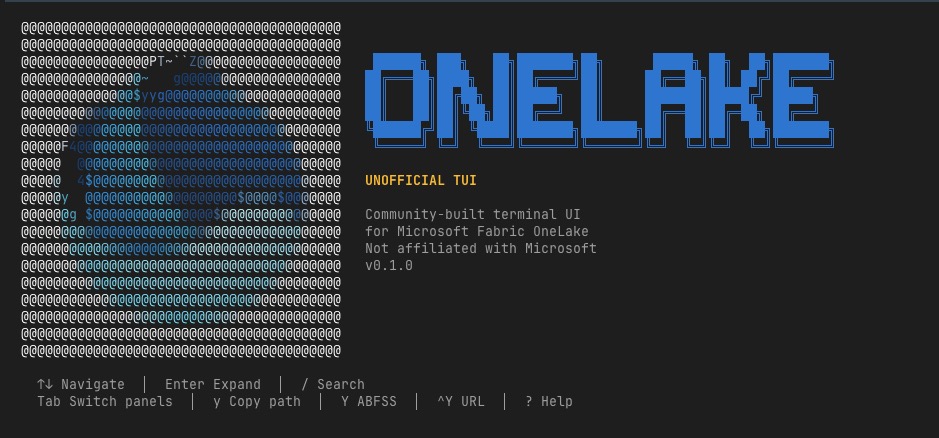
A terminal UI for browsing Microsoft Fabric workspaces, lakehouses, and Delta tables — right from your terminal. No portal, no notebooks, no Spark cluster required.
pip install onelake-tui
az login
onelake-tui
onelake-tui is the published PyPI package and currently bundles both the terminal UI and the onelake_client library.
What is this?
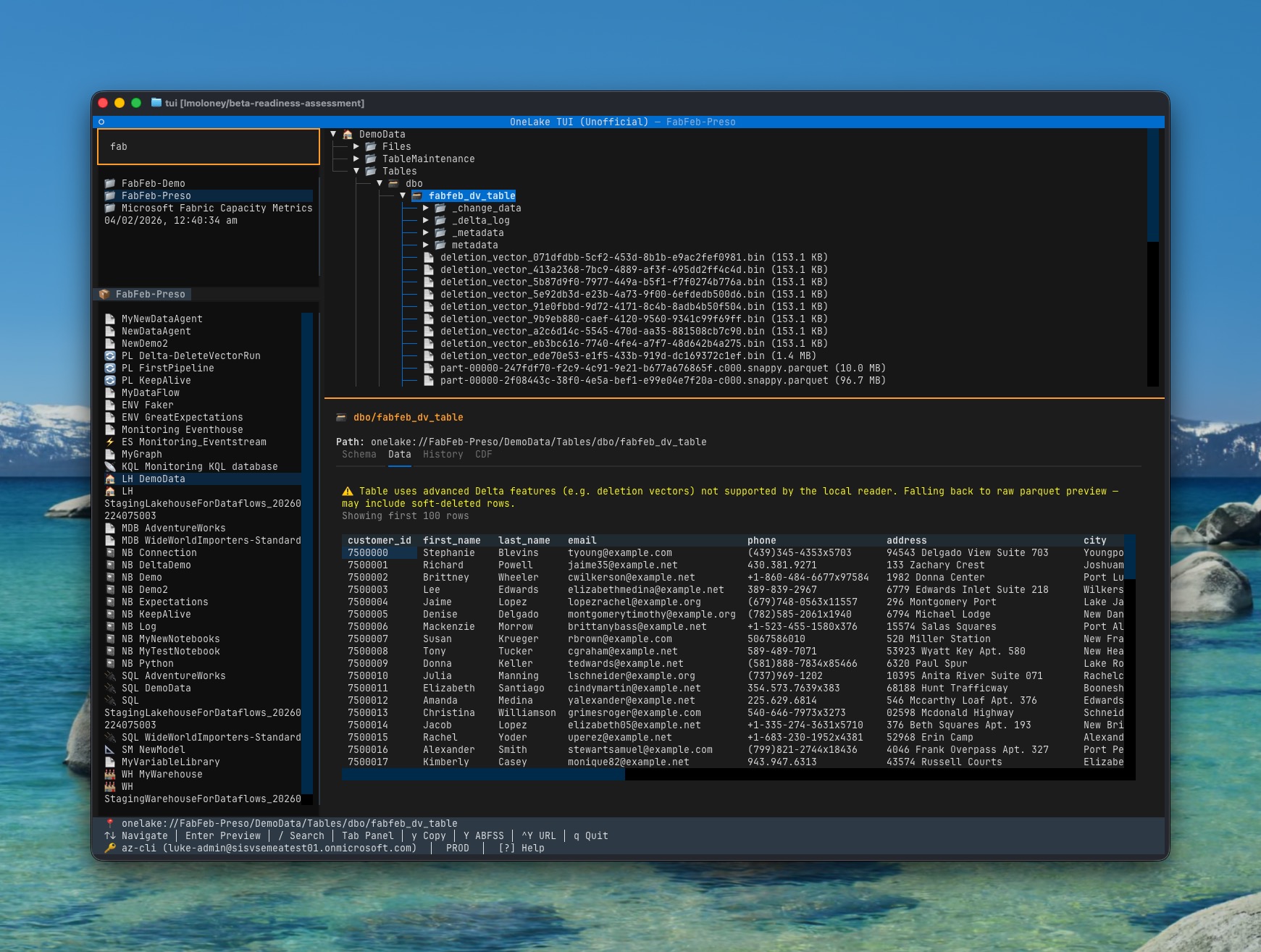
OneLake TUI gives you a keyboard-driven file-manager experience for Microsoft Fabric's OneLake storage. Browse workspaces, inspect lakehouses and warehouses, preview files, and explore Delta table metadata — all without leaving the terminal.
Built with Textual and an async Python client for the Fabric REST and OneLake DFS APIs.
Features
- Three-panel layout — workspace picker → item list → DFS file tree + detail/preview
- Rich file preview — press Enter on any file:
- Markdown, JSON (NDJSON), CSV, Parquet, Avro, syntax-highlighted code
- All previews are selectable and copyable
- Delta table inspector — tabbed detail view:
- Schema, data preview (first 100 rows), transaction history, Change Data Feed
- Schema-aware table detection — handles both
Tables/schema/table(mirrored DBs) andTables/table(lakehouses) - Live search — press
/to filter workspaces - Multi-environment — PROD, MSIT, DXT, DAILY via
--envflag - Copy menu — press
yto choose HTTPS/ABFSS + named/GUID URI formats - Vim-friendly navigation —
j/k/g/G+h/l, withTab/Shift+Tabstill supported - Toggleable footer —
Ctrl+Fhides/shows the status bar - Zero config — uses
az login, no service keys or config files required
Roadmap (linked issues)
Roadmap source of truth: ../README.md#roadmap
| Area | Status |
|---|---|
| OneLake TUI (Unofficial) | ✅ Working (browse, preview, inspect, copy path) |
| File preview (MD/JSON/CSV/Parquet/Avro) | ✅ Done |
| Delta table detail (schema/data/history/CDF) | ✅ Done |
| Workspace search/filter | ✅ Done |
| OneLake CLI | 🔲 Planned (onelake ls, onelake cat, onelake cp) |
| Download/upload | 🔲 Planned |
| Shortcuts discoverability/manageability | 🔲 Planned |
| ADLS direct connections | 🔲 Planned |
| OneLake security policy management | 🔲 Planned |
| Bulk operations | 🔲 Planned |
| Copying data + soft-deleted data handling | 🔲 Planned |
Installation
Prerequisites: Python 3.11+, Azure CLI (az login)
pip install onelake-tui    # from PyPI
onelake-tui                # launch (PROD)
onelake-tui --env msit     # Microsoft internal testing ring
From source (for development):
cd TUI
uv sync
uv run onelake-tui
Quick Start
- Authenticate —
az login(if you haven't already) - Launch —
onelake-tui - Select workspace — pick from the left panel
- Select item — choose a lakehouse, warehouse, or mirrored DB
- Browse files — expand folders in the tree
- Preview — press Enter on any file
- Explore tables — expand
Tables/for Delta metadata - Search — press
/to filter workspaces
Keybindings
| Key | Action |
|---|---|
↑ / ↓ |
Navigate |
j / k |
Navigate (vim-style) |
g / G |
Jump to top / bottom |
← / → |
Collapse/expand tree nodes |
Enter |
Preview file / Expand folder |
/ |
Search/filter workspaces |
Escape |
Close search / go back |
h / l |
Previous/next panel |
Tab / Shift+Tab |
Switch panels |
y |
Open copy menu (HTTPS/ABFSS, named/GUID) |
Ctrl+F |
Toggle footer visibility |
S |
Save SVG screenshot to current directory |
r |
Refresh |
? |
Show help |
q |
Quit |
Architecture
TUI/src/
├── onelake_client/            # Standalone async Python client library
│   ├── auth.py                #   Dual-scope token management
│   ├── environment.py         #   Environment ring config (PROD/MSIT/DXT/DAILY)
│   ├── _http.py               #   httpx retry + pagination
│   ├── fabric/client.py       #   Fabric REST API (control plane)
│   ├── dfs/client.py          #   OneLake DFS API (data plane)
│   ├── tables/delta.py        #   Delta table metadata reader
│   ├── tables/iceberg.py      #   Iceberg table metadata reader
│   └── models/                #   Pydantic data models
└── onelake_tui/               # Textual-based terminal UI
    ├── app.py                 #   Main app, keybindings, event wiring
    ├── app.tcss               #   Layout CSS (3-panel + footer)
    ├── workspace_picker.py    #   Flat filterable workspace list
    ├── item_list.py           #   Item list for selected workspace
    ├── tree.py                #   DFS file tree (single item)
    ├── detail.py              #   Detail/preview panel with rich rendering
    ├── sprite.py              #   OneLake-inspired splash art + shimmer animation
    ├── status_bar.py          #   3-line footer (path, shortcuts, auth)
    ├── nodes.py               #   Node dataclasses
    └── banner.py              #   Welcome screen delegate
Navigation model: Workspace → Item → DFS files/folders/tables. Each stage is a separate widget:
WorkspacePicker(flat OptionList, filterable)ItemList(flat OptionList per workspace)OneLakeTree(lazy-loading tree per item)DetailPanel(context-aware: metadata on highlight, preview on Enter)
Auth Configuration
Authentication uses DefaultAzureCredential, which supports (in order):
| Method | Use case |
|---|---|
az login |
Local development |
| Service principal | CI/CD pipelines |
| Managed identity | Azure-hosted environments |
Environment Configuration
uv run onelake-tui              # PROD (default)
uv run onelake-tui --env msit   # Microsoft internal testing
uv run onelake-tui --env dxt    # Developer testing
uv run onelake-tui --env daily  # Daily builds
Each environment maps to the correct Fabric REST and OneLake DFS hostnames automatically.
Debugging
tail -f ~/.onelake-tui/debug.log
Development
cd TUI
uv sync --all-extras
uv run pytest           # Unit + integration tests
uv run ruff check src/  # Lint
uv run ruff format src/ # Format
License
MIT
Project details
Verified details
These details have been verified by PyPIProject links
GitHub Statistics
Maintainers
Release history Release notifications | RSS feed


Download files
Download the file for your platform. If you're not sure which to choose, learn more about installing packages.
Source Distribution
Built Distribution
Filter files by name, interpreter, ABI, and platform.
If you're not sure about the file name format, learn more about wheel file names.
Copy a direct link to the current filters
File details
Details for the file onelake_tui-0.5.0.tar.gz.
File metadata
- Download URL: onelake_tui-0.5.0.tar.gz
- Upload date:
- Size: 147.4 kB
- Tags: Source
- Uploaded using Trusted Publishing? Yes
- Uploaded via: twine/6.1.0 CPython/3.13.12
File hashes
| Algorithm | Hash digest | |
|---|---|---|
| SHA256 |
78afc0b69194339b1dd6034f88e0c94af9edd385f3ef809bc37a56430b970052
|
|
| MD5 |
1f9a6e081bbcf9dc46f58a0081938c05
|
|
| BLAKE2b-256 |
6d014489b90f08ad78abe07a7db4b26fc5d12bbd4abc6f75b7035ce9ec0faa6b
|
Provenance
The following attestation bundles were made for onelake_tui-0.5.0.tar.gz:
Publisher:
publish.yml on lmoloney/OneLakeTools
-
Statement:
-
Statement type:
https://in-toto.io/Statement/v1 -
Predicate type:
https://docs.pypi.org/attestations/publish/v1 -
Subject name:
onelake_tui-0.5.0.tar.gz -
Subject digest:
78afc0b69194339b1dd6034f88e0c94af9edd385f3ef809bc37a56430b970052 - Sigstore transparency entry: 1553543731
- Sigstore integration time:
-
Permalink:
lmoloney/OneLakeTools@4b1cf69d75624b48025b05d3bfe86d52cb4f6f71 -
Branch / Tag:
refs/tags/v0.5.0 - Owner: https://github.com/lmoloney
-
Access:
public
-
Token Issuer:
https://token.actions.githubusercontent.com -
Runner Environment:
github-hosted -
Publication workflow:
publish.yml@4b1cf69d75624b48025b05d3bfe86d52cb4f6f71 -
Trigger Event:
push
-
Statement type:
File details
Details for the file onelake_tui-0.5.0-py3-none-any.whl.
File metadata
- Download URL: onelake_tui-0.5.0-py3-none-any.whl
- Upload date:
- Size: 62.5 kB
- Tags: Python 3
- Uploaded using Trusted Publishing? Yes
- Uploaded via: twine/6.1.0 CPython/3.13.12
File hashes
| Algorithm | Hash digest | |
|---|---|---|
| SHA256 |
df3e865c8c801b62e57de87ae5cbd02dbdefb6e95316ec2da7870e52295aff8d
|
|
| MD5 |
22448c315f47d296ea75b8e6ef14cf96
|
|
| BLAKE2b-256 |
13d70d6ba94b2d871168cb02b128a9df71e8ac349f01c81382a88309060a1108
|
Provenance
The following attestation bundles were made for onelake_tui-0.5.0-py3-none-any.whl:
Publisher:
publish.yml on lmoloney/OneLakeTools
-
Statement:
-
Statement type:
https://in-toto.io/Statement/v1 -
Predicate type:
https://docs.pypi.org/attestations/publish/v1 -
Subject name:
onelake_tui-0.5.0-py3-none-any.whl -
Subject digest:
df3e865c8c801b62e57de87ae5cbd02dbdefb6e95316ec2da7870e52295aff8d - Sigstore transparency entry: 1553543745
- Sigstore integration time:
-
Permalink:
lmoloney/OneLakeTools@4b1cf69d75624b48025b05d3bfe86d52cb4f6f71 -
Branch / Tag:
refs/tags/v0.5.0 - Owner: https://github.com/lmoloney
-
Access:
public
-
Token Issuer:
https://token.actions.githubusercontent.com -
Runner Environment:
github-hosted -
Publication workflow:
publish.yml@4b1cf69d75624b48025b05d3bfe86d52cb4f6f71 -
Trigger Event:
push
-
Statement type:






