




onemetric

Installation
-
Install onemetric from PyPI (recommended):
pip install onemetric -
Install onemetric from the GitHub source:
git clone https://github.com/SkalskiP/onemetric.git
cd onemetric
python setup.py install
Example
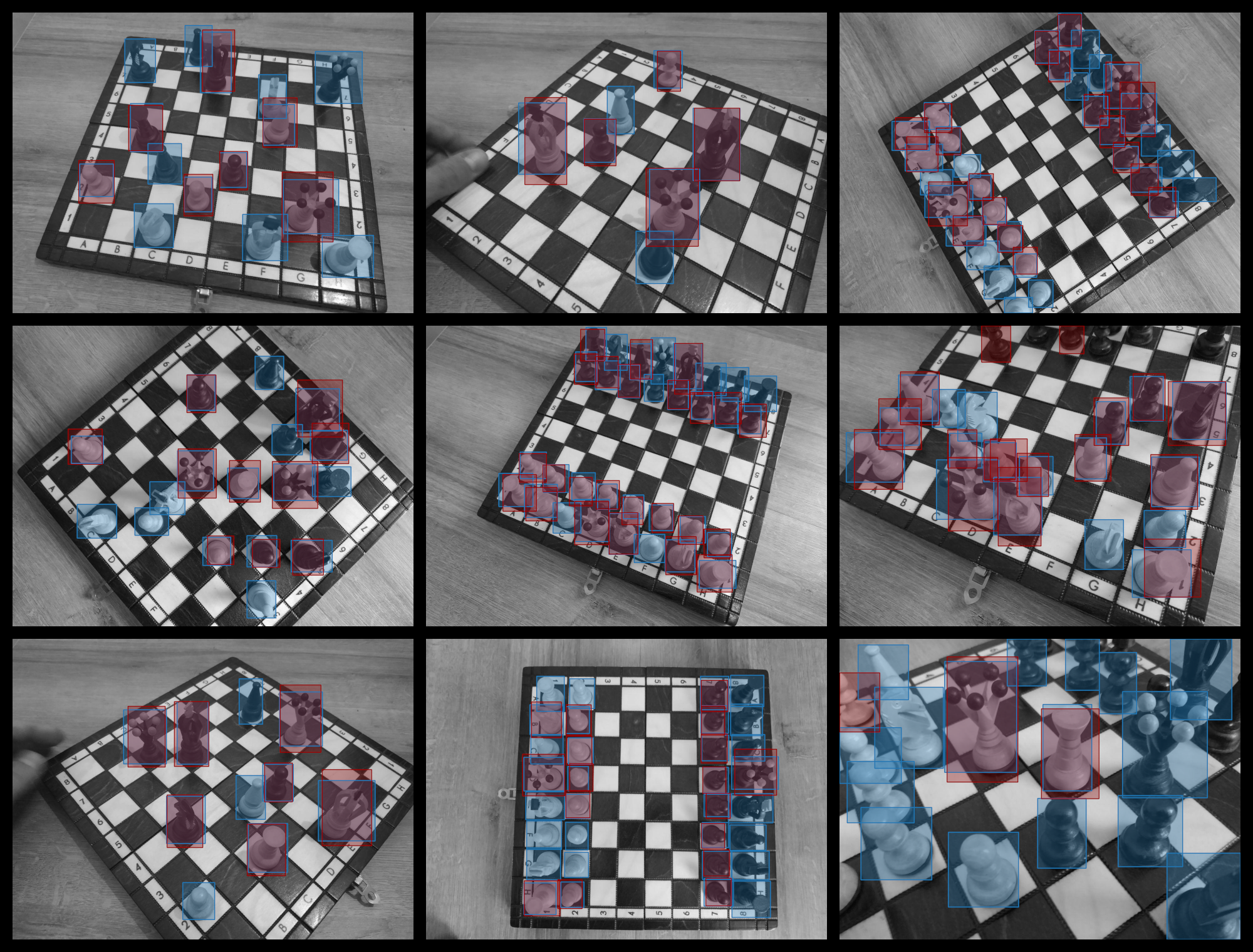
Figure 1. Dataset sample, blue - ground-truth and red - detection.
Calculate mAP@0.5
>>> from onemetric.cv.loaders import YOLOLoader
>>> from onemetric.cv.object_detection import MeanAveragePrecision

>>> model = load_model(...)  # model-specific loading method

>>> data_set = YOLOLoader(
...     images_dir_path=DATA_SET_IMAGES_PATH,
...     annotations_dir_path=DATA_SET_ANNOTATIONS_PATH
... ).load()

>>> true_batches, detection_batches = [], []
>>> for entry in data_set:
>>>     detections = model(entry.get_image())  # model-specific prediction method
>>>     true_batches.append(entry.get_annotations())
>>>     detection_batches.append(detections)

>>> mean_average_precision = MeanAveragePrecision.from_detections(
...     true_batches=true_batches,
...     detection_batches=detection_batches,
...     num_classes=12,
...     iou_threshold=0.5
... )

>>> mean_average_precision.value
0.61
Calculate Confusion Matrix
>>> confusion_matrix = ConfusionMatrix.from_detections(
...     true_batches=true_batches,
...     detection_batches=detection_batches,
...     num_classes=12
... )

>>> confusion_matrix.plot(CONFUSION_MATRIX_TARGET_PATH, class_names=CLASS_NAMES)
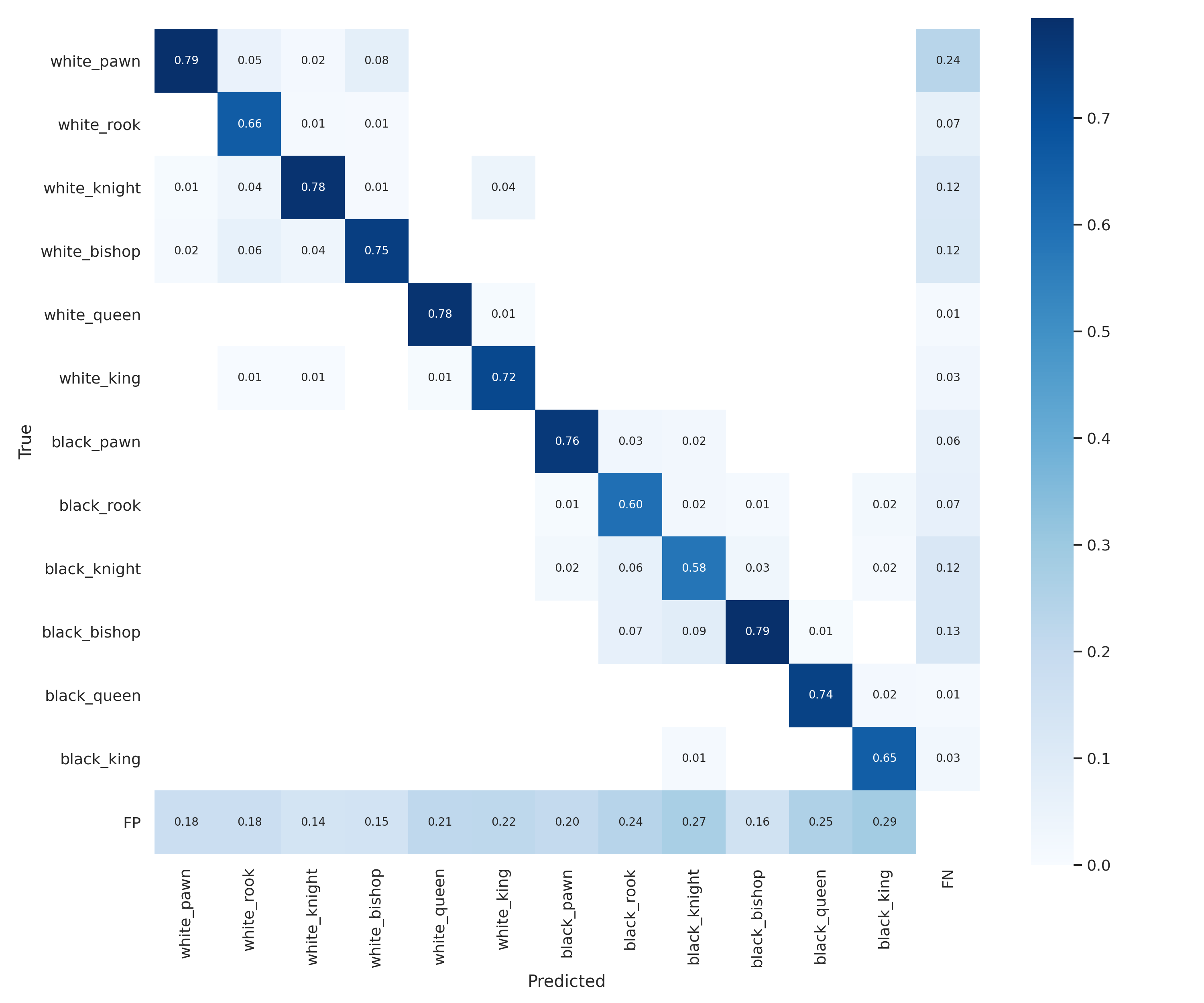
Figure 2. Create confusion matrix chart
Documentation
The official documentation is hosted on Github Pages: https://skalskip.github.io/onemetric
Contribute
Feel free to file issues or pull requests. Let us know what metrics should be part of onemetric!
Citation
Please cite onemetric in your publications if this is useful for your research. Here is an example BibTeX entry:
@MISC{onemetric,
   author = {Piotr Skalski},
   title = {{onemetric}},
   howpublished = "\url{https://github.com/SkalskiP/onemetric/}",
   year = {2021},
}
License
This project is licensed under the BSD 3 - see the LICENSE file for details.
1 maintainer

Metadata
1 maintainer
Release files for onemetric 0.1.2
For a detailed explanation of source distributions (sdists) and built distributions (wheels), please see the package formats documentation.
Source distribution (sdist)
| File | Size | Uploaded | |
|---|---|---|---|
| onemetric-0.1.2.tar.gz | 15.2 kB | Details |
Built distribution (wheel)
| File | Interpreter | ABI | Platform | Reset |
|---|---|---|---|---|
| onemetric-0.1.2-py3-none-any.whl | Python 3 | none | any | Details |
Total release size: 36.8 kB
Release files / onemetric-0.1.2.tar.gz
| Download URL | onemetric-0.1.2.tar.gz |
|---|---|
| Size | 15.2 kB |
| Tags | Source |
|
SHA-256 checksum How to use checksums |
1f50d65d1722ebd9ee55c4580fb9dc8e35400529e3986afb6a39560c75a974e5
|
|
BLAKE2b-256 checksum How to use checksums |
d386454ee9b070881afbc79baa44fd9b6577510c671e000bafd0121e42896af1
|
| Upload date | |
|
Uploaded using Trusted Publishing? What is trusted publishing? |
No |
| Uploaded via |
twine/3.3.0 pkginfo/1.7.0 requests/2.25.1 setuptools/57.0.0 requests-toolbelt/0.9.1 tqdm/4.58.0 CPython/3.9.6
|
Release files / onemetric-0.1.2-py3-none-any.whl
| Download URL | onemetric-0.1.2-py3-none-any.whl |
|---|---|
| Size | 21.6 kB |
| Tags | Python 3 |
|
SHA-256 checksum How to use checksums |
2ac57e267f4997ee59e8784679f54cbd4969b97ec220794de294a2c34f1f353d
|
|
BLAKE2b-256 checksum How to use checksums |
f0165a806acc0929b661b6ce273f099fdb4a2a48055c9fa298dddce038d15c19
|
| Upload date | |
|
Uploaded using Trusted Publishing? What is trusted publishing? |
No |
| Uploaded via |
twine/3.3.0 pkginfo/1.7.0 requests/2.25.1 setuptools/57.0.0 requests-toolbelt/0.9.1 tqdm/4.58.0 CPython/3.9.6
|














