
onetrace-console
A local web console for runs recorded with onetrace: every run in one place, each one checked by the verifier, and any two compared stage by stage.
The console never computes a verdict of its own. It keeps each run's files exactly as they were written, runs onetrace-verify and the SDK's own diff over them, and shows what those report. If the console and the run folder ever disagree, the folder is right.
Install
pip install onetrace-console
It needs Python 3.12 or later. It installs from PyPI alone: onetrace 0.2.0 and onetrace-verify 0.2.0, with the [crypto] extra so signatures and anchors are checked. The pages' viewer ships inside the package.
See it with the demo's runs
onetrace-console demo
This copies the reference demo's two runs into onetrace-console-demo/ under the folder you start it from, starts the console, loads both runs, compares them, and prints the pages' addresses. The demo keeps its store and its trust file in that folder too. It runs in local mode, so it refuses to start while ONETRACE_CONSOLE_CONFIG is set.
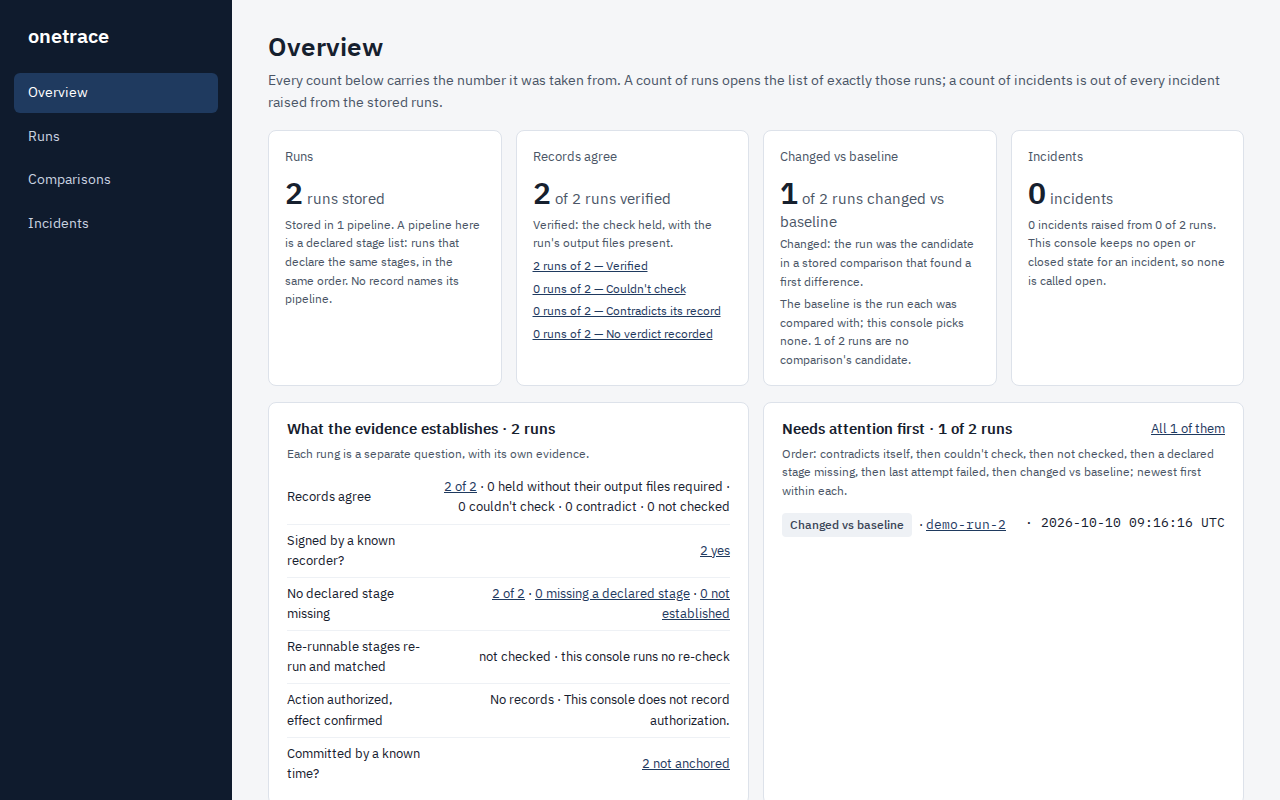
A read-only copy of the demo is hosted at https://demo.oneproof.dev. To try the read-only mode yourself, run onetrace-console demo --public.
Your own runs
onetrace-console <runs folder>
onetrace-console <runs folder> --compare <run A> <run B>
onetrace-console <runs folder> --open
onetrace-console <runs folder>loads every run folder in it: every folder holding aMANIFEST.json. It compares nothing unless you ask.- A run folder is skipped, with the reason, while the others load: a run still being recorded (it holds onetrace's
.lock), a folder that holds a link, or a folder whoseSHA256SUMSdoesn't match its files. --compare A Bcompares two of them, named by their folder names; A is the baseline.--openopens the console in your browser.--port Nlistens on port N, here and fordemo. The default is 8080.
What it shows
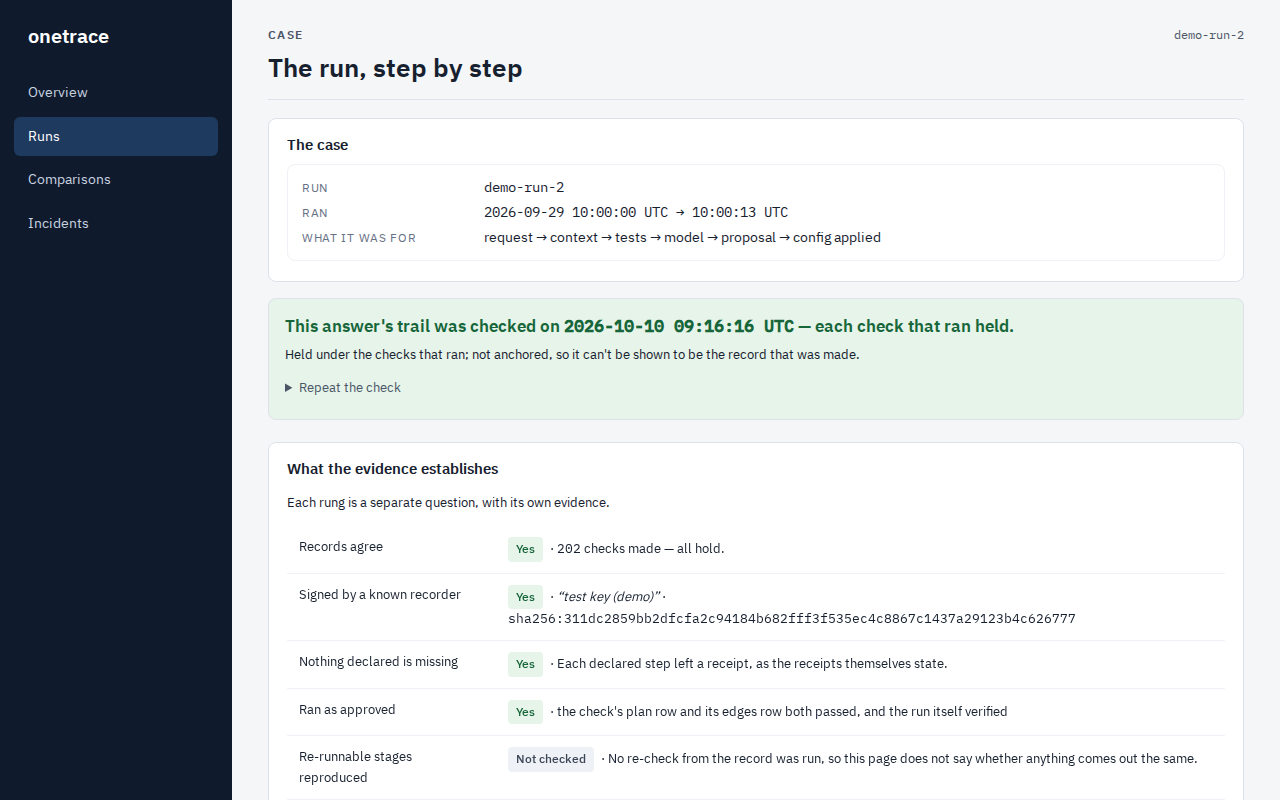
- Each run: the verifier's result and every row it reported, the run's stages, and its receipt, including whether it is signed and anchored.
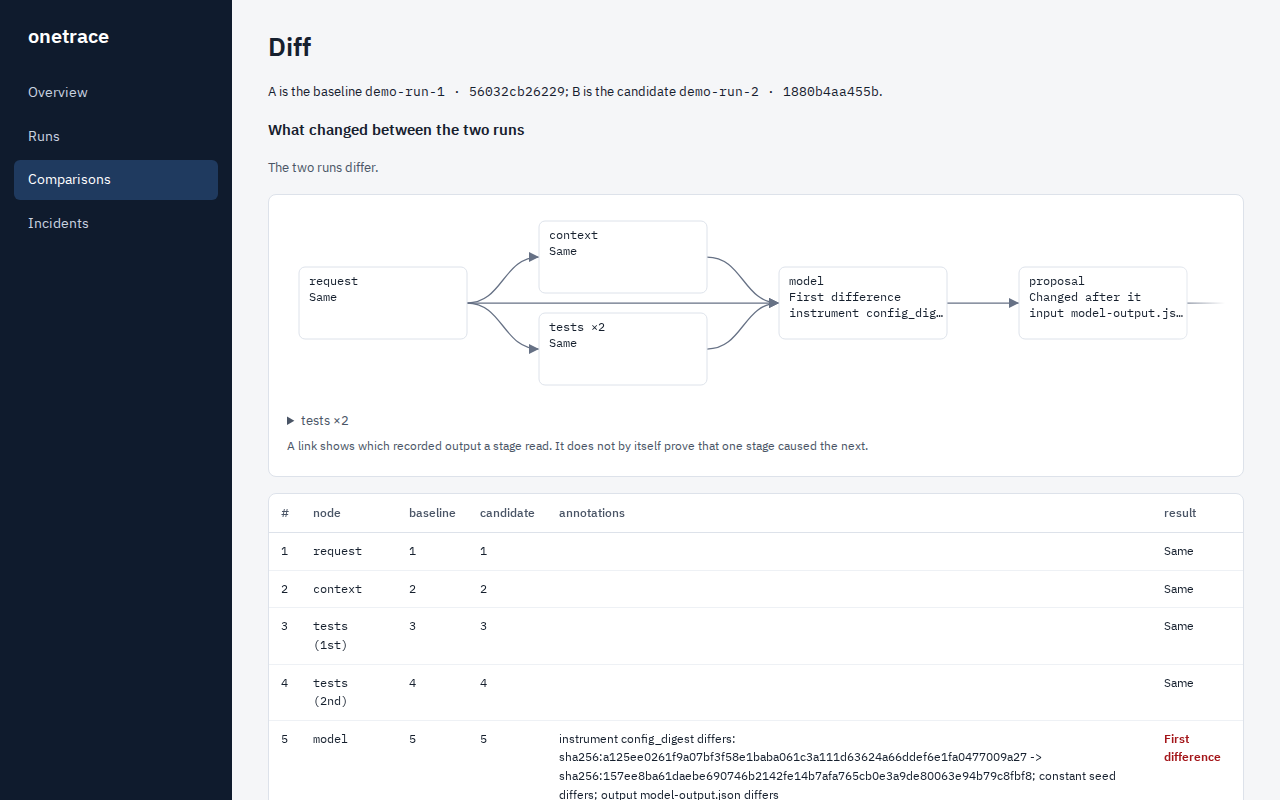
- Two runs compared: the stage-by-stage comparison
onetrace diffproduces, and the text that changed, as the SDK reports them. - Counts: every number with what it counts, and a link to the exact runs behind it.
What it does not show
Nothing here says which version is correct, who changed the source, or why.
A run's record does not show:
- that the output or the action was correct;
- why the model wrote what it wrote;
- that the signing key wasn't misused (your trust list is what ties a key to a name);
- that the run was correct at the anchored time (the anchor shows only that the record existed by then).
Where it runs
Started as above, it listens on 127.0.0.1 only, and makes no network calls; --open asks your browser to open the local page. A folder load keeps what it stores in a store folder under the folder you start it from, and demo keeps it in onetrace-console-demo/.
To run it for a team, as a container with sign-in, see OPERATOR_README.md.
For contributors
On Windows, run the test suite from a short path (for example C:\src\oc), or turn on long paths: some of the files the suite writes have paths longer than Windows' 260-character limit.
Licence
Copyright 2026 Shamik Saha. Licensed under Apache-2.0; see LICENSE.
The bundled IBM Plex fonts are under the SIL Open Font License 1.1.
1 maintainer

Metadata
1 maintainer
Release files for onetrace-console 0.1.0
For a detailed explanation of source distributions (sdists) and built distributions (wheels), please see the package formats documentation.
Source distribution (sdist)
| File | Size | Uploaded | |
|---|---|---|---|
| onetrace_console-0.1.0.tar.gz | 966.2 kB | Details |
Built distribution (wheel)
| File | Interpreter | ABI | Platform | Reset |
|---|---|---|---|---|
| onetrace_console-0.1.0-py3-none-any.whl | Python 3 | none | any | Details |
Total release size: 1.6 MB
Release files / onetrace_console-0.1.0.tar.gz
| Download URL | onetrace_console-0.1.0.tar.gz |
|---|---|
| Size | 966.2 kB |
| Tags | Source |
|
SHA-256 checksum How to use checksums |
0c809fcc45d29b1a45d9d6b8523367ed69804c0681913d331c35127ff1d20de3
|
|
BLAKE2b-256 checksum How to use checksums |
c9f512e929dd4de0e8af9bbd8188691d688bb79ebb58b0f09201e61c7cbbc13e
|
| Upload date | |
|
Uploaded using Trusted Publishing? What is trusted publishing? |
No |
| Uploaded via |
twine/7.0.0 CPython/3.12.10
|
Release files / onetrace_console-0.1.0-py3-none-any.whl
| Download URL | onetrace_console-0.1.0-py3-none-any.whl |
|---|---|
| Size | 656.0 kB |
| Tags | Python 3 |
|
SHA-256 checksum How to use checksums |
88f16613048ef2574ada13f8e267441f544a98d8ad7a0c4398368bc01cf5a323
|
|
BLAKE2b-256 checksum How to use checksums |
cf249160dfb8aa4e254335903fea1294480b76a9dd3346696b2298a6284de89f
|
| Upload date | |
|
Uploaded using Trusted Publishing? What is trusted publishing? |
No |
| Uploaded via |
twine/7.0.0 CPython/3.12.10
|













