
ONLYOFFICE addon for Plone
Verified details
These details have been verified by PyPIProject links
GitHub Statistics
Maintainers

Project description
ONLYOFFICE addon for Plone
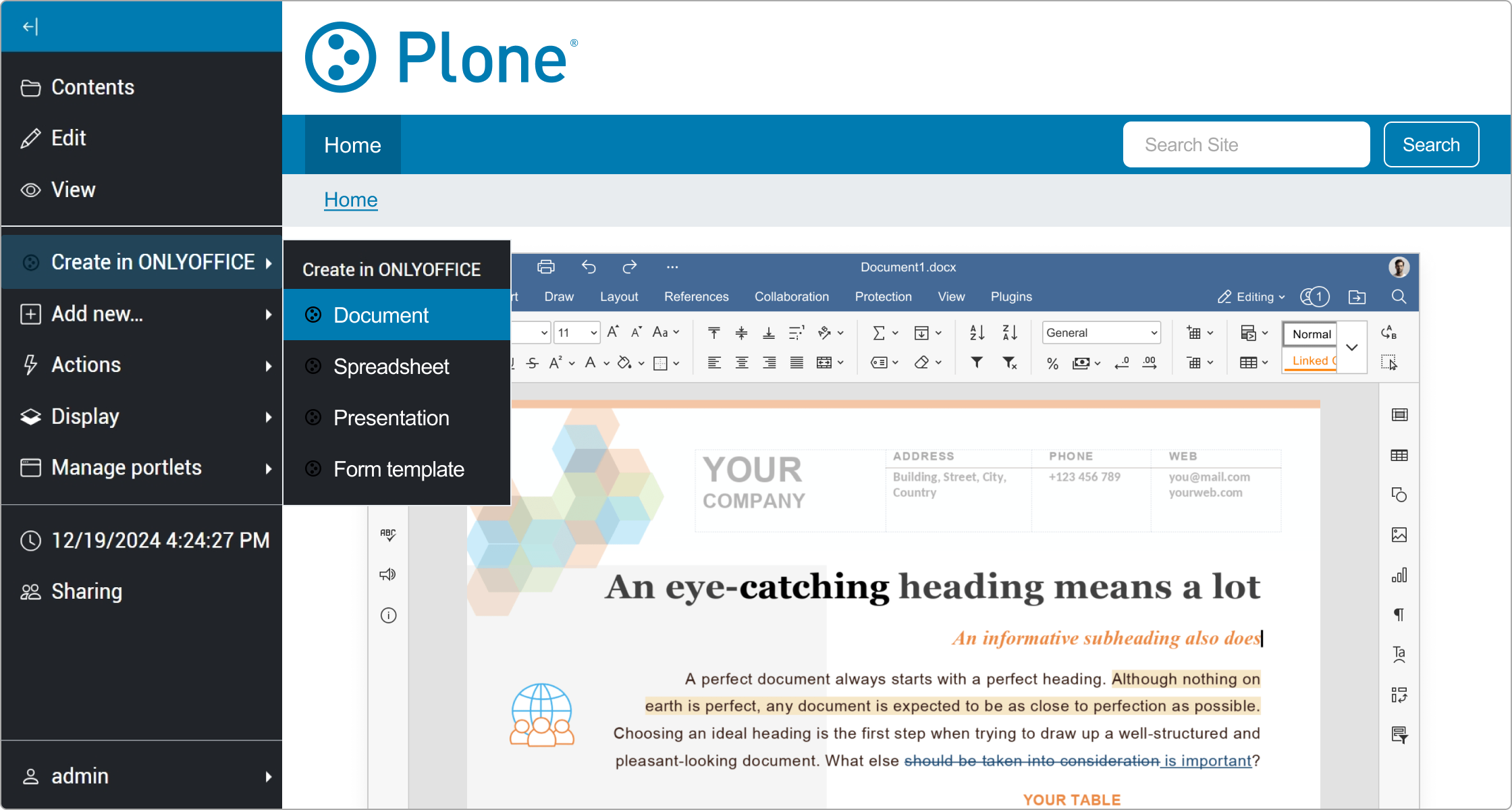
This addon allows users to edit office documents within Plone using ONLYOFFICE Docs.
Features ✨
The addon allows to:
- Create and edit text documents, spreadsheets, and presentations.
- Share documents with other users.
- Co-edit documents in real-time: use two co-editing modes (Fast and Strict), Track Changes, comments, and built-in chat.
Supported file formats 📁
| Action | Formats |
|---|---|
| Editing | DOCX, XLSX, PPTX, PDF |
| Viewing | DJVU, DOC, DOCM, DOCX, DOT, DOTM, DOTX, EPUB, FB2, FODT, HTML, MHT, ODT, OTT, OXPS, PDF, RTF, TXT, XPS, XML, CSV, FODS, ODS, OTS, XLS, XLSB, XLSM, XLSX, XLT, XLTM, XLTX, FODP, ODP, OTP, POT, POTM, POTX, PPS, PPSM, PPSX, PPT, PPTM, PPTX |
| Convert (Download as) | DOC, DOCM, DOCX, DOT, DOTM, DOTX, EPUB, FB2, FODT, HTML, MHT, ODT, OTT, OXPS, PDF, RTF, XPS, XML, FODS, ODS, OTS, XLS, XLSB, XLSM, XLSX, XLT, XLTM, XLTX, FODP, ODP, OTP, POT, POTM, POTX, PPS, PPSM, PPSX, PPT, PPTM, PPTX |
| Convert to Office Open XML | DOC, DOCM, DOT, DOTM, DOTX, EPUB, FB2, FODT, HTML, MHT, ODT, OTT, OXPS, PDF, RTF, XPS, XML, FODS, ODS, OTS, XLS, XLSB, XLSM, XLT, XLTM, XLTX, FODP, ODP, OTP, POT, POTM, POTX, PPS, PPSM, PPSX, PPT, PPTM |
Installing ONLYOFFICE Docs
To use the addon, you need a running instance of ONLYOFFICE Docs (Document Server) accessible to both your Plone server and client browsers.
ONLYOFFICE Docs must be able to send POST callbacks to Plone for document status updates.
You can deploy either version below:
🖥️ Self-hosted version
- Community Edition (Free): Docker guide or manual installation
- Enterprise Edition: Installation guide
Community Edition vs Enterprise Edition comparison can be found here.
☁️ Cloud
If you prefer not to maintain your own server, use ONLYOFFICE Docs Cloud which requires neither installation nor configuration.
Installing the addon
- Installation instructions can be found under Manage add-ons and packages.
- To activate, go to
Site Setup->Add-onsand press theInstallbutton to enable the addon.
You can also install the addon via Docker:
docker run -p 8080:8080 -e ADDONS="onlyoffice.plone" plone/plone-backend:6.1 start
📝 Note: If you have a previous version (e.g., onlyoffice.connector), remove it before installing the new one.
Configuring the addon ⚙️
Navigate to Site Setup → Add-ons Configuration → ONLYOFFICE Configuration and configure:
- Document Editing Service URL: Your ONLYOFFICE Docs endpoint
- Secret key: For JWT token signing and validation
- Internal request addresses (optional): For internal network routing
JWT is enabled by default to protect the editors from unauthorized access. If setting a custom Secret key, ensure it matches the one in the ONLYOFFICE Docs config file for proper validation.
Developing the addon
Run this command to install the addon from the local repository:
docker run -p 8080:8080 -e DEVELOP="/app/src/onlyoffice.plone" -v /path/to/onlyoffice.plone:/app/src/onlyoffice.plone plone/plone-backend:6.1 start
For more information, check Developing packages variable.
Upgrade the addon
- Update instructions can be found under Manage add-ons and packages.
- Navigate to the Add-on screen (add
/prefs_install_products_formto your site URL) and in the Upgrades list select onlyoffice.plone and click Upgrade onlyoffice.plone.
How it works
The ONLYOFFICE addon follows the API documented here:
- User navigates to a document within Plone and selects the
ONLYOFFICE Editaction. - Plone prepares a JSON object for the Document Server with the following properties:
- url: the URL that ONLYOFFICE Document Server uses to download the document;
- callbackUrl: the URL that ONLYOFFICE Document Server informs about status of the document editing;
- key: the UUID+Modified Timestamp to instruct ONLYOFFICE Document Server whether to download the document again or not;
- title: the document Title (name).
- Plone constructs a page from a
.pttemplate, filling in all of those values so that the client browser can load up the editor. - The client browser makes a request for the javascript library from ONLYOFFICE Document Server and sends ONLYOFFICE Document Server the docEditor configuration with the above properties.
- Then ONLYOFFICE Document Server downloads the document from Plone and the user begins editing.
- ONLYOFFICE Document Server sends a POST request to the
callbackURL to inform Plone that a user is editing the document. - When all users and client browsers are done with editing, they close the editing window.
- After 10 seconds of inactivity, ONLYOFFICE Document Server sends a POST to the
callbackURL letting Plone know that the clients have finished editing the document and closed it. - Plone downloads the new version of the document, replacing the old one.
ONLYOFFICE Docs editions
ONLYOFFICE offers different versions of its online document editors that can be deployed on your own servers.
- Community Edition 🆓 (
onlyoffice-documentserverpackage) - Enterprise Edition 🏢 (
onlyoffice-documentserver-eepackage)
The table below will help you to make the right choice.
| Pricing and licensing | Community Edition | Enterprise Edition |
|---|---|---|
| Get it now | Start Free Trial | |
| Cost | FREE | Go to the pricing page |
| Simultaneous connections | up to 20 maximum | As in chosen pricing plan |
| Number of users | up to 20 recommended | As in chosen pricing plan |
| License | GNU AGPL v.3 | Proprietary |
| Support | Community Edition | Enterprise Edition |
| Documentation | Help Center | Help Center |
| Standard support | GitHub or paid | 1 or 3 years support included |
| Premium support | Contact us | Contact us |
| Services | Community Edition | Enterprise Edition |
| Conversion Service | + | + |
| Document Builder Service | + | + |
| Interface | Community Edition | Enterprise Edition |
| Tabbed interface | + | + |
| Dark theme | + | + |
| 125%, 150%, 175%, 200% scaling | + | + |
| White Label | - | - |
| Integrated test example (node.js) | + | + |
| Mobile web editors | - | +* |
| Plugins & Macros | Community Edition | Enterprise Edition |
| Plugins | + | + |
| Macros | + | + |
| Collaborative capabilities | Community Edition | Enterprise Edition |
| Two co-editing modes | + | + |
| Comments | + | + |
| Built-in chat | + | + |
| Review and tracking changes | + | + |
| Display modes of tracking changes | + | + |
| Version history | + | + |
| Document Editor features | Community Edition | Enterprise Edition |
| Font and paragraph formatting | + | + |
| Object insertion | + | + |
| Adding Content control | + | + |
| Editing Content control | + | + |
| Layout tools | + | + |
| Table of contents | + | + |
| Navigation panel | + | + |
| Mail Merge | + | + |
| Comparing Documents | + | + |
| Spreadsheet Editor features | Community Edition | Enterprise Edition |
| Font and paragraph formatting | + | + |
| Object insertion | + | + |
| Functions, formulas, equations | + | + |
| Table templates | + | + |
| Pivot tables | + | + |
| Data validation | + | + |
| Conditional formatting | + | + |
| Sparklines | + | + |
| Sheet Views | + | + |
| Presentation Editor features | Community Edition | Enterprise Edition |
| Font and paragraph formatting | + | + |
| Object insertion | + | + |
| Transitions | + | + |
| Animations | + | + |
| Presenter mode | + | + |
| Notes | + | + |
| Form creator features | Community Edition | Enterprise Edition |
| Adding form fields | + | + |
| Form preview | + | + |
| Saving as PDF | + | + |
| PDF Editor features | Community Edition | Enterprise Edition |
| Text editing and co-editing | + | + |
| Work with pages (adding, deleting, rotating) | + | + |
| Inserting objects (shapes, images, hyperlinks, etc.) | + | + |
| Text annotations (highlight, underline, cross out, stamps) | + | + |
| Comments | + | + |
| Freehand drawings | + | + |
| Form filling | + | + |
| Get it now | Start Free Trial |
* If supported by DMS.
Need help? User Feedback and Support 💡
- 🐞 Found a bug? Please report it by creating an issue.
- ❓ Have a question? Ask our community and developers on the ONLYOFFICE Forum.
- 👨💻 Need help for developers? Check our API documentation.
- 💡 Want to suggest a feature? Share your ideas on our feedback platform.
Authors
- Ascensio System SIA: integration@onlyoffice.com
Change Log
4.1.0
Added
- replace docxf with pdf as a form template
- ar-SA, ca-ES, da-DK, eu-ES, fi-FI, gl-ES, he-IL, hu-HU, hy-AM, id-ID, ms-MY, nb-NO, ro-RO, si-LK, sl-SI, sq-AL, sr-Cyrl-RS, sr-Latn-RS, tr-TR, ur-PK and zh-TW empty file templates
- support for plone 6.1
- document formats submodule
- jwt lifetime
- update demo document server url
- shardkey in querystring
4.0.0
Added
- support for plone 6
3.0.0
Added
- download as
- documents conversion
- connection to a demo document server
- settings validation
- mail merge from storage
- compare file from storage
- insert image from storage
- advanced server settings for specifying internal addresses
Changed
- parameter document.title for editor from file object title
- document server v6.0 and earlier is no longer supported
2.1.1
Fixed
- issue with packaging
2.1.0
Added
- support docxf and oform formats
- create blank docxf from creation menu
- "save as" in editor
2.0.0
Added
- JWT support
Fixed
- Issue when files inside unpublished folders couldn't be edited
1.0.0
Added
- Edit option for DOCX, XLSX, PPTX.
- View template for documents
- Configuration page
- Translations for BR, CZ, DE, EN, ES, FR, IT, JP, NL, RU, ZH
Project details
Verified details
These details have been verified by PyPIProject links
GitHub Statistics
Maintainers


Download files
Download the file for your platform. If you're not sure which to choose, learn more about installing packages.
Source Distribution
Built Distribution
Filter files by name, interpreter, ABI, and platform.
If you're not sure about the file name format, learn more about wheel file names.
Copy a direct link to the current filters
File details
Details for the file onlyoffice_plone-4.1.0.tar.gz.
File metadata
- Download URL: onlyoffice_plone-4.1.0.tar.gz
- Upload date:
- Size: 2.0 MB
- Tags: Source
- Uploaded using Trusted Publishing? Yes
- Uploaded via: twine/6.1.0 CPython/3.13.12
File hashes
| Algorithm | Hash digest | |
|---|---|---|
| SHA256 |
2ce8113c983f78a07db895f8927e8bbf38256d494196c5cd148cda2ff5a414b5
|
|
| MD5 |
b036f57724ec8669ec675c77a89260dc
|
|
| BLAKE2b-256 |
cc50ed6cea86b02f1abed1dd9c16e5bae301ce927e881ed9e71c8818b2171653
|
Provenance
The following attestation bundles were made for onlyoffice_plone-4.1.0.tar.gz:
Publisher:
release.yml on ONLYOFFICE/onlyoffice-plone
-
Statement:
-
Statement type:
https://in-toto.io/Statement/v1 -
Predicate type:
https://docs.pypi.org/attestations/publish/v1 -
Subject name:
onlyoffice_plone-4.1.0.tar.gz -
Subject digest:
2ce8113c983f78a07db895f8927e8bbf38256d494196c5cd148cda2ff5a414b5 - Sigstore transparency entry: 1518877500
- Sigstore integration time:
-
Permalink:
ONLYOFFICE/onlyoffice-plone@95c8f39497a40791d8cba34ffd54f8db8cd51c8b -
Branch / Tag:
refs/tags/v4.1.0 - Owner: https://github.com/ONLYOFFICE
-
Access:
public
-
Token Issuer:
https://token.actions.githubusercontent.com -
Runner Environment:
github-hosted -
Publication workflow:
release.yml@95c8f39497a40791d8cba34ffd54f8db8cd51c8b -
Trigger Event:
push
-
Statement type:
File details
Details for the file onlyoffice_plone-4.1.0-py3-none-any.whl.
File metadata
- Download URL: onlyoffice_plone-4.1.0-py3-none-any.whl
- Upload date:
- Size: 2.1 MB
- Tags: Python 3
- Uploaded using Trusted Publishing? Yes
- Uploaded via: twine/6.1.0 CPython/3.13.12
File hashes
| Algorithm | Hash digest | |
|---|---|---|
| SHA256 |
a43354eee5cc73034d438faebf0d574c52e62d26e3d4993d69d251d19ac29e6c
|
|
| MD5 |
e2dde1d4dd1f491db3bb6f3ec8d45b0c
|
|
| BLAKE2b-256 |
68ff62189503b14b041619bc404226d260b9803cc0a208b2e424f3e8439c0a29
|
Provenance
The following attestation bundles were made for onlyoffice_plone-4.1.0-py3-none-any.whl:
Publisher:
release.yml on ONLYOFFICE/onlyoffice-plone
-
Statement:
-
Statement type:
https://in-toto.io/Statement/v1 -
Predicate type:
https://docs.pypi.org/attestations/publish/v1 -
Subject name:
onlyoffice_plone-4.1.0-py3-none-any.whl -
Subject digest:
a43354eee5cc73034d438faebf0d574c52e62d26e3d4993d69d251d19ac29e6c - Sigstore transparency entry: 1518877512
- Sigstore integration time:
-
Permalink:
ONLYOFFICE/onlyoffice-plone@95c8f39497a40791d8cba34ffd54f8db8cd51c8b -
Branch / Tag:
refs/tags/v4.1.0 - Owner: https://github.com/ONLYOFFICE
-
Access:
public
-
Token Issuer:
https://token.actions.githubusercontent.com -
Runner Environment:
github-hosted -
Publication workflow:
release.yml@95c8f39497a40791d8cba34ffd54f8db8cd51c8b -
Trigger Event:
push
-
Statement type:






