
OnlyOne
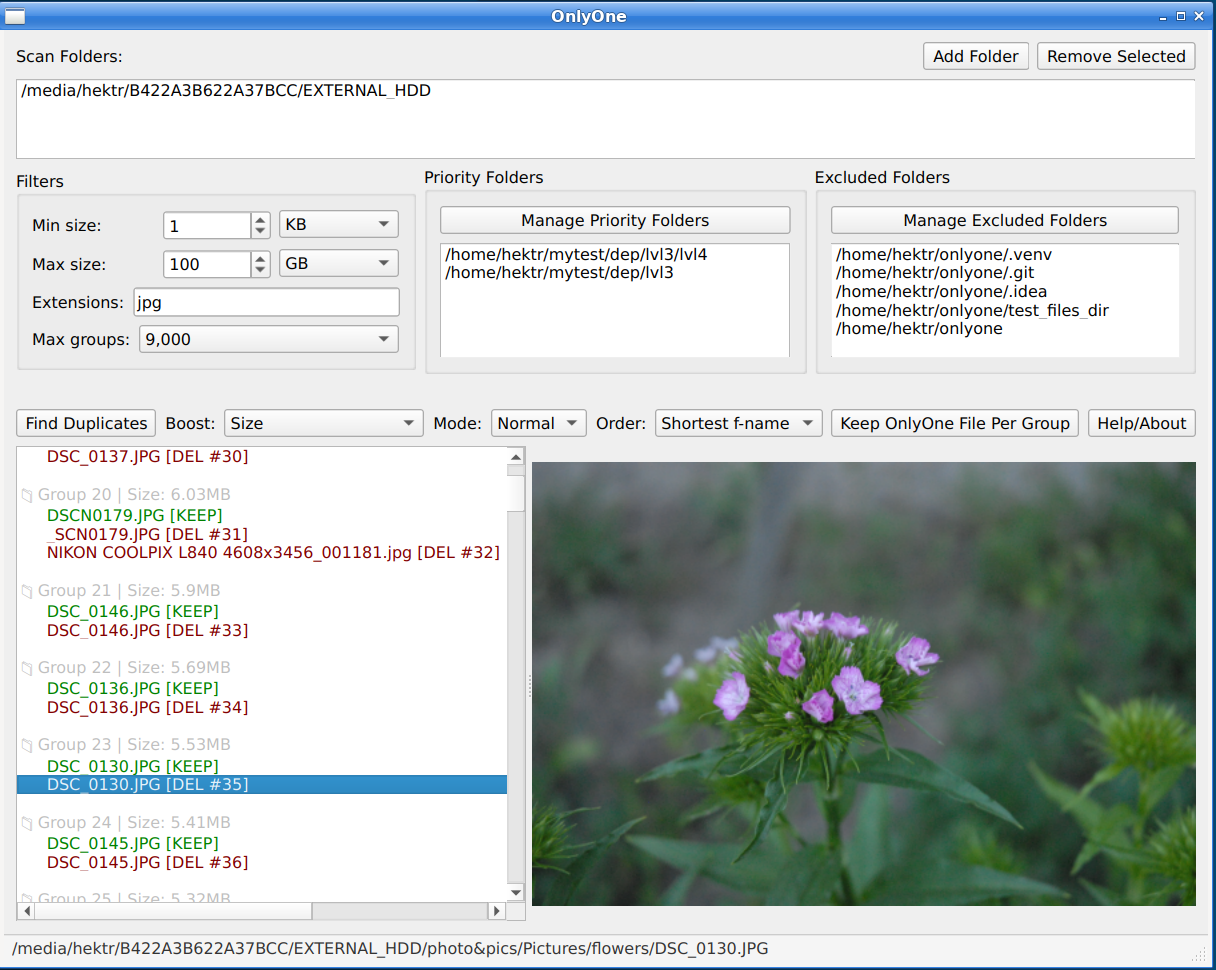
A PyQt-based tool for finding and removing duplicate files with advanced filtering and progress tracking.
*Note: GUI-version is "extra"(not mandatory part), so to install app with gui, use:
pip install onlyone[gui]
How to install and run
- Create python virtual environment:
python3 -m venv ~/mytestenv - Switch and activate to it
cd ~/mytestenv && source bin/activate - Install onlyone into it:
pip install onlyone[gui] - Run the app:
onlyone-guioronlyone(for cli)
Note: Newest OnlyOne requires at least python 3.8 (but higher version is recommended)
GitHub
- You can download binary from github release
- If you like this app, push a star on its github page
- See Changelog to see what's new you can find here
Usage as a Module
Once installed, you can integrate OnlyOne into your own Python scripts:
from onlyone import DeduplicationCommand, DeduplicationParams, DeduplicationMode

# 1. Configure parameters
params = DeduplicationParams.from_human_readable(
    root_dirs=["~/Downloads/"],
    min_size_str="1KB",
    max_size_str="1GB",
    extensions=["^", ".jpg", ".png"],  # '^' enables blacklist mode
    mode=DeduplicationMode.FULL,
    max_groups=12,
)

# 2. Create the command
command = DeduplicationCommand()

# 3. Execute
# Optional: pass progress_callback and stopped_flag for GUI integration
groups, stats = command.execute(params)

# 4. Process results
print(f"Duplicate groups found: {len(groups)}")
for group in groups:
    print(f"Size: {group.size}, Files: {len(group.files)}")
    for file in group.files:
        print(f"  - {file.path}")
NOTE for anxious people
No files are deleted until you click "Keep OnlyOne File Per Group" or manually delete a file via the context menu. Even then, files are safely moved to the system trash (not permanently erased) and all deletion operations are recorded in the log file ~/.onlyone/logs/app.log
The red/green highlighting and "KEEP"/"DEL" labels shown after scanning are preview indicators only - they help you understand which files would be preserved or removed if you click "Keep OnlyOne File Per Group". No files are actually deleted at this stage. Deletion occurs only after you explicitly confirm the action.
NOTE for cautious people
FOR HIGHLY SIMILAR FILES ONLY FULL MODE IS 100% RELIABLE.
Highly similar files means the same size, same 64+ kbytes at start, end and middle point of the file.
Normal mode is 100% reliable only for files <= 256KB (app uses 128KB chunks for files of this size).
Bigger files are compared in NORMAL mode just by size and 3 little chunks (64+ KB, chunk is adaptive).
It's ok in the most cases, but sometimes it can lead to false positives.
Don't use versions older than 2.5.7, they are not reliable.
Features
- Filtering by file size and extension
- Sorting inside duplicate groups
- Supporting various deduplication modes
- Preview images/pdf directly in the interface
- Context menu(open/delete/reveal in explorer)
- Progress tracking
- One click deletion (delete all duplicates at once)
- Priority and excluded directories functionality
- Statistics/report
- XXHASH hashing algorithm (30% faster than BLAKE3, and 3-3.5x faster than MD5)
How does it work?
- Recursively scans folder using filters (min/max size, extension)
- Applies one of the initial grouping ways from "boosting" option (size, size+extension, etc)
- Further checking depends on mode:
- "normal": checks hash-sum of 3 parts of the file: front -> middle -> end (generally reliable)
- "full": checks hash-sum of front -> entire file
- Shows the list of groups sorted in descending order (groups with larger files come first).
**Files inside a group are sorted by path/filename length (you can regulate this).
Deleting all duplicates at once
The main principle: ALL files moved to trash EXCEPT the FIRST file in each group.
Which file is "first" depends on sorting:
-
Priority files(files from "Priority Folders", if set) always come first
- Among priorities: file with shortest path (by default) comes first
-
Among non-priorities: same rule (shortest path is used by default for in-group sorting)
If both files have the same path depth, the file with shortest filename wins the first place.REMEMBER: In the end, there can be only one file/per group :)
How to use cli-version
Examples:
Find and show duplicates in Downloads, Documents and Videos folders:
onlyone -i ~/Downloads ~/Documents ~/Videos
Filter files by size and extensions and find duplicates:
onlyone -i .~/Downloads -m 500KB -M 10MB -x .jpg .png
Filter files by size, exclude extensions jpg and png, find duplicates:
onlyone -i .~/Downloads -m 500KB -M 10MB -x ^ .jpg .png
Filter files by size, include extensions jpg and png only, find duplicates:
onlyone -i .~/Downloads -m 500KB -M 10MB -x .jpg .png
Same as above + move duplicates to trash (with confirmation prompt):
onlyone -i .~/Downloads -m 500KB -M 10MB -x .jpg .png --keep-one
Same as above but without confirmation and with output to a file (for scripts):
onlyone -i .~/Downloads -m 500KB -M 10MB -x .jpg .png --keep-one --force > ~/Downloads/report.txt
Options:
-i, --input input folder(or multiple space separated folders)
-m, --min-size min size filter
-M, --max-size max size filter
-x, --extensions extension filter (space separated, start with ^ to make extensions list work in "blacklist" mode)
-p, --priority-dirs priority dirs (space separated). Files from here are prioritized to keep (come first in each group)
--excluded-dirs excluded/ignored dirs (space separated)
--max-groups limit number of result groups
--boost {size,extension,filename,fuzzy} Rule for initial file grouping:
sizeGroup files of the same size only (default)extensionGroup files of the same size and extensionfilenameGroup files of the same size and filenamefuzzyGroup files of the same size and similar filename
**Groups formed above will be checked (hash-checking) in further stages
--mode {fast, normal, full} checking mode (normal by default)
normalcheck by hashsum from 3 parts of filefullcheck by full hash
--sort {shortest-path, shortest-filename} sorting inside a group (shortest-path by default)
--dry-run Test running
--keep-one Keep one file/per group and move the rest to trash (one confirmation)
--keep-one --force Keep one file/per group and move the rest to trash (no confirmation)
--ascii ASCII-compilant output
--stats Show stats
--version, -v Show version and exit
--help, -h Show help file
TESTS
pytest tests/ -v
Build with Pyinstaller
pyinstaller --noconfirm --clean --noconsole --copy-metadata=onlyone --onefile --paths ./src --name=OnlyOne --exclude-module=PySide6.QtNetwork ./src/onlyone/gui/launcher.py
Built With
- Python 3.x
- PySide6 (Qt)
- send2trash
- PIL/Pillow (for image handling)
- xxhash
LINKS
- GitHub Page
- Releases
- PyPI
- email (initum.x@gmail.com)

© 2026 initumX
1 maintainer

Metadata
1 maintainer
Release files for onlyone 2.6.0
For a detailed explanation of source distributions (sdists) and built distributions (wheels), please see the package formats documentation.
Source distribution (sdist)
| File | Size | Uploaded | Provenance | Actions |
|---|---|---|---|---|
| onlyone-2.6.0.tar.gz | 106.9 kB | Without provenance | Details for onlyone-2.6.0.tar.gz |
Built distribution (wheel)
| File | Interpreter | ABI | Platform | Actions Reset |
|---|---|---|---|---|
| onlyone-2.6.0-py3-none-any.whl | Python 3 | none | any | Details for onlyone-2.6.0-py3-none-any.whl |
Total release size: 175.4 kB
Release files / onlyone-2.6.0.tar.gz
| Download URL | onlyone-2.6.0.tar.gz |
|---|---|
| Size | 106.9 kB |
| Tags | Source |
|
SHA-256 checksum How to use checksums |
e77ea660096bc84f6fcfaf41263edd18e5e59e0463ef3699507c67720822e0cb
|
|
BLAKE2b-256 checksum How to use checksums |
d0b3435afe23be5ed3fa2b8ffdf7f221bd475c9470ed011033bb836d9dd407c7
|
| Upload date | |
|
Uploaded using Trusted Publishing? What is trusted publishing? |
No |
| Uploaded via |
twine/6.2.0 CPython/3.13.5
|
Release files / onlyone-2.6.0-py3-none-any.whl
| Download URL | onlyone-2.6.0-py3-none-any.whl |
|---|---|
| Size | 68.5 kB |
| Tags | Python 3 |
|
SHA-256 checksum How to use checksums |
879377ab8840caec4e4d4e23564c010eea31cc9d36eafeaba93276c61b306ff4
|
|
BLAKE2b-256 checksum How to use checksums |
408bb5c5677727720d01cc9f9afe6299515367bf75adb06c525cf402ceeec237
|
| Upload date | |
|
Uploaded using Trusted Publishing? What is trusted publishing? |
No |
| Uploaded via |
twine/6.2.0 CPython/3.13.5
|
Security for onlyone 2.6.0
Provenance
Provenance describes where a file came from. On PyPI, provenance is shared via attestations, which provide a verifiable record of the build or publishing details. View details, limitations and caveats.
No provenance found
None of the files in this release were uploaded with provenance metadata.
A note on package security
PyPI is a repository for distributing packages, not a service for auditing them. While third-party security researchers and our staff do their best to detect and remove malicious packages, PyPI cannot guarantee the quality, security or suitability of any given package.
To learn more about protecting yourself from malicious actors, visit our package security documentation.














