
onnx-perf-test - ONNX Performance Test
A simple Python tool to measure the performance of ONNX models.
Installation 
pip install onnx-perf-test
- onnxruntime is installed with the package, for other execution providers, make sure to install the appropriate version of onnxruntime.
Usage
onnx_perf_test {onnx_model} [--provider {provider}] [--num_runs {num_runs}] [--output_dir {output_dir}] [--draw] [--keep_profiling_file]
Arguments:
onnx_model: Path to the ONNX model file.--provider: Provider to use for inferencing. Default is uses onnxruntime.get_available_providers() to get the available providers. Options:TENSORRT,CUDA,CPU...--num_runs: Number of runs to average the performance. Default is 10.--output_dir: Output directory to save the results. Does not save the results if not provided.--draw: Draw the performance graph. Requiresmatplotlibto be installed. Default isFalse.--keep_profiling_file: Keep the profiling file generated by onnxruntime. Default isFalse.
Example
onnx_perf_test model.onnx --provider CUDA --num_runs 20 --output_dir results --draw
Output
Running performance test on .\model.onnx with provider DEFAULT
Model inputs:
        input.1 - Shape: [1, 3, 32, 32], Type: tensor(float)
Model outputs:
        22 - Shape: [1, 10], Type: tensor(float)

Warming up the session...
Starting performance test...
Run 1: 0.53 ms
Run 2: 0.41 ms
Run 3: 0.39 ms
Run 4: 0.40 ms
Run 5: 0.39 ms
Run 6: 0.41 ms
Run 7: 0.39 ms
Run 8: 0.41 ms
Run 9: 0.42 ms
Run 10: 0.39 ms

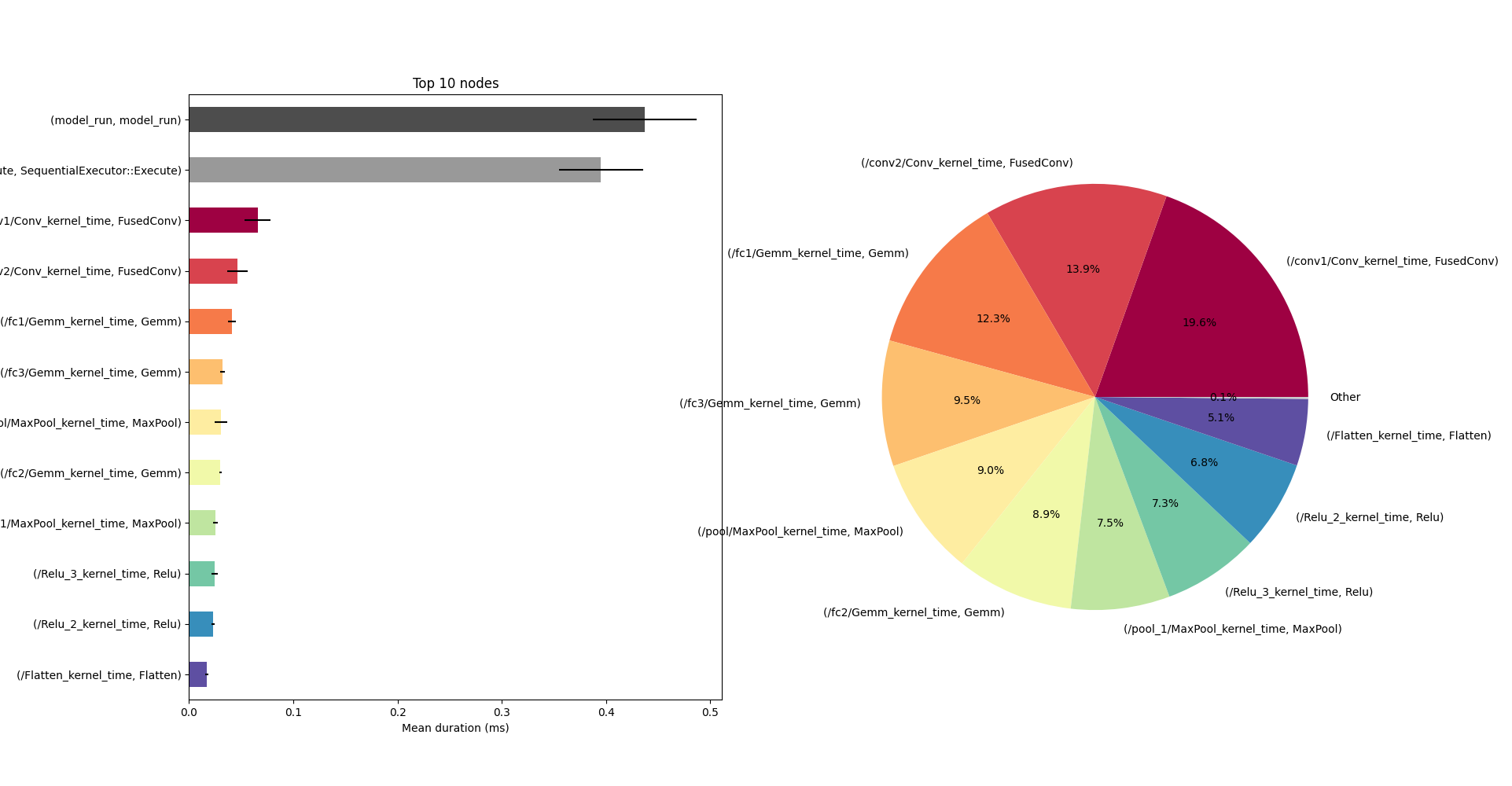
model_run: 0.39530000000000004 ± 0.033970739042757235 ms
        model_run: 0.39530000000000004 ± 0.033970739042757235 ms

SequentialExecutor::Execute: 0.3592 ± 0.02518288660534724 ms
        SequentialExecutor::Execute: 0.3592 ± 0.02518288660534726 ms

FusedConv: 0.0977 ± 0.013367040726270638 ms
        /conv1/Conv_kernel_time: 0.056999999999999995 ± 0.010749676997731395 ms
        /conv2/Conv_kernel_time: 0.0407 ± 0.003301514803843834 ms
        /conv2/Conv_fence_before: 0.0 ± 0.0 ms
        /conv2/Conv_fence_after: 0.0 ± 0.0 ms
        /conv1/Conv_fence_before: 0.0 ± 0.0 ms
        /conv1/Conv_fence_after: 0.0 ± 0.0 ms

Gemm: 0.0967 ± 0.00279085809185793 ms
        /fc1/Gemm_kernel_time: 0.038400000000000004 ± 0.0027568097504180435 ms
        /fc3/Gemm_kernel_time: 0.029800000000000004 ± 0.0016193277068654818 ms
        /fc2/Gemm_kernel_time: 0.028500000000000004 ± 0.0009718253158075512 ms
        /fc2/Gemm_fence_before: 0.0 ± 0.0 ms
        /fc3/Gemm_fence_before: 0.0 ± 0.0 ms
        /fc3/Gemm_fence_after: 0.0 ± 0.0 ms
        /fc2/Gemm_fence_after: 0.0 ± 0.0 ms
        /fc1/Gemm_fence_after: 0.0 ± 0.0 ms
        /fc1/Gemm_fence_before: 0.0 ± 0.0 ms

MaxPool: 0.049 ± 0.0024944382578492947 ms
        /pool/MaxPool_kernel_time: 0.026600000000000002 ± 0.0015776212754932302 ms
        /pool_1/MaxPool_kernel_time: 0.0224 ± 0.0014298407059684809 ms
        /pool_1/MaxPool_fence_after: 0.0 ± 0.0 ms
        /pool/MaxPool_fence_before: 0.0 ± 0.0 ms
        /pool_1/MaxPool_fence_before: 0.0 ± 0.0 ms
        /pool/MaxPool_fence_after: 0.0 ± 0.0 ms

Relu: 0.043199999999999995 ± 0.002699794230842212 ms
        /Relu_3_kernel_time: 0.0217 ± 0.0018885620632287062 ms
        /Relu_2_kernel_time: 0.0215 ± 0.001178511301977579 ms
        /Relu_3_fence_before: 0.0 ± 0.0 ms
        /Relu_3_fence_after: 0.0 ± 0.0 ms
        /Relu_2_fence_before: 0.0 ± 0.0 ms
        /Relu_2_fence_after: 0.0 ± 0.0 ms

Flatten: 0.0172 ± 0.0020439612955674524 ms
        /Flatten_kernel_time: 0.0172 ± 0.0020439612955674524 ms
        /Flatten_fence_after: 0.0 ± 0.0 ms
        /Flatten_fence_before: 0.0 ± 0.0 ms
Analyze ONNX Profiling File
Additionally, you can analyze your own .json profiling file generated by ONNXRuntime using the analyze_onnx_profiling.py script.
analyze_onnx_profile {onnx_profile_file} [--output_dir {output_dir}] [--draw]
Arguments:
onnx_profile_file: Path to the ONNX profiling file.--output_dir: Output directory to save the results. Does not save the results if not provided.--draw: Draw the performance graph. Requiresmatplotlibto be installed. Default isFalse.
Example
analyze_onnx_profile model_profile.json --output_dir results --draw
1 maintainer

Metadata
1 maintainer
Release files for onnx-perf-test 0.7.0
For a detailed explanation of source distributions (sdists) and built distributions (wheels), please see the package formats documentation.
Source distribution (sdist)
| File | Size | Uploaded | Provenance | Actions |
|---|---|---|---|---|
| onnx_perf_test-0.7.0.tar.gz | 7.0 kB | Without provenance | Details for onnx_perf_test-0.7.0.tar.gz |
Built distribution (wheel)
| File | Interpreter | ABI | Platform | Actions Reset |
|---|---|---|---|---|
| onnx_perf_test-0.7.0-py3-none-any.whl | Python 3 | none | any | Details for onnx_perf_test-0.7.0-py3-none-any.whl |
Total release size: 15.0 kB
Release files / onnx_perf_test-0.7.0.tar.gz
| Download URL | onnx_perf_test-0.7.0.tar.gz |
|---|---|
| Size | 7.0 kB |
| Tags | Source |
|
SHA-256 checksum How to use checksums |
d761e1a4003a95dd5183d7e85df413976729e83e4fc4dd0155ab94c2d482d44e
|
|
BLAKE2b-256 checksum How to use checksums |
644ecf28243dac94a5c84587f854eef7b2c5ae56d77058c3cd3e9c93f14d243f
|
| Upload date | |
|
Uploaded using Trusted Publishing? What is trusted publishing? |
No |
| Uploaded via |
twine/5.1.1 CPython/3.11.0
|
Release files / onnx_perf_test-0.7.0-py3-none-any.whl
| Download URL | onnx_perf_test-0.7.0-py3-none-any.whl |
|---|---|
| Size | 8.0 kB |
| Tags | Python 3 |
|
SHA-256 checksum How to use checksums |
dc240d25c0a83493d2f8a606077cc60d8856d3c347c875b9e87ce14badff8b79
|
|
BLAKE2b-256 checksum How to use checksums |
83bd174a4cfa8b046a36386c6cb1e5b299366d009b6b284c39d7e02ab4a068ce
|
| Upload date | |
|
Uploaded using Trusted Publishing? What is trusted publishing? |
No |
| Uploaded via |
twine/5.1.1 CPython/3.11.0
|
Security for onnx-perf-test 0.7.0
Provenance
Provenance describes where a file came from. On PyPI, provenance is shared via attestations, which provide a verifiable record of the build or publishing details. View details, limitations and caveats.
No provenance found
None of the files in this release were uploaded with provenance metadata.
A note on package security
PyPI is a repository for distributing packages, not a service for auditing them. While third-party security researchers and our staff do their best to detect and remove malicious packages, PyPI cannot guarantee the quality, security or suitability of any given package.
To learn more about protecting yourself from malicious actors, visit our package security documentation.














