
onoats
Always-on Organized Audio Transcript System — onoats.dev
onoats is a local-first voice recorder and transcript converter. It captures your microphone (me) and system audio (them) as separate streams, transcribes both, and writes chronological sessions as plain JSONL and Markdown.
There is no database. The converter needs no API keys, and downstream tools can consume the same filesystem queue without depending on onoats internals.
|
|
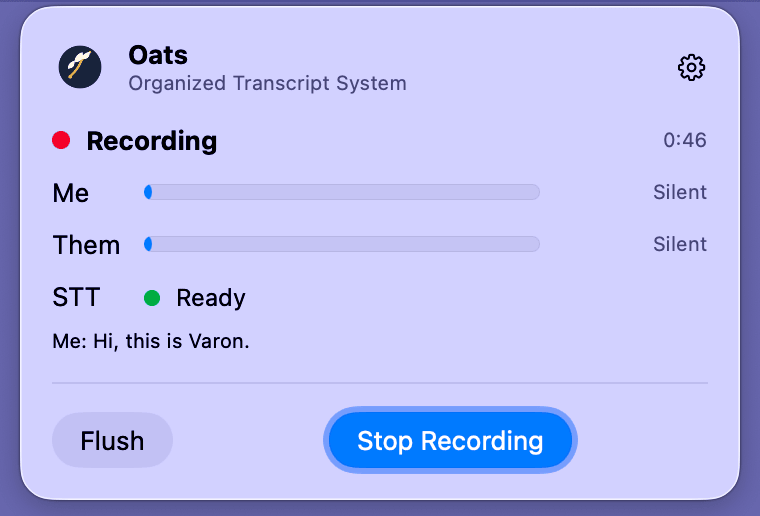
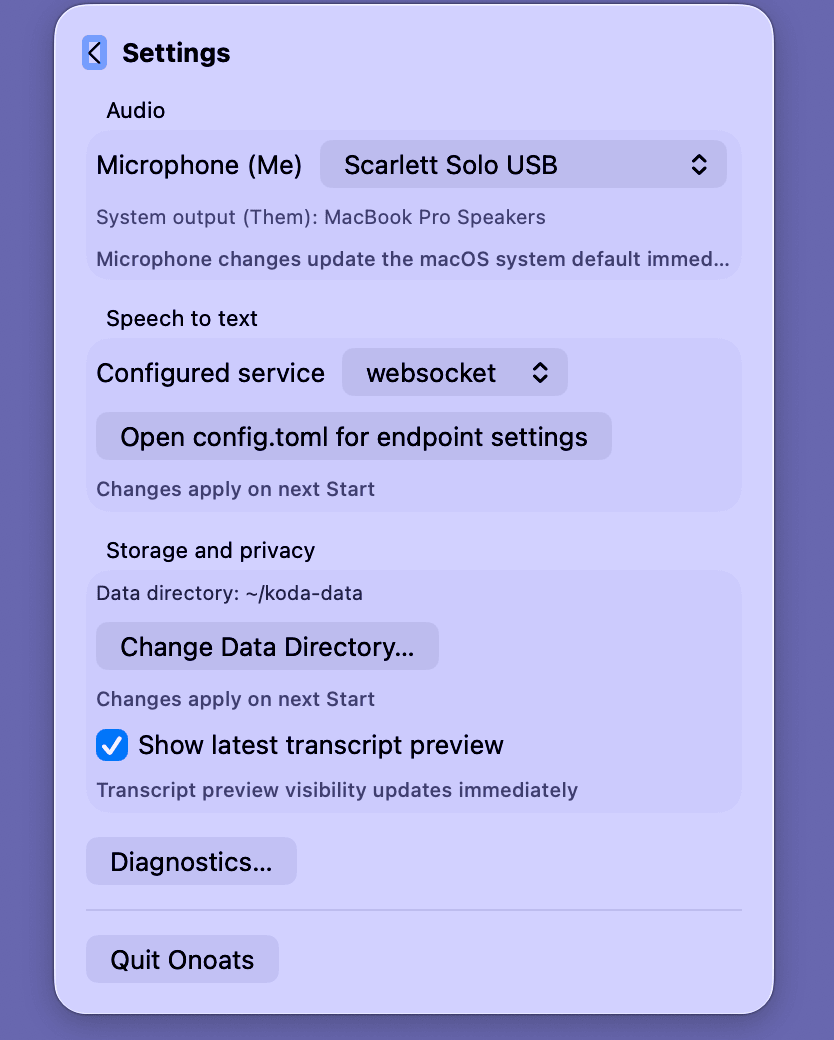
| Watch both channels live, then Flush or Stop. | Choose audio, STT, storage, and privacy settings. |
Quickstart
macOS 14.4+ — menu bar + native capture (recommended)
Install the Xcode Command Line Tools and uv, then:
git clone https://github.com/vr000m/onoats-bot.git
cd onoats-bot
make -C native setup
The setup command builds and signs Onoats.app, installs it in
~/Applications, installs the CLI, and runs the guided configuration. Open
the app and select Start Recording. The first run asks for microphone and
system-audio permission.
macOS 14.4+ — CLI + native capture (no menu bar)
git clone https://github.com/vr000m/onoats-bot.git
cd onoats-bot
make -C native setup-cli
This installs the CLI and signed native capturer without the app. The command prints the exact environment needed to start a socket-capture session.
Other platforms (and macOS below 14.4) — CLI + PortAudio
uv tool install onoats
onoats init
onoats bot
System-audio capture needs a loopback device on this path. See the complete installation guide for prerequisites, platform support, extras, native CLI usage, and the BlackHole fallback.
Everyday commands
onoats init         # configure storage, audio, and speech-to-text
onoats bot          # record microphone + system audio
onoats status       # inspect recorder state, devices, and warnings
onoats flush        # rotate the current buffer without stopping
onoats stop         # drain, rotate, and stop the recorder
onoats convert      # render pending JSONL sessions as Markdown
onoats devices      # list PortAudio devices
onoats bot-single remains available for legacy microphone-only recording.
How it works
- The recorder keeps microphone and system audio on separate branches.
- Each branch has its own STT session and produces canonical
meorthemutterances. - A completed or flushed session moves atomically into
sessions/pending/. onoats convert, or another queue consumer, claims the JSONL and renders the result.
The recorder never reconnects a failed native audio stream itself. Failures are
bounded and loud; each supervisor owns one generation, while partial transcripts
still rotate into the queue. For a menu-bar-owned
capture-heartbeat-stalled failure only, the app verifies the exact failed
generation and starts one wholly fresh supervisor generation automatically.
Direct CLI sessions and other failures remain stopped.
Cross-platform matrix
| Capability | Linux / Windows / Intel Mac | Apple Silicon Mac |
|---|---|---|
| CLI + PortAudio capture | ✅ | ✅ |
| Hosted or local TCP STT | ✅ | ✅ |
| Native system-audio capture | — | ✅ macOS 14.4+ |
| Menu-bar app | — | ✅ macOS 14.4+ |
| Local Whisper-MLX | — | ✅ [macos] extra |
| Speaker diarization | — | ✅ opt-in extra |
The baseline install is MLX-free. Native capture uses a Core Audio process tap and does not need a virtual loopback device.
Menu bar (macOS)
The menu-bar app puts the common actions first:
- Start / Stop / Flush control the current recorder generation.
- Seminar locks that category for the next app-owned recording.
- Settings manages the microphone, STT service, data directory, transcript preview, configuration file, and diagnostics.
- Live, display-only telemetry shows audio activity and STT health without becoming an authority for capture or persistence.
The app and CLI read the same config.toml. A running session snapshots its
configuration and data directory, so edits apply to the next Start.
See the menu-bar guide for permissions, status meanings, privacy controls, logs, warnings, login-item behaviour, and generation-bound Stop/Flush semantics.
Configuration
onoats init writes config.toml, secrets.env, and dictionary.txt
under $XDG_CONFIG_HOME/onoats. Process environment values override config
files, which override built-in defaults.
The configuration guide documents every file, STT backend and endpoint, launchd self-healing, shutdown timing, and storage option.
Speaker diarization (opt-in)
Diarization labels speakers only on the them channel and requires websocket
STT plus the diarization extra and locally cached model weights. It fails
open during a session: transcription continues without labels.
See speaker diarization for installation, model download, label semantics, and limitations.
Audio source
socket is the recommended native macOS path; portaudio is the default
cross-platform path. Select one with AUDIO_SOURCE, config.toml, or
onoats bot --source.
See audio sources and the versioned capturer wire contract.
Data location
The default data root is $XDG_DATA_HOME/onoats
(~/.local/share/onoats). Change it with [storage] data_dir,
ONOATS_DATA_DIR, or onoats init --data-dir.
See data location and queue ownership before sharing a queue with another worker.
The queue contract
Every session is a type-discriminated JSONL file under
sessions/pending/. The first line is session_meta; later lines are
utterance or silence_gap. Queue publication uses an atomic rename.
The versioned queue contract defines fields, categories, run IDs, diarization metadata, and consumer ownership.
Documentation
| Guide | Covers |
|---|---|
| Installation | platform choices, prerequisites, extras, and updates |
| Menu bar | controls, permissions, telemetry, privacy, warnings, and logs |
| Configuration | config files, STT, diarization, audio, storage, and precedence |
| Queue contract | canonical JSONL interface for downstream consumers |
| Native build and release | signing, staged installation, smoke, rollback, and TCC |
| Recorder control socket | generation-authenticated Flush and Stop protocol |
| Audio socket contract | native capturer framing, handshake, and backpressure |
| BlackHole fallback | loopback setup for the PortAudio path |
License
BSD-2-Clause — see LICENSE.
1 maintainer

Metadata
1 maintainer
Release files for onoats 1.6.0
For a detailed explanation of source distributions (sdists) and built distributions (wheels), please see the package formats documentation.
Source distribution (sdist)
| File | Size | Uploaded | Provenance | Actions |
|---|---|---|---|---|
| onoats-1.6.0.tar.gz | 2.2 MB | With provenance | Details for onoats-1.6.0.tar.gz |
Built distribution (wheel)
| File | Interpreter | ABI | Platform | Actions Reset |
|---|---|---|---|---|
| onoats-1.6.0-py3-none-any.whl | Python 3 | none | any | Details for onoats-1.6.0-py3-none-any.whl |
Total release size: 2.5 MB
Release files / onoats-1.6.0.tar.gz
| Download URL | onoats-1.6.0.tar.gz |
|---|---|
| Size | 2.2 MB |
| Tags | Source |
|
SHA-256 checksum How to use checksums |
a867e247441b349cf87277d63149a5ebb20f9ad7343daf7a9be993a789ece705
|
|
BLAKE2b-256 checksum How to use checksums |
8bca730f8d894d4fedbbdcf3febf2b5efbaf3913cb09cbb3e5a85a821e4f9aec
|
| Upload date | |
|
Uploaded using Trusted Publishing? What is trusted publishing? |
Yes |
| Uploaded via |
twine/7.0.0 CPython/3.13.16
|
Provenance
Provenance describes where a file came from. On PyPI, provenance is shared via attestations, which provide a verifiable record of the build or publishing details. View details, limitations and caveats.


PyPI Publish Attestation
PyPI verified that this artifact, at this checksum, originated from the publisher listed below.
Signed by GitHub Actions, verified by PyPI on Nov 8, 2026.
Transparency logRelease files / onoats-1.6.0-py3-none-any.whl
| Download URL | onoats-1.6.0-py3-none-any.whl |
|---|---|
| Size | 297.0 kB |
| Tags | Python 3 |
|
SHA-256 checksum How to use checksums |
ea482e12e89d7ed58bba122d06649bfe05700f6e6840f097f10331c25b609bea
|
|
BLAKE2b-256 checksum How to use checksums |
833f5ec3cf60e21ccc86037131a0b2a1c9d72f389c127c2d4489f1a1e6b9ac6c
|
| Upload date | |
|
Uploaded using Trusted Publishing? What is trusted publishing? |
Yes |
| Uploaded via |
twine/7.0.0 CPython/3.13.16
|
Provenance
Provenance describes where a file came from. On PyPI, provenance is shared via attestations, which provide a verifiable record of the build or publishing details. View details, limitations and caveats.
PyPI Publish Attestation
PyPI verified that this artifact, at this checksum, originated from the publisher listed below.
Signed by GitHub Actions, verified by PyPI on Nov 8, 2026.
Transparency logSecurity for onoats 1.6.0
Provenance
Provenance describes where a file came from. On PyPI, provenance is shared via attestations, which provide a verifiable record of the build or publishing details. View details, limitations and caveats.
Full provenance
Both files in this release have been uploaded with provenance metadata.
Attestation for onoats-1.6.0.tar.gz
PyPI Publish Attestation
PyPI verified that this artifact, at this checksum, originated from the publisher listed below.
Signed by GitHub Actions, verified by PyPI on Nov 8, 2026.
Transparency logA note on package security
PyPI is a repository for distributing packages, not a service for auditing them. While third-party security researchers and our staff do their best to detect and remove malicious packages, PyPI cannot guarantee the quality, security or suitability of any given package.
To learn more about protecting yourself from malicious actors, visit our package security documentation.














