
OnsetLab
Tool-calling AI agents that run locally.




Quick Start · Architecture · MCP Servers · CLI · Models · Docs
Local models are fast, free, and private. But ask one to call a tool and it falls apart. Wrong function names, broken parameters, infinite loops.
The models are capable. The framework wasn't.
OnsetLab makes 3B-7B models do reliable tool calling through a hybrid REWOO/ReAct architecture. The framework handles planning, execution, and error recovery. The model only does what it's good at: one step at a time.
Quick Start
pip install onsetlab
Requires Ollama running locally with a model pulled:
ollama pull phi3.5
from onsetlab import Agent
from onsetlab.tools import Calculator, DateTime

agent = Agent("phi3.5", tools=[Calculator(), DateTime()])

result = agent.run("What's 15% tip on $84.50?")
print(result.answer)
The agent routes the query, builds an execution plan, calls the right tool, and returns the answer. No prompt engineering required.
Architecture
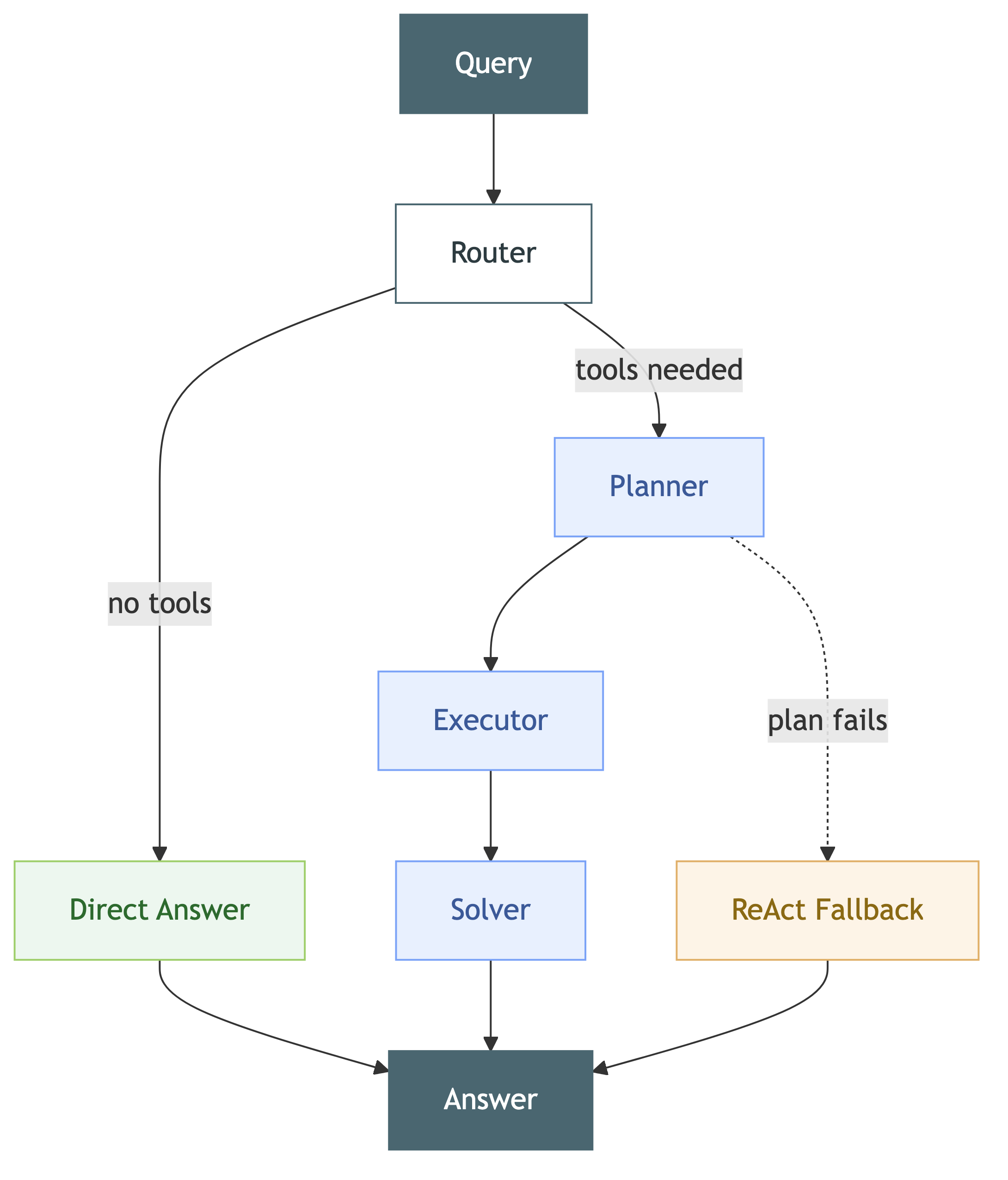
The Router classifies queries as tool-needed or direct-answer using the model itself. The Planner generates structured THINK -> PLAN steps with auto-generated tool rules from JSON schemas. The Executor resolves dependencies and runs tools in order. If planning fails, the ReAct Fallback switches to iterative Thought -> Action -> Observation loops to recover.
Built-in Tools
| Tool | Description |
|---|---|
Calculator |
Math expressions, percentages, sqrt/sin/log |
DateTime |
Current time, timezones, date math, day of week |
UnitConverter |
Length, weight, temperature, volume, speed, data |
TextProcessor |
Word count, find/replace, case transforms, pattern extraction |
RandomGenerator |
Random numbers, UUIDs, passwords, dice rolls, coin flips |
More tools will be added over time.
MCP Servers
Connect any MCP-compatible server to give your agent access to external tools like GitHub, Slack, Notion, and more.
from onsetlab import Agent, MCPServer

server = MCPServer.from_registry("filesystem", extra_args=["/path/to/dir"])

agent = Agent("phi3.5")
agent.add_mcp_server(server)

result = agent.run("List all Python files in the directory")
print(result.answer)

agent.disconnect_mcp_servers()
Any MCP server available via npm works too. See the docs for examples.
Built-in registry: filesystem · github · slack · notion · google_calendar · tavily
CLI
python -m onsetlab                                          # interactive chat
python -m onsetlab --model qwen2.5:7b                       # specify model
python -m onsetlab benchmark --model phi3.5 --verbose        # validate a model
python -m onsetlab benchmark --compare phi3.5,qwen2.5:7b    # compare models
python -m onsetlab export --format docker -o ./my-agent      # export as Docker
python -m onsetlab export --format config -o agent.yaml      # export as YAML
Export formats: YAML (portable config), Docker (Dockerfile + compose + Ollama), vLLM (GPU-accelerated), Script (standalone .py file). See Export & Deploy docs for details.
Tested Models
| Model | Size | RAM | Notes |
|---|---|---|---|
phi3.5 |
3.8B | 4GB+ | Default. Good balance of speed and quality |
qwen2.5:3b |
3B | 4GB+ | Fast, good for simple tasks |
qwen2.5:7b |
7B | 8GB+ | Strong tool calling |
qwen3-a3b |
MoE, 3B active | 16GB+ | Best tool calling accuracy |
llama3.2:3b |
3B | 4GB+ | General purpose |
Works with any Ollama model. Run python -m onsetlab benchmark --model your-model to verify.
Website · Playground · Documentation · PyPI
Apache 2.0
1 maintainer

Metadata
1 maintainer
Release files for onsetlab 0.2.3
For a detailed explanation of source distributions (sdists) and built distributions (wheels), please see the package formats documentation.
Source distribution (sdist)
| File | Size | Uploaded | |
|---|---|---|---|
| onsetlab-0.2.3.tar.gz | 70.5 kB | Details |
Built distribution (wheel)
| File | Interpreter | ABI | Platform | Reset |
|---|---|---|---|---|
| onsetlab-0.2.3-py3-none-any.whl | Python 3 | none | any | Details |
Total release size: 154.4 kB
Release files / onsetlab-0.2.3.tar.gz
| Download URL | onsetlab-0.2.3.tar.gz |
|---|---|
| Size | 70.5 kB |
| Tags | Source |
|
SHA-256 checksum How to use checksums |
f16e3e287eaf2b799cb4d3fdf078cb3c39fb494c76ea87e3fb5f9c05a2b6f73b
|
|
BLAKE2b-256 checksum How to use checksums |
e9a23bd98424cca16aba6449a4cf8b2c942bb61ec76e2aaead3c4888f560df8e
|
| Upload date | |
|
Uploaded using Trusted Publishing? What is trusted publishing? |
No |
| Uploaded via |
twine/6.2.0 CPython/3.12.0
|
Release files / onsetlab-0.2.3-py3-none-any.whl
| Download URL | onsetlab-0.2.3-py3-none-any.whl |
|---|---|
| Size | 83.9 kB |
| Tags | Python 3 |
|
SHA-256 checksum How to use checksums |
79b748a9c4b4da9713524f117e3d54dcce5135167cccaf085d7568ceb9c9cbfc
|
|
BLAKE2b-256 checksum How to use checksums |
1863f6389ad7523b339d9254eb6cec77188b0a799d5adeb90b715492c59cf183
|
| Upload date | |
|
Uploaded using Trusted Publishing? What is trusted publishing? |
No |
| Uploaded via |
twine/6.2.0 CPython/3.12.0
|














