
Multi purpose API Generator based on an Ontology Framework.

Project description
OntologyToAPI
This project is an ontology-driven API generator designed for backend development by transforming structured domain knowledge into fully functional APIs. The tool accepts ontologies specified in Turtle (.ttl), Resource Description Framework (.rdf) and Web Ontology Language (.owl).

Ontological Framework:
- The following classes, relationships and data properties serve as a semantic blueprint for both metadata and business models.
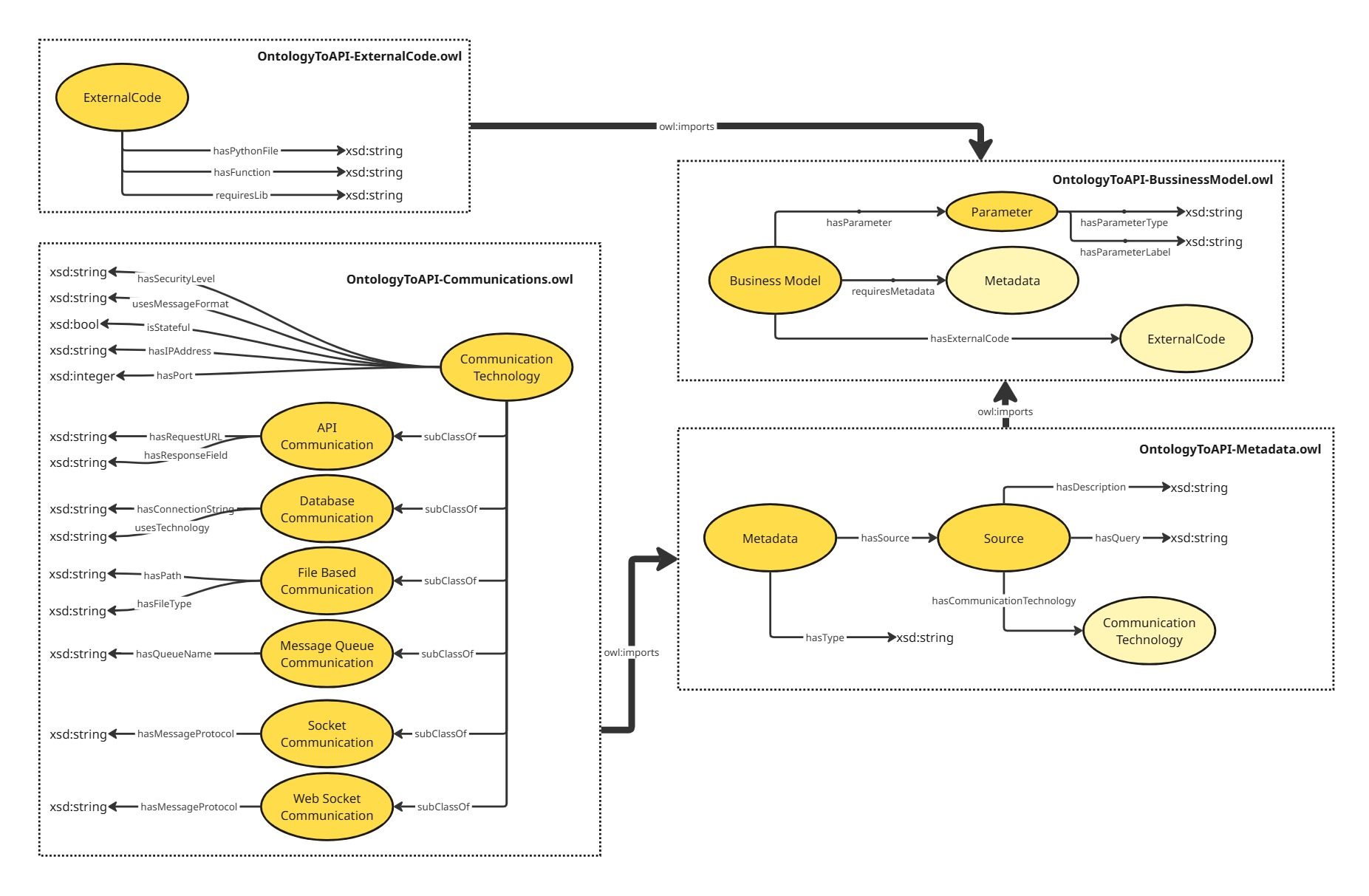
The ontological framework is composed of four main modules:
- Metadata Ontology Module: This module defines the essential classes and properties required to describe the metadata and its sources (e.g. Query to be executed on the CommunicationTechnology).
- BusinessModel Ontology Module: This module captures the specific business logic and rules governing some operation, it requires an ExternalCode concretization, and it can require any metadata or parameter (To be sent in the API request).
- ExternalCode Ontology Module: This module has all the technical details to connect to an external code, it also adds the possibility to dynamically require python packages.
- Communications Ontology Module: This module describes the communication technologies that can be used to fetch the data of some metadata in multiple forms (e. g).
A full manual on how to extend your own ontologies using the OntologyToAPI framework is still in development, but you can check the examples provided at the samples repository to get started at https://github.com/JCGCosta/OntologyToAPISamples
From now on you must be ready to go and create your own ontological specification importing the Ontology Modules and extending it. You can do this by using the Protégé ontology editor (https://protege.stanford.edu/). Or if you prefer you can use any text editor to create your ontology files in the supported formats (.ttl, .rdf, .owl).
Step 1: Installing the Package
pip install -U ontologytoapi
Step 2: Running
- With your metadata and business models ontologies implemented you can generate your API by having the following python file as an entry point:
import uvicorn
from OntologyToAPI.core.APIGenerator import APIGenerator

if __name__ == "__main__":
    APIGen = APIGenerator(showLogs=True)
    APIGen.load_ontologies(paths=[
        "Your/Metadata/Ontology/.ttl.owl.rdf"
    ])
    APIGen.load_ontologies(paths=[
        "Your/BusinessModel/Ontology/.ttl.owl.rdf"
    ])
    APIGen.serialize_ontologies()
    api_app = APIGen.generate_api_routes()
    uvicorn.run(api_app, host="127.0.0.1", port=5000)
Supported communication technologies are (Currently):
Stateful Connections
- "SOCKET" - For Socket connections using asyncio streams
Stateless Connections
- "API" - For REST APIs using requests driver
- "MYSQL" - For MySQL Databases using aiomysql driver
- "SQLITE" - For SQLite Databases using aiosqlite driver
- "POSTGRESQL" - For PostgreSQL Databases using asyncpg driver
- "MONGODB" - For MongoDB Databases using motor driver
- "UNQLITE" - For UnQLite Databases using unqlite+asyncio driver
Next Steps:
Next steps involve extending the support for new communication technologies.
- "FILE" - For File operations using aiofiles driver
- "WEBSOCKET" - For WebSocket connections using websockets driver
- "MQTT" - For MQTT connections using asyncio-mqtt driver
- "REDIS" - For Redis Databases using aioredis driver
- "CASSANDRA" - For Cassandra Databases using cassandra-driver with asyncio support
Change Log
VERSION="0.0.16" LAST_UPDATE="12/11/2025"
- Readme updates
- Added the Async SQLite driver
- Added the Async Postgres driver
- Added the Async UnqLite driver
Release history Release notifications | RSS feed


Download files
Download the file for your platform. If you're not sure which to choose, learn more about installing packages.
Source Distribution
Built Distribution
Filter files by name, interpreter, ABI, and platform.
If you're not sure about the file name format, learn more about wheel file names.
Copy a direct link to the current filters
File details
Details for the file ontologytoapi-0.0.16.tar.gz.
File metadata
- Download URL: ontologytoapi-0.0.16.tar.gz
- Upload date:
- Size: 12.0 kB
- Tags: Source
- Uploaded using Trusted Publishing? No
- Uploaded via: twine/6.1.0 CPython/3.13.7
File hashes
| Algorithm | Hash digest | |
|---|---|---|
| SHA256 |
4c442581ed72e5893902c920747ba4b6e559ff02a6542b019f2f20495e3d3e2b
|
|
| MD5 |
9b3293104366477e80bea3e9391e984f
|
|
| BLAKE2b-256 |
797cbaff0516d25a6a021fa8ea42e02e9abf2516386d552720d54c8c77c30de1
|
File details
Details for the file ontologytoapi-0.0.16-py3-none-any.whl.
File metadata
- Download URL: ontologytoapi-0.0.16-py3-none-any.whl
- Upload date:
- Size: 17.3 kB
- Tags: Python 3
- Uploaded using Trusted Publishing? No
- Uploaded via: twine/6.1.0 CPython/3.13.7
File hashes
| Algorithm | Hash digest | |
|---|---|---|
| SHA256 |
01292e4466e2e6ef7fa058358f75d81219180fcb9fac3405bad8afaf43d6e4dd
|
|
| MD5 |
aea061b3ff381be9e8008b7b07f6748c
|
|
| BLAKE2b-256 |
b657e65d429bc48088c1ad8f7b544155bae16643f453fee9d87019fe1d6be42b
|






