






ONTology editOR (ontor)
ontology editor built on Owlready2
functionality
each instance of the ontor class represents an individual ontology and provides support for:
- creating new, loading existing, and saving ontologies
- modifying ontologies:
- import other ontologies
- simply extract information such as axioms and class restrictions
- insert classes, properties, instances, relations, and restrictions
- insert general class axioms using a workaround for Owlready2
- delete classes, properties, instances, relations, and restrictions but preserve the ontology's structure by reassigning subclasses and instances appropriately
- reasoning over ontologies and debugging by interactively deleting problematic axioms
- visualizing the entire ontology or selected parts thereof
ontor provides a tuple based syntax with JSON and CSV support for ontology editing to facilitate focusing on the ontology's content
requirements and installation
- Python 3.9+
- install ontor using pip
- from PyPI:
pip install ontor - from GitHub, in editable mode:
pip install -e .
- from PyPI:
- generate documentation via sphinx using the makefile in docs/:
make html
demo
the directory example/ includes a demo application inspired by Protégé's pizza example
general class axioms
in addition to class axioms, General Class Axioms (GCAs) can express more complex statements - the generic axioms are equivalented using helper classes
in the example, a uniform price of 5 is set for all pizzas with seafood toppings without making use of an explicitly defined class for these pizzas:\
[
  ["has_topping",null,"min",1,"seafood_topping",null,null,null,null,null,null,null,true],
  ["has_price",null,"value",null,null,"float",null,null,5,null,null,null,true]
]
this allows a reasoner to infer that the price for all instances of seafood_pizza as well as for the instance Another_pizza is 5
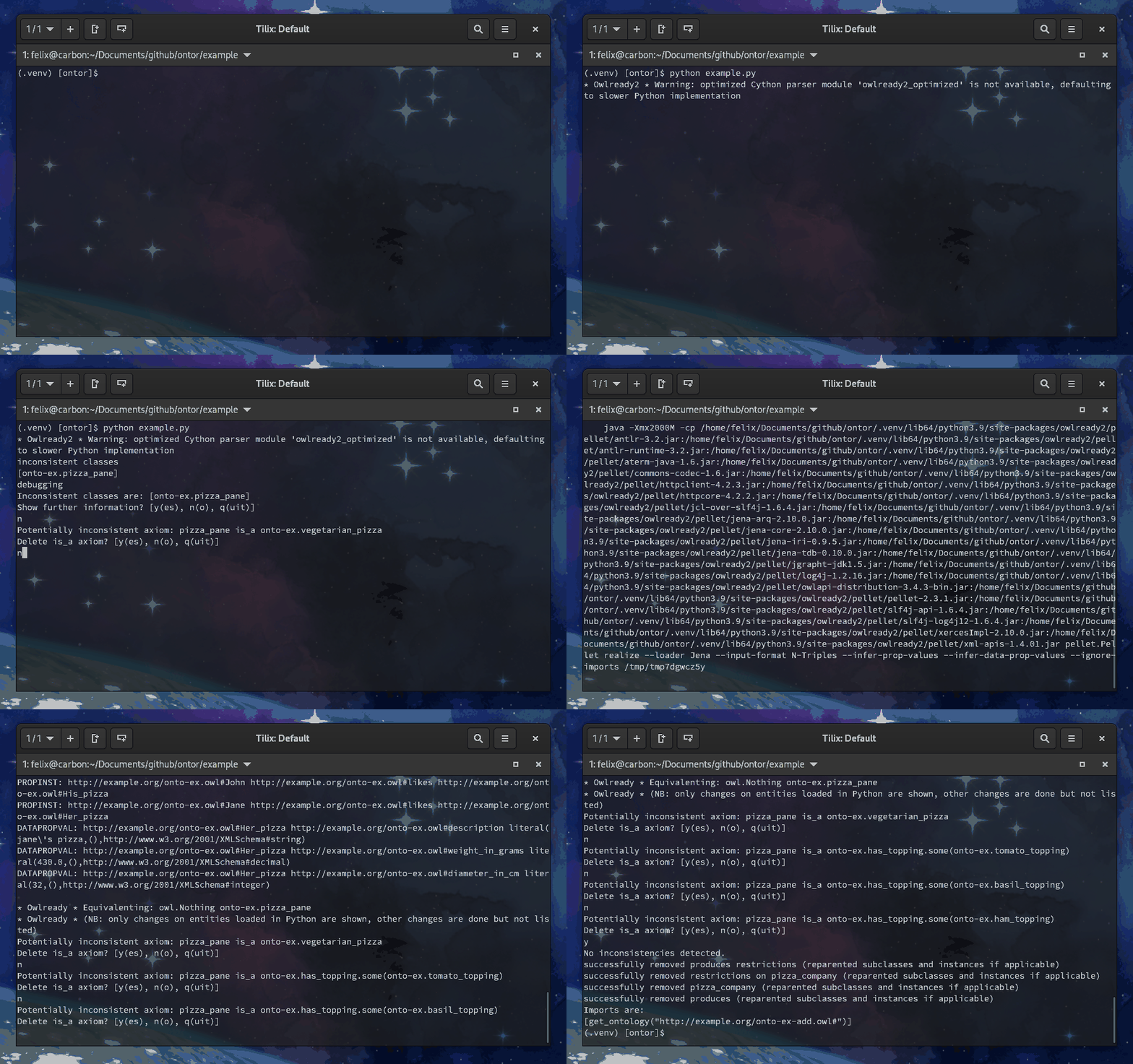
interactive debugging
interactively debug an ontology
in the example: ontor3.debug_onto()
visualization
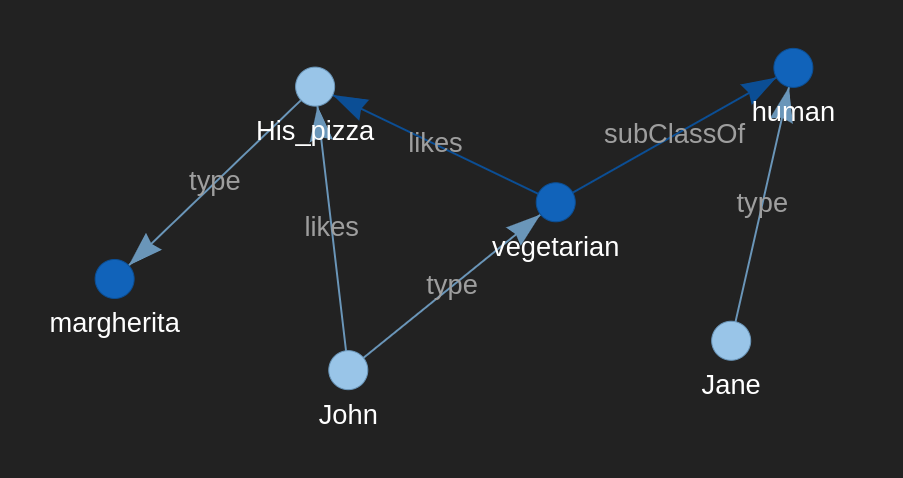
visualize selected instances, classes, and properties in a given radius around a focus node; e.g., all nodes in a radius of two relations around the node "John"
in the example: ontor3.visualize(classes=["human", "pizza"], properties=["likes", "diameter_in_cm"], focusnode="John", radius=2)
workflow
When creating ontologies from scratch, note that some functions have to be called in a specific order:
- add_taxo - the taxonomy has to be created first to ensure that all classes are defined, which are required by the properties, axioms, and individuals
- add_ops, add_dps - properties must be defined before axioms can be specified
- add_axioms, add_gcas, add_instances - axioms and instances can only be added when all the necessary classes and properties have been defined
license
GPL v3.0
contact
Felix Ocker - felix.ocker@googlemail.com
1 maintainer

Metadata
1 maintainer
Release files for ontor 0.4.11
For a detailed explanation of source distributions (sdists) and built distributions (wheels), please see the package formats documentation.
Source distribution (sdist)
| File | Size | Uploaded | |
|---|---|---|---|
| ontor-0.4.11.tar.gz | 36.7 kB | Details |
Built distribution (wheel)
| File | Interpreter | ABI | Platform | Reset |
|---|---|---|---|---|
| ontor-0.4.11-py3-none-any.whl | Python 3 | none | any | Details |
Total release size: 71.3 kB
Release files / ontor-0.4.11.tar.gz
| Download URL | ontor-0.4.11.tar.gz |
|---|---|
| Size | 36.7 kB |
| Tags | Source |
|
SHA-256 checksum How to use checksums |
e1ef2f2ab74ec6dcf871ecef36d8be28c0c8a7ae053dca43569cb99fde39489c
|
|
BLAKE2b-256 checksum How to use checksums |
21c2f1609a4991e6a6beb15aaaa4a38a410db26571f2a54ec76d6158afbd577d
|
| Upload date | |
|
Uploaded using Trusted Publishing? What is trusted publishing? |
No |
| Uploaded via |
twine/4.0.1 CPython/3.11.2
|
Release files / ontor-0.4.11-py3-none-any.whl
| Download URL | ontor-0.4.11-py3-none-any.whl |
|---|---|
| Size | 34.6 kB |
| Tags | Python 3 |
|
SHA-256 checksum How to use checksums |
14be5fe1d6471ba6a8e748069061c68bfc292431685959c5e5840931328a7ae8
|
|
BLAKE2b-256 checksum How to use checksums |
853476278a8e73dc44134273ca356c760340a116d566e9041447a6cb8994e14e
|
| Upload date | |
|
Uploaded using Trusted Publishing? What is trusted publishing? |
No |
| Uploaded via |
twine/4.0.1 CPython/3.11.2
|














