
onuion
Real-time Security Risk Analysis Model
Open-source hybrid (rule-based + ML) security risk analysis system for session data analysis with sub-millisecond inference time.



🎯 Purpose
onuion is a production-ready risk analysis system that detects security risks by analyzing session data. Using a hybrid approach (rule-based + ML), it provides both fast detection with deterministic rules and sophisticated pattern recognition with machine learning.
⚡ Features
- Real-time Inference: < 1ms inference time target
- Hybrid System: Rule-based + TensorFlow ML model
- Small Model: ~2,000 parameters, optimized for tabular data
- Production-Ready: Modular, tested, documented code
- Open Source: Licensed under MIT
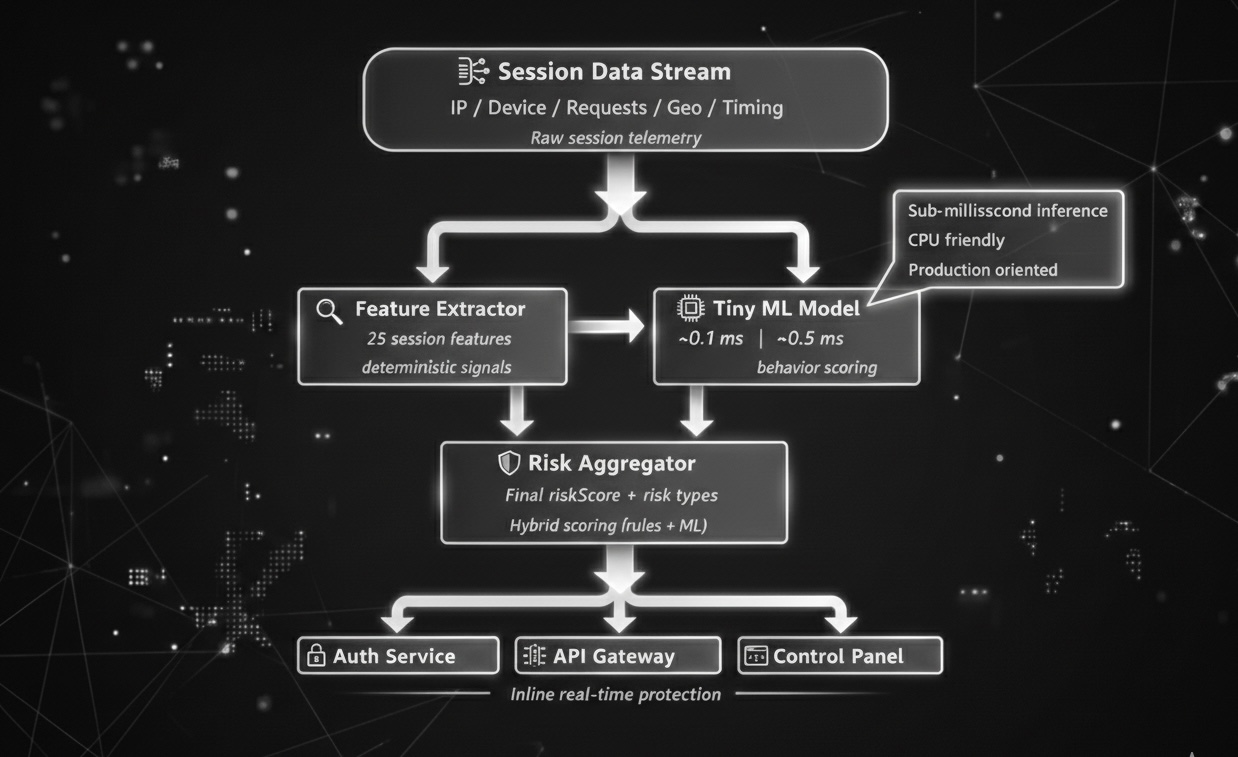
🏗️ Architecture
Session Data
    ↓
[Feature Extractor] → 25 numeric/categorical features
    ↓
[Rule Engine] → Deterministic risk detection (< 0.1ms)
    ↓
[TensorFlow Model] → ML-based risk probability (< 0.5ms)
    ↓
[Risk Aggregator] → Final riskScore + risk array
    ↓
Risk Analysis Result
Components
-
Feature Extractor: Converts session data into 25 features
- IP change metrics
- Geo-location differences
- Device fingerprint changes
- Request rates and patterns
- Session timing information
-
Rule Engine: Fast risk detection with deterministic rules
ip_mismatch: IP changesession_hijacking: Session hijacking indicatorsbot_behavior: Bot behavior patternsgeo_anomaly: Geo-location anomalydevice_fingerprint_mismatch: Device fingerprint mismatchrapid_ip_change: Rapid IP changesuspicious_request_pattern: Suspicious request patterns
-
TensorFlow Model: Feed Forward Neural Network
- Input: 25 features
- 3 Dense layers (64 → 32 → 16 units)
- Output: Risk probability (0.0 - 1.0)
- Total parameters: ~2,000
-
Risk Aggregator: Combines rule and ML scores
- Weighted combination (Rule 40%, ML 60%)
- Final riskScore (0-100)
- Risk array generation
📦 Installation
Requirements
- Python 3.8+
- TensorFlow 2.10+
- NumPy 1.21+
Installation Steps
# Clone repository
git clone https://github.com/onuion/onuion.git
cd onuion

# Create virtual environment (recommended)
python -m venv venv
source venv/bin/activate  # Linux/Mac
# or
venv\Scripts\activate  # Windows

# Install dependencies
pip install -r requirements.txt

# Install in development mode (optional)
pip install -e .
🚀 Usage
Basic Usage
from onuion import analyze_risk

# Session data
session_data = {
    "current_ip": "192.168.1.100",
    "initial_ip": "192.168.1.50",
    "ip_history": ["192.168.1.50", "192.168.1.100"],
    "current_geo": {"country": "TR", "city": "Istanbul"},
    "initial_geo": {"country": "TR", "city": "Ankara"},
    "current_device": {"fingerprint": "fp123"},
    "initial_device": {"fingerprint": "fp123"},
    "current_browser": {},
    "initial_browser": {},
    "requests": [
        {"timestamp": 1706000000, "method": "GET", "endpoint": "/api/users"}
    ],
    "session_duration_seconds": 10.0,
    "current_session_id": "sess_123",
    "initial_session_id": "sess_123",
    "current_cookies": {},
    "initial_cookies": {},
    "current_referrer": "",
    "initial_referrer": ""
}

# Risk analysis
result = analyze_risk(session_data)

# Results
print(f"Risk Score: {result.riskScore}/100")
print(f"Risks: {result.risk}")
print(f"Inference Time: {result.inference_time_ms:.3f} ms")
Output Format
{
    "riskScore": 45.2,  # Risk score (0-100)
    "risk": ["ip_mismatch", "geo_anomaly"],  # Detected risk types
    "rule_score": 40.0,  # Rule engine score
    "ml_score": 48.0,  # ML model score
    "confidence": 92.0,  # Confidence score
    "inference_time_ms": 0.856  # Inference time (ms)
}
Examples
See the examples/ directory for more examples:
examples/basic_usage.py: Basic usage exampleexamples/load_from_json.py: Load from JSON fileexamples/sample_session.json: Example session data
🧪 Model Training
Training with Synthetic Data (for testing)
python -m onuion.train --synthetic --epochs 50 --output-dir models/onuion_model
Training with Real Data
# Data format: .npz file
# Contents: X_train, y_train, X_val, y_val (numpy arrays)

python -m onuion.train --data-path data/training_data.npz --epochs 100
Hugging Face Integration
onuion supports Hugging Face Hub for model sharing and deployment.
Model Hub: https://huggingface.co/onuion/onuion
Upload a model to Hugging Face Hub:
from onuion.huggingface import upload_to_hub

# Upload a saved model
upload_to_hub(
    model_path="models/onuion_model",
    repo_id="onuion/onuion",
    token="your_hf_token",  # Optional, can use huggingface-cli login
    private=False
)
Download a model from Hugging Face Hub:
from onuion.huggingface import download_from_hub
from onuion import analyze_risk

# Download model
model = download_from_hub(
    repo_id="onuion/onuion",
    local_dir="models/downloaded_model"
)

# Use with inference
model.save("models/downloaded_model")
result = analyze_risk(session_data, model_path="models/downloaded_model")
Install Hugging Face dependencies:
pip install huggingface_hub
See examples/huggingface_upload.py and examples/huggingface_download.py for complete examples.
📊 Performance
Inference Time
- Target: < 1ms
- Average: ~0.5-0.8ms (CPU)
- P95: < 1.5ms
- Throughput: ~1,000-2,000 requests/second
Benchmark

python benchmark/benchmark.py
🧪 Testing

# Run risk test
python tests/test_analyze_risk_script.py
# Run all tests
pytest tests/

# With coverage
pytest tests/ --cov=onuion --cov-report=html
📊 Diagrams
📚 Documentation
See the docs/ directory for detailed documentation:
docs/model.md: Model architecture detailsdocs/risk_types.md: Risk type descriptionsdocs/api.md: API reference
🤝 Contributing
We welcome your contributions! Please:
- Fork the repository
- Create a feature branch (
git checkout -b feature/amazing-feature) - Commit your changes (
git commit -m 'Add amazing feature') - Push to the branch (
git push origin feature/amazing-feature) - Open a Pull Request
📝 License
This project is licensed under the MIT License. See the LICENSE file for details.
🙏 Acknowledgments
- TensorFlow team
- Open source community
- All contributors
📧 Contact
You can open an issue or send a pull request for questions.
Note: This project is prepared for production use, but it is recommended to use a model trained with real data. The default model is only for testing inference purposes.
1 maintainer

Metadata
1 maintainer
Release files for onuion 0.1.1
For a detailed explanation of source distributions (sdists) and built distributions (wheels), please see the package formats documentation.
Source distribution (sdist)
| File | Size | Uploaded | |
|---|---|---|---|
| onuion-0.1.1.tar.gz | 23.7 kB | Details |
Built distribution (wheel)
| File | Interpreter | ABI | Platform | Reset |
|---|---|---|---|---|
| onuion-0.1.1-py3-none-any.whl | Python 3 | none | any | Details |
Total release size: 46.0 kB
Release files / onuion-0.1.1.tar.gz
| Download URL | onuion-0.1.1.tar.gz |
|---|---|
| Size | 23.7 kB |
| Tags | Source |
|
SHA-256 checksum How to use checksums |
86c42487ea3e44963b967958d771752a6705f5c4b61ddca4de7e8d39f79767e5
|
|
BLAKE2b-256 checksum How to use checksums |
c506e40fffaae7f2f703888ab887e220f47746e3261a280d118705173a0895a2
|
| Upload date | |
|
Uploaded using Trusted Publishing? What is trusted publishing? |
No |
| Uploaded via |
twine/6.2.0 CPython/3.11.9
|
Release files / onuion-0.1.1-py3-none-any.whl
| Download URL | onuion-0.1.1-py3-none-any.whl |
|---|---|
| Size | 22.4 kB |
| Tags | Python 3 |
|
SHA-256 checksum How to use checksums |
a690bc048d0c3ca0e2d38d9910cf83adb47f039f649eb22318964b543322a037
|
|
BLAKE2b-256 checksum How to use checksums |
e94f527bb4f1508927ae163b83550c8b220493cb4f13aa796cea2cdd29e4ad20
|
| Upload date | |
|
Uploaded using Trusted Publishing? What is trusted publishing? |
No |
| Uploaded via |
twine/6.2.0 CPython/3.11.9
|














